Stepper motor slows down with analog read

I would be very pleased if some could help me in my first steps of programming Arduino UNO REV3, also I am using stepper NEMA8 motor to control speed with arduino and motor driver DRW8825 Set at 1/16 steps

With program as below motor speed is 19rpm. And it runs perfect for what I need

#include <AccelStepper.h>
#define dirPin 2
#define stepPin 3
#define motorInterfaceType 1
AccelStepper stepper = AccelStepper(motorInterfaceType, stepPin, dirPin);

void setup() {

stepper.setMaxSpeed(1000);
}
void loop() {
// Set the speed in steps per second:
stepper.setSpeed(1000);
// Step the motor with a constant speed as set by setSpeed():
stepper.runSpeed();
}

I would like to change speed based on reading value on analog input, in my case this is A2pin connected to 1-5VDC

Here is program

#include <AccelStepper.h>
#define dirPin 2
#define stepPin 3
#define motorInterfaceType 1
AccelStepper stepper = AccelStepper(motorInterfaceType, stepPin, dirPin);

const int analogPin = A2; // pin that the sensor is attached to
const int threshold = 1; // an arbitrary threshold level that's in the range of the analog input
int sensorValue = analogRead(A2);
int voltage = analogRead(A2) * (5.0 / 1023.0);

void setup() {
// Set the maximum speed in steps per second:
Serial.begin(9600);
stepper.setMaxSpeed(1000);
}

void loop() {
int voltage = analogRead(A2)*(5.0 / 1023.0);
Serial.println(voltage);
if (int (voltage == 5)){
stepper.setSpeed(1000);
stepper.runSpeed();
}

With above code my motor rotates with 6rpm instead 19rpm as above.
Question is why motor slows dovn with identical code. OK here I have analog reading can this slow down motor.
In advance many thanks for any kind of help to better understanding programin
Best regards Kamilo

Can I assume that the device connected to A2 is a potentiometer? So it is human controlled? Humans aren't very fast so you really only need to read the pot 20-50 times a second. Use a millis() timer to only take a pot reading and print it every 20ms to 50ms.

Speed up your Serial baud rate. 9600 is very slow.

Non-blocking (millis()) timing tutorials:
Blink without delay().
Beginner's guide to millis().
Several things at a time.

Read the forum guidelines to see how to properly post code and some good information on making a good post.
Use the IDE autoformat tool (ctrl-t or Tools, Auto format) before posting code in code tags.

You can go back and fix your original post by highlighting the code and clicking the </> in the menu bar.
code tags new

Yes of course it can, and will. It takes 100us to take a reading so it adds a delay thus slowing down the steps.

By the way that code is useless. Never use == , always use > and a value of less that 5V. There is no need to convert an analog reading into volts, just use the raw values.

If you read the pot intermittently you will get a stuttering of the motion as the steps will not be constant.

The way round this is to use a regular interrupt to generate the pulses at a constant rate.

Dear Mike,
Thank you for your kind, fast reply.
I did program modification however the difference in motor speed was negligible, with or without voltage calculation.
Attached is a schematic of how I am changing voltage in pin A2.
Also following is a complete program.

#include <AccelStepper.h>
// Define stepper motor connections and motor interface type. Motor interface type must be set to 1 when using a driver:
#define dirPin 2
#define stepPin 3
#define motorInterfaceType 1

AccelStepper stepper = AccelStepper(motorInterfaceType, stepPin, dirPin);

const int analogPin = A2; // pin that the sensor is attached to
const int threshold = 1; // an arbitrary threshold level that's in the range of the analog input
int sensorValue = analogRead(A2);
int voltage = analogRead(A2);

void setup() {
Serial.begin(9600);
stepper.setMaxSpeed(1000);
}

void loop() {
int voltage = analogRead(A2);
Serial.println(voltage);

if (int (voltage >= 819)){
stepper.setSpeed(1000);
stepper.runSpeed();
}

if (int (voltage >= 615)){
stepper.setSpeed(100);
stepper.runSpeed();
}

if (int (voltage >= 410)){
stepper.setSpeed(50);
stepper.runSpeed();
}

if (int (voltage >= 204)){
stepper.setSpeed(100);
stepper.runSpeed();
}

if (int (voltage >= 1)){
stepper.setSpeed(5);
stepper.runSpeed();
}

if (int (voltage >= 0)){
stepper.setSpeed(10);
stepper.runSpeed();
}
}

Thank you in advance for any suggestions.
Best regards, Kamilo

control speed.pdf (1.31 MB)

Hi, @13041943
Welcome to the forum.
To add code please click this link;

Can we please have a circuit diagram?
An image of a hand drawn schematic will be fine, include ALL power supplies, component names and pin labels.

Thanks.. Tom... :smiley: :+1: :coffee: :australia:

Hi, @13041943
please post code with tags

About the code - you should think about the logic of the conditions. Your sequence of if() means that, for example, with a voltage = 900, your code will be executed in all conditions sequentially, which is unlikely to correspond to what you wanted. Instead of using many if()
use if() else if() else if()...

And why do you use int() inside the condition?

Hi,
Change

Serial.begin(9600)

to

Serial.begin(115200)

and change your IDE monitor baud rate to 115200.

Tom.... :smiley: :+1: :coffee: :australia:

Dear friends,
Following TomGeorge's advise, I increase baud rate to 115200 and this significantly increased speed of motor (from 6rpm to 13rpm) which is very near to what i need. What would be next higher value?
TomGeorge, thank you very much.
Regarding advice from B707, thank you for your suggestion, sounds good and I will play with this and will let you know. Previously I used case() but did not work well.
Many thanks to everybody for your kind support.

See the drop down menu on the serial monitor.

Hi,
Try this edit of your code.
The speed changes only take place if you have a change in analog input.

#include <AccelStepper.h>
// Define stepper motor connections and motor interface type. Motor interface type must be set to 1 when using a driver:
#define dirPin 2
#define stepPin 3
#define motorInterfaceType 1

AccelStepper stepper = AccelStepper(motorInterfaceType, stepPin, dirPin);

const int analogPin = A2; // pin that the sensor is attached to
const int threshold = 1; // an arbitrary threshold level that's in the range of the analog input
int sensorValue;
int voltage;
int oldvoltage;

void setup()
{
  Serial.begin(115200);
  Serial.println ("+++Stepper code+++");
  stepper.setMaxSpeed(1000);
}

void loop()
{
  voltage = analogRead(A2);
  Serial.print("voltage = ");
  Serial.print(voltage);
  Serial.print(" oldvoltage = ");
  Serial.println(oldvoltage);
  if (voltage != oldvoltage) //check if voltage value has changed
  {
    if ( voltage >= 819)
    {
      stepper.setSpeed(1000);
      stepper.runSpeed();
    }
    if ( voltage >= 615)
    {
      stepper.setSpeed(100);
      stepper.runSpeed();
    }
    if ( voltage >= 410)
    {
      stepper.setSpeed(50);
      stepper.runSpeed();
    }
    if (voltage >= 204)
    {
      stepper.setSpeed(100);
      stepper.runSpeed();
    }
    if ( voltage >= 1)
    {
      stepper.setSpeed(5);
      stepper.runSpeed();
    }
    if ( voltage >= 0)
    {
      stepper.setSpeed(10);
      stepper.runSpeed();
    }
    oldvoltage = voltage; // update oldvoltage for next loop
  }
}

I have also Auto Formatted your code, press [ CTRL ] [ T ], as you see it indents your code so you see the if statements better.
I have loaded this on a UNO, it compiles and responds, but I have no stepper driver module.

You also do not need to declare "voltage" as an "int" all the time, if you declare it before the setup, this makes it a Global variable for your code.

Tom... :smiley: :+1: :coffee: :australia:

I think the problem is, that the printing is done in every loop. This fills up the serial buffer, the print command blocks ands slows down the loop cycle time. Higher baud rates will speed up the cycle time, but will not solve the main problem of filling up the buffer.

ahh, but it could. IF your sends/receives are processed more quickly, there is a better chance that the buffer will never be depleted(presuming one is able to get beyond the "constipated serial" point). However, one might consider improving transmission speeds to be just masking the problem, leading to more frequent use of the printing option and resulting in the same old problem down the road. Hence, I suggest changing baud rates usually as a diagnostic, to try and make the point to the user that their excessive use of the print feature may be causing them grief.
C

TomGeorge,
Thank you so much for your effort helping me with my project. I loaded your program but my motor hardly moves.
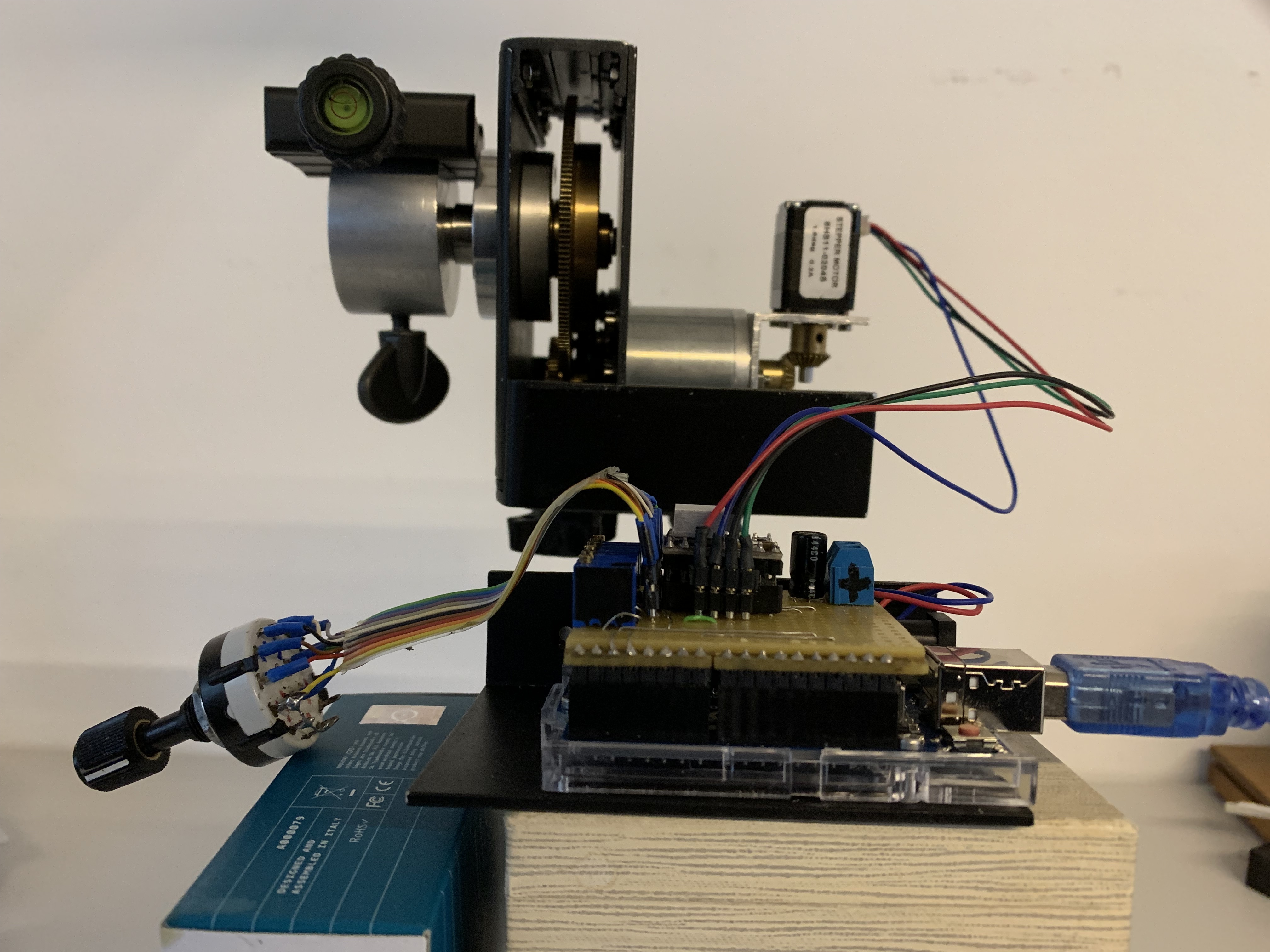
Below I am sending a picture of my setup on the test board. As you may see on the front is a six point switch to change a motor speed and
5V is taken from the Arduino and the power supply is 12VDC.

This program works perfectly changing speed with voltage from 5V down to 1V.
here is final program

#include <AccelStepper.h>
#define dirPin 2
#define stepPin 3
#define motorInterfaceType 1
AccelStepper stepper = AccelStepper(motorInterfaceType, stepPin, dirPin);
const int analogPin = A2;
const int threshold = 1;
int sensorValue = analogRead(A2) * (5.0 / 1023.0);
int voltage = analogRead(A2) * (5.0 / 1023.0);

void setup() {
Serial.begin(115200);
stepper.setMaxSpeed(1000);
}

void loop() {
int voltage = analogRead(A2) * (5.0 / 1023.0);
Serial.println(voltage);

if ((voltage >= 5)){
stepper.setSpeed(1000);
stepper.runSpeed();
}

if ((voltage >= 4)){
stepper.setSpeed(400);
stepper.runSpeed();
}

if ((voltage >= 3)){
stepper.setSpeed(250);
stepper.runSpeed();
}

if ((voltage >= 2)){
stepper.setSpeed(100);
stepper.runSpeed();
}

if ((voltage >= 1)){
stepper.setSpeed(50);
stepper.runSpeed();
}

if ((voltage >= 0)){
stepper.setSpeed(10);
stepper.runSpeed();
}
}

Many thanks to Franz-Peter and Camsisca, regretfully my programming knowledge is not so good to discuss your comment, anyhow thank you for your contribution.
Thanks everybody and best regards

@13041943
you really really really should
re-edit your postings to post code as code-sections

The MoBaTools-library offers independ step-signal-creation.
This enables to do add serial output without influencing the stepfrequency

here is a demo-code that shows it

// MACRO-START * MACRO-START * MACRO-START * MACRO-START * MACRO-START * MACRO-START *
// Take it for granted at the moment scroll down to void setup
// start of macros dbg and dbgi
#define dbg(myFixedText, variableName) \
  Serial.print( F(#myFixedText " "  #variableName"=") ); \
  Serial.println(variableName);
// usage: dbg("1:my fixed text",myVariable);
// myVariable can be any variable or expression that is defined in scope

#define dbgi(myFixedText, variableName,timeInterval) \
  do { \
    static unsigned long intervalStartTime; \
    if ( millis() - intervalStartTime >= timeInterval ){ \
      intervalStartTime = millis(); \
      Serial.print( F(#myFixedText " "  #variableName"=") ); \
      Serial.println(variableName); \
    } \
  } while (false);
// usage: dbgi("2:my fixed text",myVariable,1000);
// myVariable can be any variable or expression that is defined in scope
// third parameter is the time in milliseconds that must pass by until the next time a
// Serial.print is executed
// end of macros dbg and dbgi
// MACRO-END * MACRO-END * MACRO-END * MACRO-END * MACRO-END * MACRO-END * MACRO-END *

/* ====== minimumStepper =======================================
    Bare minimum to get a stepper with step/dir driver turning
*/
#include <MobaTools.h>
// Stepper connections - Please adapt to your own needs.
const byte dirPin = 2;
const byte stepPin = 3;

const byte microSteps = 16;
const int stepsPerRev = 200 * microSteps;    // Steps per revolution - may need to be adjusted

MoToStepper stepper1( stepsPerRev, STEPDIR );  // create a stepper instance

const int analogPin = A2; // pin that the sensor is attached to
int ADC_Value;
int oldADC_Value;
int mySpeedVar;

void setup() {
  Serial.begin(115200);
  Serial.println("Setup-Start");
  stepper1.attach( stepPin, dirPin );
  stepper1.setSpeed( 190 );              // 19 rev/min (if stepsPerRev is set correctly)
  stepper1.setRampLen( stepsPerRev / (2 * microSteps) ); // Ramp length is 1/2 revolution
  stepper1.rotate(1);                    // start turning, 1=vorward, -1=backwards
}


void loop() {
  ADC_Value = analogRead(A2);

  dbgi("1:", ADC_Value, 1000);

  if (ADC_Value != oldADC_Value) {//check if ADC_Value value has changed
    dbgi("2:", ADC_Value, 1000);
    dbgi("2:", oldADC_Value, 1000);

    switch (ADC_Value) {
      
      case 800 ... 1023:
        mySpeedVar = 1013;
        break;

      case 600 ... 799:
        mySpeedVar = 100;
        break;
        
      case 200 ... 599:
        mySpeedVar = 50;
        break;

      case 1 ... 199:
        mySpeedVar = 25;
        break;
    }        
        
    dbgi("3:",mySpeedVar ,1000);
    stepper1.setSpeed( mySpeedVar );

    oldADC_Value = ADC_Value; // update oldADC_Value for next loop
  }

}

best regards Stefan

Dear Stefan,
Sorry for the late reply due to my absence on summer holidays.
Yesterday I tried your program and appear to be perfect for my application. As a matter of fact this is going to be drive for my astrophotography.
Your idea for changing motor speed is genius.
Thank you very much and will keep you posted about my progress in programming.
Best regards, Kamilo.

Dear Stefan,

In attachment I am sending picture of our project, yours and mine. As you can see this is going to be drive for my astrophotography.

I did slight modification of your code regarding number of steps, 6 instead of 4 as you proposed.

Namely, motor speed is controlled using DRV8825 driver and Arduino Uno V3. Sensor signal to A2 is connected to 6 point rotary switch in order to have 6 different motor speeds.

Everything works perfect, motor soundless in all speeds without overheating. My only problem is how to get precise control of motor speed.

As you see, on attached picture, motor is driving gear box. The ratio of gear box is such that output shaft have speed of 1 (one) turn in 24 hours.

In our case with motor speed 71, output shaft of gearbox makes 1 turn in 23 hours and 52minutes. If I put motor speed 70, output shaft make 1 turn in 24 hours and 8 minutes.

Pay attention on code

case 900 ... 985:

mySpeedVar = 71;

break;

My question is how to adjust motor speed to run like clock 1 turn in 24 hours.

Below is complete code

Should you need any further detail feel free to let me know.

Dear Stefan, thank you very much for your help and hoping that you will find solution

Best regards. Kamilo

// MACRO-START * MACRO-START * MACRO-START * MACRO-START * MACRO-START * MACRO-START *

// Take it for granted at the moment scroll down to void setup

// start of macros dbg and dbgi

#define dbg(myFixedText, variableName) \

Serial.print( F(#myFixedText " " #variableName"=") ); \

Serial.println(variableName);

// usage: dbg("1:my fixed text",myVariable);

// myVariable can be any variable or expression that is defined in scope

#define dbgi(myFixedText, variableName,timeInterval) \

do { \

static unsigned long intervalStartTime; \

if ( millis() - intervalStartTime >= timeInterval ){ \

intervalStartTime = millis(); \

Serial.print( F(#myFixedText " " #variableName"=") ); \

Serial.println(variableName); \

} \

} while (false);

// usage: dbgi("2:my fixed text",myVariable,1000);

// myVariable can be any variable or expression that is defined in scope

// third parameter is the time in milliseconds that must pass by until the next time a

// Serial.print is executed

// end of macros dbg and dbgi

// MACRO-END * MACRO-END * MACRO-END * MACRO-END * MACRO-END * MACRO-END * MACRO-END *

/* ====== minimumStepper =======================================

Bare minimum to get a stepper with step/dir driver turning

*/

#include <MobaTools.h>

// Stepper connections - Please adapt to your own needs.

const byte dirPin = 2;

const byte stepPin = 3;

const byte microSteps = 16;

const int stepsPerRev = 200 * microSteps; // Steps per revolution - may need to be adjusted

MoToStepper stepper1( stepsPerRev, STEPDIR ); // create a stepper instance

const int analogPin = A2; // pin that the sensor is attached to

int ADC_Value;

int oldADC_Value;

int mySpeedVar;

void setup() {

Serial.begin(115200);

Serial.println("Setup-Start");

stepper1.attach( stepPin, dirPin );

stepper1.setSpeed( 200 ); // 20 rev/min (if stepsPerRev is set correctly)

stepper1.setRampLen( stepsPerRev / (2 * microSteps) ); // Ramp length is 1/2 revolution

stepper1.rotate(1); // start turning, 1=vorward, -1=backwards

}

void loop() {

ADC_Value = analogRead(A2);

dbgi("1:", ADC_Value, 1025);

if (ADC_Value != oldADC_Value) {//check if ADC_Value value has changed

dbgi("2:", ADC_Value, 1025);

dbgi("2:", oldADC_Value, 1025);

switch (ADC_Value) {

case 900 ... 985:

mySpeedVar = 71;

break;

case 700 ... 800:

mySpeedVar = 60;

break;

case 650 ... 695:

mySpeedVar = 50;

break;

case 490 ... 500:

mySpeedVar = 25;

break;

case 328 ... 450:

mySpeedVar = 1025;

break;

case 10 ... 200:

mySpeedVar = 500;

break;

}

dbgi("3:",mySpeedVar ,1025);

stepper1.setSpeed( mySpeedVar );

oldADC_Value = ADC_Value; // update oldADC_Value for next loop

}

}.
If this is for an astronomical tracker surely you want it to move in Sidereal time not clock time? That is one revolution every 23 h 56 min 4.0905 s or as close as possible to this.

Thank you Mike for your comment, yes this is for astronomical photos, 23h 56min is celestial, 24h is solar and 24h 31min is lunar speed.
Therefore solar 24h is one of 6 speeds that I need. My question is how to get accurate rotation.
Should you have any suggestion you are welcome.

I would suggest a timed interrupt, from a external RTC module would serve you best.