Hello all,
I'm wanting to run two separate LIDAR sensors on the Arduino. In order to do this, I need to change one of the sensor's address (since both devices have the same default address) so that I can communicate with each one individually.
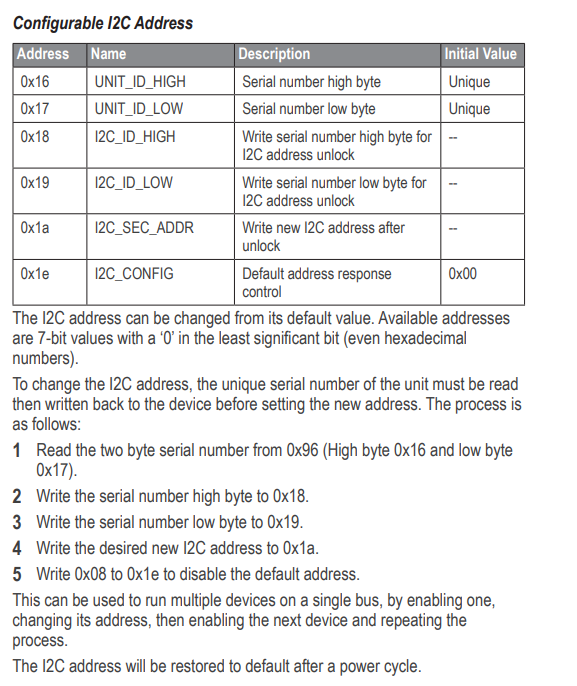
The step by step process is outlined in the manual (which I attached) and I also included screenshot of the portion of the manual that specifically explains the procedure.
My primary stumbling blocks are as follows:
-
It appears I'm suppose to read the serial number from address 0x96, yet each of the two bytes also have their own individual addresses (0x16 and 0x17). As of right now, I'm not even using the low and high byte addresses in my code as I'm little unsure of the distinction between address 0x96 and addresses 0x16 and 0x17.
-
When assigning the new address to the LIDAR sensor (step 4), do I still need to initially use the default address (0x62) at the beginning of the transmission to initially connect and talk to the sensor?
-
It looks like the orange line enables or disables the sensor. So when changing the address of one of the sensors do I tie the orange line of the second sensor to a GPIO pin and drive that pin low? It would appear that I would otherwise be addressing both devices when I'm only trying to talk to one.
Thanks in advance for any assistance or insight anyone has to offer.
 #include <Wire.h>
#include <LIDARLite.h>

LIDARLite myLidarLite;

float dist;
byte serialNumber[2];

const int sensor1_EN = 9;
const int sensor2_EN = 10;

char UNIT_ID_HIGH = 0x16;
char UNIT_ID_LOW = 0x17;
char I2C_ID_HIGH = 0x18;
char I2C_ID_LOW = 0x19;
char I2C_SEC_ADDR = 0x1a;
char I2C_CONFIG = 0x1e;

// LIDAR Sensor addresses
char LIDAR1_ADDR = 0x62;    // Default address
char LIDAR2_ADDR = 0x74;    // New address for second sensor

void setup()
{
  pinMode(sensor1_EN, OUTPUT);
  pinMode(sensor2_EN, OUTPUT);

  // Disable sensor 1 and enable sensor 2
  digitalWrite(sensor1_EN, LOW);
  digitalWrite(sensor2_EN, HIGH);

  Serial.begin(115200); // Initialize serial connection

  Wire.begin();  // Connect to the I2C bus

  // Connect to LIDAR 1 Device to read high byte
  Wire.beginTransmission(LIDAR1_ADDR);
  Wire.write(UNIT_ID_HIGH);             // Point to the address which holds the high byte of the serial number
  Wire.endTransmission();

  // STEP 1 (from datasheet)
  // Read in serial number from the LIDAR 2 sensor
  Wire.requestFrom(LIDAR1_ADDR, 1);
  serialNumber[0] = Wire.read();    // Read in high byte

    // Connect to LIDAR 1 Device to read low byte of serial number
  Wire.beginTransmission(LIDAR1_ADDR);
  Wire.write(UNIT_ID_LOW);        // Point to the address which holds the low byte of the serial number
  Wire.endTransmission();

  // STEP 1 (from datasheet)
  // Read in serial number from the LIDAR 1 sensor (0x96)
  Wire.requestFrom(LIDAR1_ADDR, 1);
  serialNumber[1] = Wire.read();    // Read in low byte

  // STEPS 2-3 (from datasheet)
  // Write low and high serial bytes to the addresses specified in the manual
  Wire.beginTransmission(LIDAR1_ADDR);     // Connect to the device
  Wire.write(I2C_ID_LOW);                  // Register to hold low byte
  Wire.write(serialNumber[1]);             // Low byte of serial number
  Wire.endTransmission();

  Wire.beginTransmission(LIDAR1_ADDR);
  Wire.write(I2C_ID_HIGH);                 // Register to hold high byte
  Wire.write(serialNumber[0]);             // High byte of serial number
  Wire.endTransmission();

  // STEP 4 (from datasheet)
  // Write the new desired I2C address to 0x1a
  Wire.beginTransmission(LIDAR1_ADDR);     // Old address still?
  Wire.write(I2C_SEC_ADDR);                // New address location
  Wire.write(LIDAR2_ADDR);                 // Value of new address
  Wire.endTransmission();

  // STEP 5 - Disable default address
  Wire.beginTransmission(LIDAR1_ADDR);     // Old address still?
  Wire.write(I2C_CONFIG);                  // Point to the appropriate register
  Wire.write(0x08);                        // Write 0x08 ro register to disable default address
  Wire.endTransmission();

  // Re-enable sensor 1
  //digitalWrite(sensor1_EN, HIGH);

    /*
    begin(int configuration, bool fasti2c, char lidarliteAddress)

    Starts the sensor and I2C.

    Parameters
    ----------------------------------------------------------------------------
    configuration: Default 0. Selects one of several preset configurations.
    fasti2c: Default 100 kHz. I2C base frequency.
      If true I2C frequency is set to 400kHz.
    lidarliteAddress: Default 0x62. Fill in new address here if changed. See
      operating manual for instructions.*/
  myLidarLite.begin(0, true, LIDAR2_ADDR);

    /*
    configure(int configuration, char lidarliteAddress)

    Selects one of several preset configurations.

    Parameters
    ----------------------------------------------------------------------------
    configuration:  Default 0.
      0: Default mode, balanced performance.
      1: Short range, high speed. Uses 0x1d maximum acquisition count.
      2: Default range, higher speed short range. Turns on quick termination
          detection for faster measurements at short range (with decreased
          accuracy)
      3: Maximum range. Uses 0xff maximum acquisition count.
      4: High sensitivity detection. Overrides default valid measurement detection
          algorithm, and uses a threshold value for high sensitivity and noise.
      5: Low sensitivity detection. Overrides default valid measurement detection
          algorithm, and uses a threshold value for low sensitivity and noise.
    lidarliteAddress: Default 0x62. Fill in new address here if changed. See
      operating manual for instructions.
  */

  // Configure Sensor 1 (default address 0x62)
  myLidarLite.configure(0, LIDAR2_ADDR);

  // Configure Sensor 2 (address 0x74)
  //myLidarLite.configure(0, LIDAR2_ADDR);
}

void loop ()
{
  /*------------------------------------------------------------------------------
  Distance

  Take a distance measurement and read the result.

  Process
  ------------------------------------------------------------------------------
  1.  Write 0x04 or 0x03 to register 0x00 to initiate an aquisition.
  2.  Read register 0x01 (this is handled in the read() command)
      - if the first bit is "1" then the sensor is busy, loop until the first
        bit is "0"
      - if the first bit is "0" then the sensor is ready
  3.  Read two bytes from register 0x8f and save
  4.  Shift the first value from 0x8f << 8 and add to second value from 0x8f.
      The result is the measured distance in centimeters.

  Parameters
  ------------------------------------------------------------------------------
  biasCorrection: Default true. Take aquisition with receiver bias
    correction. If set to false measurements will be faster. Receiver bias
    correction must be performed periodically. (e.g. 1 out of every 100
    readings).
  lidarliteAddress: Default 0x62. Fill in new address here if changed. See
    operating manual for instructions.*/

  dist = myLidarLite.distance(LIDAR2_ADDR);
  Serial.println(dist);
  delay(100);
}
User_Manual.pdf (750 KB)
 I have since made modifications and corrections to my code (which I re-uploaded above) and have a better understanding of what is going on now.