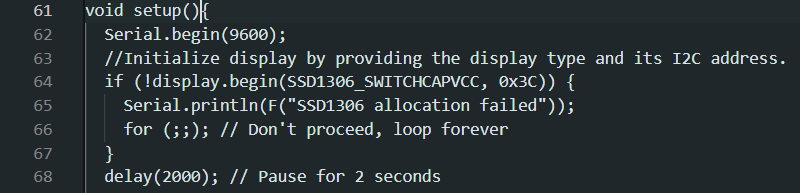
I've copied the code from the opening post in Car dashboard SSD1306 read & display speed sensor and did paste it in the IDE (initially 2.3.6, later 2.3.7 nightly build 20251025).
It was first noticed that void setup() was not highlighted.
This can be solved by applying an autoformat.
The next observation was that the PROGMEM table did not always colour correctly .
In line 33 and following lines the colouring is omitted. An autoformat sometimes mostly fixes this for most lines but not the two long lines (and the line following that). Undoing an autoformat does only partially restore the original syntax highlighting; it keeps the incorrect highlighting in 34 to 36 and often in other lines.
Note that the table issue (for me) is a lowest priority issue; it's just a tiny bit annoying when it's observed setup() is a bigger issue as it can indicate a non-existing mistake.
Windows 11
Hi @sterretje . I messed a bit with the sketch you list.
While doing something on the long lines (???) I got a message, something about highlighting stopped for performance reasons on long lines. I tried to get the message up again but could not manage that.
It did mention changing the “Editor: Max Tokenization Line Length ” (defaulted to 500 - the first long line is over 2200 long) to fix that. Tried and it does indeed fix it.
Thanks. I did not see that message about "something about highlighting stopped for performance reasons on long lines".
Note that we did find that exceptionally long code lines cause significant performance impact when the setting is at higher values:
opened 05:54PM - 21 Aug 22 UTC
closed 10:17AM - 19 Sep 22 UTC
conclusion: resolved
topic: code
type: imperfection
### Describe the problem
Arduino sketches may contain large machine generated… arrays for data such as images. These may span many columns, using a block that follows the dimensions of the source data (e.g., an array with 320 elements per line might be generated for a 320x240 pixel image), or even be all on a single long line.
🐛 The Arduino IDE UI becomes noticeably laggy or even completely unresponsive when the sketch contains a long line
### To reproduce
1. Download the following demonstration sketch, which contains a line 18432 characters long:
[LongLine.zip](https://github.com/arduino/arduino-ide/files/9389700/LongLine.zip)
1. Unzip the downloaded file.
1. Open the "**LongLine**" sketch in the Arduino IDE.
🐛 The IDE UI is completely unresponsive.
1. Force close the Arduino IDE.
1. Start the Arduino IDE (making sure it loads an innocuous sketch on startup).
1. Open the "**Command Palette**" via the <kbd>**Ctrl**</kbd>+<kbd>**Shift**</kbd>+<kbd>**P**</kbd> shortcut (<kbd>**Command**</kbd>+<kbd>**Shift**</kbd>+<kbd>**P**</kbd> for macOS users).
1. Select the "**Preferences: Open Settings (UI)**" command.
1. In the "**Search Settings**" field, type `editor.maxTokenizationLineLength`
1. Change the value of the "**Editor: Max Tokenization Line Length**" setting from the default `20000` to `500`
1. Open the "**LongLine**" sketch in the Arduino IDE.
🙂 The IDE remains perfectly responsive.
### Expected behavior
IDE is usable when the sketch contains long lines.
### Arduino IDE version
2.0.0-rc9.2.snapshot-de32bdd
### Operating system
Windows
### Operating system version
10
### Additional context
I am able reproduce the issue in [**Theia Blueprint**](https://theia-ide.org/docs/blueprint_download) (but not in [**VS Code**](https://code.visualstudio.com/)), so the inability to handle such content is not a bug in the Arduino IDE codebase.
I see that this was reported in the Theia project and fixed by reducing the default value of the `editor.maxTokenizationLineLength` to 400: https://github.com/eclipse-theia/theia/issues/8021
So a similar change should be made in Arduino IDE as well.
---
I used a ridiculously long line in the demo sketch (though it was generated from an image of only 32x32 px, using [an established tool](https://notisrac.github.io/FileToCArray/)). More reasonable line lengths result in less dramatic impact, but still make the IDE unpleasant to use. A real world file was provided here:
https://forum.arduino.cc/t/2-0-slows-down-if-very-long-lines-but-ok-with-crs-line-feeds-inserted/1021335/5
---
It seems that changes to the `editor.maxTokenizationLineLength` setting are not applied to sketches which have already been "tokenized", so make sure to reload the sketch if you are experimenting with the setting.
---
The issue is not related to the Arduino Language Server because it occurs even when the language server is not running due to not having a board open.
---
Originally reported at https://forum.arduino.cc/t/2-0-slows-down-if-very-long-lines-but-ok-with-crs-line-feeds-inserted/1021335
### Issue checklist
- [X] I searched for previous reports in [the issue tracker](https://github.com/arduino/arduino-ide/issues?q=)
- [X] I verified the problem still occurs when using the latest [nightly build](https://github.com/arduino/arduino-ide#nightly-builds)
- [X] My report contains all necessary details
So if you are going to change the setting, please make sure you remember having done that so you don't later assume any resulting poor performance is inherent to Arduino IDE.
The setting was 20000 at the time when the reports of poor performance under these conditions were received, so it might well be that you will still achieve acceptable performance even with value like 2500.
There is a request to increase the default value of the setting from the current 500 here:
opened 05:45AM - 02 Nov 22 UTC
type: enhancement
topic: code
### Describe the problem
Sketch with a long line leads to strange behaviour i… n the IDE.
- Wrong color parsing after col +/- 500
In a long line of code, after character +/- 500 the IDE stops coloring:
<img width="1465" alt="Bildschirmfoto 2022-11-02 um 06 17 32" src="https://user-images.githubusercontent.com/68701579/199404731-d235c41e-002a-4519-a944-00aa3385b882.png">
In some cases, following lines are also not highlighted:
<img width="571" alt="Bildschirmfoto 2022-11-02 um 06 25 32" src="https://user-images.githubusercontent.com/68701579/199405368-75028c6c-f87c-4743-adef-b337481b791e.png">
### To reproduce
Put that sketch snippet in the IDE, around col 500 the effect starts:
```cpp
void setup() {
String mqtt_msg = "('" + mqtt_device_id + "','" + String(longitude_tft, 10) + "','" + String(latitude_tft, 10) + "','" + mqtt_alarm + "','" + String(B1Volt, 1) + "','" + String(B2Volt, 1) + "','" + Batt_Temp11 + "','" + Batt_Temp12 + "','" + Batt_Temp13 + "','" + Batt_Temp14 + "','" + Batt_Temp15 + "','" + Batt_Temp16 + "','" + Batt_Temp21 + "','" + Batt_Temp22 + "','" + Batt_Temp23 + "','" + Batt_Temp24 + "','" + Batt_Temp25 + "','" + Batt_Temp26 + "','" + Batt_Temp31 + "','" + Batt_Temp32 + "','" + Batt_Temp33 + "','" + Batt_Temp34 + "','" + Batt_Temp35 + "','" + Batt_Temp36 + "','" + Batt_Temp41 + "','" + Batt_Temp42 + "','" + Batt_Temp43 + "','" + Batt_Temp44 + "','" + Batt_Temp45 + "','" + Batt_Temp46 + "','" + String(air_quality_score) + "','" + mqtt_status1 + "','" + mqtt_status2 + "','" + mqtt_status3 + "','" + mqtt_status4 + "','" + (t - 3) + "','" + h + "','" + (p / 100) + "','" + SIV + "','" + cog + "','" + sog + "')";
}
void loop() {}
```
### Expected behavior
- Correct color parsing for sketches that contain reasonably long lines
### Arduino IDE version
2.0.1
### Operating system
macOS
### Operating system version
12
### Issue checklist
- [X] I searched for previous reports in [the issue tracker](https://github.com/arduino/arduino-ide/issues?q=)
- [X] I verified the problem still occurs when using the latest [nightly build](https://github.com/arduino/arduino-ide#nightly-builds)
- [X] My report contains all necessary details