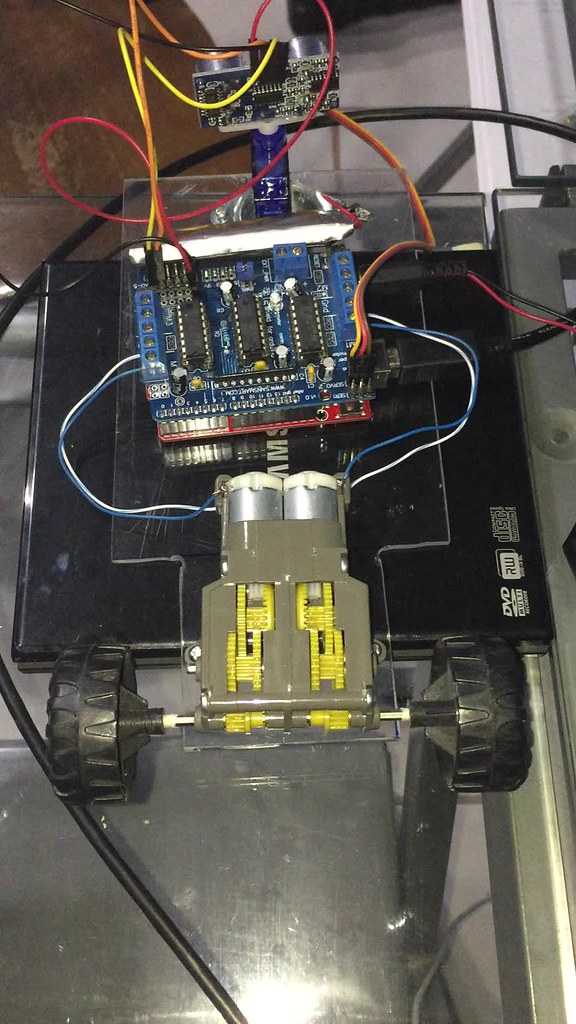
Im working on an obstacle avoiding robot from a sketch I got off a website.
#include <AFMotor.h>
#include <Servo.h>
#include <NewPing.h>

#define TRIG_PIN A4 // Pin A4 on the Motor Drive Shield soldered to the ultrasonic sensor
#define ECHO_PIN A5 // Pin A5 on the Motor Drive Shield soldered to the ultrasonic sensor
#define MAX_DISTANCE 200 // sets maximum useable sensor measuring distance to 200cm
#define MAX_SPEED 180 // sets speed of DC traction motors to 180/256 or about 70% of full speed - to get power drain down.
#define MAX_SPEED_OFFSET 10 // this sets offset to allow for differences between the two DC traction motors
#define COLL_DIST 10 // sets distance at which robot stops and reverses to 10cm
#define TURN_DIST COLL_DIST+10 // sets distance at which robot veers away from object (not reverse) to 20cm (10+10)
NewPing sonar(TRIG_PIN, ECHO_PIN, MAX_DISTANCE); // sets up sensor library to use the correct pins to measure distance.

AF_DCMotor motor1(1, MOTOR12_1KHZ); // create motor #1 using M1 output on Motor Drive Shield, set to 1kHz PWM frequency
AF_DCMotor motor2(4, MOTOR12_1KHZ); // create motor #2, using M2 output, set to 1kHz PWM frequency
Servo myservo;  // create servo object to control a servo

int pos = 0; // this sets up variables for use in the sketch (code)
  int maxDist = 0;
  int maxAngle = 0;
  int maxRight = 0;
  int maxLeft = 0;
  int maxFront = 0;
int course = 0;
int curDist = 0;
String motorSet = "";
int speedSet = 0;

void setup() {
  Serial.begin(9600);
  myservo.attach(9);  // attaches the servo on pin 9 (SERVO_2 on the Motor Drive Shield to the servo object
  delay(2000); // delay for two seconds
  myservo.write(90); // Face Forward
  checkPath(); // run the CheckPath routine to find the best path to begin travel
  motorSet = "FORWARD"; // set the director indicator variable to FORWARD
  moveForward(); // run function to make robot move forward
}

void loop() {
  checkForward(); // check that if the robot is supposed to be moving forward, that the drive motors are set to move forward - this is needed to overcome some issues with only using 4 AA NiMH batteries
  checkPath(); // set ultrasonic sensor to scan for any possible obstacles
}

void checkPath() {
  Serial.println("Checking path...");
  int curLeft = 0;
  int curFront = 0;
  int curRight = 0;
  int curDist = 0;
  myservo.write(144); // set servo to face left 54-degrees from forward
  delay(120); // wait 120milliseconds for servo to reach position
  for(pos = 144; pos >= 36; pos-=18)     // loop to sweep the servo (& sensor) from 144-degrees left to 36-degrees right at 18-degree intervals.
  {
    myservo.write(pos);  // tell servo to go to position in variable 'pos'
    delay(90); // wait 90ms for servo to get to position
    checkForward(); // check the robot is still moving forward
    curDist = readPing(); // get the current distance to any object in front of sensor

    // If distances are too close///objects are nearby!!!
    if (curDist < COLL_DIST) { // if the current distance to object is less than the collision distance
      Serial.println("call checkCourse()");
      checkCourse(); // run the checkCourse function
      break; // jump out of this loop
    }
    if (curDist < TURN_DIST) { // if current distance is less than the turn distance
      Serial.println("call changePath()");
      changePath(); // run the changePath function
    }

    //ELSE if curDist !< COLL_DIST then...
    if (curDist > maxDist) {
      maxAngle = pos;
      maxDist = curDist;
      Serial.println("curDist > maxDist, maxDist has been set!");
    }
// COMMENTED OUT BECAUSE CODE WAS NOT USED ELSEWHERE
//    if (pos > 90 && curDist > curLeft) {
//      curLeft = curDist;
//      Serial.println("facing left and curDist > curLeft?");
//    }
//    if (pos == 90 && curDist > curFront) {
//      curFront = curDist;
//      Serial.println("facing front and curDist > curFront?");
//    }
//    if (pos < 90 && curDist > curRight) {
//      curRight = curDist;
//      Serial.println("facing left and curDist > curRight?");
//    }
  }
//  maxLeft = curLeft;
//  maxRight = curRight;
//  maxFront = curFront;
  Serial.println("Done checking path...");
}

void setCourse() { // set direction for travel based on a very basic distance map, simply which direction has the greatest distance to and object - turning right or left?
    Serial.println("Setting course...");
    if (maxAngle < 90) {turnRight();}
    if (maxAngle > 90) {turnLeft();}
    maxLeft = 0;
    maxRight = 0;
    maxFront = 0;
}

void checkCourse() { // we're about to hit something so move backwards, stop, find where the empty path is.
  Serial.println("Checking course...");
  moveBackward();
  delay(500);
  moveStop();
  setCourse();
}

void changePath() {
  Serial.println("Changing path...");
  if (pos < 90) {veerLeft();} // if current pos of sensor is less than 90-degrees, it means the object is on the right hand side so veer left
  if (pos > 90) {veerRight();} // if current pos of sensor is greater than 90-degrees, it means the object is on the left hand side so veer right
}

int readPing() { // read the ultrasonic sensor distance
  Serial.println("Reading ping...");
  delay(70);
  unsigned int uS = sonar.ping();
  int cm = uS/US_ROUNDTRIP_CM;
  Serial.println(cm);
  return cm;
}

void checkForward() { Serial.println("Checking forward..."); if (motorSet=="FORWARD") {motor1.run(FORWARD); motor2.run(FORWARD); } }     // make sure motors are going forward

void checkBackward() { Serial.println("Checking backward..."); if (motorSet=="BACKWARD") {motor1.run(BACKWARD); motor2.run(BACKWARD); } } // make sure motors are going backward

void moveStop() { Serial.println("Move stopping..."); motor1.run(RELEASE); motor2.run(RELEASE);}  // stop the motors.

void moveForward() {
  Serial.println("Moving forward...");
    motorSet = "FORWARD";
    motor1.run(FORWARD);      // turn it on going forward
    motor2.run(FORWARD);      // turn it on going forward
  for (speedSet = 0; speedSet < MAX_SPEED; speedSet +=2) // slowly bring the speed up to avoid loading down the batteries too quickly
  {
    motor1.setSpeed(speedSet+MAX_SPEED_OFFSET);
    motor2.setSpeed(speedSet);
    delay(5);
  }
}

void moveBackward() {
  Serial.println("Moving backward...");
    motorSet = "BACKWARD";
    motor1.run(BACKWARD);      // turn it on going forward
    motor2.run(BACKWARD);     // turn it on going forward
  for (speedSet = 0; speedSet < MAX_SPEED; speedSet +=2) // slowly bring the speed up to avoid loading down the batteries too quickly
  {
    motor1.setSpeed(speedSet+MAX_SPEED_OFFSET);
    motor2.setSpeed(speedSet);
    delay(5);
  }
}

void turnRight() {
  Serial.println("Turning right...");
  motorSet = "RIGHT";
  motor1.run(FORWARD);      // turn motor 1 forward
  motor2.run(BACKWARD);     // turn motor 2 backward
  delay(400); // run motors this way for 400ms
  motorSet = "FORWARD";
  motor1.run(FORWARD);      // set both motors back to forward
  motor2.run(FORWARD);
}

void turnLeft() {
  Serial.println("Turning left...");
  motorSet = "LEFT";
  motor1.run(BACKWARD);     // turn motor 1 backward
  motor2.run(FORWARD);      // turn motor 2 forward
  delay(400); // run motors this way for 400ms
  motorSet = "FORWARD";
  motor1.run(FORWARD);      // turn it on going forward
  motor2.run(FORWARD);      // turn it on going forward
}

void veerRight() {Serial.println("Veering right..."); motor2.run(BACKWARD); delay(400); motor2.run(FORWARD);} // veering right? set right motor backwards for 400ms

void veerLeft() {Serial.println("Veering left..."); motor1.run(BACKWARD); delay(400); motor1.run(FORWARD);} // veering left? set left motor backwards for 400ms
The code seems fine, I've made one modification based on suggestions I got in these forums about commenting a few lines in the loop() because they werent really being used in the code.
What I would like to know is what is the best way to debug a sketch like this since so many things happen so fast repeatedly. Im used to adding serial prints but in this case they dont work well. From the video of the rig operating you can see the left engine works better than the right engine which seems to stop and sputter at times. Im guessing that is a gearbox issue.
But it also seems the logic is not working as intended since there is nothing in front of the sensor during the run and at times the motors run backwards. At least the left one seems to.
Here is the link to the video: