Hi! Im new here and I'm not really sure how to use this site yet, although I have a question that I hope someone can answer right away!
So I have this project in my school and I only based this of a youtube video and his works perfectly, https://youtu.be/eg8AlYlV0PM?feature=shared
However, instead of a 5v fan I used a 12v dc fan. I also am not so sure how high the resistance is for the potentiometer and used a 50k one
THE PROBLEM : After I plug every wiring, and input the coding needed, my lcd should say "Temp : (the number) C ", but instead it says "Temp: nanC". When I searched it, it said "Not a number" so I am not sure what that means. Another problem is when the fan turns on always, and the speed doesnt really change so I'm gonna need help with that also. I also need help with the potentiometer. Is there something wrong with the code?
here's the wirings
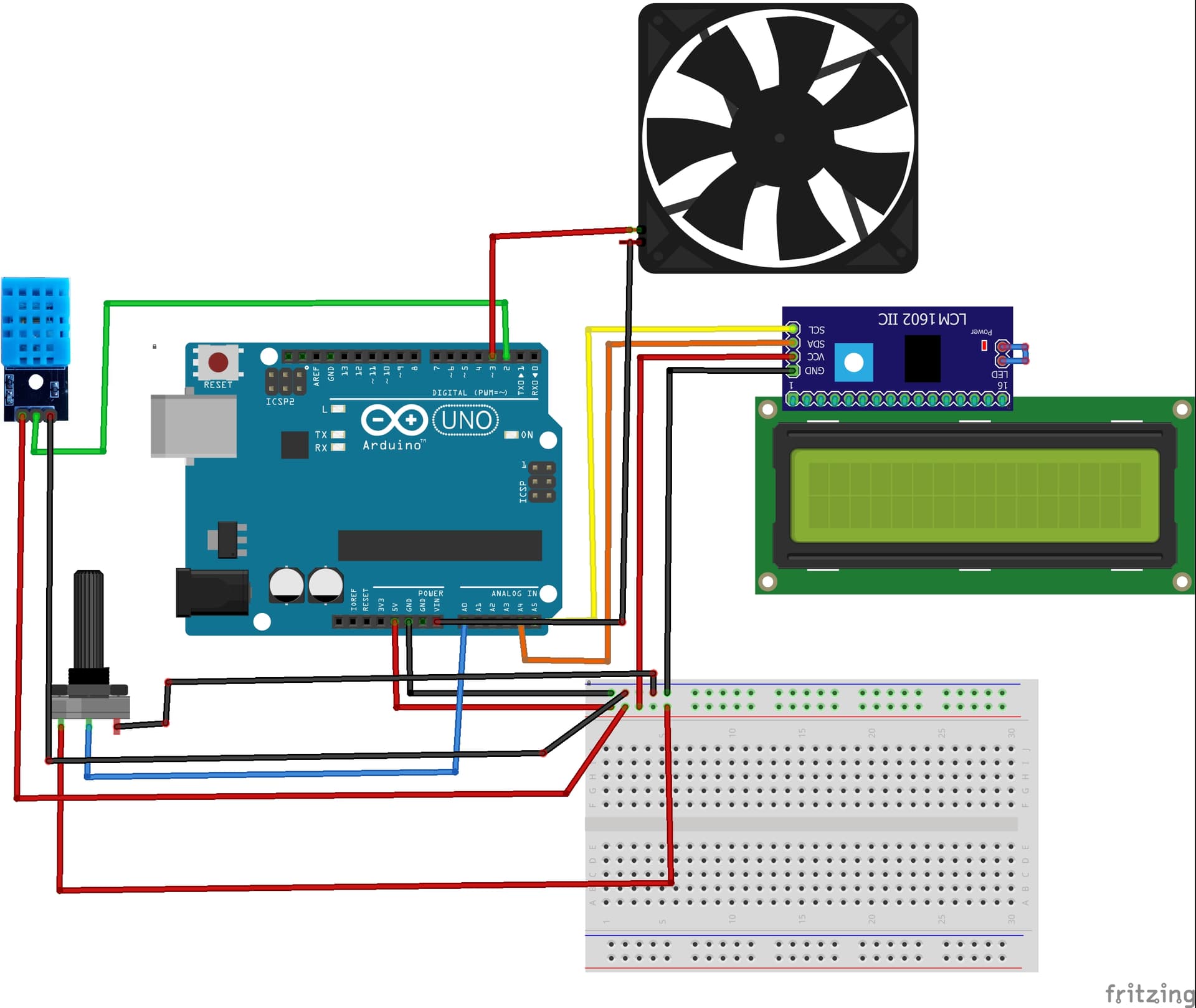
and here's the code
#include <DHT.h>
#include <Wire.h>
#include <LiquidCrystal_I2C.h>

#define DHTPIN 2
#define DHTTYPE DHT11

DHT dht(DHTPIN, DHTTYPE);

const int potPin = A0;
const int fanPin = 3; // Connect the fan to this pin

LiquidCrystal_I2C lcd(0x27, 16, 2); // Set the LCD address and dimensions

void setup() {
  dht.begin();
  pinMode(fanPin, OUTPUT);
  lcd.init();                      // Initialize the LCD
  lcd.backlight();                 // Turn on the backlight
  lcd.setCursor(0, 0);
  lcd.print("Temp Fan Control");
  lcd.setCursor(0, 1);
  lcd.print("by Your Name");
  delay(2000);
  lcd.clear();
}

void loop() {
  int threshold = map(analogRead(potPin), 0, 1023, 20, 40); // Map potentiometer value to temperature range

  float temperature = dht.readTemperature();

  if (temperature > threshold) {
    digitalWrite(fanPin, HIGH); // Turn on the fan
  } else {
    digitalWrite(fanPin, LOW); // Turn off the fan
  }

  lcd.clear();
  lcd.setCursor(0, 0);
  lcd.print("Temp: ");
  lcd.print(temperature);
  lcd.print("C");

  lcd.setCursor(0, 1);
  lcd.print("Threshold: ");
  lcd.print(threshold);
  lcd.print("C");

  delay(1000);
}
