I'm working on a project to monitor the temperature/humidity using DHT11 sensor.
I need to save the data in a CSV format to file with the timestamp and also display the data on a webpage in LAN.
I'm using Arduino UNO with Ethernet shield W5500 and DS3132 RTC for timestamp.
If I run just the web server section of code, everything OK, the webpage opens up and is property rendered with the data.
#include "DHT.h"
#include <SPI.h>
#include <Ethernet.h>
#include <SD.h>
// Date and time functions using a DS3231 RTC connected via I2C and Wire lib
#include "RTClib.h"

#define DHTPIN 7
#define DHTTYPE DHT11

RTC_DS3231 rtc;
DHT dht(DHTPIN, DHTTYPE);
byte mac[] = {
  0xDE, 0xAD, 0xBE, 0xEF, 0xFE, 0xED
};

IPAddress ip(192, 168, 0, 99);
EthernetServer server(80);

File myFile;
String timeStamp;

void setup()
{
  Serial.begin (57600);

  // change this to match your SD shield or module;
  // Arduino Ethernet shield: pin 4
  // Adafruit SD shields and modules: pin 10
  // Sparkfun SD shield: pin 8
  // MKRZero SD: SDCARD_SS_PIN
  /*Serial.print("Initializing SD card...");
  if (!SD.begin(4)) {
    Serial.println("initialization failed!");
    while (1);
  }
  Serial.println("initialization done.");*/

  dht.begin( );
  Ethernet.begin(mac, ip);
  server.begin( );

  // Write Header Row of CSV
  /*myFile = SD.open("test2.txt", FILE_WRITE);

  if (myFile) {
    Serial.print("Writing Header Row of CSV");
    myFile.println("time,temperature,humidity");
    // close the file:
    myFile.close();
    Serial.println("done.");
  } else {
    // if the file didn't open, print an error:
    Serial.println("error opening test2.txt");
  }*/

  // setuop RTC module
  if (! rtc.begin()) {
    Serial.println("Couldn't find RTC");
    Serial.flush();
    abort();
  }

  if (rtc.lostPower()) {
    Serial.println("RTC lost power, let's set the time!");
    // When time needs to be set on a new device, or after a power loss, the
    // following line sets the RTC to the date & time this sketch was compiled
    rtc.adjust(DateTime(F(__DATE__), F(__TIME__)));
    // This line sets the RTC with an explicit date & time, for example to set
    // January 21, 2014 at 3am you would call:
    // rtc.adjust(DateTime(2014, 1, 21, 3, 0, 0));
  }
}

void loop( )
{
  // === RTC Module Code ===

  DateTime now = rtc.now();

  // Serial.print(now.year());
  // Serial.print('/');
  // Serial.print(now.month());
  // Serial.print('/');
  // Serial.print(now.day());
  // Serial.print(now.hour());
  // Serial.print(':');
  // Serial.print(now.minute());
  // Serial.print(':');
  // Serial.print(now.second());
  // Serial.println();

  // timeStamp = String(now.year()) + "/" + String(now.month()) + "/" + String(now.day()) + " " + String(now.hour()) + ":" + String(now.minute()) + ":" + String(now.second());
  // Serial.println(timeStamp);
  // Serial.println();

  // === === === === === ===

  float h = dht.readHumidity( );
  float t = dht.readTemperature( );
  EthernetClient client = server.available();

  // open the file. note that only one file can be open at a time,
  // so you have to close this one before opening another.
  // myFile = SD.open("test2.txt", FILE_WRITE);

  // TODO: fix the web page
  if (client)
  {
    boolean currentLineIsBlank = true;
    while (client.connected ( ) )
    {
      if (client.available ( ) )
      {
        char character = client.read ( );
        Serial.write(character);
        if (character == '\n' && currentLineIsBlank)
        {
          client.println ("HTTP/1.1 200 OK");
          client.println ("Content-Type: text/html");
          client.println ("Connection: close");
          client.println ("Refresh: 5");
          client.println ( );
          client.println ("<!DOCTYPE HTML>");
          client.println ("<html>");
          client.print ("<Title>Arduino Ethernet Webserver </Title>");
          client.print ("<h1>Arduino Ethernet Shield Webserver </h1>");
          client.print ("<h4>Temperature in C: ");
          client.print (t); client.print("C");
          client.print ("</h4><h4>Humidity: ");
          client.print (h); client.print("%");
          client.println ("<br />");
          client.println ("</html>");
          break;
        }

        if ( character == '\n')
        {
          currentLineIsBlank = true;
        }
        else if (character != '\r')
        {
          currentLineIsBlank = false;
        }
      }
    }
    delay(1);
    client.stop();
  }

  // if the file opened okay, write to it:
  /*delay(5000);
  if (myFile) {
    Serial.print("Writing to test.txt...");

    myFile.print(now.year(), DEC);
    myFile.print('/');
    myFile.print(now.month(), DEC);
    myFile.print('/');
    myFile.print(now.day(), DEC);
    myFile.print(" ");
    myFile.print(now.hour(), DEC);
    myFile.print(':');
    myFile.print(now.minute(), DEC);
    myFile.print(':');
    myFile.print(now.second(), DEC);
    myFile.print(",");
    myFile.print(t);
    myFile.print(",");
    myFile.print(h);
    myFile.println("");

    // close the file:
    myFile.close();
    Serial.println("done.");
  } else {
    // if the file didn't open, print an error:
    Serial.println("error opening test.txt");
  }*/
}
If I disable the webpage and run just the code to save data to file with timestamp, everything is also OK.
#include "DHT.h"
#include <SPI.h>
#include <Ethernet.h>
#include <SD.h>
// Date and time functions using a DS3231 RTC connected via I2C and Wire lib
#include "RTClib.h"

#define DHTPIN 7
#define DHTTYPE DHT11

RTC_DS3231 rtc;
DHT dht(DHTPIN, DHTTYPE);
byte mac[] = {
  0xDE, 0xAD, 0xBE, 0xEF, 0xFE, 0xED
};

IPAddress ip(192, 168, 0, 99);
EthernetServer server(80);

File myFile;
String timeStamp;

void setup()
{
  Serial.begin (57600);

  // change this to match your SD shield or module;
  // Arduino Ethernet shield: pin 4
  // Adafruit SD shields and modules: pin 10
  // Sparkfun SD shield: pin 8
  // MKRZero SD: SDCARD_SS_PIN
  Serial.print("Initializing SD card...");
  if (!SD.begin(4)) {
    Serial.println("initialization failed!");
    while (1);
  }
  Serial.println("initialization done.");

  dht.begin( );
  Ethernet.begin(mac, ip);
  server.begin( );

  // Write Header Row of CSV
  myFile = SD.open("test2.txt", FILE_WRITE);

  if (myFile) {
    Serial.print("Writing Header Row of CSV");
    myFile.println("time,temperature,humidity");
    // close the file:
    myFile.close();
    Serial.println("done.");
  } else {
    // if the file didn't open, print an error:
    Serial.println("error opening test2.txt");
  }

  // setuop RTC module
  if (! rtc.begin()) {
    Serial.println("Couldn't find RTC");
    Serial.flush();
    abort();
  }

  if (rtc.lostPower()) {
    Serial.println("RTC lost power, let's set the time!");
    // When time needs to be set on a new device, or after a power loss, the
    // following line sets the RTC to the date & time this sketch was compiled
    rtc.adjust(DateTime(F(__DATE__), F(__TIME__)));
    // This line sets the RTC with an explicit date & time, for example to set
    // January 21, 2014 at 3am you would call:
    // rtc.adjust(DateTime(2014, 1, 21, 3, 0, 0));
  }
}

void loop( )
{
  // === RTC Module Code ===

  DateTime now = rtc.now();

  // Serial.print(now.year());
  // Serial.print('/');
  // Serial.print(now.month());
  // Serial.print('/');
  // Serial.print(now.day());
  // Serial.print(now.hour());
  // Serial.print(':');
  // Serial.print(now.minute());
  // Serial.print(':');
  // Serial.print(now.second());
  // Serial.println();

  // timeStamp = String(now.year()) + "/" + String(now.month()) + "/" + String(now.day()) + " " + String(now.hour()) + ":" + String(now.minute()) + ":" + String(now.second());
  // Serial.println(timeStamp);
  // Serial.println();

  // === === === === === ===

  float h = dht.readHumidity( );
  float t = dht.readTemperature( );
  EthernetClient client = server.available();

  // open the file. note that only one file can be open at a time,
  // so you have to close this one before opening another.
  myFile = SD.open("test2.txt", FILE_WRITE);

  // TODO: fix the web page
  // if (client)
  // {
  //   boolean currentLineIsBlank = true;
  //   while (client.connected ( ) )
  //   {
  //     if (client.available ( ) )
  //     {
  //       char character = client.read ( );
  //       Serial.write(character);
  //       if (character == '\n' && currentLineIsBlank)
  //       {
  //         client.println ("HTTP/1.1 200 OK");
  //         client.println ("Content-Type: text/html");
  //         client.println ("Connection: close");
  //         client.println ("Refresh: 5");
  //         client.println ( );
  //         client.println ("<!DOCTYPE HTML>");
  //         client.println ("<html>");
  //         client.print ("<Title>Arduino Ethernet Webserver </Title>");
  //         client.print ("<h1>Arduino Ethernet Shield Webserver </h1>");
  //         client.print ("<h4>Temperature in C: ");
  //         client.print (t); client.print("C");
  //         client.print ("</h4><h4>Humidity: ");
  //         client.print (h); client.print("%");
  //         client.println ("<br />");
  //         client.println ("</html>");
  //         break;
  //       }

  //       if ( character == '\n')
  //       {
  //         currentLineIsBlank = true;
  //       }
  //       else if (character != '\r')
  //       {
  //         currentLineIsBlank = false;
  //       }
  //     }
  //   }
  //   delay(1);
  //   client.stop();
  // }

  // if the file opened okay, write to it:
  delay(5000);
  if (myFile) {
    Serial.print("Writing to test.txt...");
    // TODO: check the encoding of timeStamp, file contains some gibberish
    // myFile.println(timeStamp + "," + String(t) + "," + String(h));

    myFile.print(now.year(), DEC);
    myFile.print('/');
    myFile.print(now.month(), DEC);
    myFile.print('/');
    myFile.print(now.day(), DEC);
    myFile.print(" ");
    myFile.print(now.hour(), DEC);
    myFile.print(':');
    myFile.print(now.minute(), DEC);
    myFile.print(':');
    myFile.print(now.second(), DEC);
    myFile.print(",");
    myFile.print(t);
    myFile.print(",");
    myFile.print(h);
    myFile.println("");

    // close the file:
    myFile.close();
    Serial.println("done.");
  } else {
    // if the file didn't open, print an error:
    Serial.println("error opening test.txt");
  }
}
The data is saved properly to the file. I've checked the board connnection to LAN, the board responds to ping.
➜  ~ ping 192.168.0.99
PING 192.168.0.99 (192.168.0.99) 56(84) bytes of data.
64 bytes from 192.168.0.99: icmp_seq=1 ttl=128 time=3.49 ms
64 bytes from 192.168.0.99: icmp_seq=2 ttl=128 time=1.08 ms
64 bytes from 192.168.0.99: icmp_seq=3 ttl=128 time=3.29 ms
64 bytes from 192.168.0.99: icmp_seq=4 ttl=128 time=0.872 ms
^C
--- 192.168.0.99 ping statistics ---
4 packets transmitted, 4 received, 0% packet loss, time 3004ms
rtt min/avg/max/mdev = 0.872/2.183/3.492/1.211 ms
But when I try to run the complete code, with both sections(server, sd card) it tries to run for a few seconds and then just hangs. No errors are displayed and the board responds to a ping indicating an active connection.
[Starting] Opening the serial port - /dev/ttyACM0
[Info] Opened the serial port - /dev/ttyACM0
itializing SD card...initialization done.
izing SD card...initialization done.
Initializing SD card...initialization done.
Initializing SD card...initialization done.
Initializing SD card...initialization done.
Initializing SD card...initialization done.
My code from earlier without RTC, but with server and SD card runs OK.
#include "DHT.h"
#include <SPI.h>
#include <Ethernet.h>
#include <SD.h>
#define DHTPIN 7
#define DHTTYPE DHT11

DHT dht(DHTPIN, DHTTYPE);
byte mac[] = {
               0xDE, 0xAD, 0xBE, 0xEF, 0xFE, 0xED
             };

IPAddress ip(192, 168, 0, 99);
EthernetServer server(80);

File myFile;

void setup()
{
  Serial.begin (9600);

  // change this to match your SD shield or module;
  // Arduino Ethernet shield: pin 4
  // Adafruit SD shields and modules: pin 10
  // Sparkfun SD shield: pin 8
  // MKRZero SD: SDCARD_SS_PIN
  Serial.print("Initializing SD card...");
  if (!SD.begin(4)) {
    Serial.println("initialization failed!");
    while (1);
  }
  Serial.println("initialization done.");

  dht.begin( );
  Ethernet.begin(mac, ip);
  server.begin( );
}

void loop( )
{
  float h = dht.readHumidity( );
  float t = dht.readTemperature( );
  EthernetClient client = server.available();

  // open the file. note that only one file can be open at a time,
  // so you have to close this one before opening another.
  myFile = SD.open("test.txt", FILE_WRITE);

  if (client)
    {
      boolean currentLineIsBlank = true;
      while (client.connected ( ) )
        {
          if (client.available ( ) )
            {
              char character = client.read ( );
              Serial.write(character);
              if (character == '\n' && currentLineIsBlank)
                {
                  client.println ("HTTP/1.1 200 OK");
                  client.println ("Content-Type: text/html");
                  client.println ("Connection: close");
                  client.println ("Refresh: 5");
                  client.println ( );
                  client.println ("<!DOCTYPE HTML>");
                  client.println ("<html>");
                  client.print ("<Title>Arduino Ethernet Webserver </Title>");
                  client.print ("<h1>Arduino Ethernet Shield Webserver </h1>");
                  client.print ("<h4>Temperature in C: ");
                  client.print (t);client.print("C");
                  client.print ("</h4><h4>Humidity: ");
                  client.print (h);client.print("%");
                  client.println ("<br />");
                  client.println ("</html>");
                  break;
                }

                if ( character == '\n')
                  {
                    currentLineIsBlank = true;
                  }
                else if (character != '\r')
                  {
                    currentLineIsBlank = false;
            }
        }
    }
    delay(1);
    client.stop();
  }

  // if the file opened okay, write to it:
  if (myFile) {
    Serial.print("Writing to test.txt...");
    myFile.println("Temperature: " + String(t) + " Humidity: " + String(h));
    // close the file:
    myFile.close();
    Serial.println("done.");
  } else {
    // if the file didn't open, print an error:
    Serial.println("error opening test.txt");
  }
}
The wiring diagrams for RTC module as well as DHT11 are below:
DS3132 RTC
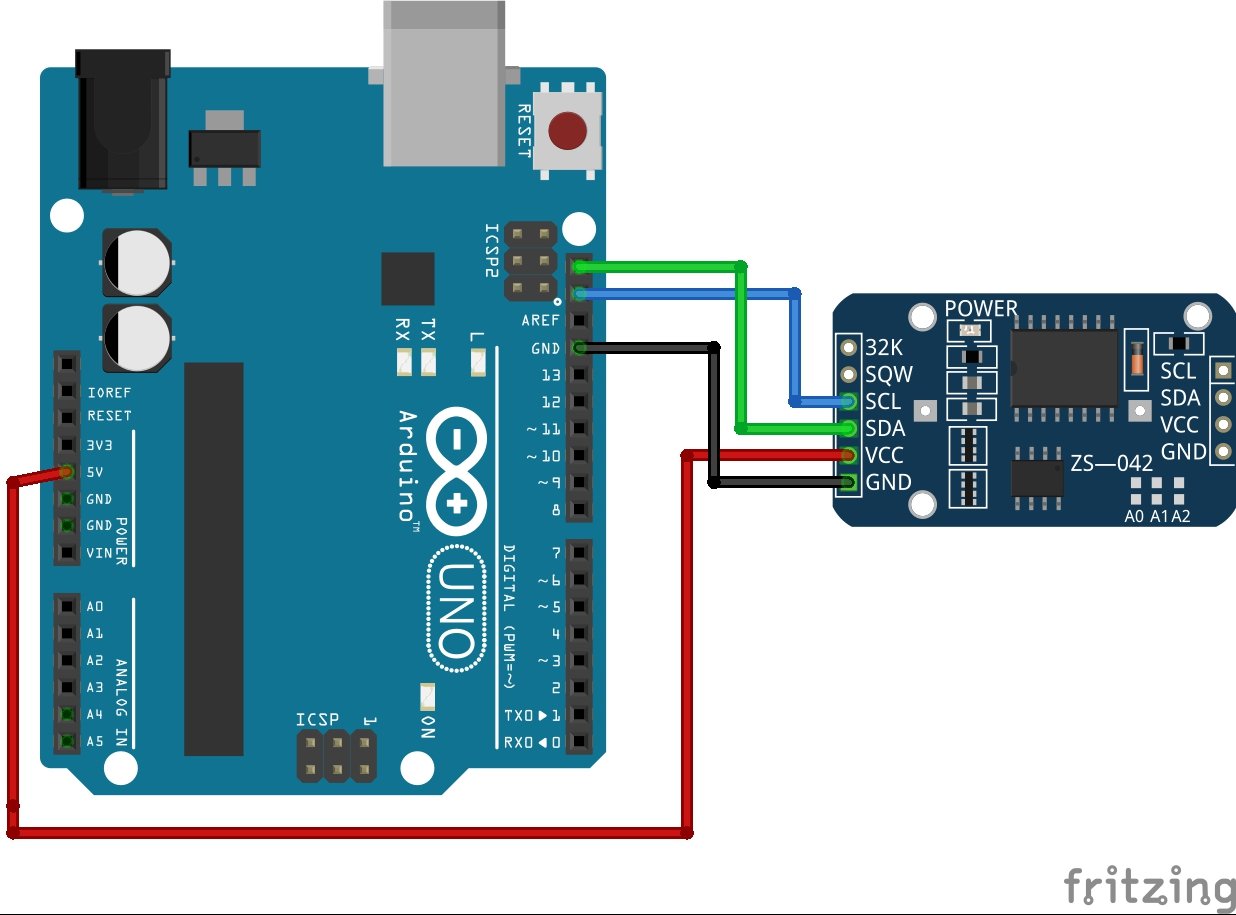
DTH 11

My wiring for DHT11 is slightly different: the green wire in connected to pin 7 and red wire is connected to 3.3V pin.
I've included the photographs of the setup here.
I'm not sure what's causing the code to hang, I appreciate the help.