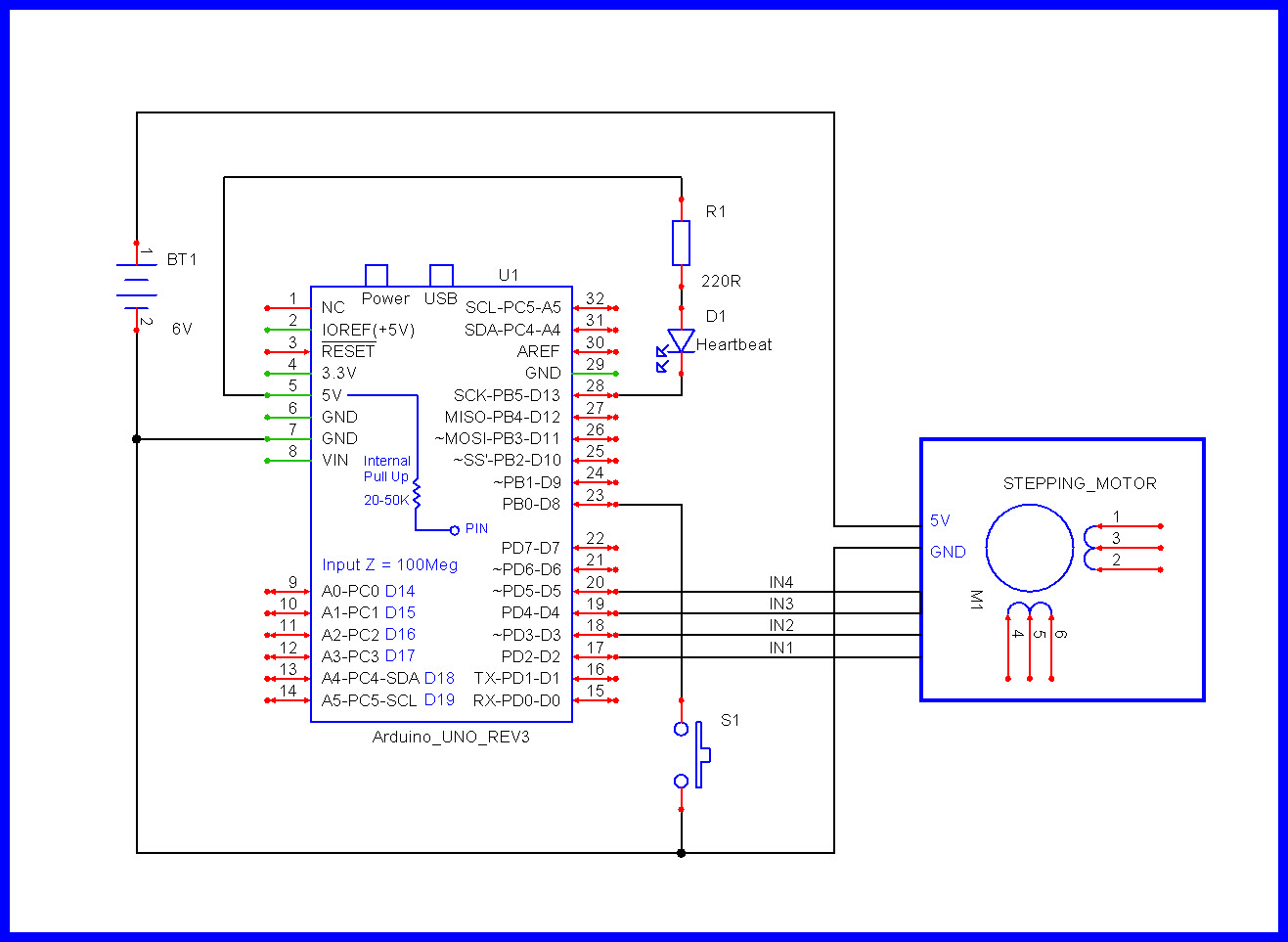
Hi. On google groups on the subject of "Accelstepper" I found a post by Mike McCauley with the code I wanted to test in my simple project. I am trying to understand the Accelstepper library (I am not a programmer) and use it to move two stepper motors that will be controlled independently with the X, Y joystick - They will guide the trolley on v-slot profiles. For now, I have limited myself to one stepper motor to learn the principle of operation. This code works great for me, but I'd like to add limit buttons to it. I wrote on the google group, but the topic seems to be closed.
I understand that the basis of this program is to keep reading joystick values through the millis () function in a loop. If I add limiting buttons, their value must also be constantly read in the millis () loop so that the cart stops when the limit button is pressed and goes back a few steps in the opposite direction, temporarily deactivating the code responsible for moving the cart with the joystick? So the bounding button loop must take precedence over the X, Y control loop. I wonder where to put the bounding button loop in this code.
Mike's original code looks like this:
#include <AccelStepper.h>

// Define a stepper and the pins it will use
AccelStepper stepper; // Defaults to AccelStepper::FULL4WIRE (4 pins) on 2, 3,
4, 5

#define JOYSTICK_PIN A0
#define MAX_SPEED 100
#define INPUT_READ_INTERVAL 100
unsigned long last_input_time = 0;

void setup()
{
Serial.begin(9600);

// Change these to suit your stepper if you want
stepper.setMaxSpeed(0);
stepper.setAcceleration(10);
// stepper.moveTo(1000000000);
}

void loop()
{
// Every INPUT_READ_INTERVAL milliseconds, read inputs.
// We do this infrequently to prevent interfering
// with the stepper motor high speed stepping
// Get the current joystick position as analog value

unsigned long current_time = millis();
if (current_time - last_input_time > INPUT_READ_INTERVAL)
{
int joystick_in = analogRead(JOYSTICK_PIN);
// Map the raw analog value to speed range from -MAX_SPEED to MAX_SPEED
int desired_speed = map(joystick_in, 0, 1023, -MAX_SPEED, MAX_SPEED);
// Serial.println(desired_speed);

// Based on the input, set targets and max speed
stepper.setMaxSpeed(abs(desired_speed));
if (desired_speed == 0 && stepper.speed() == 0)
{
// Prevent running off the end of the position range
stepper.setCurrentPosition(0);
}
else if (desired_speed < 0)
{
stepper.moveTo(-1000000000);
}
else if (desired_speed > 0)
{
stepper.moveTo(1000000000);
}
last_input_time = current_time;
}


stepper.run();
}
Also, based on the post by the user groundFungus from this Arduino forum, I work this way:
#include <AccelStepper.h>

// Define a stepper and the pins it will use
AccelStepper stepper(1, 14, 12);

#define JOYSTICK_PIN 34
#define MAX_SPEED 1000
#define INPUT_READ_INTERVAL 100
unsigned long last_input_time = 0;
const byte buttonPin = 27;
bool lastButtonState = HIGH; // button history
bool moveDir = false;  // stepper direction flag
long moveSteps = 800;  // number of steps to move per button press

void setup()
{
  Serial.begin(9600);
  pinMode(buttonPin, INPUT_PULLUP);
  //pinMode(homebtn, INPUT_PULLUP);
  // Change these to suit your stepper if you want
  stepper.setMaxSpeed(0);
  stepper.setAcceleration(1000);
  // stepper.moveTo(1000000000);
}

void loop()
{
  unsigned long current_time = millis();
  if (current_time - last_input_time > INPUT_READ_INTERVAL)
  {
    int joystick_in = analogRead(JOYSTICK_PIN);
    // Map the raw analog value to speed range from -MAX_SPEED to MAX_SPEED
    int desired_speed = map(joystick_in, 0, 4095, -MAX_SPEED, MAX_SPEED);
    // Serial.println(desired_speed);

    // Based on the input, set targets and max speed
    stepper.setMaxSpeed(abs(desired_speed));
    bool buttonState = digitalRead(buttonPin);
    if (buttonState == HIGH) {
      if (desired_speed == 0 && stepper.speed() == 0)
      {
        // Prevent running off the end of the position range
        stepper.setCurrentPosition(0);
      }
      else if (desired_speed < 0)
      {
        stepper.moveTo(-10000);
      }
      else if (desired_speed > 0)
      {
        stepper.moveTo(10000);
      }
      last_input_time = current_time;
    }
    else if (buttonState == LOW) {
      while (stepper.currentPosition() != 0) // Full speed basck to 0
      {
        stepper.setSpeed(0);
        stepper.run();


        // stepper.runToPosition();
        break;
      }
    }
  }
  stepper.run();  // must be called very often
  // ideally once every loop iteration
}

How do I approach this. Does the break; command is the right solution?