Hello there,
I am using an arduino uno with an pressure sensor that returns a voltage in an analog input. I want to keep the time in a variable when a specific pressure value is reached and also keep the time in another variable when the value reaches another point and then subtract to find the time that has elapsed. I am using the millis() function (although) i am not sure if that is the corrent way to go). The problem is that i am missing a lot of important values during the calculations. The event that i am trying to measure is 500ms (max). In the first loop i get good result but after that the values are incorrect. Any suggestions would help.
Post your code.
'''
void setup()
{
Serial.begin(4800);
analogReference(EXTERNAL);
}
void loop(){
float voltage = 3.3 * analogRead(A0) / 1023;
float pressure = mapFloat(voltage, 0.2, 2.7, -100.0, 0);
Serial.println(pressure,1);
}
float mapFloat(float x, float in_min, float in_max, float out_min, float out_max)
{
return (x - in_min) * (out_max - out_min) / (in_max - in_min) + out_min;
}
'''
Right now in this code i am not calculating the time ellapsed because the code i wrote for that failed. This is just the reading of the sensor and a function to convert it into pressure
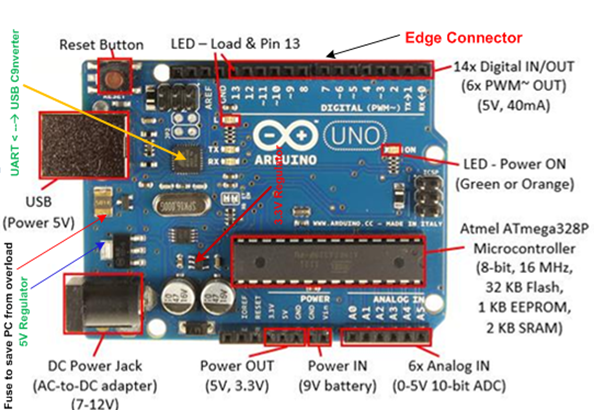
1. Why are you using EXTERNAL option (1.1V to 5V) rather than INTERNAL (1.1V) or DEFAULT (5V) for the Vref-pin of the ADC (Fig-1)?

Figure-1:
2. How much voltage are you applying from external source to the Vref-pin of the ADC?
3. map() function does not handle the fractional numbers and yet you are using float numbers -- why?
4. Use code tags while posting codes/sketches.
void setup()
{
   Serial.begin(4800);
   analogReference(EXTERNAL);
}

void loop()
{
   float voltage = 3.3 * analogRead(A0) / 1023;
   float pressure = mapFloat(voltage, 0.2, 2.7, -100.0, 0);
   Serial.println(pressure,1);
}

float mapFloat(float x, float in_min, float in_max, float out_min, float out_max)
{
    return (x - in_min) * (out_max - out_min) / (in_max - in_min) + out_min;
}
I am using voltage regulator to get 5V stable for the ADC to do the comparison . It helps get a better reading.
i can use double as well i think its just something i havent given much thought. Does this slow down the process?
** Actually its 3.3V since the sensor is powered with 3.3v as well.
What is the voltage range for the output signal of your pressure sensor?
0.2 to 2.7
Regulated 3.3V is also available from a connector pin of UNO, which you can use for both of your sensor and the ADC.
I didnt know its regulated. But i have used in the past and i was getting ''fuzzy'' readings at times where the pressure was completely stable at 1bar(checked it with external instrument). Anyway the problem still remains with the time measurement. Is the internal clock of the arduino capable of doing this job or do i have to give an external source like an RTC or a GPS module? I would prefer if i didnt have to use GPS since its exceeding the cost for the setup i want to do.
Ok i spot it now . Any advice about the clock issue?
You have a pressure sensor? Let's say it is var1.
What is the second variable? Is that one also a pressure sensor? Let's say it is var2.
At what value of var1, you want to measure the elapse time -- t1?
AT waht value of var2, you want to measure the elapse time -- t2?
i measure pressure with only 1 sensor. the pressure changes all the time when the system is working. i want to measure time between 2 pressure values. for example lets say my pressure goes to 5 bars and after some time its decreases to 2 bars. i want to measure the time it took to go from 5 to 2 bars. the approximate time should be around 400-500ms.
Use while-do statements along with millis() function.
Hints:
int var1, var2;

void setup()
{
    Serial.begin(9600);
}

void loop()
{
  while(var1 != 5)
  {
    ; //wait or something else
  }
  unsigned long presentMillis = millis();  //record intial time
  while(var1 != 2)
  {
    ;  //wait or do something else
  }
  unsigned long timeDifference = millis() - presentMillis;
  delay(5000);  //test interval
}
1 Like
thanks i ll test it and get back to you
This topic was automatically closed 180 days after the last reply. New replies are no longer allowed.