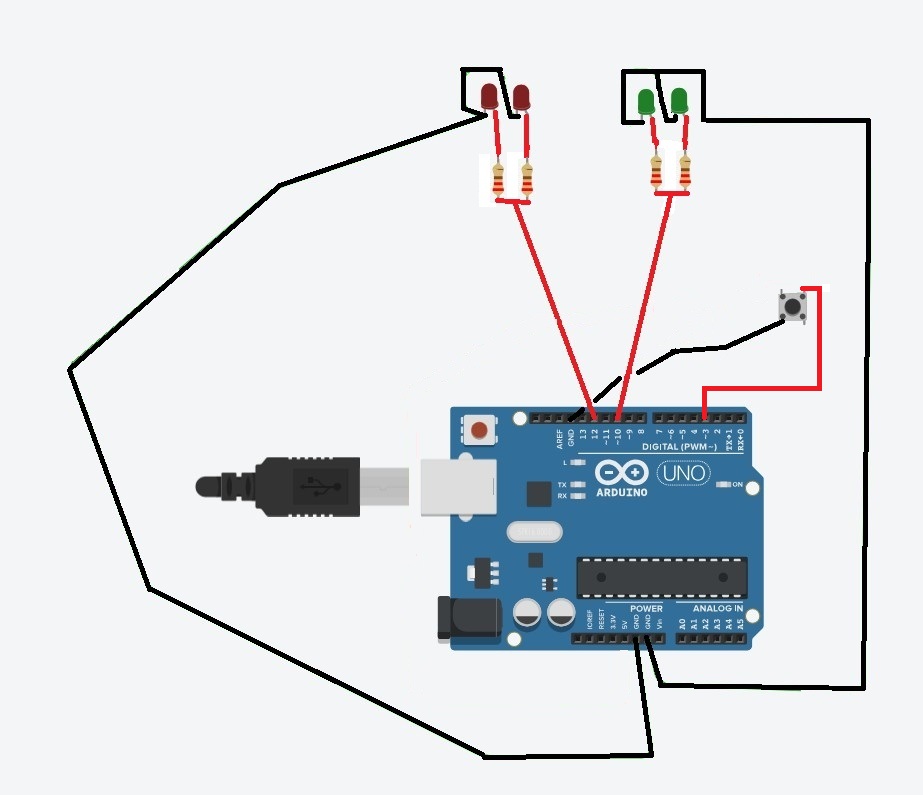
Trying to find simple sketch to toggle two pairs of LEDs off and on with momentary pushbutton. Starting with pair one on when powering up the Uno, pressing momentary push button to switch between pair one and pair two, alternate pairs of LEDs staying on between presses of button.
Sample circuit is for reference on function (may be inaccurate as to correct hookup). Haven't been able to find sketch that can do this.

Take a look at the StateChangeDetection example in the IDE. It will show you how to read the state of an input and react when the state changes, such as by being turned on
Each LED should have its own series current limiting resistor.
What you drew might work, but will not be the best you can do and is def not officially correct.
See
https://www.allaboutcircuits.com/technical-articles/led-arrays-one-resistor-or-many/
and
There is no input to read the pushbutton...
a7
Use one resistor for each LED. If they come from the same batch thry might shine the same bright.
There are two pairs Of LEDs, Red and Green. I want them to work in the following order; when Uno is turned on, Green LEDs will be on. Each button press will switch between Red pair and Green pair. LEDs will stay on between button presses. These will be used in a project that has two red and two green indicators.
Not sure what you mean. I want the LEDs to match in brightness for both colors.

Yes! You got it perfectly right.
Not a programmer. If I could find the sketch that can accomplish the intended function, or one that could be easily modified to do what I am trying to accomplish, that would be great. The examples I have found so far don't involve pairs of LEDs, or involve multiple other functions that are not needed. Also, the circuit I drew is based on the pieces of other circuits I have found that have some of the functions I need, but not all.
So now I need to know if the button is connected correctly so it will have debounce capability.
Nobody is born programmer.
The IDE has a folder named "Examples".
Look for button examples.
Look for "Blinking an LED".
Explore them!

If I am reading this right, I need to remove the resistor on the switch? Otherwise the connections are correct, but not to the correct pins on the Uno?
Don't need to blink the LEDs. Just want to switch between red and green LEDs, leaving them on between switches.
State Change (or Edge) Detection along with some way to accommodate switch bouncing is an essential first bit of power you can take for yourself.
See this post and the thread it is part of; read the code play with it in the simulator until it makes sense:
HTH
a7
- One side of the switch connects to GND, the other side connects to the GPIO.
In setup( ) turn on the internal pull-up resistor.
Look for a LOW for switch closed state.
A sketch that should lead you in the right direction. Mostly taken straight from the StateChangeDetection example
const int buttonPin = A3;  // the pin that the pushbutton is attached to

int buttonPushCounter = 0;  // counter for the number of button presses
int buttonState = 0;        // current state of the button
int lastButtonState = 0;    // previous state of the button

void setup()
{
    pinMode(buttonPin, INPUT_PULLUP);
    Serial.begin(115200);
}

void loop()
{
    // read the pushbutton input pin:
    buttonState = digitalRead(buttonPin);

    // compare the buttonState to its previous state
    if (buttonState != lastButtonState)
    {
        // if the state has changed, increment the counter
        if (buttonState == LOW)
        {
            // if the current state is LOW then the button went from off to on:
            buttonPushCounter++;
            Serial.println("button pressed");
            Serial.print("number of button presses: ");
            Serial.println(buttonPushCounter);
            if (buttonPushCounter % 2 == 0)  //even number of presses
            {
                Serial.println("RED on, GREEN off");
            }
            else
            {
                Serial.println("RED off, GREEN on");
            }
        }
        // Delay a little bit to avoid bouncing
        delay(50);
    }
    // save the current state as the last state, for next time through the loop
    lastButtonState = buttonState;
}
NOTE that there is work to be done to make this do what you want so take note of other replies in this topic
A forever blink will do the job. There are surely more LED examples.
What is GPIO?