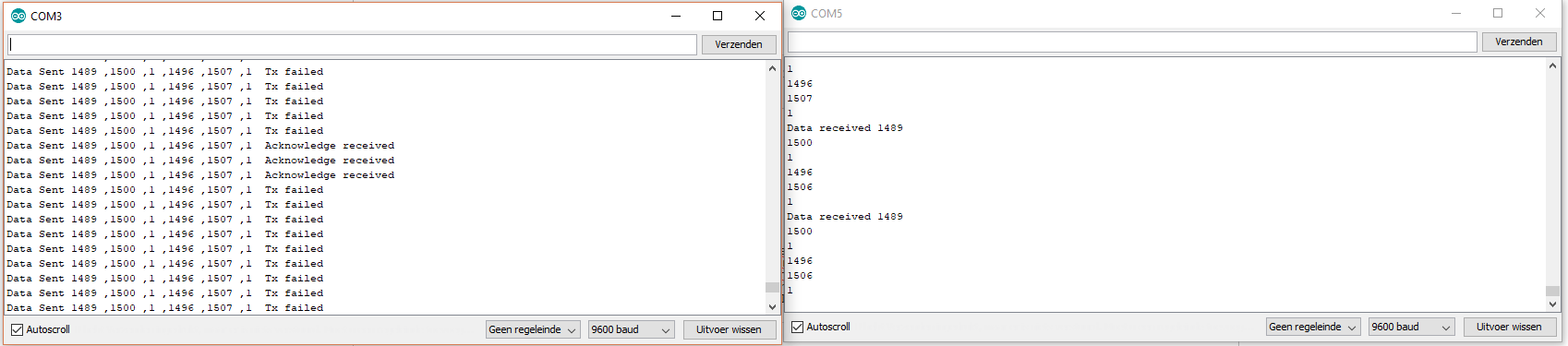
Hey thanks for the reply I mixed ur code with a code from a tutorial on the internet and made these codes
transmitter:
// SimpleTx - the master or the transmitter

#include <SPI.h>
#include <nRF24L01.h>
#include <RF24.h>
#define CE_PIN   9
#define CSN_PIN 10

const byte slaveAddress[5] = {'R','x','A','A','A'};

RF24 radio(CE_PIN, CSN_PIN); // Create a Radio

struct dataStruct {
  byte valX;          // The Joystick position values
  byte valY;
  byte valSW;
  byte valX2;
  byte valY2;
  byte valSW2;
};
dataStruct myData;

unsigned long currentMillis;
unsigned long prevMillis;
unsigned long txIntervalMillis = 50; // send once per second


void setup() {
    Serial.begin(9600);
    Serial.println("SimpleTx Starting");
    radio.begin();
    radio.setDataRate( RF24_250KBPS );
    radio.setRetries(3,5); // delay, count
    radio.openWritingPipe(slaveAddress);
    myData.valX = 127;
    myData.valY = 127;
    myData.valSW = 0;
    myData.valX2 = 127;
    myData.valY2 = 127;
    myData.valSW2 = 0;
}

//====================

void loop() {
    GetJoyValues();
    currentMillis = millis();
    if (currentMillis - prevMillis >= txIntervalMillis) {
        send();
        prevMillis = millis();
    }
}

//====================
void GetJoyValues(){
    myData.valX = map( analogRead(A0), 0, 1024, 0, 255);
    myData.valY = map( analogRead(A1), 0, 1024, 0, 255);
    myData.valSW = digitalRead(2);
    myData.valX2 = map( analogRead(A2), 0, 1024, 0, 255);
    myData.valY2 = map( analogRead(A3), 0, 1024, 0, 255);
    myData.valSW = digitalRead(4);
}
void send() {
    bool rslt;
    rslt = radio.write( &myData, sizeof(myData) );
        // Always use sizeof() as it gives the size as the number of bytes.
        // For example if dataToSend was an int sizeof() would correctly return 2
    Serial.print("Data Sent ");
    if (rslt) {
        Serial.println("  Acknowledge received");
    }
    else {
        Serial.println("  Tx failed");
    }
}

//================
Receiver:
// SimpleRx - the slave or the receiver

#include <SPI.h>
#include <nRF24L01.h>
#include <RF24.h>
#include <Servo.h>

#define CE_PIN   9
#define CSN_PIN 10

const byte thisSlaveAddress[5] = {'R','x','A','A','A'};

RF24 radio(CE_PIN, CSN_PIN);
Servo myServo;
Servo myMotorThrust;
Servo myMotorLift;

int liftValue = 0;
int thrustValue = 0;
int angleValue = 0;
char dataReceived[10]; // this must match dataToSend in the TX
bool newData = false;

struct Received_data {
  byte valX;          // The Joystick position values
  byte valY;
  byte valSW;
  byte valX2;
  byte valY2;
  byte valSW2;
};
Received_data received_data;

//===========

void setup() {

    Serial.begin(9600);
    myServo.attach(3);
    myMotorThrust.attach(9);
    myMotorLift.attach(5);
    received_data.valX = 127;
    received_data.valY = 127;
    received_data.valSW = 0;
    received_data.valX2 = 127;
    received_data.valY2 = 127;
    received_data.valSW2 = 0;
    Serial.println("SimpleRx Starting");
    radio.begin();
    radio.setDataRate( RF24_250KBPS );
    radio.openReadingPipe(1, thisSlaveAddress);
    radio.startListening();
}

//=============

void loop() {
    getData();
    showData();
    RunComponents();
}

//==============

void getData() {
    if ( radio.available() ) {
        radio.read( &received_data, sizeof(Received_data) );
        newData = true;
    }
}

void showData() {
    if (newData == true) {
        Serial.print("Data received ");
        newData = false;
    }
}
void RunComponents() {

    thrustValue = map(received_data.valX2,0,255,1000,2000);
    angleValue = map(received_data.valY,0,255,0,180);
    liftValue = map(received_data.valX,0,255,1000,2000);

    myServo.write(angleValue);
    myMotorThrust.writeMicroseconds(thrustValue);
    myMotorLift.writeMicroseconds(liftValue);

    Serial.print("Angle: ");
    Serial.print(angleValue);
    Serial.print("\n");
    Serial.print("Thrust: ");
    Serial.print(thrustValue);
    Serial.print("\n");
    Serial.print("Lift: ");
    Serial.print(liftValue);
}
But it doesn't really work
Can you please help me make this work I can read code but writing my own is still hard.
Note that I deleted some of your code. Otherwise I could'nt compile the code (Did this when mixing up with the other code before hand it worked).
Thanks already