Trying to connect pump through MAX485 using MODBUS

Hello, guys

I have a Kamoer pump with its own 24V DC adapter and a control board that supports RS485 with MODBUS, and i'm trying to control it with an Arduino UNO.
The Arduino is connected to the PC through USB (receiving data through Serial, but that's for a later step).

I've connected the MAX485 to the Arduino like this:

RO->0
RE->1
DE->2
DI->3
VCC->5V
GND->GND

and to the pump controller like this

A->A
B->B

MAX485's led is on, so it appears to be working

I'm using <ModbusRTUMaster.h> since it can use the supported functions (other libraries don't seem to have the write single coil func) but i've tried others without success. ModbusRtu, ModbusMaster, ArduinoModbus...
I keep getting a Timeout Error with this and other libraries.

Here is the control board documentation:
board_23da3858-fb94-4ea4-82f1-616b8582b057.pdf (2.4 MB)

The important parts are:
-The pump address is 192 (0xC0) by default.
-Baud rate is 9600
-The supported feature codes are
0x05 - Write Single Coil
0x03 - Read Holding Registers
0x06 - Write Single Registe
0x10 - Write Multiple Registers
-"FIRST, YOU NEED TO SEND A COMMAND TO ENABLE THE 485. SENDING OTHER COMMANDS CANNOT RESPOND"
the command being 0x05 (the full message being "C0 05 1004 FF00 D9EA", but i don't know how to print the full hex string to check if it is correct)

I have tried using the slave id as 192 (the default pump id) and 0 for broadcast.
When using 0 i get no error but the pump does nothing.

After sending the enable command, i attempt to start and stop the pump in a loop, but i keep getting Timeout errors.
I cannot even try to debug reading holding registers because i cannot enable the pump's 485 communication successfully.

If i understand correctly, the Arduino's USB connection to the PC is Serial.
After a while i understood that the example codes i found tried to connect the MAX485 to Serial, which was wrong (or am i wrong about this too??), but surely i'm still missing something.

Here's my code

//https://github.com/CMB27/ModbusRTUMaster
#include <ModbusRTUMaster.h>
#include <RS485.h>

// The ATmega328P and ATmega168 only have one HardwareSerial port, and on Arduino boards it is usually connected to a USB/UART bridge.
// So, for these boards, we will use SoftwareSerial with the lbrary, leaving the HardwareSerial port available to send debugging messages.
///#include <SoftwareSerial.h>
const int8_t rxPin = 0;//ro
const int8_t rePin = 1;
const int8_t dePin = 2;
const int8_t txPin = 3;//di

///SoftwareSerial mySerial(rxPin, txPin);
//#define MODBUS_SERIAL mySerial

#define MODBUS_BAUD 9600

// 0 indicates a broadcast message.
// The default address is 192 (0xC0)
int SLAVE_ID = 0xC0; //0;

// SUPPORTED FEATURE CODES
//   Read:
// 0x03: Multiple Holding Registers (FC=03)
//   Write:
// 0x05: Single Coil (FC=05)
// 0x06: Single Holding Register (FC=06)
// 0x10: Multiple Holding Registers (FC=16)

#define COIL_485ENABLE 0x1004
#define COIL_STARTSTOP 0x1001

const uint8_t numCoils = 1;
bool coils[numCoils];

///ModbusRTUMaster master(MODBUS_SERIAL, dePin);
ModbusRTUMaster master(RS485, dePin, rePin);

uint8_t error;

const char* errorStrings[] = {
  "success", "invalid id", "invalid buffer", "invalid quantity",
  "response timeout", "frame error", "crc error", "unknown comm error",
  "unexpected id", "exception response", "unexpected function code", "unexpected response length",
  "unexpected byte count", "unexpected address", "unexpected value", "unexpected quantity"
};
const uint8_t numExceptionResponseStrings = 4;
const char* exceptionResponseStrings[] = {
  "illegal function", "illegal data address", "illegal data value", "server device failure"
};

void setup() {
  //Serial for printing to PC
  Serial.begin(9600);
  while (!Serial);
  Serial.println();

  pinMode(LED_BUILTIN, OUTPUT);
  digitalWrite(LED_BUILTIN, LOW); //led off

  //modbusSetup
  RS485.begin(MODBUS_BAUD); //, HALFDUPLEX, SERIAL_8E1);
  //MODBUS_SERIAL.begin(MODBUS_BAUD);
  master.begin(MODBUS_BAUD);
  delay(100);

  enablePumpCommunication();
  delay(1000);
}

void loop() {
  startPump();
  delay(1000);
  stopPump();
  delay(3000);
}

void enablePumpCommunication() {

  // "FIRST, YOU NEED TO SEND A COMMAND TO ENABLE THE 485.
  // SENDING OTHER COMMANDS CANNOT RESPOND"

  //C0 05 1004 FF00 D9EA
  Serial.println("---enableCommunication");
  error = master.writeSingleCoil(SLAVE_ID, COIL_485ENABLE, 0x01);
  printError(error);
  
  delay(100);

  // check if coil is ON?
  Serial.println("---read coil AFTER enable");
  // (unitId, startAddress, buffer, quantity)
  error = master.readCoils(SLAVE_ID, COIL_485ENABLE, coils, numCoils);
  printError(error);
}
void startPump() {
  digitalWrite(LED_BUILTIN, HIGH); //led on

  //C0 05 1001 FF00 C93B
  Serial.println("---startPump");
  error = master.writeSingleCoil(SLAVE_ID, COIL_STARTSTOP, 0x01);
  printError(error);
}
void stopPump() {
  digitalWrite(LED_BUILTIN, LOW); //led off

  //C0 05 1001 0000 881B
  Serial.println("---stopPump");
  error = master.writeSingleCoil(SLAVE_ID, COIL_STARTSTOP, 0x00);
  printError(error);
}
void printError(uint8_t error) {
  if (!error) {
    Serial.println("No error :)");
    return;
  }
  Serial.println("Error:");
  if (error < (16)) {
    Serial.print(errorStrings[error]);
    if (error == MODBUS_RTU_MASTER_EXCEPTION_RESPONSE) {
      uint8_t exceptionResponse = master.getExceptionResponse();
      Serial.print(exceptionResponse);
      if (exceptionResponse >= 1 && exceptionResponse <= numExceptionResponseStrings) {
        Serial.print(" - ");
        Serial.print(exceptionResponseStrings[exceptionResponse - 1]);
      }
    }
  } else {
    Serial.print("Unknown error: <" + String(error) + ">");
  }
  Serial.println();
}

Does anyone know why i keep getting a Timeout?
I don't have a USB-RS485 dongle for testing.
I would recommend getting a USB RS485 adapter (like this one: Amazon.com: USB to RS485 Converter Industrial Adapter Original FT232RL and SP485EEN Fast Communication Embedded Protection Circuits Resettable Fuse ESD Protection : Electronics )

and a Modbus emulator for your computer. If you're running Windows I'd recommend WinModbus.

Debugging connections between devices is difficult. It becomes much easier if you have a third device that you know works, you can attach it to the other devices in turn and verify that they're working. The emulator will allow you to see if you're producing valid Modbus packets.

On your UNO Pin 0 and 1 are for Serial

You can’t have the IDE’s console open and be sending stuff and the pins Rx and Tx used at the same time with another equipment.

Get a board with more than one UART or use SoftwareSerial (a hardware based UART is way more robust).

Since your modbus baud rate is low, quite likely you can make it work with software serial. You don't need to include RS485 library.
Something like this:

#include <ModbusMaster.h>
#include <SoftwareSerial.h>

// RS485 communication and control pins
const int8_t rxPin = 2;  // RO (MAX485 → Arduino RX)
const int8_t txPin = 3;  // DI (Arduino TX → MAX485 DI)
const int8_t rePin = 4;  // RE (Receiver Enable)
const int8_t dePin = 5;  // DE (Driver Enable)

// Create SoftwareSerial instance
SoftwareSerial mySerial(rxPin, txPin);

// Create ModbusMaster instance named "master"
ModbusMaster master;

// RS485 direction control
void preTransmission()
{
  digitalWrite(rePin, HIGH);
  digitalWrite(dePin, HIGH);
}

void postTransmission()
{
  digitalWrite(rePin, LOW);
  digitalWrite(dePin, LOW);
}

void setup()
{
  // Set up RS485 control pins
  pinMode(rePin, OUTPUT);
  pinMode(dePin, OUTPUT);
  digitalWrite(rePin, LOW);
  digitalWrite(dePin, LOW);

  // Initialize serial ports
  Serial.begin(9600);      // For monitoring
  mySerial.begin(9600);    // For RS485 communication

  // Set up Modbus master
  master.begin(1, mySerial);            // Slave ID = 1
  master.preTransmission(preTransmission);
  master.postTransmission(postTransmission);
}

I KNEW i was missing something basic, thanks.
Now i don't get those weird squares in the terminal.

I had a cheaper one in my cart but it didn't have leds, so instead i ordered the one you posted, thanks.

Thanks for your time!
I rearranged the pins and adapted the code a little, but i keep getting timeout errors.
Guess i'll have to wait for the USB adapter...

Here's the updated code, if anyone wants to spot errors:

#include <ModbusMaster.h>
#include <SoftwareSerial.h>

#define MODBUS_BAUD 9600

// 0 indicates a broadcast message.
// The default address is 192 (0xC0)
int SLAVE_ID = 0xC0; //0;

const int COIL_STARTSTOP = 0x1001;
const int COIL_485ENABLE = 0x1004;

const uint8_t numCoils = 1;
bool coils[numCoils];

// RS485 communication and control pins (same order as in MAX485)
const int8_t rxPin = 2;  // RO (MAX485 → Arduino RX)
const int8_t rePin = 4;  // RE (Receiver Enable)
const int8_t dePin = 5;  // DE (Driver Enable)
const int8_t txPin = 3;  // DI (Arduino TX → MAX485 DI)

// Create SoftwareSerial instance
SoftwareSerial mySerial(rxPin, txPin);

// Create ModbusMaster instance named "master"
ModbusMaster master;

// RS485 direction control
void preTransmission()
{
  digitalWrite(rePin, HIGH);
  digitalWrite(dePin, HIGH);
}
void postTransmission()
{
  digitalWrite(rePin, LOW);
  digitalWrite(dePin, LOW);
}

void setup()
{
  // Set up RS485 control pins
  pinMode(rePin, OUTPUT);
  pinMode(dePin, OUTPUT);
  digitalWrite(rePin, LOW);
  digitalWrite(dePin, LOW);

  // Initialize serial ports
  Serial.begin(9600);      // For monitoring
  mySerial.begin(MODBUS_BAUD);    // For RS485 communication

  // Set up Modbus master
  master.begin(SLAVE_ID, mySerial);
  master.preTransmission(preTransmission);
  master.postTransmission(postTransmission);

  enablePumpCommunication();
}

void loop() {
  startPump();
  delay(1000);
  stopPump();
  delay(3000);
}

void writeSingleCoil(uint16_t coil_addr, uint8_t value) {
  uint8_t result;
  result = master.writeSingleCoil(coil_addr, value);
  if (result == master.ku8MBSuccess) {
    Serial.println("Coil "+String(coil_addr)+" written successfully to "+String(value)+".");
  } else {
    Serial.print("Error writing coil "+String(coil_addr)+": ");
    Serial.println(result, HEX);
  }
}
void enablePumpCommunication() {
  // "FIRST, YOU NEED TO SEND A COMMAND TO ENABLE THE 485.
  // SENDING OTHER COMMANDS CANNOT RESPOND"
  Serial.println("//////enablePumpCommunication");

  //C0 05 1004 FF00 D9EA
  writeSingleCoil(COIL_485ENABLE, 0xFF00);
}
void startPump() {
  digitalWrite(LED_BUILTIN, HIGH); // led on

  //C0 05 1001 FF00 C93B
  writeSingleCoil(COIL_STARTSTOP, 0xFF00);
}
void stopPump() {
  digitalWrite(LED_BUILTIN, LOW); // led off

  //C0 05 1001 0000 881B
  writeSingleCoil(COIL_STARTSTOP, 0x0000);
}

Can you tell something more about this? I's not modbus command..

"C0 05 1004 FF00 D9EA" is the whole thing i need to send through RS485 (if i understand correctly).
C0 is the default pump address,
05 (0x05) is the Modbus command "Write single coil",
1004 is the coil address,
FF00 is the value and
D9EA is the checksum.

I'm looking for a way to send the exact bytes, maybe there is a simpler way but i still dont fully understand SoftwareSerial and the pins and all that.
I saw this thread resolved-send-hexa-frame-with-rs485-protocol-lib/321337/14 where they seem to be sending the bytes without any Modbus library, but i couldnt get it to work... but i didn't know about pins 1 and 2 being serial, so i'll try changing it again.

Sorry, this was supposed to be a fun little project to water plants but almost each and every step has stumped me, i've never worked with pumps and i knew absolutely nothing about RS485 or Modbus, and i've been at it for 3 days now. All i know about the pump is in the pdf i attached earlier, page 3 (P8 INTERFACE: 485 communication) and from page 12 ("C011") onwards.
These are chinese pumps and the english translation seems decent but not perfect.

The summary of all i know up to this point is:
the control board has 2 cables, A and B,
and they support RS485 communication through Modbus
but you must first enable it by sending a command,
the command being C0 05 1004 FF00 D9EA
The default address is 192 (0xC0)
The default baud rate is 9600
The Serial port settings are: (i don't even know what to do with this table)

  • start bit: 1
  • data bits: 8
  • stop bit: 1
  • parity bit: none
    Only supports 4 functions:
  • 0x05 - Write Single Coil
  • 0x03 - Read Holding Registers
  • 0x06 - Write Single Registe
  • 0x10 - Write Multiple Registers

As i've read, there are several flavors of Modbus, the most common being RTU but the manual doesn't specify which one it supports.

I don't want to discourage you, but I've done a lot of work trying to get Modbus to work with various Arduinos, and it can be arduous. Basically as far as I can tell the public Modbus libraries are all various levels of buggy, and the serial implementation on many Arduino boards are also buggy. That's why I found using the USB adapter and a software emulator so important, it allows you to see under the hood at what is actually being created.

For examples, see this thread:

Oh... i see, thank you.
While i wait for the USB adapter to arrive, i'm looking for an emulator. I found com0com but i could not install the drivers correctly. Do you have an emulator suggestion?

Also another multi-part question.
There's a webpage that connects to a serial COM port and sends JSON data. Currently it detects the Arduino and i can communicate back and forth between webpage and Arduino. The missing part was the Arduino-pump communication.
I know this is an Arduino forum... but can i possibly skip the Arduino part and replace it with some kind of software on the PC? Maybe a python script? Is that what you meant?
I know i still have lots of research to do but any pointer is highly appreciated.
That way i could plug the pump through the USB RS485 adapter to the PC and save the Arduino for something else, but i still don't understand how/where to catch the JSON from the webpage->COM port and translate it to something the pump understands.

I run Windows on my laptop so I use WinModbus: https://www.winmodbus.com/

They have a free 14-day trial which should be enough to get you going. I ended up buying the paid version of both client and server because I found they were worth it.

The method used in the referenced code which is sending the array of bytes should work for you.

You have the basic arrays

byte Enable[] = { 0xC0, 0x05, 0x10, 0x04, 0xFF, 0x00, 0xD9, 0xEA};


byte Start[] = {0xC0, 0x05, 0x10, 0x01, 0xFF, 0x00, 0xC9, 0xFB};


byte Stop[] = {0xC0, 0x05, 0x10, 0x01, 0x00, 0x00, 0x88, 0x1B};

I would try and send them from the Arduino to the 485 adaptor connected to the pump board with the byte by byte process of the linked thread.

It is valid modbus request, but 1004 is not command but address.
I have not used modbusmaster library for coils, but if you look at the library example, it uses boolean for coil state:

bool state = true;

void loop()
{
  uint8_t result;
  uint16_t data[6];
  
  // Toggle the coil at address 0x0002 (Manual Load Control)
  result = node.writeSingleCoil(0x0002, state);
  state = !state;

While I expect the library is smart enough to accept FF00 as well, it's worth to try.

First of all, I must declare that I knew nothing about Modbus before this investigation..
Also I don't have a TTL to RS485 converter.

However I downloaded the 'ModbusMaster' library and loaded the code from post #7 on to an Arduino Uno R3.

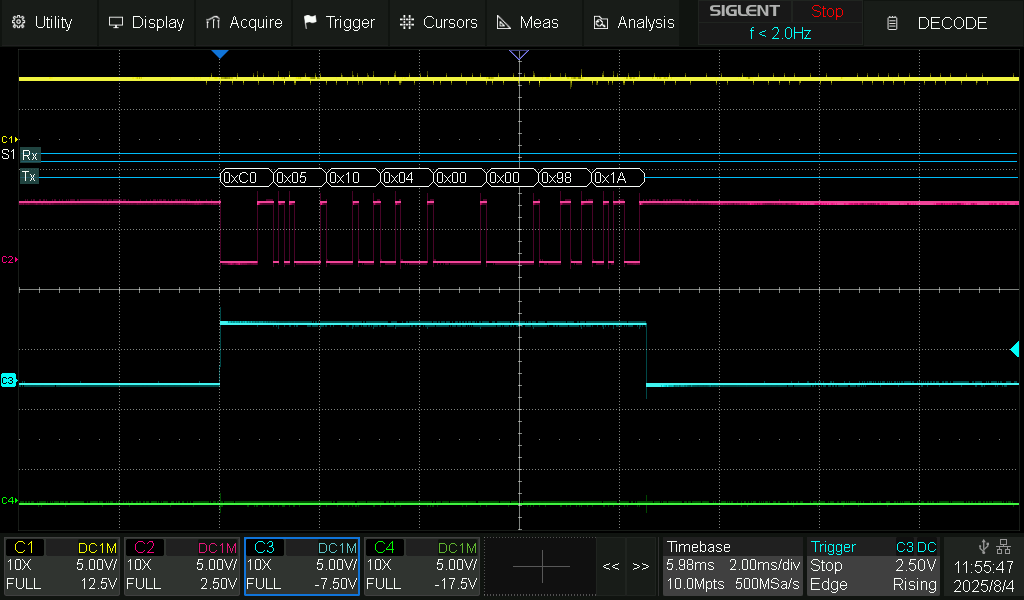
I monitored various signals on an oscilloscope as follows:

  • Channel 1 - yellow trace - pin 2 (RO).
  • Channel 2 - red trace - pin 3 (DI).
  • Channel 3 - blue trace - pin 4 (RE), note that (DE) is similar.
  • Channel 4 - green trace - pin 13 (LED_BUILTIN).
  • I am also decoding the serial communications.

Here are the results that I got:

The first message after the Arduino is started, the 'enable pump'
message:


The data sent is wrong.
Instead of C0 05 10 04 FF 00 D9 EA
it is sending C0 05 10 04 00 00 98 1A .

This is the 'start pump' message:


Again the data sent is incorrect.
Instead of C0 05 10 01 FF 00 C9 3B
It is sending C0 05 10 01 00 00 88 1B

The 'stop pump' message is as follows:


This is sent correctly. C0 05 10 01 00 00 88 1B.

Looking at your code, the function 'writeSingleCoil()' has a parameter 'value' which should be of data type 'uint8_t'.
void writeSingleCoil(uint16_t coil_addr, uint8_t value)
You are passing it a 16 bit number.

Looking at 'ModbusMaster.cpp', we see:

/**
Modbus function 0x05 Write Single Coil.

This function code is used to write a single output to either ON or OFF 
in a remote device. The requested ON/OFF state is specified by a 
constant in the state field. A non-zero value requests the output to be 
ON and a value of 0 requests it to be OFF. The request specifies the 
address of the coil to be forced. Coils are addressed starting at zero.

@param u16WriteAddress address of the coil (0x0000..0xFFFF)
@param u8State 0=OFF, non-zero=ON (0x00..0xFF)
@return 0 on success; exception number on failure
@ingroup discrete
*/
uint8_t ModbusMaster::writeSingleCoil(uint16_t u16WriteAddress, uint8_t u8State)
{
  _u16WriteAddress = u16WriteAddress;
  _u16WriteQty = (u8State ? 0xFF00 : 0x0000);
  return ModbusMasterTransaction(ku8MBWriteSingleCoil);
}

in particular look at this line in the comments:
@param u8State 0=OFF, non-zero=ON (0x00..0xFF)

if the parameter is zero then the data sent is 0x00 0x00.
if the parameter is any non zero value, then the data sent is 0xFF 0x00.

When you pass it the 16 bit number '0xFF00' it overflows as an unsigned 8 bit number and becomes '0x00'.

That is the reason your code is sending the wrong data.

Here is the code from post #7 after modification to pass an 8 bit number to the parameter 'value'.:

#include <ModbusMaster.h>
#include <SoftwareSerial.h>

#define MODBUS_BAUD 9600

// 0 indicates a broadcast message.
// The default address is 192 (0xC0)
int SLAVE_ID = 0xC0; //0;

const int COIL_STARTSTOP = 0x1001;
const int COIL_485ENABLE = 0x1004;

const uint8_t numCoils = 1;
bool coils[numCoils];

// RS485 communication and control pins (same order as in MAX485)
const int8_t rxPin = 2;  // RO (MAX485 → Arduino RX)
const int8_t rePin = 4;  // RE (Receiver Enable)
const int8_t dePin = 5;  // DE (Driver Enable)
const int8_t txPin = 3;  // DI (Arduino TX → MAX485 DI)

// Create SoftwareSerial instance
SoftwareSerial mySerial(rxPin, txPin);

// Create ModbusMaster instance named "master"
ModbusMaster master;

// RS485 direction control
void preTransmission()
{
  digitalWrite(rePin, HIGH);
  digitalWrite(dePin, HIGH);
}
void postTransmission()
{
  digitalWrite(rePin, LOW);
  digitalWrite(dePin, LOW);
}

void setup()
{
  // Set up RS485 control pins
  pinMode(rePin, OUTPUT);
  pinMode(dePin, OUTPUT);
  pinMode(LED_BUILTIN, OUTPUT);
  digitalWrite(rePin, LOW);
  digitalWrite(dePin, LOW);

  // Initialize serial ports
  Serial.begin(9600);      // For monitoring
  mySerial.begin(MODBUS_BAUD);    // For RS485 communication

  // Set up Modbus master
  master.begin(SLAVE_ID, mySerial);
  master.preTransmission(preTransmission);
  master.postTransmission(postTransmission);

  enablePumpCommunication();
}

void loop() {
  startPump();
  delay(1000);
  stopPump();
  delay(3000);
}

void writeSingleCoil(uint16_t coil_addr, uint8_t value) {
  uint8_t result;
  result = master.writeSingleCoil(coil_addr, value);
  if (result == master.ku8MBSuccess) {
    Serial.println("Coil " + String(coil_addr) + " written successfully to " + String(value) + ".");
  } else {
    Serial.print("Error writing coil " + String(coil_addr) + ": ");
    Serial.println(result, HEX);
  }
}
void enablePumpCommunication() {
  // "FIRST, YOU NEED TO SEND A COMMAND TO ENABLE THE 485.
  // SENDING OTHER COMMANDS CANNOT RESPOND"
  Serial.println("//////enablePumpCommunication");

  //C0 05 1004 FF00 D9EA
  writeSingleCoil(COIL_485ENABLE, 0xFF);
}
void startPump() {
  digitalWrite(LED_BUILTIN, HIGH); // led on

  //C0 05 1001 FF00 C9EB
  writeSingleCoil(COIL_STARTSTOP, 0xFF);
}
void stopPump() {
  digitalWrite(LED_BUILTIN, LOW); // led off

  //C0 05 1001 0000 881B
  writeSingleCoil(COIL_STARTSTOP, 0x00);
}

Here are the results from the modified code.
First the 'enable pump' message:


The data is now correctly sent as C0 05 10 04 FF 00 D9 EA.

Here is the 'start pump' message:


The data is now correctly sent as `C0 05 10 01 FF 00 C9 EB'.

The 'stop pump' message is alright still.

I couldn't do any more investigation as I don't have the necessary hardware, but I believe I have found the solution.

1 Like

When you pass it the 16 bit number '0xFF00' it overflows as an unsigned 8 bit number and becomes '0x00'.

That is the reason your code is sending the wrong data.

Yes, it appears that you have run into an issue with the library being used.

#include <ModbusMaster.h>

Why is a library required to send an array of bytes over software serial to a TTL to 485 converter?

The library creates the array of bytes.

The Modbus protocol expects a packet of bytes of varying length terminated with a checksum. The library assembles the packet and calculates the checksum.

This is the same general idea as using a PC-based Modbus emulator. It displays the packets byte by byte.

Thanks, i'll check it out.

You are right, i have edited the first post, but i got it right on post 9.
I tried with FF00 and 0x01 with no success...

I tried some variations of that code but keep getting timeouts

ZOMG, then you are the fastest learner ever! Thank you so, so much for your time.
You even added the missing pinMode(LED_BUILTIN, OUTPUT); and corrected the typo on the start pump command //C0 05 1001 FF00 C93B -> //C0 05 1001 FF00 C9EB
I was pretty thrilled to try the code but sadly i keep getting timeout errors :sob:
My guess now is that i'm still missing something to do with this table

In this thread modbusmaster-communications-parameters/512656 i read you can begin Serial with another config Serial.begin(9600, SERIAL_8O1);, but i need to use it on SoftwareSerial... im researching that right now.

Found this library GitHub - neilh10/AltSoftSerial: Software emulated serial using hardware timers for improved compatibility which seems to be a fork that adds parity options to another software serial,
so now i include it and configure it

#include <AltSoftSerial.h>
...
AltSoftSerial altSerial(rxPin, txPin);
...
altSerial.begin(MODBUS_BAUD, SERIAL_8O1);
master.begin(SLAVE_ID, altSerial);

but still no luck, only timeouts... i NEED the usb dongle to arrive :face_with_steam_from_nose: