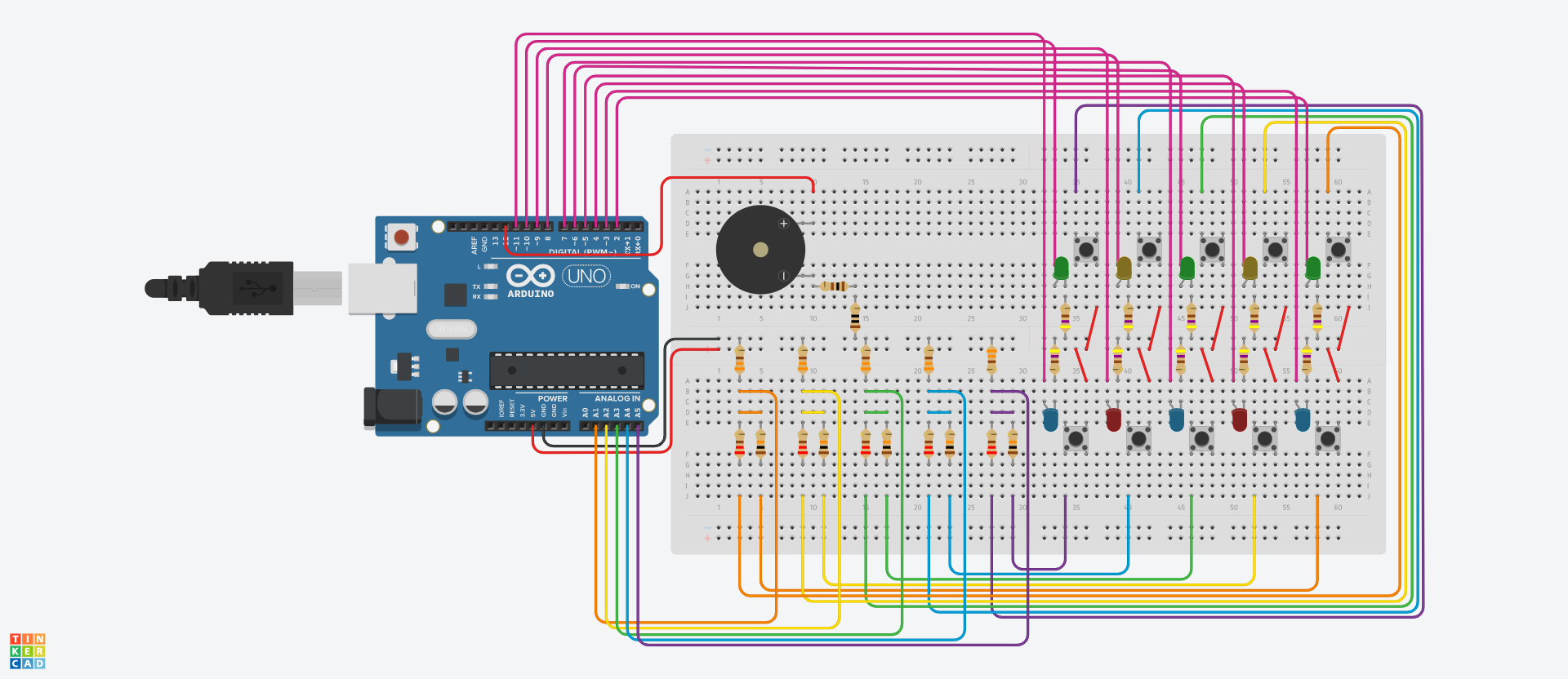
@jentlantheunis I am not going to try to edit your old code. Please post the entire sketch as it stands now to ensure we all looking at the same thing.
TIA
a7
@jentlantheunis I am not going to try to edit your old code. Please post the entire sketch as it stands now to ensure we all looking at the same thing.
TIA
a7
here is the most recent code.
int leds[10] = {2, 3, 4, 5, 6, 7, 8, 9, 10, 11};
int buzzer = 12;
int button12 = A1;
int button12State;
int prevButton12State;

int score = 0;

int randLed; int randDuration;
int randInterval;
int currentTargetLed;

int income;
bool pressed;
bool looping;

unsigned long startMillis;
unsigned long ledStartMillis;

void setup() {
  Serial.begin(9600);
  Serial.setTimeout(200);

  for(int i = 0; i < 10; i++) {
    pinMode(leds[i], OUTPUT);
  }

  Serial.println("RESET");
  randomSeed(analogRead(A0));
  startMillis = millis();
}

void loop() {
  // button12State = analogRead(button12);
  // if(button12State > 0) {
  //   if(button12State < 10) {
  //     Serial.println("button 2 is pressed");
  //   }
  //   else if(button12State > 20 && button12State < 30) {
  //     Serial.println("button 1 is pressed");
  //   }
  // }

  game();
}

void game() {
  randInterval = random(1000, 5000);
  Serial.print("Waiting ");
  Serial.print(randInterval);
  Serial.println(" ms");

  startMillis = millis();
  while((millis() - startMillis) < randInterval) {
    // wait for rand interval, don't do anything in the meantime (BUT YOU COULD!)
  }
  raiseLed();
}

void raiseLed() {
  randLed = random(10);
  randDuration = random(1000, 5000);
  // turn on randomly selected led
  digitalWrite(leds[randLed], 1);
  Serial.print("turned on led ");
  Serial.println(randLed);
  currentTargetLed = randLed;
  pressed = false;

  // while the led is on for the random duration, check if the button next to it is pressed
  ledStartMillis = millis();
  looping = true;
  while(((millis() - ledStartMillis) < randDuration) && (looping == true)) {
    // test without buttons
    if(Serial.available() > 0) {
      income = Serial.read() - '0';
      if(income == currentTargetLed) {
        Serial.println("WIN");
        digitalWrite(leds[randLed], 0);
        Serial.print("turned off led ");
        Serial.println(randLed);
        pressed = true;
        looping = false;
        // don't continue with the set duration when right button pressed
      }
    }

    // test with buttons
    // checkForButton();

  }

  // print lose message when failed
  if(!pressed) {
    Serial.println("LOSE");
    digitalWrite(leds[randLed], 0);
    Serial.print("turned off led ");
    Serial.print(randLed);
    Serial.print( " after ");
    Serial.print(randDuration);
    Serial.println(" ms");
  }
}

int tempo = 180;
int quarterLength = 1000 / (tempo / 60);
void playWinSound(int buzzer) {
  playHertzforLength(buzzer, 392, quarterLength / 2);
  playHertzforLength(buzzer, 493.88	, quarterLength / 2);
  playHertzforLength(buzzer, 587.33	, quarterLength / 2);
  playHertzforLength(buzzer, 783.99		, quarterLength);
  playHertzforLength(buzzer, 587.33	, quarterLength / 2);
  playHertzforLength(buzzer, 783.99		, quarterLength);
}

float ms; unsigned long noteStart;
void playHertzforLength(int buzzer, float hertz, int noteLength) {
  ms = 1000000/hertz;
  noteStart = millis();
  while((millis() - noteStart) < noteLength) {
    digitalWrite(buzzer, 1);
    delayMicroseconds(ms/2);
    digitalWrite(buzzer, 0);
    delayMicroseconds(ms/2);
  }
}
So does that code work now?
Please describe the issue(s) with the current code or say it is working.
a7
the issue is still the same as before. The code works until the delays get messed up, and there are delays where there shouldn't be and vice versa
I don't know yet what is going on in your code, but somewhere along the way you lost the pinMode setting for the buzzer output pin.
void setup() {
  Serial.begin(9600);
  Serial.setTimeout(200);

  for(int i = 0; i < TEN; i++) {
    pinMode(leds[i], OUTPUT);
  }

// try it with, and without, this pinMode call:
  pinMode(buzzer, OUTPUT);

  Serial.println("RESET");
  randomSeed(analogRead(A0));

for (; ; ) {
  playWinSound(buzzer);
  delay(300);
}
Also I see you have introduced a new variable looping. I see what it does and I ask you to look into the break statement, which will do exactly what you want with it looking like a hack and that you did not know about break:
//  looping = true; we don't need
  while ((millis() - ledStartMillis) < randDuration) {
    // test without buttons
    if (Serial.available() > 0) {
      income = Serial.read() - '0';
      if (income == currentTargetLed) {
        Serial.println("WIN");
        digitalWrite(leds[randLed], 0);
        Serial.print("turned off led ");
        Serial.println(randLed);
        pressed = true;
//        looping = false;
        // don't continue with the set duration when right button pressed:
        break;
      }
    }

    // test with buttons
    // checkForButton();

  }
Neither of those should solve your problem. I got the sketch to issue "RESET" when it should never, so there is something odd going on in there.
Otherwise, I seem to be able to play the game OK... I do not know what you mean by saying the delays get messed up, I do not see that.
And please if you offer serial output as evidence, do not post a GIF. Cut and paste the text from the serial monitor window and make it clear where one should look to see this misbehaviour - add comments to the output if you think you have relevant things to point out, like where it "messed up" or what keys you were striking.
a7
final update: IT WORKS
Here's my final code. I might make a few tweaks to the timings or might ad a speed up feature, but this is now a working game. Turns out the messed up delays had everything to do with Serial.print and not with my code.
Here is my code:
int leds[10] = {2, 3, 4, 5, 6, 7, 8, 9, 10, 11};
int buzzer = 12;
int buttons[5] = {A1, A2, A3, A4, A5};
// The buttons at the even LEDs have resistors of 220 Ω, while those at the odd LEDs have resistors of 10 kΩ.
// This enables the detection of two seperate buttons with only one analog input pin.
int buttonStates[5] = {0, 0, 0, 0, 0};
int previousButtonStates[5] = {0, 0, 0, 0, 0};

int score = 0;
int highscore = 0;

int minInterval = 500; int maxInterval = 5000;
int minDuration = 250; int maxDuration = 2000;

int randLed; int randDuration;
int randInterval;
int currentTargetLed;

int income;
bool pressed;
bool looping;
bool gameEnd;
bool idle = true;

unsigned long startMillis;
unsigned long ledStartMillis;

void setup() {
  Serial.begin(9600);
  Serial.setTimeout(200);

  for(int i = 0; i < 10; i++) {
    pinMode(leds[i], OUTPUT);
  }
  pinMode(buzzer, 1);

  Serial.println("RESET");
  randomSeed(analogRead(A0));

}

void loop() {
  while(idle) {
    if(checkButtons() != -1) {
      gameStartCycle();
    }
  }
  while(millis()-startMillis < 60000) {
    manageLeds();
    gameEnd = true;
  }
  if(gameEnd) {
    gameEndCycle();
  }
}

void gameStartCycle() {
  digitalWrite(leds[0], 1);
  digitalWrite(leds[1], 1);
  playHertzforLength(buzzer, 440, 500);
  delay(500);
  digitalWrite(leds[4], 1);
  digitalWrite(leds[5], 1);
  playHertzforLength(buzzer, 440, 500);
  delay(500);
  digitalWrite(leds[8], 1);
  digitalWrite(leds[9], 1);
  playHertzforLength(buzzer, 440, 500);
  delay(500);
  digitalWrite(leds[2], 1);
  digitalWrite(leds[3], 1);
  digitalWrite(leds[6], 1);
  digitalWrite(leds[7], 1);
  playHertzforLength(buzzer, 880, 1000);
  for (int i = 0; i < 10; i++) {
    digitalWrite(leds[i], 0);
  }
  idle = false;
  startMillis = millis();
}

void gameEndCycle() {
  playGameEndSound(buzzer, 180);
  // Serial.println(score);
  delay(1000);
  playPoints(buzzer, score);
  if(score > highscore) {
    delay(500);
    playNewHighscore(buzzer);
    highscore = score;
  }
  score = 0;
  idle = true;
  gameEnd = false;
}

void manageLeds() {
  randInterval = random(minInterval, maxInterval);

  delay(randInterval);
  raiseLed();
}

void raiseLed() {
  randLed = random(10);
  randDuration = random(minDuration, maxDuration);
  // turn on randomly selected led
  digitalWrite(leds[randLed], 1);
  currentTargetLed = randLed;
  pressed = false;

  // while the led is on for the random duration, check if the button next to it is pressed
  ledStartMillis = millis();
  looping = true;
  while(((millis() - ledStartMillis) < randDuration) && (looping == true)) {
    if(checkButtons() == currentTargetLed) {
      Serial.println("WIN");
      digitalWrite(leds[randLed], 0);
      playWinSound(buzzer, 180);
      score++;
      pressed = true;
      looping = false;
    }
  }

  // print lose message when failed
  if(!pressed) {
    Serial.println("LOSE");
    digitalWrite(leds[randLed], 0);
    playLoseSound(buzzer, 180);
  }
}

int pressedButton;
int checkButtons() {
  pressedButton = -1;
  for(int i = 0; i < 5; i++) {
    buttonStates[i] = analogRead(buttons[i]);
    if(buttonStates[i] > 10 && previousButtonStates[i] < 10) {
      if(buttonStates[i] > 600 && buttonStates[i] < 640) {
        pressedButton = 2*i;
      }
      if(buttonStates[i] > 25 && buttonStates[i] < 40) {
        pressedButton = 2*i + 1;
      }
    }
    previousButtonStates[i] = buttonStates[i];
  }
  return pressedButton;
}


int quarterLength;
void playWinSound(int buzzer, int tempo) {
  quarterLength = 1000 / (tempo / 60);
  playHertzforLength(buzzer, 523.25, quarterLength/2);
  playHertzforLength(buzzer, 783.99, quarterLength/2);
}


void playLoseSound(int buzzer, int tempo) {
  quarterLength = 1000 / (tempo / 60);
  playHertzforLength(buzzer, 293.66, quarterLength/2);
  playHertzforLength(buzzer, 196.00, quarterLength/2);
}

void playGameEndSound(int buzzer, int tempo) {
  quarterLength = 1000 / (tempo / 60);
  playHertzforLength(buzzer, 392.00, quarterLength / 2);
  playHertzforLength(buzzer, 493.88, quarterLength / 2);
  playHertzforLength(buzzer, 587.33, quarterLength / 2);
  playHertzforLength(buzzer, 783.99, quarterLength);
  playHertzforLength(buzzer, 587.33, quarterLength / 2);
  playHertzforLength(buzzer, 783.99, quarterLength);
}

int tens = 0; int rest;
void playPoints(int buzzer, int score) {
  tens = score / 10;
  rest = score % 10;
  Serial.print(tens);
  Serial.print(" - ");
  Serial.println(rest);
  for(int i = 0; i < tens; i++) {
    playHertzforLength(buzzer, 880.00, 500);
    delay(500);
  }
  for(int i = 0; i < rest; i++) {
    playHertzforLength(buzzer, 698.46, 250);
    delay(250);
  }
}

void playNewHighscore(int buzzer) {
  for(int i = 0; i < 3; i++) {
    playHertzforLength(buzzer, 659.25, 100);
    playHertzforLength(buzzer, 698.46, 100);
    delay(200);
  }
}

float ms; unsigned long noteStart;
void playHertzforLength(int buzzer, float hertz, int noteLength) {
  ms = 1000000/hertz;
  noteStart = millis();
  while((millis() - noteStart) < noteLength) {
    digitalWrite(buzzer, 1);
    delayMicroseconds(ms/2);
    digitalWrite(buzzer, 0);
    delayMicroseconds(ms/2);
  }
}
I added an idle state when the arduino is started and when any button is pressed, a sequence starts after which the game starts. It goes on for one minute, during which the player has to score as many times as possible. After the time is up, a melody plays to indicate the end of the game and then the score is announced through a series of beeps, a different beep for tens and then the units. After that, the game can be played again and a highscore is kept track of.
Hope you all enjoy this.
jentlantheunis out.
Nice.
I got it going here, good work. The sound f/x add quite a bit.
I reversed a schematic, if you have one, please post it for ppl to see how it is wired.
I had to slow it down to win at all...
a7
This topic was automatically closed 180 days after the last reply. New replies are no longer allowed.