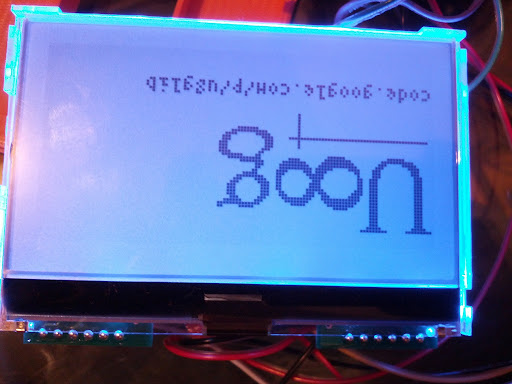
Good point. It does not exist on the Arduino C++ interface, but it is there on the C-level interface. It should be added.
The other tricky thing is that the font either needs to be a fixed width
or the variable width characters need to be rendered centered
within a fixed width.
I'm wondering if this really is a request/need for digraph support vs overstrike.
The two are very different.
I had to deal with using digraph support in the early 80's when writing
C code on IBM machines and printers.
EBCDIC does not have curly braces in its font.
(Makes C programming really tough)
So the digraph (< is { and >) is }
When the device can render a curly brace it all happens
under the hood and is hidden,
however it can make writing code on devices/terminals or
reading printouts when the digraph is displayed
rather than the actual curly brace characters a bit challenging/confusing sometimes.
u8glib is working great with a st7920 lcd over SPI on my Arduino Nano, but it does not compile for the atmega 32u4 (arduino leonardo) on Arduino 1.0. Using a earlier version of u8glib on arduino 1.0-RC2 works fine.
I'm using 1.04. When I said I made it work in 1.0-rc2, I was using 1.23.
You can replicate this error by just selecting the arduino leonardo board in the 1.0 IDE (uncomment its lines from /arduino-1.0/hardware/arduino/boards.txt if you haven't done it already) and try to compile any u8glib sketch (I haven't tried compiling it with other constructors than st7920 over SPI)
/arduino-1.0/libraries/U8glib/utility/u8g_com_arduino_port_d_wr.c: In function ‘u8g_com_arduino_port_d_wr_fn’:
/arduino-1.0/libraries/U8glib/utility/u8g_com_arduino_port_d_wr.c:80:7: error: ‘UCSR0B’ undeclared (first use in this function)
/arduino-1.0/libraries/U8glib/utility/u8g_com_arduino_port_d_wr.c:80:7: note: each undeclared identifier is reported only once for each function it appears in
U8glib has also been tested with Arduino 1.0.1 IDE.
Additionally I have some experimental code for SSD1306 (Adafruit 128x64 OLED)
and SSD1322 based OLEDs inside the release. This code has not yet been confirmed
because i do not have access to these displays. Any confirmation or bug-reports on
these display types would be great.
I'm using the library for the DFRobot ST7920 128 X 64 LCD and it works without a problem, both in serial as in parallel mode. But the weird thing is, is that the parallel mode is a bit slower. In SW serial I got a refresh rate of 6 to 7 frames per sec and in 8bit it goes down to 4 to 5.
Is this normal behavior or am I doing something wrong?
I'm trying to get NHD-C12864A1Z-FSB-FBW-HTT working with the u8glib, but I'm getting nothing the screen. It works fine with the Adafruit library. I've checked the pin mapping several times and I have connected to the Arduino correctly. I've unsuccessfully tried loading it as the following ST7565 devices: U8GLIB_DOGM128, U8GLIB_LM6059, U8GLIB_LM6063, and U8GLIB_DOGM132. Is there something I'm missing?
Below is the code used in the Adafruit and u8glib sketches. The Arduino is connected the same in both cases. The Adafruit one works, but the other does not.
Adafruit
// pin 9 - Serial data out (SID)
// pin 8 - Serial clock out (SCLK)
// pin 7 - Data/Command select (RS or A0)
// pin 6 - LCD reset (RST)
// pin 5 - LCD chip select (CS)
ST7565 glcd(9, 8, 7, 6, 5);
u8glib
U8GLIB_LM6059 u8g(8, 9, 5, 7, 6);
The Adafruit library leaves the left most column of pixels garbled. There are a few activated pixels, the rest are inactive. This makes pixel (0,0) actually located at (1,0). The rest of the screen is fine. I don't know if this is relevant information
Great. Now we need to correct the display and the Bias. I have seen that the Adafruit code and the NHD display do differ in that. I also guess that I need to implement another variant for this display. So, here is another request from me. Can you apply the U8GLIB_DOGM128 constructor?
Maybe you can also send a picture of the result with the DOGM128 constructor. Main questions are: Is the contrast as good as before? Is it better? I also expect that the wrong line will disapear but the display might be flipped (not a problem, because u8glib can rotate the screen by 180 degree) and probably the row mapping is still wrong.
If the row mapping is still wrong, i would like to use the DOGM128 as a template for further changes.
I'm making an Arduino shield for this LCD, so I'd be thrilled to see these changes make it upstream. It would be nice to point folks to u8glib. I really appreciate the work you're doing to unify the graphics libraries. I'll match the pin mapping with the u8glib default pins.
To see graphics I had to change the contrast in ug8_dev_st7576_lm6059.c, line 70 from
I have tried the U8GLIB_DOGM128 constructor. The default contrast was also poor, so I changed the contrast in u8g_dev_st7565_dogm128.c, line 59 from
0x018, /* contrast value, EA default: 0x016 */
to
0x005, /* contrast value, EA default: 0x016 */
A contrast of 0x005 in the DOGM128 constructor seems a little more washed out than the LM6059 constructor.
I've cloned your google code repo and I'm able to run ...arduino/create_release.sh. Do you want to make the changes in there and I'll test it? I can also rewire my setup to be consistent with your library.
col offset wrong by 4 pixel
--> change line 79 to "0x004"
contrast wrong
--> probably change contrast in line 68 to 0x005 (or maybe other values like 0x006 or 0x007)
--> you might also try to change the value in line 55 from 0x0a2 to 0x0a3
Once you find the best values, i would be really glad to add these values to the new device.
Also, let me know if there is something else wrong with the new NHD_C12864 device.
Changing line 79 to 0x004 worked. The pixels are aligned.
Changing line 61 (not 68) to 0x008 looked good for contrast. I played with several values. 0x009 also worked. 0x010 is where the background started getting funky.
Keep line 55 at 0x0a2. To get a reasonable screen using 0x0a3 I had to bring the contrast down to 0x003.
Some people might consider the display to be upside down, but this is the orientation in which I would like to use it. It allows buttons beneath the screen to be as close as possible. Are you cool with leaving it like this in the library? It would mean one fewer steps in my instructions.