No help at all - it was a suggestion to buy a completely different sensor to "solve" the problem that K0ral78 is having.
I agree with @k0ral78 - I've tried those for a rain water tank and the quality is poor
the doc you posted shows that you can get measures automatically either at 2Hz (every 500ms) or at 10Hz (every 100ms) depending on how you wire the Rx pin of the sensor.
As SoftwareSerial is not doing well under high load, let's go for the 2Hz version
make sure you wire your arduino as such:

then try this sketch
#include <SoftwareSerial.h>
SoftwareSerial alixSerial(7, 8); // pin 7 is the Rx pin. Pin 8 does not need to be connected.

bool readDistance(uint16_t & d) {
  const uint8_t startMarker = 0xFF;
  static bool waitingForMarker = true;
  static uint8_t data[3];
  static uint8_t dataIndex = 0;

  if (alixSerial.available() != 0) {
    uint8_t r = alixSerial.read();

    if (waitingForMarker) {
      if (r == startMarker) {
        dataIndex = 0;
        waitingForMarker = false;
        Serial.println(F("Received start Marker")); // debug
      }
    } else {
      data[dataIndex++] = r;
      if (dataIndex >= sizeof data) {
        waitingForMarker = true;
        d = (((uint16_t)data[0]) << 8) + data[1];
        uint8_t ck = (((uint16_t)data[0]) + ((uint16_t)data[1]) - 1u) & 0x00FFu;
        if (data[2] != ck) Serial.println(F("Wrong checksum.·")); // debug
        return (data[2] == ck);
      }
    }
  }
  return false;
}

void setup() {
  Serial.begin(115200);
  alixSerial.begin(9600);
}


void loop() {
  uint16_t distance;
  if (readDistance(distance)) {    // did we get a read
    // Yes, print the distance that was read
    Serial.println(distance);
  }
}
you need to call the readDistance() function often enough to acquire the payload so don't write blocking code
No it ain't............ look again.
I'll give a BIGGER pic so you can SEE.
Apart from that, why try to fit car tyres to a truck or visa versa....... one shown suits Arduino so use that.
Seems a no brainer to me at least.
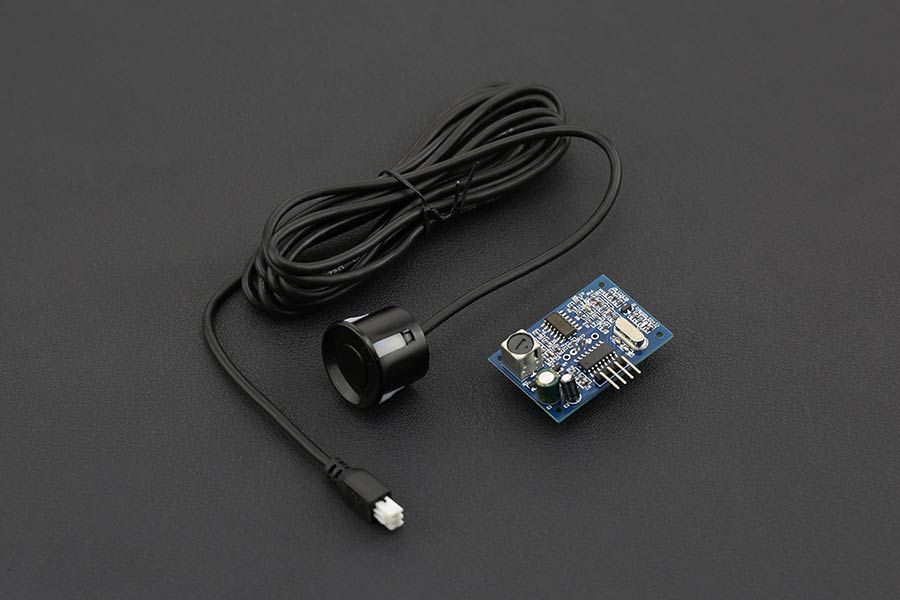
the issue is that it does not work reliably according to my tests.
In my rain water tank I'm using a UART based DYP-A02YY waterproof ultrasonic ranging sensor . It has been quite stable. The code I posted above comes from that sensor, which seems to have the same binary protocol as OP's sensor.
I agree with you, JSN sensor is not reliable.
I am happy to see that you use that sensor. I also use it in one tank , but sometimes water drop cover the sensor because of evaporation then it doesn't measure anymore.
I also use this one that is more reliable and accurate than your BUT...after few months it stops working https://wiki.dfrobot.com/A01NYUB%20Waterproof%20Ultrasonic%20Sensor%20SKU:%20SEN0313
Thank you I will try it as soon as possible
I did not face that challenge so far (my sensor is 10cm above the max level of the water in the tank)
Thank you for your code, but..I still can't read anything.
You wrote automatically, are you sure? I think that UART controlled means that you can control the output. As far as I understood, controlled means that you can control (by a trigger) the moment when you want the measurement.
I tried to reply the plot reported in the product page to trigger the measurement. I will past the plot image here below trying to send a character or the impulse in the plot to the RX of the sensor and reading what the sensor sends with its TX to the RX of Arduino. What do you think?
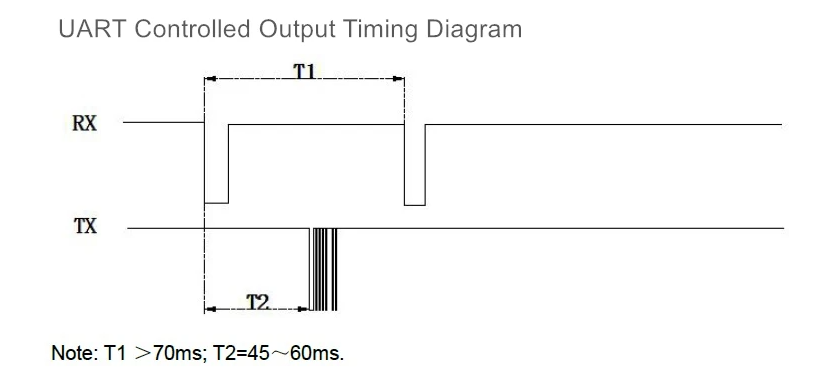
I don't think so from your image

Given they say to connect the module's Rx to GND or 5V/floatting, there is no way to send a command to it.
Now you refer to Underwater Ultrasonic Obstacle Avoidance Sensor -6m Arduino WiKi - DFRobot and I also see on the web site that they have two models though UART Auto and UART controlled but I don't see anything that tells me those are the same sensors.
if you have that one note that they say:
Note: the sensor needs to be put into water to get data, otherwise the output distance value is 0
As you didn’t specify the board you’re using I assume the UNO R3 (most common). The 328 has only 1 USART, and it’s used for communication with you PC. Still it can be used, but with some limitations.
In this particular case you’ll connect the sensor to +5V, GND and pin0(Rx). The output of the sensor will overpower (but not damage) the output of the USB-bridge. That means the sensor will work, but uploading a new program or giving commando’s through the serial monitor won’t. (As pin1(Tx) is not connected sending data to the serial monitor is still possible.)
I’m planning a project with such a sensor for use with another board, but I haven’t bought the components yet so I can’t test.
This might work (it compiles):
// Ultrasonic with UART Automatic Output
// connected to: +5V, GND, pin0(Rx)

uint16_t mmDistance = 0;  // distance in millimeters

void setup() {
  Serial.begin(9600);  // start USART
  // put the rest of your setup code here, to run once:
}

void loop() {
  if (Serial.available()) {
    static uint8_t i = 0;
    static uint8_t frameHigh = 0;
    static uint8_t frameLow = 0;
    uint8_t temp = Serial.read();           // grab a byte
    if ((i == 0) && (temp == 0xFF)) i = 1;  // startframe, wait if not FF
    if (i == 1) {                           // 2nd frame
      i = 2;                                // increment counter
      frameHigh = temp;                     // store frame
    }
    if (i == 2) {       // 3d frame, low byte of distance
      i = 3;            // increment counter
      frameLow = temp;  // store frame
    }
    if (i == 3) {                                                                  // 4th frame, checksum
      i = 0;                                                                       // reset counter
      if (frameHigh + frameLow == temp) mmDistance = (frameHigh << 8) + frameLow;  // checksum is good
    }
  }

  // put your the rest of main code here, to run repeatedly:
  // you can use mmDistance any time, the value will be less than 500ms old
}
I didn't use the HW serial port but a SW serial port using the specific library. I am using Arduino Yun. As far as I know and for my application, you can consider it like an Arduino UNO. In this test I don't use WiFi.
@stitech thank you for your code but it is focused on auto UART. This is not how my sensor works
@J-M-L
I also have that underwater sensor but I asked about it in another post 
how do you know? which exact model is it ?
Seems to me your choice doesn't have a good track record either or at least after 34 posts still no closer to getting it to even work.
not my choice.
I used the UART based DYP-A02YY waterproof ultrasonic ranging sensor
works automatically with the code I posted previously
seems OP has something else and it's unclear which version it is...
Next attempt: UART controlled, software serial.
I’m not familiar with the Yun, if adaptations are necessary you must do them yourself.
I got the timing from:

// Ultrasonic with UART controlld output
// connected to: +5V, GND, a pin defined as rxPin, a pin defined as triggerPin, a pin defined as txPin but unused

#include <SoftwareSerial.h>

uint16_t mmDistance = 0;       // distance in millimeters
uint32_t triggerPeriod = 100;  // period in milliseconds
uint32_t lastTrigger;          // for storage
uint8_t rxPin = 2;             // on a UNO R3 rxPin must be pin 2 or pin 3
uint8_t txPin = 20;            // pin exists on the ATmega328, not on the UNO R3 board
uint8_t triggerPin = 4;        // or any other pin

SoftwareSerial ultraSonic = SoftwareSerial(rxPin, txPin);  // set up software serial instance

void setup() {
  ultraSonic.begin(9600);          // start software serial instance
  ultraSonic.listen();             // incoming frames will be placed in this buffer
  pinMode(triggerPin, OUTPUT);     // output for trigger
  digitalWrite(triggerPin, HIGH);  // pin is low after reset
  delayMicroseconds(10);           // hopefully long enough
  digitalWrite(triggerPin, LOW);   // first triggerpulse
  delayMicroseconds(10);           // hopefully long enough
  digitalWrite(triggerPin, HIGH);  // end pulse
  lastTrigger = millis();
}

void loop() {
  if (millis() - triggerPeriod > lastTrigger) {  // triggerPeriod should be long enough for the sensor to send 4 frames
    uint8_t frameStart;
    uint8_t frameHigh;
    uint8_t frameLow;
    for (uint8_t i = 0; i < 4; i++) {
      uint8_t temp = ultraSonic.read();                                                             // read a frame
      if (i == 0) frameStart = temp;                                                                // 1st frame, should be FF
      if (i == 1) frameHigh = temp;                                                                 // 2nd frame, high byte of distance
      if (i == 2) frameLow = temp;                                                                  // 3d frame, low byte of distance
      if (i == 3)                                                                                   // 4th frame, checksum
        if ((frameStart + frameHigh + frameLow) == temp) mmDistance = (frameHigh << 8) + frameLow;  // if checksum is good store distance
    }
    ultraSonic.flush();             // in case of failed reading
    digitalWrite(triggerPin, LOW);  // triggerpulse for new measurement
    delayMicroseconds(10);
    digitalWrite(triggerPin, HIGH);
    lastTrigger = millis();
  }
  // put the rest of your main code here, to run repeatedly:
  // you can use mmDistance any time, the value will be less than 100ms old
}
I read your post Ultrasonic underwater ranging sensor, and I wonder if they indeed come from the same manufacturer, and have the same firmware.
In that case the Tx of the software serial can be used as trigger.

// Ultrasonic with UART controlld output (2)
// connected to: +5V, GND, a pin defined as rxPin, a pin defined as txPin

#include <SoftwareSerial.h>

uint16_t mmDistance = 0;       // distance in millimeters
uint32_t triggerPeriod = 100;  // period in milliseconds
uint32_t lastTrigger;          // for storage
uint8_t rxPin = 2;             // on a UNO R3 all pin have PinChangeInterrupt capability
uint8_t txPin = 4;             // or any other pin

SoftwareSerial ultraSonic = SoftwareSerial(rxPin, txPin);  // set up software serial instance

void setup() {
  ultraSonic.begin(9600);  // start software serial instance
  ultraSonic.listen();     // incoming frames will be placed in this buffer
  ultraSonic.write(0xFF);  // triggerpulse
  lastTrigger = millis();
}

void loop() {
  if (millis() - triggerPeriod > lastTrigger) {  // triggerPeriod should be long enough for the sensor to send 4 frames
    uint8_t frameStart;
    uint8_t frameHigh;
    uint8_t frameLow;
    for (uint8_t i = 0; i < 4; i++) {
      uint8_t temp = ultraSonic.read();                                                             // read a frame
      if (i == 0) frameStart = temp;                                                                // 1st frame, should be FF
      if (i == 1) frameHigh = temp;                                                                 // 2nd frame, high byte of distance
      if (i == 2) frameLow = temp;                                                                  // 3d frame, low byte of distance
      if (i == 3)                                                                                   // 4th frame, checksum
        if ((frameStart + frameHigh + frameLow) == temp) mmDistance = (frameHigh << 8) + frameLow;  // if checksum is good store distance
    }
    ultraSonic.flush();      // in case of failed reading
    ultraSonic.write(0xFF);  // triggerpulse for next measurement
    lastTrigger = millis();
  }
  // put the rest of your main code here, to run repeatedly:
  // you can use mmDistance any time, the value will be less than 100ms old
}
Reading the sheet of yet another version by the same manufacturer, it looks like the sensor will go in stand-by mode after 2 seconds not receiving a trigger pulse.
in the code from DFRobot that @k0ral78 referred to in the first post, they use the module's Rx as a trigger
#include <SoftwareSerial.h>
#define COM 0x55
SoftwareSerial mySerial(7, 8);
void setup() {
  Serial.begin(115200);
  mySerial.begin(115200);
}
void loop() {
  mySerial.write(COM);
  •••
0x55 is in binary 0b01010101 so the Rx pin will receive a series of pulses that would trigger the reading possibly.
This is in contradiction with the diagram and mandatory T1 timing requirements

at 115200 bauds you have ~9µs between the bits so the pulse is definitely not like on the drawing.
may be what is meant with the drawing is that the first front will trigger the reading and any other front coming in in the next 70ms will be ignored.
Because I explicitly bought UART controlled version