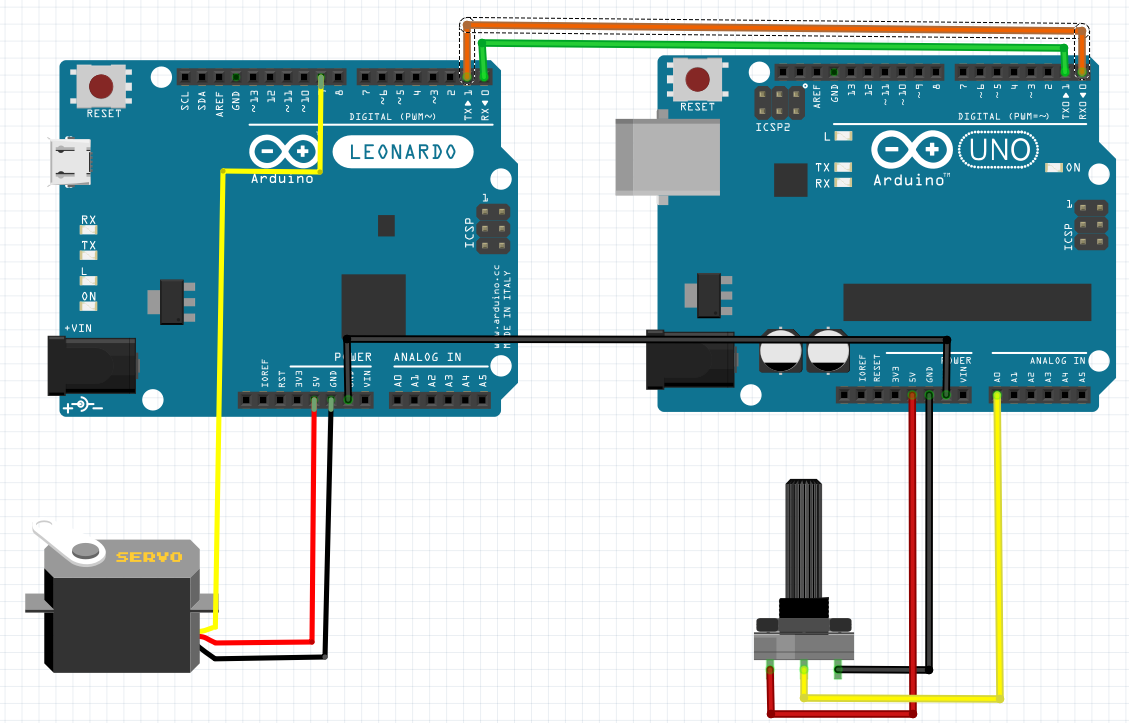
Hi, I am watching a tutorial but he uses UNO and Mega and I use a UNO and Leonardo. I am trying to control a servo -which is connected to the leonardo- with a 10k potentiometer -which is connected to the UNO- and I can't control it. I read topics in here about serial connection and I learned about there is Serial in UNO and Serial1 on leonardo.
int potpin = A0;
int val;
void setup() {
  // put your setup code here, to run once:
  Serial.begin(9600);


}

void loop() {
  // put your main code here, to run repeatedly:
  Serial.print("Sent: ");
  Serial.println(val);
  val = analogRead(potpin);
  val = map(val, 0, 1023, 0, 180);
  Serial.write(val);
  delay(15);
}
I tried different codes for leonardo and this is the last version. When I run this codes the servo shakes like crazy and sometimes moves to a different position. What am I doing wrong?
You can't use Serial, pins 0, 1 for this on Uno because on Uno they are used for code upload and serial monitor. If you want to connect something to Uno using UART, you need to use Software Serial and 2 other pins.
On Leonardo, it's ok to use pins 0, 1 because they are not used for code upload & serial monitor. Those pins are associated with Serial1 on Leonardo, as you have read.
But when you receive it, you also print out up to 12 characters at 9600 baud. How long does that take? And then on top of that you wait 15 ms. Is it any wonder that the transmitter is overrunning the receiver and creating chaos?
Try backing off on how often you transmit a new value to start with, and not printing the received value or delaying in the receiver and see how it goes from there.
Oh, and don't power the servo from the Leonardo. It takes way more current than you should be asking for from the board.
Update:
I asked a chatgpt one more time and this time it worked! Here is the last codes for Uno and Leonardo respetctively:
int potpin = A0;
int val;

void setup() {
  Serial.begin(9600); // Debug via USB
}

void loop() {
  val = analogRead(potpin);
  val = map(val, 0, 1023, 0, 180);
  Serial.println(val);  // Send as ASCII text with newline
  delay(15);
}
#include <Servo.h>

Servo myservo;
int val;
int lastVal = -1; // To help filter out minor changes

void setup() {
  myservo.attach(9);
  Serial.begin(9600);   // USB Serial for debugging
  Serial1.begin(9600);  // UART for communication with Uno
  Serial.println("Leonardo Ready");
}

void loop() {
  // Check if a complete number is available on Serial1
  if (Serial1.available() > 0) {
    val = Serial1.parseInt();  // Read the integer sent from Uno
    // Validate range and update only if the change is significant
    if (val >= 0 && val <= 180 && abs(val - lastVal) > 2) {
      myservo.write(val);
      lastVal = val;
      Serial.print("Received: ");
      Serial.println(val);
    }
  }
  delay(15);
}
Sadly my pc gave bluescreen and I lose my conversation with chatgpt but I copied the code before that fortunately.
Just not to let you wondering: most people here at the forum are not chatGPT fans because we frequently see people looking for easy and quick solutions on the AI instead of learning and then bringing broken code here for the human intelligence to fix it.
Generally, there is no effort on the OP part and that bothers the helpers.
I don't think that is your case. Your project seems to be exactly for learning purposes (otherwise you would be using only one of the boards to read the pot and control the servo). So, to answer your question
I suggest you to take a look in what this line does:
and how Serial comms work. A good place to take a look is on the famous Robin2 Serial Input Basics .