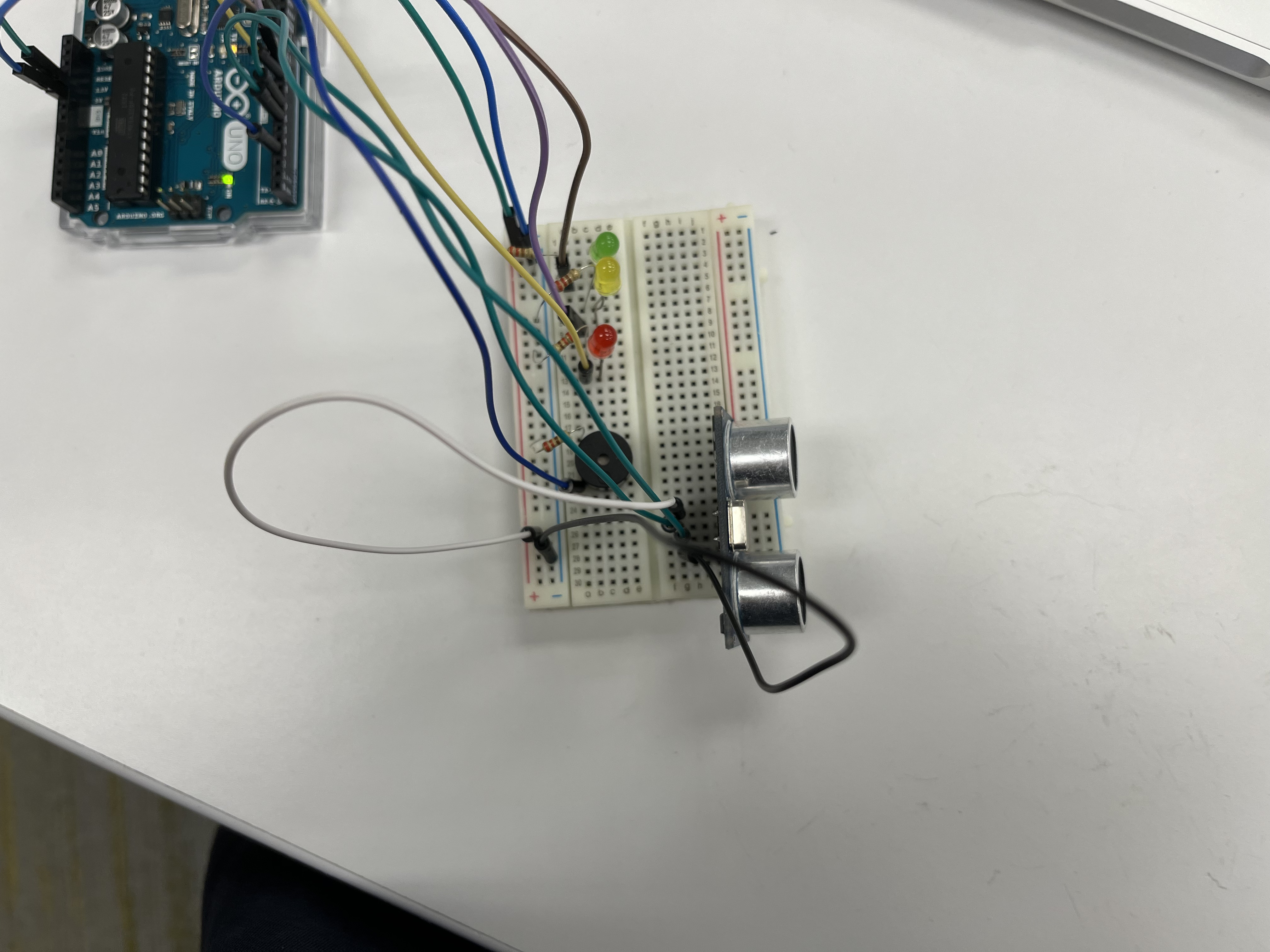
Hey, I am trying to build this ultrasonic security system based on this: Ultrasonic Security System | Arduino Project Hub . However, my project is not working. Please help me to debug this. Thank you.
This is my code:
const int trigPin = 2;
const int echoPin = 3;
const int LEDlampRed = 4;
const int LEDlampYellow = 5;
const int LEDlampGreen = 6;
const int buzzer = 7;
int sound  = 600;
long durationindigit, distanceincm;


void setup() {
  Serial.begin (9600);
  pinMode(trigPin, OUTPUT);
  pinMode(echoPin, INPUT);
  pinMode(LEDlampRed, OUTPUT);
  pinMode(LEDlampYellow, OUTPUT);
  pinMode(LEDlampGreen, OUTPUT);
  pinMode(buzzer, OUTPUT);
}
void  loop() {
  digitalWrite(trigPin, LOW);
  delayMicroseconds(2);
  digitalWrite(trigPin, HIGH);
  delayMicroseconds(10);
  digitalWrite(trigPin, LOW);
  durationindigit = pulseIn(echoPin, HIGH);
  distanceincm = (durationindigit * 0.034) / 2;

  if (distanceincm < 50) {
      digitalWrite(LEDlampGreen, HIGH);
}
  else {
      digitalWrite(LEDlampGreen,  LOW);
  }

  if (distanceincm < 20) {
    digitalWrite(LEDlampYellow,  HIGH);
}
  else {
    digitalWrite(LEDlampYellow,LOW);
  }
  if (distanceincm  < 5) {
    digitalWrite(LEDlampRed, HIGH);
    sound = 1000;
}
  else  {
    digitalWrite(LEDlampRed,LOW);
  }

  if (distanceincm > 5 ||  distanceincm <= 0){
    Serial.println("Outside the permissible range of distances");
    noTone(buzzer);
  }
  else {
    Serial.print(distanceincm);
    Serial.println("  cm");
    tone(buzzer, sound);
  }

  delay(300);
}
Please explain this phrase.
Why so much code?
Hello zhoucynt
Use a logic analyzer to see what happens.
Insert Serial.println()´s at points of interrest and analyze the test results.
Have a nice day and enjoy coding in C++.
the code runs without any bugs, yet when I am connected to the Arduino, nothing changed, no LED lighting up, no buzzer etc.
So, if there are no bugs, it works.
What's the problem?
ohh I just find out that when I am trying to upload my code, it shows faild uploading.
The exit status 1 error ocurrs when the arduino and the computer don't get along. I have found 2 solutions for it:
Disconnect all USB devices, since those may use the USB channel (COM) the arduino needs. Also, if any program uses the COM channel for USB comunication, it will also interfere. For example, I can't run arduino when Cura (a 3d slicer program) is running, since Cura uses COM channels to transfer its data from the PC to a USB/SD card, blocking the arduino.
The number 1 programmers' trick: switch on an off. Close the IDE and re open it, or reboot the PC completely. That one never fails, at least for me.
Hope it works!
Noted and corrected, thanks.
Thank you. Now the code is successfully uploaded. Yet the LED lights and buzzers have no reactions while the code is running.
So what do the debug prints say?
paulpaulson said:
Insert Serial.println()´s at points of interrest and analyze the test results
where you have:
distanceincm = (durationindigit * 0.034) / 2;
if (distanceincm < 50) {
substitute:
distanceincm = (durationindigit * 0.034) / 2;
Serial.println (distanceincm):
if (distanceincm < 50) {
and determine what is happening there
Did you open the serial monitor?
1 Like
Thank you, I am new to this. Just found it out. It keeps showing me the distance is 0.
It sounds like pulseIn is timing-out.
Check your wiring.
const int trigPin = 2;
const int echoPin = 3;
You only have pin 3 connected!
system
January 23, 2024, 8:31pm
18
This topic was automatically closed 180 days after the last reply. New replies are no longer allowed.