These are what I get. How can I know this sensor is broke or not?
I've done two different source code. One I used from tutorials and one from NewPing library just in case I did something wrong. But the result are same.
You have the trigger and echo wires in the wrong side of the breadboard. As they are, they are connected to nothing. Move them to the same side of the center of the breadboard as the sensor.
And Karma for a well done first post. Most new members do not bother to read the guidelines.
BRUCE_BLACK:
I'm a beginner and tried to do something with distance sensor but it keeps return wired values.
160cm
162cm
163cm
[...]
You also forgot to mention what values you expect, as this are perfectly valid readings for a distance sensor that's rated to do a distance of 2-400cm.
Indeed it seems to be a simple wiring error this time.
And to pre-empt your next wiring question: note how the blue and red lines are interrupted. That means in your breadboard the power rails are also interrupted (whether that is the case differs per breadboard, yours does have this interruption).
groundFungus:
You have the trigger and echo wires in the wrong side of the breadboard. As they are, they are connected to nothing. Move them to the same side of the center of the breadboard as the sensor.
And Karma for a well done first post. Most new members do not bother to read the guidelines.
What am I doing.. Embarrassed. Thank you so much.
But still not working. I really can not figure why.
Now it returns zero with tutorial code. It returns not zero (167cm...) with NewPing library code.
You should connect them as per your code: trig to pin 8, echo to pin 9.
If it still doesn't work, time to get your multimeter out: check that you have 5V power on the HC-SR04's pins (measure at the board). Also check whether the connections between the trig and echo pins (on the board) and pin 8 resp pin 9 of the Arduino (at the Arduino) is actually there. Breadboards are notorious for poor connections.
Reread reply #2. As wvmarle said, your breadboard has power and ground interrupted in the middle. You have connected power and ground to the sensor to the wrong side in your latest photo.
And to pre-empt your next wiring question: note how the blue and red lines are interrupted. That means in your breadboard the power rails are also interrupted (whether that is the case differs per breadboard, yours does have this interruption).
groundFungus:
Move the power wires from the Uno to the opposite end of the breadboard or connect the rails, in the middle, as shown below.
Mmm... I should have looked better at the images Missed that part. OP apparently as well, even after I pointed it out Irritating "feature" of those breadboards...


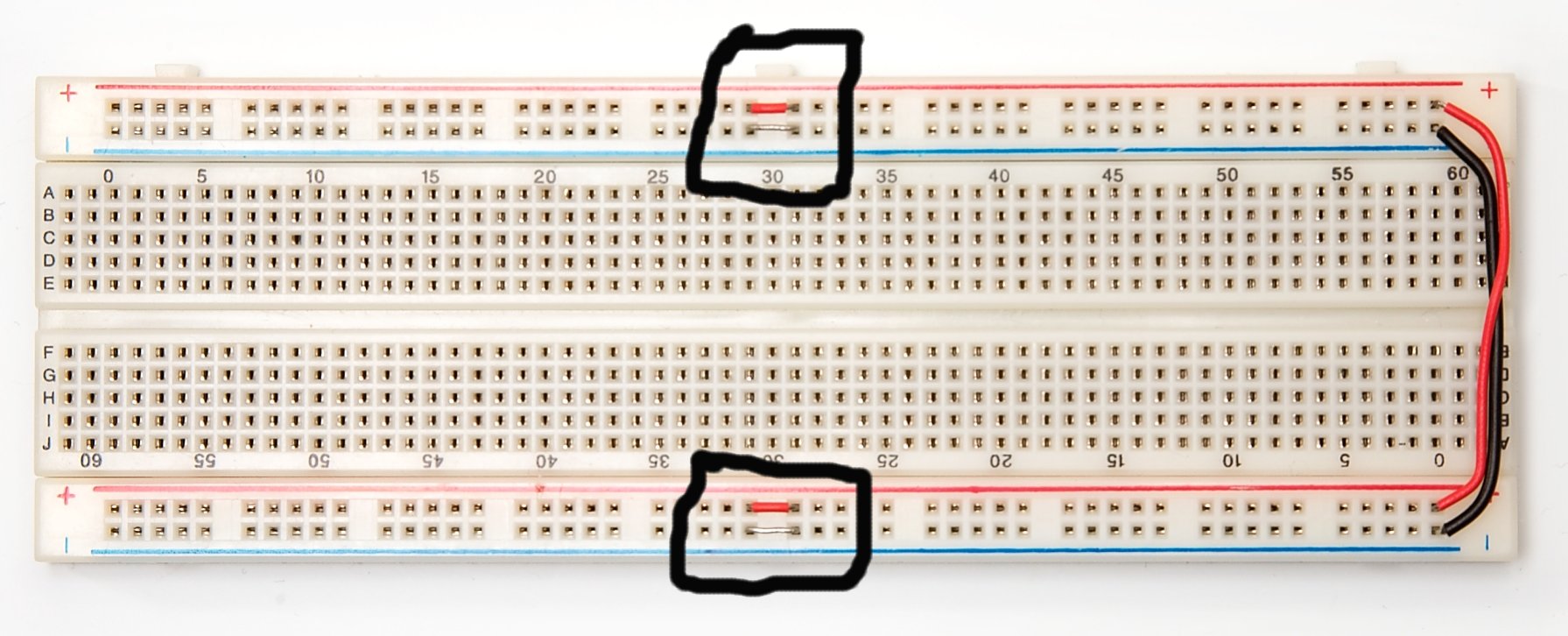
 Missed that part. OP apparently as well, even after I pointed it out