Unable to reconnect to BLE after disconnection when working with one central and multiple Peripherals

Hello there everyone. I am running into a weird issue. When I connect my central to my two peripherals. It stays connected (which it ideally shouldn't, I will share the code and explain my logic). But when I disconnect one of the peripherals. It keeps getting connected and disconnected from the peripheral whilst sending some information.

So my trouble boils down to:

  1. Is the logic wrong in my code?
  2. Is this an issue with the BLE ?
  3. does the BLE not connect with the second device (I have made the in built LED to turn on whenever it connects to the peripheral. The 2nd peripheral does not glow after I have disconnected it and reconnected it to the central)

Steps to recreate my issue:

  1. turn both the peripheral on by connecting it to your PC (Change the service ID of each though, one Is 180f and another is 181f)
  2. Connect the central
  3. wait for both the peripheral to connect to the central (both of the peripheral lights will turn orange)
  4. Reset one of the peripheral
  5. observe the serial monitor from the central port
  6. The peripheral that has been reset continues to connect and disconnect. (which should not be happening)

Peripheral Code

#include <ArduinoBLE.h>

 // Bluetooth® Low Energy Battery Service
BLEService helloWorldService("180F");

// Bluetooth® Low Energy Battery Level Characteristic
BLEUnsignedCharCharacteristic helloWorldChar("2A19",  // standard 16-bit characteristic UUID
    BLERead | BLENotify); // remote clients will be able to get notifications if this characteristic changes

void setup() {
  Serial.begin(9600);    // initialize serial communication
  // while (!Serial);

  pinMode(LED_BUILTIN, OUTPUT); // initialize the built-in LED pin to indicate when a central is connected

  // begin initialization
  if (!BLE.begin()) {
    Serial.println("starting BLE failed!");

    while (1);
  }

  /* Set a local name for the Bluetooth® Low Energy device
     This name will appear in advertising packets
     and can be used by remote devices to identify this Bluetooth® Low Energy device
     The name can be changed but maybe be truncated based on space left in advertisement packet
  */
  int helloWorld = 0;

  BLE.setLocalName("Hello World 1");
  BLE.setAdvertisedService(helloWorldService); // add the service UUID
  helloWorldService.addCharacteristic(helloWorldChar); // add the battery level characteristic
  BLE.addService(helloWorldService); // Add the battery service
  helloWorldChar.writeValue(helloWorld); // set initial value for this characteristic

  /* Start advertising Bluetooth® Low Energy.  It will start continuously transmitting Bluetooth® Low Energy
     advertising packets and will be visible to remote Bluetooth® Low Energy central devices
     until it receives a new connection */

  // start advertising
  BLE.advertise();

  Serial.println("Bluetooth® device active, waiting for connections...");
}

void loop() {
  // wait for a Bluetooth® Low Energy central
  BLEDevice central = BLE.central();

  if(!central){
    BLE.advertise();
    digitalWrite(LED_BUILTIN, LOW);
  }

  // if a central is connected to the peripheral:
  if (central) {
    Serial.print("Connected to central: ");
    // print the central's BT address:
    Serial.println(central.address());
    // turn on the LED to indicate the connection:
        digitalWrite(LED_BUILTIN, HIGH);
        Serial.print("Hello World from ");
        int newValue = 1;
        Serial.println(newValue);
        helloWorldChar.writeValue(1); 
        delay(1000);
       // and update the battery level characteristic
    }
    // when the central disconnects, turn off the LED:
    digitalWrite(LED_BUILTIN, LOW);
    // Serial.print("Disconnected from central: ");
    // Serial.println(central.address());
}

Central Code

#include <ArduinoBLE.h>

// variables for button
// const int buttonPin = 2;
// int oldButtonState = LOW;

 // Bluetooth® Low Energy Battery Service
// BLEService helloWorldService("180F");

// // Bluetooth® Low Energy Battery Level Characteristic
// BLEUnsignedCharCharacteristic helloWorldChar("2A19",  // standard 16-bit characteristic UUID
//     BLERead | BLENotify);

void setup() {
  Serial.begin(9600);
  // while (!Serial);

  // configure the button pin as input
  // pinMode(buttonPin, INPUT);

  // initialize the Bluetooth® Low Energy hardware
  BLE.begin();

  Serial.println("Bluetooth® Low Energy Central - LED control");

  // start scanning for peripherals
  // BLE.scanForUuid("180F");
  BLE.setConnectionInterval(0x0006, 0x0c80); // 7.5 ms minimum, 4 s maximum
}

void loop() {
  // check if a peripheral has been discovered
  char arr[3][30] = {"180F","181F", "Peripheral_3"};
  int n = 2;
  for(int i = 0;i<n;i++){
    BLE.scanForUuid(arr[i]);
    BLEDevice peripheral = BLE.available();

    if (peripheral) {
      // discovered a peripheral, print out address, local name, and advertised service

      Serial.print("Found ");
      Serial.print(peripheral.address());
      Serial.print(" '");
      Serial.print(peripheral.localName());
      Serial.print("' ");
      Serial.print(peripheral.advertisedServiceUuid());
      Serial.println();

      // stop scanning
      BLE.stopScan();

      if (peripheral.connect()) {
        Serial.println("Connected");
      } else {
        Serial.println("Failed to connect!");
        return;
      }

      BLECharacteristic helloWorldChar = peripheral.characteristic("2A19");
      Serial.println("Hello World from ");
      char value = '0';
      // printData(helloWorldChar.value(), helloWorldChar.valueLength());
      Serial.println(helloWorldChar.value()[0]);
      // if(helloWorldService){
      //   Serial.println("Hello World from ");
      //   char value = '0';
      //   helloWorldChar.readValue(value);
      // }
    }
  }
}

void printData(const unsigned char data[], int length) {
  for (int i = 0; i < length; i++) {
    unsigned char b = data[i];

    if (b < 16) {
      Serial.print("0");
    }

    Serial.print(b, HEX);
  }
}

My problem is that I am still receiving the data from the peripheral that keeps connecting and disconnecting. But according to my logic, the peripheral should stay connected for 1 second, which it does not.

I am new to the forum and programming in BLE, kindly let me know if I have made any mistakes. Thank you for taking the time to go through my question.
Welcome to the forum.

That is not how BLE works. From your applications point of view, the central device is reading data from a peripheral. The peripheral just updates its internal state it does not send the data.

Where is that in your code?

Here are a few other things I noted in your code.

  • You use delay. That is not a good idea in general but especially when you use communication stacks. Use millis() instead for timing code. Make sure your loop runs as often as possible. Try to avoid while and waiting for things to happen. Use state variables and move on as soon as you can.
  • You must not use 16-bit UUIDs other than how they have been defined by the Bluetooth SiG. For your own characteristics and services you must use 128-bit random UUIDs. There are UUID generator available online.
  • Try to avoid using UUIDs to differentiate between devices with the same functionality. The service and characteristics should stay the same if they provide the same functionality. That is what the UUID should describe. You can differentiate in the values or the device name.
  • Make sure you use the correct data type and convert them explicitly so the reader of your code knows you did not make a mistake. helloWorldChar is a unsigned char characteristic but you assign a int value. What happens if helloWorld is larger than 255.
  • Avoid using Char in the name for characteristics. Char is used for a data type. In 2023 you no longer need to save a few bytes in your source files by using short names. Make you code easy to read.
  • Try to avoid commenting every line of your code. If you feel like writing a comment. Try re-writing your code first. Some comments can be useful.
  • Peripheral_3 is not a UUID
  • "value" and "arr" and "n" are not good variable names, chose names well and make your code easy to read, "i" for loop index is commonly used and therefore a good exception

Here you can find an example I wrote while ago for a peripheral device in reply #2. Maybe you find it useful.

Thank you for the amazing reply. I got a lot of awesome pointers and things to learn, I just had a few questions. I am unable to understand what you mean by "The peripheral just updates its internal state it does not send the data" I was under the believe '''helloWorldChar.writeValue(1); ''' Would send the data to the central if the central asks for the value of helloWorldChar.

  • Okay got it won't use delay, I actually started with millis() but got stuck in an infinite loop of which I could not figure my way out, so I just used delay (I have worked in serial communication before, using 8085 microcontroller. So I am kind of used to the programming paradigm that has)

  • Got it

  • Ah that is a great point. I will make sure not to repeat the mistake

  • I was testing with the battery monitor code and it has char, so I just decided to go with it. I was just checking if I was able to establish a connection between one central and multiple peripherals and whether I was able to read the data in a round robin manner.

  • Got it

  • hehe, It was the original comments from the battery monitor example. I didn't feel like removing them. I just wrote down few of my own comments to help make sense of specific stuff I had a hard time understanding

  • Yes, that was a redundant UUID, I was waiting for the shipment of my 4th ble to change that and check if I am able to connect to the 3rd ble. Initially I was using scanForName instead of scanForUUID

  • yep, it's a rookie mistake that I keep making.

Thanks for the link, I will go through it.

I am really grateful to your reply. Its people like you who make learning a new application fun and easy. Thank you again.

(Also if I have to put it in a nutshell, I am trying to establish a connection between 1 central and multiple peripherals and get some data (any data really at this point, its just for checking. In a future time we will specify the exact characteristics) in a round robin manner, like from the first peripheral then from the second peripheral and so on. I am still not sure If I achieved that using my code or not. But it was staying connected from my end so I was just checking the range the devices offer, at what conditions does the connection disconnect. How long does it work for etc)

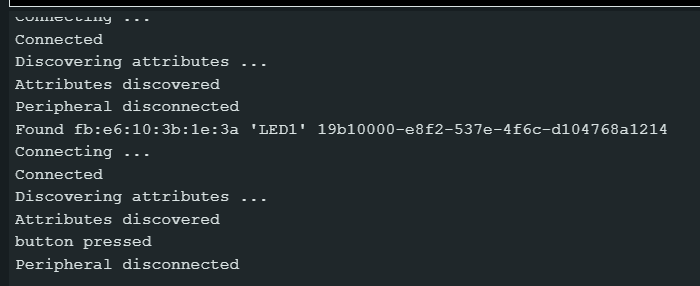
I took the information you provided and wrote the following code. Using the LED and LED CONTROL example. I changed the while loop to if statement to make sure the connection does not stay connected forever. And added advertise in the loop of peripheral so it can keep advertising so the central can connect to it again.

Code for central

  LED Control

  This example scans for Bluetooth® Low Energy peripherals until one with the advertised service
  "19b10000-e8f2-537e-4f6c-d104768a1214" UUID is found. Once discovered and connected,
  it will remotely control the Bluetooth® Low Energy peripheral's LED, when the button is pressed or released.

  The circuit:
  - Arduino MKR WiFi 1010, Arduino Uno WiFi Rev2 board, Arduino Nano 33 IoT,
    Arduino Nano 33 BLE, or Arduino Nano 33 BLE Sense board.
  - Button with pull-up resistor connected to pin 2.

  You can use it with another board that is compatible with this library and the
  Peripherals -> LED example.

  This example code is in the public domain.
*/

#include <ArduinoBLE.h>

// variables for button
const int buttonPin = 2;
int oldButtonState = LOW;

void setup() {
  Serial.begin(9600);
  while (!Serial);

  // configure the button pin as input
  pinMode(buttonPin, INPUT);

  // initialize the Bluetooth® Low Energy hardware
  BLE.begin();

  Serial.println("Bluetooth® Low Energy Central - LED control");

  // start scanning for peripherals
  // BLE.scanForUuid("19a10000-e8f2-537e-4f6c-d104768a1214");
}

void loop() {
  // check if a peripheral has been discovered
  char arr[2][50] = {"19a10000-e8f2-537e-4f6c-d104768a1214","19b10000-e8f2-537e-4f6c-d104768a1214"};
  int n = 2;
  for(int i = 0;i<n;i++){
    BLE.scanForUuid(arr[i]);
    BLEDevice peripheral = BLE.available();

    if (peripheral) {
      // discovered a peripheral, print out address, local name, and advertised service
      Serial.print("Found ");
      Serial.print(peripheral.address());
      Serial.print(" '");
      Serial.print(peripheral.localName());
      Serial.print("' ");
      Serial.print(peripheral.advertisedServiceUuid());
      Serial.println();

      // if (peripheral.localName() != "LED" || peripheral.localName() != "LED2") {
      //   return;
      // }

      // stop scanning
      BLE.stopScan();

      controlLed(peripheral);

      // peripheral disconnected, start scanning again
      // BLE.scanForUuid("19a10000-e8f2-537e-4f6c-d104768a1214");
    }
  }
}

void controlLed(BLEDevice peripheral) {
  // connect to the peripheral
  Serial.println("Connecting ...");

  if (peripheral.connect()) {
    Serial.println("Connected");
  } else {
    Serial.println("Failed to connect!");
    return;
  }

  // discover peripheral attributes
  Serial.println("Discovering attributes ...");
  if (peripheral.discoverAttributes()) {
    Serial.println("Attributes discovered");
  } else {
    Serial.println("Attribute discovery failed!");
    peripheral.disconnect();
    return;
  }

  // retrieve the LED characteristic
  BLECharacteristic ledCharacteristic = peripheral.characteristic("19b10001-e8f2-537e-4f6c-d104768a1214");

  if (!ledCharacteristic) {
    Serial.println("Peripheral does not have LED characteristic!");
    peripheral.disconnect();
    return;
  } else if (!ledCharacteristic.canWrite()) {
    Serial.println("Peripheral does not have a writable LED characteristic!");
    peripheral.disconnect();
    return;
  }

  if (peripheral.connected()) {
    // while the peripheral is connected

    // read the button pin
    int buttonState = digitalRead(buttonPin);

    if (oldButtonState != buttonState) {
      // button changed
      oldButtonState = buttonState;

      if (buttonState) {
        Serial.println("button pressed");

        // button is pressed, write 0x01 to turn the LED on
        ledCharacteristic.writeValue((byte)0x01);
      } else {
        Serial.println("button released");

        // button is released, write 0x00 to turn the LED off
        ledCharacteristic.writeValue((byte)0x00);
      }
    }
  }

  Serial.println("Peripheral disconnected");
}

Code for Peripheral

/*
  LED

  This example creates a Bluetooth® Low Energy peripheral with service that contains a
  characteristic to control an LED.

  The circuit:
  - Arduino MKR WiFi 1010, Arduino Uno WiFi Rev2 board, Arduino Nano 33 IoT,
    Arduino Nano 33 BLE, or Arduino Nano 33 BLE Sense board.

  You can use a generic Bluetooth® Low Energy central app, like LightBlue (iOS and Android) or
  nRF Connect (Android), to interact with the services and characteristics
  created in this sketch.

  This example code is in the public domain.
*/

#include <ArduinoBLE.h>

BLEService ledService("19B10000-E8F2-537E-4F6C-D104768A1214"); // Bluetooth® Low Energy LED Service

// Bluetooth® Low Energy LED Switch Characteristic - custom 128-bit UUID, read and writable by central
BLEByteCharacteristic switchCharacteristic("19B10001-E8F2-537E-4F6C-D104768A1214", BLERead | BLEWrite);

const int ledPin = LED_BUILTIN; // pin to use for the LED

void setup() {
  Serial.begin(9600);
  // while (!Serial);

  // set LED pin to output mode
  pinMode(ledPin, OUTPUT);

  // begin initialization
  if (!BLE.begin()) {
    Serial.println("starting Bluetooth® Low Energy module failed!");

    while (1);
  }

  // set advertised local name and service UUID:
  BLE.setLocalName("LED1");
  BLE.setAdvertisedService(ledService);

  // add the characteristic to the service
  ledService.addCharacteristic(switchCharacteristic);

  // add service
  BLE.addService(ledService);

  // set the initial value for the characeristic:
  switchCharacteristic.writeValue(0);

  // start advertising
  BLE.advertise();

  Serial.println("BLE LED Peripheral");
}

void loop() {
  // listen for Bluetooth® Low Energy peripherals to connect:
  BLEDevice central = BLE.central();

  // if a central is connected to peripheral:
  if (central) {
    Serial.print("Connected to central: ");
    // print the central's MAC address:
    Serial.println(central.address());

    // while the central is still connected to peripheral:
    if (central.connected()) {
      // if the remote device wrote to the characteristic,
      // use the value to control the LED:
      if (switchCharacteristic.written()) {
        if (switchCharacteristic.value()) {   // any value other than 0
          Serial.println("LED on");
          digitalWrite(ledPin, HIGH);         // will turn the LED on
        } else {                              // a 0 value
          Serial.println(F("LED off"));
          digitalWrite(ledPin, LOW);          // will turn the LED off
        }
      }
    }

    // when the central disconnects, print it out:
    Serial.print(F("Disconnected from central: "));
    Serial.println(central.address());

    BLE.advertise();
  }
}


it connects twice then it does not connect again. So what am I doing wrong?