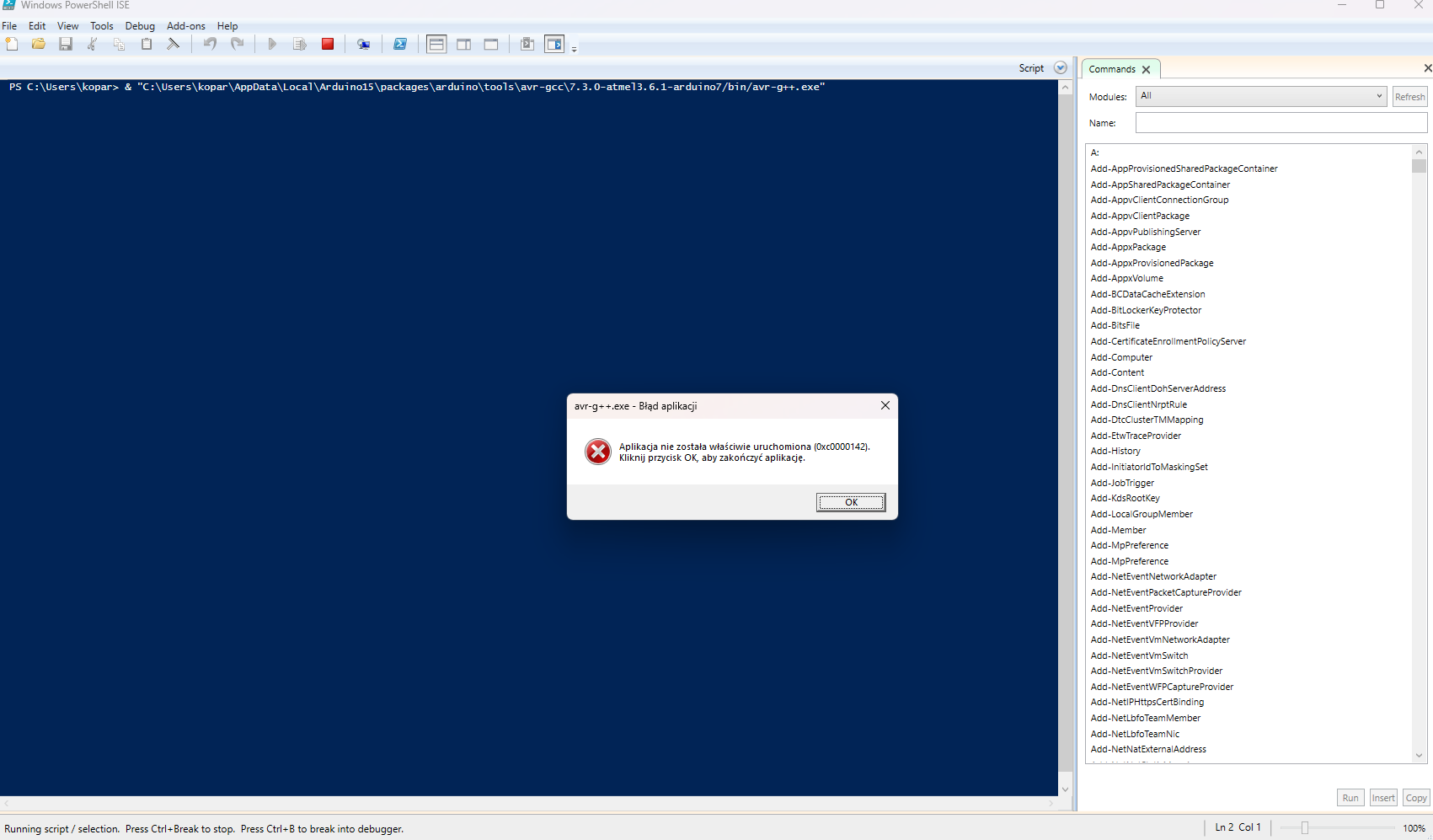
This message pops up no matter what file i try to run.
I am using IDE verision 2.3.4 and Adruino Uno.
I even tried running something in visual studio code with PlatformIO.
Same error there.
I already tried uninstaling and re-instaling Adruino IDE.
Checked a lot of steps online and none worked.
I am running out of ideas.
Help would be greatly appreciated.
Start by reading the "how to post" etc. details at the top of the forum.
Then supply your code (in code brackets) show a circuit diagram of how the devices are connected showing pin numbers ( no fritzing) and whatever power supplies you are using.
Show how and what you are using to upload.
Did you also uninstall all the stuff that relates to Arduino? There is a variety of directories.
The following might solve the issue. Downgrade the AVR board package in board manager to version 1.8.3 and see if that solves the issue. Next you can upgrade again (to 1.8.6).
hi. Thanks for reply.
Uploading all code, circut and error message.
I am really sorry if this is stupid question ,but why i need to upload all code and circut? I am not an expert but i think this is something wrong in files, compiling or softwere , because as i said diffrent sketch doesnt change a thing.
// the setup function runs once when you press reset or power the board
void setup() {
  // initialize digital pin LED_BUILTIN as an output.
  pinMode(LED_BUILTIN, OUTPUT);
}

// the loop function runs over and over again forever
void loop() {
  digitalWrite(LED_BUILTIN, HIGH);  // turn the LED on (HIGH is the voltage level)
  delay(1000);                      // wait for a second
  digitalWrite(LED_BUILTIN, LOW);   // turn the LED off by making the voltage LOW
  delay(1000);                      // wait for a second
}
my code is just example Blink
FQBN: arduino:avr:uno
Using board 'uno' from platform in folder: C:\Users\kopar\AppData\Local\Arduino15\packages\arduino\hardware\avr\1.8.6
Using core 'arduino' from platform in folder: C:\Users\kopar\AppData\Local\Arduino15\packages\arduino\hardware\avr\1.8.6

Detecting libraries used...
C:\Users\kopar\AppData\Local\Arduino15\packages\arduino\tools\avr-gcc\7.3.0-atmel3.6.1-arduino7/bin/avr-g++ -c -g -Os -w -std=gnu++11 -fpermissive -fno-exceptions -ffunction-sections -fdata-sections -fno-threadsafe-statics -Wno-error=narrowing -flto -w -x c++ -E -CC -mmcu=atmega328p -DF_CPU=16000000L -DARDUINO=10607 -DARDUINO_AVR_UNO -DARDUINO_ARCH_AVR -IC:\Users\kopar\AppData\Local\Arduino15\packages\arduino\hardware\avr\1.8.6\cores\arduino -IC:\Users\kopar\AppData\Local\Arduino15\packages\arduino\hardware\avr\1.8.6\variants\standard C:\Users\kopar\AppData\Local\arduino\sketches\F214670560D1A97C928AC78DE9DFBA06\sketch\Blink.ino.cpp -o nul
Error while detecting libraries included by C:\Users\kopar\AppData\Local\arduino\sketches\F214670560D1A97C928AC78DE9DFBA06\sketch\Blink.ino.cpp
Generating function prototypes...
C:\Users\kopar\AppData\Local\Arduino15\packages\arduino\tools\avr-gcc\7.3.0-atmel3.6.1-arduino7/bin/avr-g++ -c -g -Os -w -std=gnu++11 -fpermissive -fno-exceptions -ffunction-sections -fdata-sections -fno-threadsafe-statics -Wno-error=narrowing -flto -w -x c++ -E -CC -mmcu=atmega328p -DF_CPU=16000000L -DARDUINO=10607 -DARDUINO_AVR_UNO -DARDUINO_ARCH_AVR -IC:\Users\kopar\AppData\Local\Arduino15\packages\arduino\hardware\avr\1.8.6\cores\arduino -IC:\Users\kopar\AppData\Local\Arduino15\packages\arduino\hardware\avr\1.8.6\variants\standard C:\Users\kopar\AppData\Local\arduino\sketches\F214670560D1A97C928AC78DE9DFBA06\sketch\Blink.ino.cpp -o C:\Users\kopar\AppData\Local\Temp\639624710\sketch_merged.cpp
exit status 0xc0000142

Compilation error: exit status 0xc0000142
Computer is only conected to adruino and thats it.
[quote="bluejets, post:2, topic:1345083"]
Show how and what you are using to upload.
[/quote]
I am not sure what you want me to do.
Record a video?
My hope is that either a dialog, or a message printed to the PowerShell terminal will now appear that will give a more helpful explanation of the problem than that cryptic "exit status 0xc0000142" error message you see when Arduino IDE runs the compiler. If so, please tell us the full and exact text from the dialog or terminal.
It might also be a problem with libraries; see https://www.reddit.com/r/arduino/comments/16pilvm/compilation_error_exit_status_0xc0000142/. If you don't have any libraries installed, it's unlikely that this is the cause (and downgrading/upgrading the AVR board package should have solved it). If you have libraries installed in the libraries directory of the sketchbook directory, try to uninstall them and see if the problem disappears.
Hi ,
sorry for not replying earlier. I was testing everything i could think of.
Thanks for those tips ,but unfortunately none of them worked.
I have run System File Checker and DISM tool from the guide you linked and look at the reddit conversation you also linked but still nothing.
Although in the reddit post autor said he fixed the problem :
Thanks guys we managed to fix the problem after fixing a bit the code and checking some libraries
However as i said this error come up no metter what code i use.
I also tried re-installing again but no result.
I think i will use a laptop for now and just reinstal system.
If anyone have any idea , please help.

 This procedure is not intended to solve the problem. The purpose is to gather more information.