I do not know why but for some reason the RX led on my Arduino Uno is always on, but I have not uploaded any code into it, and it is not even accepting code, and whenever I try to upload code into it I get this error:
An error occurred while uploading the sketch
avrdude: stk500_recv(): programmer is not responding
avrdude: stk500_getsync() attempt 1 of 10: not in sync: resp=0x33
avrdude: stk500_recv(): programmer is not responding
avrdude: stk500_getsync() attempt 2 of 10: not in sync: resp=0x33
avrdude: stk500_recv(): programmer is not responding
avrdude: stk500_getsync() attempt 3 of 10: not in sync: resp=0x33
avrdude: stk500_recv(): programmer is not responding
avrdude: stk500_getsync() attempt 4 of 10: not in sync: resp=0x33
avrdude: stk500_recv(): programmer is not responding
avrdude: stk500_getsync() attempt 5 of 10: not in sync: resp=0x33
avrdude: stk500_recv(): programmer is not responding
avrdude: stk500_getsync() attempt 6 of 10: not in sync: resp=0x33
avrdude: stk500_recv(): programmer is not responding
avrdude: stk500_getsync() attempt 7 of 10: not in sync: resp=0x33
avrdude: stk500_recv(): programmer is not responding
avrdude: stk500_getsync() attempt 8 of 10: not in sync: resp=0x33
avrdude: stk500_recv(): programmer is not responding
avrdude: stk500_getsync() attempt 9 of 10: not in sync: resp=0x33
avrdude: stk500_recv(): programmer is not responding
avrdude: stk500_getsync() attempt 10 of 10: not in sync: resp=0x33
No, I have nothing connected except for of course the USB cable, but I do not think I have fried it because it has been like that since I bought it, like the first time I have turned it on it was like that, and how can I reload the boot loader?
What serial port is selected in the Tools menu?
What board is selected in the Tools menu?
Do you have a genuine Uno or a clone or knockoff? What is the USB to serial chip?
Did you try a different and known good USB cable?
Did you try a different USB port?
Please post a photo of your setup.
You will need a programmer or another Arduino. There are instructions all over the web. "bootload an uno" gets about 1.7 million hits. Like this one.
But if it is brand new you should not have to install a bootloader.
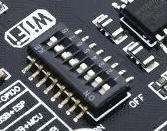
There are 3 major chips on the board. Atmega 328, esp8266 and the USB converter CH340. Every device has one RX and one TX pin. But you need sometimes connect the Atmega to esp8266, sometimes connect the Atmega to computer over USB and sometimes connect the esp8266 to computer. The first 6 switches are in pairs (RX and TX) for connecting two of the 3 devices.
1,2 ON all others OFF connect esp8266 to Atmega. no connection to computer.
3,4 ON all others OFF connects Atmega to computer over USB. no connection to esp8266
5,6 ON all others OFF connects esp8266 to computer over USB. no connection to Atmega
The switch 7 sets io 0 of esp8266 LOW which puts esp8266 to flashing mode at reboot. So you turn it ON with connection of esp8266 to USB (computer) to upload sketch to esp8266.
For some reason my new Arduino R3 is not accepting any sketches from the first day, and here are some of the things I have tried to solve this problem:
Checked that the cable is a data cable, not just a power cable.
Used a different USB cable.
Used a different cable.
Used a different Laptop.
Used multiple versions of the Arduino IDE.
The drives were automatically downloaded and my Arduino is detected but I reinstalled them again from that Chinese website.
Turned on switches 3 and 4, and turned off all other switches
Nothing is connected to the Arduino other than the USB cable.
Choose the right COM port
Downloaded the right esp8266 package
Choose the Arduino UNO choice in the board from the AVR boards
when I press the MCU reset button the L led flashes so the bootloader is probably already installed
When I open device manager the Arduino is detected as (ch340).
And yeah the RX led is always on when I only turn on the 3 and 4 switches on, and I would like to thank anybody who helps me as I really need this Arduino to work.