/*
   Wokwi: https://wokwi.com/projects/359009955305213953

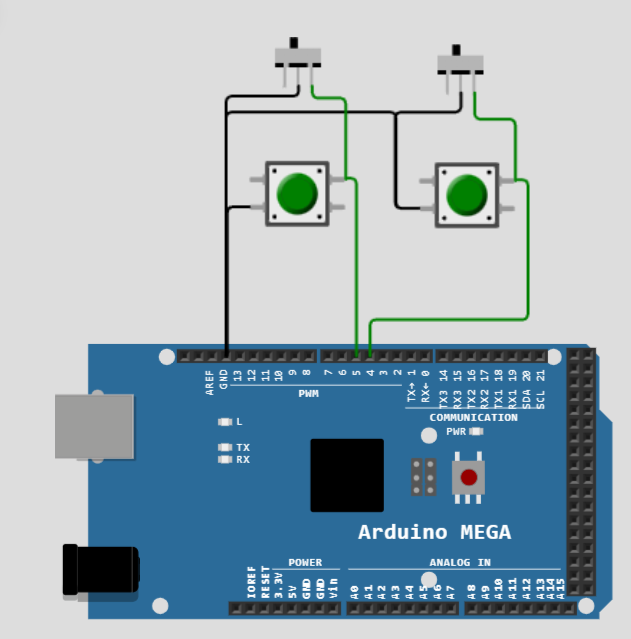
   Demo sketch with two buttons (but4 and but5) connected to Arduino MEGA board that

   1. starts counting up (slowly) when solely button but4 is pressed
   2. starts counting down (slowly) when solely button but5 is pressed
   3. starts counting up (quickly) when but5 is pressed while but4 is hold down
   4. starts counting up (quickly) when but4 is pressed while but5 is hold down

  To achieve slow counting as in no 1. and 2. the respective buttons have to be pressed. After
  2 seconds the counting starts.

  If the second button is pressed within these 2 seconds, quick counting as in no 3. or no. 4 starts.

  The further behaviour is like this:

  * In case of no. 1 or no. 2
      the counting stops if the respective button has been released.
      the counting starts again if the respective button is pressed.

  * In case of no. 3 or no. 4
      the counting stops when the "second" button has been released
      the counting starts again if the "second" button is pressed

      the counting stops when the first button (but4 in no. 3, but5 in no. 4) is released, but
      if the "second" button is not released within 2 seconds the slow(!) counting starts depending
      on the still pressed button

  Version: V0.1 - 2023-03-12
  ec2021

*/

#include "ezButton.h"

const byte IN4 = 4;
const byte IN5 = 5;

ezButton but4(IN4);
ezButton but5(IN5);
signed long count = 0;


void setup() {
  Serial.begin(9600);
  Serial.println("Start");
  pinMode(4, INPUT_PULLUP);
  pinMode(5, INPUT_PULLUP);
}

void Refresh() {
  but4.loop();
  but5.loop();
}

unsigned long but4PressTime;
boolean but4Used;
unsigned long but5PressTime;
boolean but5Used;

void loop() {
  Refresh();

  if (but4.getState() != 1) {
    but4PressTime = millis();
    but5Used = false;
    while (but4.getState() != 1)
    {
      Refresh();
      if (millis() - but4PressTime > 2000 && !but5Used) {
        count++;
        Serial.print("Slow count up\t");
        Serial.println(count);
        delay(300);
      }
      else
      {
        if (but5.getState() != 1) {
          but5Used = true;
          count++;
          Serial.print("Quick count up\t");
          Serial.println(count);
          delay(100);
        }
      }
    }
  }

  if (but5.getState() != 1) {
    but5PressTime = millis();
    but4Used = false;
    while (but5.getState() != 1)
    {
      Refresh();
      if (millis() - but5PressTime > 2000 && !but4Used) {
        count--;
        Serial.print("Slow count down\t");
        Serial.println(count);
        delay(300);
      }
      else
      {
        if (but4.getState() != 1) {
          but4Used = true;
          count--;
          Serial.print("Quick count down\t");
          Serial.println(count);
          delay(100);
        }
      }
    }
  }
}
Please be aware that there are much better methods to solve your task, this sketch uses a lot of repetitive code which could be avoided by making use of structures, arrays and functions ... But it would be much harder to understand for beginners ...
We reached on a a particular level of result with some kind of typical functioning and the explanation is enough as there is no such complicated diagram
Just pair of micro switch connected to pin 4 and pin 5 and the rest work is code with serial monitor
Already we are puzzled here with so many techniques of code, enough to make anyone crazy but still unable to get the desired result and now we have to face an odd man out topic of so called diagram which no body want to have
Just all need to know a fresh and clean code properly managed with margins to tally and experiments and so many results we executed this way only !!!
Press but4 for more than 2 seconds
” Slow count up starts
the same applies to but5...
For two buttons in the simulation
make sure no button is pressed
click first button and move mouse cursor away from this button
press second button within 2 seconds (otherwise the sketch assumes single button use)
For a simple diagram you could upload a screenshot of the simulation circuit ...
However, the simulation works fine for me, so I guess it is just the awkward use of clicking two buttons in the browser... Realize it with real hardware and check it out...
ec2021
You should not argue with @anon57585045, the points are ok and comply with the general rules of the forum. External sources may change without notification. To keep everything in one place is crucial...
Sorry, there was a mistake in the last post #38 ... This is the corrected version!
/*
   Wokwi: https://wokwi.com/projects/359089603316967425

   Demo sketch with two buttons (but4 and but5) connected to Arduino MEGA board that

   1. starts counting up (slowly) when solely button but4 is pressed
   2. starts counting down (slowly) when solely button but5 is pressed
   3. starts counting up (quickly) when but5 is pressed while but4 is hold down
   4. starts counting up (quickly) when but4 is pressed while but5 is hold down

  To achieve slow counting as in no 1. and 2. the respective buttons have to be pressed. The counting
  starts immediately

  If the second button is pressed, quick counting starts as in no 3. or no. 4.

  If in case of no. 3 or 4 the first button is released while the second is still pressed
  the counting stops. When the first button is pressed again, the quick counting resumes.

  To leave no. 3 or 4 both buttons have to be released first!

  Version: V0.21 - 2023-03-13
  ec2021

*/

const byte IN4 = 4;
const byte IN5 = 5;

struct pressButtonType {
  byte Pin;
  unsigned long lastChange;
  byte lastState;
  byte state;
  boolean pressed();
};

boolean pressButtonType::pressed() {
  byte state = digitalRead(pressButtonType::Pin);
  if (state != pressButtonType::lastState) {
    pressButtonType::lastChange = millis();
    pressButtonType::lastState = state;
  }
  if (state != pressButtonType::state && millis() - pressButtonType::lastChange > 50) {
    pressButtonType::state = state;
  };
  return !pressButtonType::state;
}

signed long count = 0;
pressButtonType but4 = {IN4, 0, HIGH};
pressButtonType but5 = {IN5, 0, HIGH};


void setup() {
  Serial.begin(9600);
  Serial.println("Start");
  pinMode(IN4, INPUT_PULLUP);
  pinMode(IN5, INPUT_PULLUP);
}


boolean LeaveWhileLoop;

void loop() {

  if (but4.pressed()) {
    LeaveWhileLoop = false;
    while (!LeaveWhileLoop)
    {
      if (but4.pressed()){
        count++;
        if (but5.pressed()) {
          Serial.print("Quick count up\t");
          Serial.println(count);
          delay(100);
        } else {
          Serial.print("Slow count up\t");
          Serial.println(count);
          delay(300);
        }
      }
      LeaveWhileLoop = (!but4.pressed() && !but5.pressed());
    }
  }

  if (but5.pressed()) {
    LeaveWhileLoop = false;
    while (!LeaveWhileLoop)
    {
      if (but5.pressed()){
          count--;
          if (but4.pressed()) {
            Serial.print("Quick count down\t");
            Serial.println(count);
            delay(100);
          } else {
            Serial.print("Slow count down\t");
            Serial.println(count);
            delay(300);
          }
      }
      LeaveWhileLoop = (!but4.pressed() && !but5.pressed());
    }
  }
}
And - just for the fun of it, here a version that makes use of a State Machine ...
/*
   Wokwi: https://wokwi.com/projects/359093488403567617

   Demo sketch with two buttons (but4 and but5) connected to Arduino MEGA board that

   1. starts counting up (slowly) when solely button but4 is pressed
   2. starts counting down (slowly) when solely button but5 is pressed
   3. starts counting up (quickly) when but5 is pressed while but4 is hold down
   4. starts counting up (quickly) when but4 is pressed while but5 is hold down

  To achieve slow counting as in no 1. and 2. the respective buttons have to be pressed. The counting
  starts immediately

  If the second button is pressed, quick counting starts as in no 3. or no. 4.

  If in case of no. 3 or 4 the first button is released while the second is still pressed
  the counting stops. When the first button is pressed again, the quick counting resumes.

  To leave no. 3 or 4 both buttons have to be released first!

  This version makes use of a State Machine ...

  Version: V0.3 - 2023-03-13
  ec2021

*/

const byte IN4 = 4;
const byte IN5 = 5;
const unsigned long shortWaitTime = 100;
const unsigned long longWaitTime  = 300;

struct pressButtonType {
  byte Pin;
  unsigned long lastChange;
  int lastState;
  int state;
  boolean pressed();
};

boolean pressButtonType::pressed() {
  int state = digitalRead(pressButtonType::Pin);
  if (state != pressButtonType::lastState) {
    pressButtonType::lastChange = millis();
    pressButtonType::lastState = state;
  }
  if (state != pressButtonType::state && millis() - pressButtonType::lastChange > 50) {
    pressButtonType::state     = state;
  };
  return !pressButtonType::state;
}

enum CountStates {IDLE, COUNTUP, COUNTDOWN};

CountStates actState  = IDLE;
CountStates lastState = IDLE;

signed long count = 0;
pressButtonType but4 = {IN4, 0, HIGH};
pressButtonType but5 = {IN5, 0, HIGH};


void StateMachine(){
  static unsigned long lastActionTime = 0;
  static unsigned long WaitTime = longWaitTime;
   switch (actState) {
     case IDLE : if (but4.pressed()){
                      actState = COUNTUP;
                  }
                 if (but5.pressed()){
                    actState = COUNTDOWN;
                 }
                 WaitTime       = longWaitTime;
              break;
     case COUNTUP :
                 if (but5.pressed()) WaitTime = shortWaitTime;
                                else WaitTime = longWaitTime;
                 if (but4.pressed() && millis()-lastActionTime >= WaitTime) {
                   lastActionTime = millis();
                   count++;
                   Serial.println(count);
                   }
                 if (!but4.pressed() && !but5.pressed()) actState = IDLE;
              break;
     case COUNTDOWN :
                 if (but4.pressed()) WaitTime = shortWaitTime;
                                else WaitTime = longWaitTime;

                 if (but5.pressed() && millis()-lastActionTime >= WaitTime) {
                   lastActionTime = millis();
                   count--;
                   Serial.println(count);
                   }
                 if (!but4.pressed() && !but5.pressed()) actState = IDLE;
              break;
     default      : actState = IDLE;
              break;
   }

}


void setup() {
  Serial.begin(115200);
  Serial.println("Start");
  pinMode(but4.Pin, INPUT_PULLUP);
  pinMode(but5.Pin, INPUT_PULLUP);
  actState = IDLE;
}


void loop() {
  StateMachine();
}