I made my design keeping it compatible with Arduino DUE board. I have copied almost everything from from Arduino DUE Board schematic except USB Host Capability which I stripped from the design as it was not required in my system where i only needed this board to appear as USB Slave device.
I am currently able to program the ATSAM3X8E chip on my custom designed board over UART0 interface (RXD0/Pin27, TXD0/Pin2). I am using Arduino IDE to program the board. When i program the board using UART0 i select Arduino DUE Programming Port from Arduino IDE> Tools > Port menu. To test the board I had programmed Arduino AnalogReadSerial example and I was able to see Serial Prints on Serial Terimnal.
The trouble starts when I plug in my Boards USB interface with my PC running Windows 7 or Windows 8( i haven't tried any other OS yet). When I plug in my boards USB in to PC, the PC is able to generate USB Plugin sound. When I remove my board USB from PC USB then it also generate USB un-plug sound.
I also was able to see the USB device appearing in Device Manager window as shown below in this picture:
I also downloaded and installed Atmel SAM-BA tool. And tried updating thr USB device driver through following SAM-BA installation folder:
C:\Program Files (x86)\Atmel\sam-ba_2.15\drv
But windows does not recognizes this device and generates following error message:
"Windows was Unable to install your Unknown device"
Please see the ATMSA3X8E scheme that I am using for my board:
i have already cycled through chip ERASE by pressing ERASE button. And I also tried to connect using SAM-BA but the board does not appear as Com port and remains appearing as Unknowd Device. Due to this reason the SAM-BA is unable to connect.
I also checked VDDOUT which are around 1.79V and made sure that 3.3V are also fine. Also the clock oscillator is working and producing 12MHz clock.
Can someone suggest what am i missing that my ATSAM3X8E based design is un able to appear as com port over its Native USB interface?
An important thing to note here is that if I attach a ready made Arduino DUE board on Native USB port, windows is always able to recognize it as Arduino DUE (COM15).
However when I press erase button for more than 250msec while resetting the Arduino DUE board the board appears as : Bossa Program port (COM20).
I then reprogram the board through Arduino IDE with AnalogReadSerial example. Now when i un-plug and plug the Arduino DUE board the board again starts to appear as Arduino DUE (COM15).
From this excercise, i can understand that ATSAM3X8E driver for the USB interface is already correctly installed. Its only my custom designed ATSAM3X8E board that is failing to configure its USB somehow.
I need to figure out what is that difference between my hardware and the original Arduino DUE board's hardware that is preventing my custom designed board to run its USB interface?
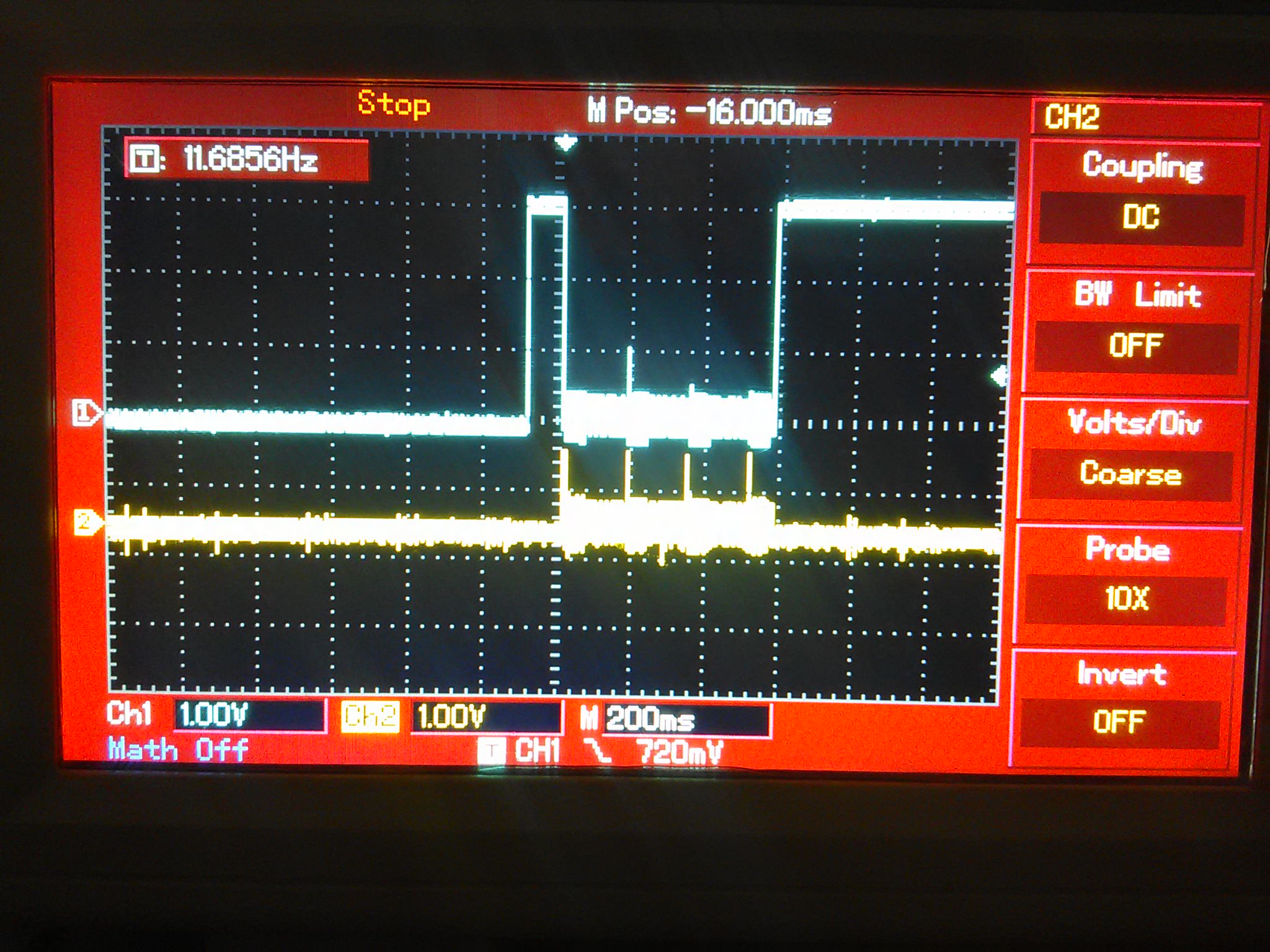
Here is screen capture of USB signals of my custom designed ATSAM3X8E board:
The upper trace is for USB_D_P and lower trace is for USB_D_N. The activity on USB signals is brief and happens just after when i press and release RESET button.
As per my knowledge Atmel has a hard burned bootloader in these ATSAM microcontrollers and as per my knowledge these bootloaders get invoked both on USB and UART interface whenever someone presses ERASE button for more than 250 msec just after the device RESET.
In my case, the default Bootloader is correctly working on UART pins as I can always program my ATSAM3X8E chips using Arduino IDE when I connect the Chip using USB/TTL converter. But, somehow the USB interface is not usable. I also tried following AnalogReadSerial Arduino Sketch :
void setup() {
// initialize serial communication at 9600 bits per second:
SerialUSB.begin(9600);
}
// the loop routine runs over and over again forever:
void loop() {
// read the input on analog pin 0:
int sensorValue = analogRead(A0);
// print out the value you read:
Serial.println(sensorValue);
delay(1); // delay in between reads for stability
}
Notice that this code has modified line: SerialUSB.begin In this line i am not using Serial.begin but SerialUSB.begin function.
This code should configure Native USB port of ATSAM3X8E chip as USB Com port. This code gets programmed successfully through UART but It just cant configure the USB interface correctly and I still see USB Interface as Unknown device.
Your schematic looks ok. The Windows error message indicates something fundamentally wrong with the USB comms. The scope trace for USB_D_N doesn't look right, USB is differential so when DP is low, DN should be high. Possibly a bad connection on PCB?
Can you also send a pic of your PCB layout? Particularly the USB lines. USB must be placed with strict guidelines on the spacing and length of both lines. If you haven't taken care of this, Eagle has a differential track placer, then that would kill your USB comms.
here is dropbox link to picture of USB signal routing.
In original Arduino DUE board:
When i probe the VBG pin 40 of the ATSAM3X8E microcontroller I can measure ~1.2V
Where as in my board :
When i probe the VBG pin 40 of the ATSAM3X8E microcontroller I can measure 0V
I think this may give us some clue. I am trying to look in the datasheet and trying to see what is the purpose of VBG pin.
The value of Resistor in orginal Arduino Schematic is
R7 = 6.8K /1%
C25 = 22pf
Where as in my design:
i have this R = 6.8k / 1%
but C25 = 20pf which is very small difference and in practice no capacitor is this accurate that a 2pf difference should matter at all.
The issue with Native USB interface was resolved back some years ago and then i forgot to update the community. The issue was with surge protection devices: CG0603MLC-05E
As soon as i removed these two pull down varistors from USB_P and USB_N data lines the interface started working. Later i figured out that my pcb supplier had actually substituted the part with some unknown surge protection device which was not performing well here in this USB circuit.
When the new board were used with originally specified CG0603MLC-05E the USB Natiev interface started working without any issue.