My Arduino uno R3 board connected to pc and showing in arduino IDE 2.3.6 at COM port COM3 but USB Script option not showing in Arduino IDE 2.3.6 tools
I M trying with UI interface with blynk.cloud but there are also not showing USB option in CONNECTION TYPE in creating new template so guide me....
Hi @vtsplgroup.
I've never heard of a "USB Script" option. Please provide a detailed description of what it was that lead you to believe that you should see such a thing in a reply here on the forum topic.
Are you following a tutorial or other information you found on the Internet? If so, provide a link to the web page where you found it. That may give the forum helpers the context they need in order to effectively assist you.

It comes* with the Blynk library and is installed under <sketchbook>/tools.
📂 tools
├── 📂 BlynkExampleBuilder
│   └── 📂 tool
│       └── 📄 BlynkExampleBuilder.jar
├── 📂 BlynkUpdater
│   └── 📂 tool
│       └── 📄 BlynkUpdater.jar
└── 📂 BlynkUsbScript
    └── 📂 tool
        └── 📄 BlynkUsbScript.jar
* Or used to come. Version 1.3.2 does not have the tools directory at all, 1.3.0 has BlynkExampleBuilder and BlynkUpdater, and 1.1.0 is the last version with BlynkUsbScript.
This is how it looks in IDE 1.8.19, I don't think it will work in IDE 2.x at all.
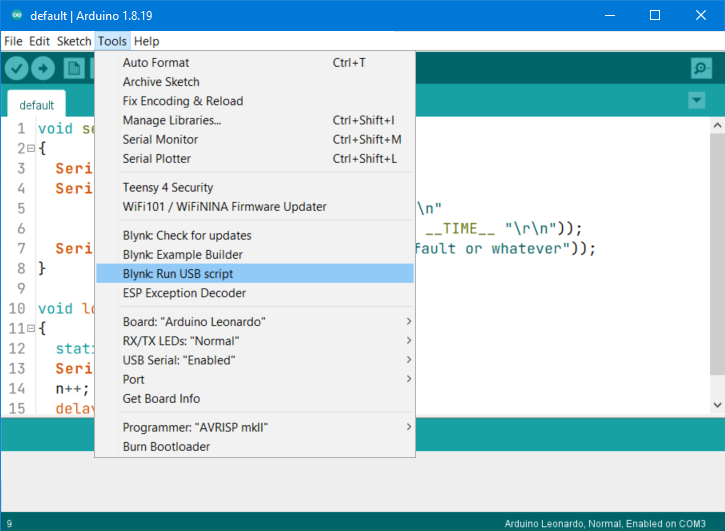
Thanks for the clarification @oqibidipo! I understand the situation now.
That is correct. The "Tools" framework that is used to add these items to Arduino IDE's "Tools" menu is very specific to the Java code base of Arduino IDE 1.x. It was not possible to add support for Arduino IDE 1.x "Tools" to Arduino IDE 2.x (which is a complete rewrite of the application in a different programming language).
Arduino IDE 2.x instead uses the VS Code extension framework to allow users to add additional capabilities. However, there is no Arduino IDE 2.x extension to replace the Arduino IDE 1.x "Blynk: Run USB script" Tool.
@vtsplgroup I can suggest two solutions. You use whichever one of them you prefer:
Recommended solution
An alternative approach is described in the Blynk documentation here:
The "Blynk: Run USB script" Tool actually just does the same procedure for you, so this approach is functionally equivalent (though less convenient).
Alternative solution
If you do want to use the "Blynk: Run USB script" Tool, you will need to use the obsolete Arduino IDE version 1.8.19, and then install the Tool.
If you want to do this, just let us know and we'll provide instructions.