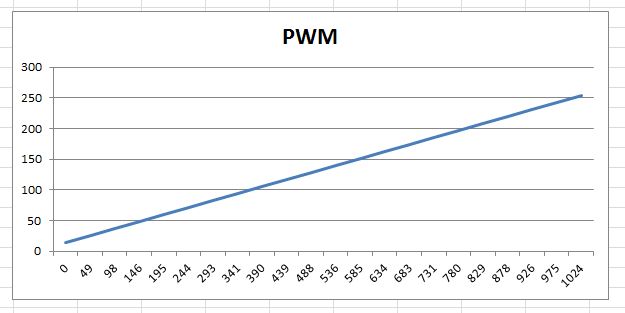
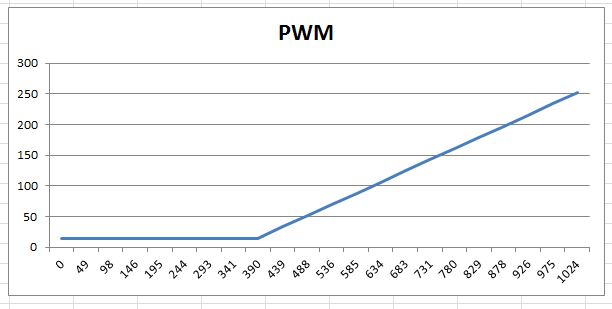
Two good suggestions striaght away, and from reading the documentation both look like they'd work just fine.
Many thanks for swifting putting me back on the right track.
@richierich1 can do the same thing "by hand". No objection to libraries, but there are things that should just be taken in stride sometimes; eveyone should know how sling a few lines of code
    int value = analogRead(A0);   // for example

    if (value <= knee) return zeroValue;
    else return map(value - knee, 1024, zeroValue, maxValue);
map() often finds itself nearby to calls to constrain(). map will happily extrapolate, so constrain() can be necessary.
I don't like map at all and only use it when I am too lazy to do without. For "real" mapping, there are better libraries, like @robtillaart's, available.
Over the weekend I'll set up a test nano and play around with all the options you've all shown me as it'll be a good learning exercise.
The actual project this is used on is just a dimmer on some accessory lights on my motorcycle, so speed or accuracy isn't that important. I just noticed yesterday evening that it would better if the auto dimming ramped down sooner to the minimum brightness.
Changing the code in the nano on this motorcycle is a PITA as it's buried in the bike, and I have already broken off (and re-soldered) the micro USB connector once. I'm not sure how many more chances I'll get to plug back into it before it breaks again and needs replacing.
I've just been testing out the suggestion made by @UKHeliBob and @jfjlaros and both work great, but I'll probably use @jfjlaros suggested code as it is the simplest.
@robtillaart Many thanks for linking to your library. It's a bit of sledgehammer to crack a nut for this simple project but I will try to use it on future projects..
Just have to work out how to use GitHub first.
@alto777 Many thanks for your input here, I'll try your suggestions when I come back to looking at the FastMap..