UTFT doesnt name a type

Hi guys,
i saw similar post questions about this in arduino fourms but honestly still not clear to me , can anyone help me please !

everytime i compile my code it says " UTFT doesnt name a type" even though i included the UTFT folder that I downloaded and it has UTFT.h and examples and libraires , I copied that folder and I paste it in in the arduino library but still not working

Where exactly did you put the library folder ? Did you stop and restart the IDE after installing the library ?

I put the UTFT library in the arduino library folder and then when i closed the sketch and re opened it apperes there in the sketch colume

To be clear. You put the UTFT folder in Documents\Arduino\libraries and you can import the library from the Sketch/Import Library menu in the IDE. Is that right ?

Look in the UTFT directory within your library directory and see whether it contains a file UTFT.h and whether that file contains a declaration for the UTFT type.

Thank you guys alot for the helpful information
i got it to work :slight_smile:

kaznov:
Thank you guys alot for the helpful information
i got it to work :slight_smile:

For those of us on the sidelines (and/or someone who in the future finds this thread because they are having the same problem), what did you do to fix things?

And, you may want to edit the first post to add "[Solved]" (no quotation marks...) to the subject.

I happen to have the same problem. I have a mega 2560 and a 3.2" TFT LCD from Womarts that I can't use yet. The first problem is the issue with getting my sample program from the UTFT folder to run. Can anyone help me with "the 'UTFT' does not name a type" issue?
How did you fix your problem (directed to the guy quoted below)? What steps did you take to find the issue? All help is greatly appreciated. :~

kaznov:
Hi guys,
i saw similar post questions about this in arduino fourms but honestly still not clear to me , can anyone help me please !
I have attached the file I am trying to compile.

everytime i compile my code it says " UTFT doesnt name a type" even though i included the UTFT folder that I downloaded and it has UTFT.h and examples and libraires , I copied that folder and I paste it in in the arduino library but still not working

UTFT_Demo_320x240.ino (6.95 KB)

Where exactly are the UTFT library files installed ?

Should, be something like this :- !!!!

Regards,

Graham

ppcjunkie:
I happen to have the same problem. I have a mega 2560 and a 3.2" TFT LCD from Womarts that I can't use yet. The first problem is the issue with getting my sample program from the UTFT folder to run. Can anyone help me with "the 'UTFT' does not name a type" issue?
How did you fix your problem (directed to the guy quoted below)? What steps did you take to find the issue? All help is greatly appreciated. :~

kaznov:
Hi guys,
i saw similar post questions about this in arduino fourms but honestly still not clear to me , can anyone help me please !
I have attached the file I am trying to compile.

everytime i compile my code it says " UTFT doesnt name a type" even though i included the UTFT folder that I downloaded and it has UTFT.h and examples and libraires , I copied that folder and I paste it in in the arduino library but still not working

It compiles fine! ..............

What version of Arduino IDE are you using?

Regards,

Graham

ppcjunkie:
I happen to have the same problem. I have a mega 2560 and a 3.2" TFT LCD from Womarts that I can't use yet. The first problem is the issue with getting my sample program from the UTFT folder to run. Can anyone help me with "the 'UTFT' does not name a type" issue?
How did you fix your problem (directed to the guy quoted below)? What steps did you take to find the issue? All help is greatly appreciated. :~

kaznov:
Hi guys,
i saw similar post questions about this in arduino fourms but honestly still not clear to me , can anyone help me please !
I have attached the file I am trying to compile.

everytime i compile my code it says " UTFT doesnt name a type" even though i included the UTFT folder that I downloaded and it has UTFT.h and examples and libraires , I copied that folder and I paste it in in the arduino library but still not working

The good news! I got it working and have made a short video about what I have found. Here is the link; http://youtu.be/WXCINQaZNgE I hope now to find out why I cannot get the Utouch library working, but for all who have had issues with the UTFT library I hope this will help. It will be at least one less thing for you to have to worry about. The problem seems to have been with the installation of my IDE (1.5.4r2) on Windows Vista. I have not used this again feeling that it was just recently released in beta and I don't have a Due or Yun board, at least yet. I did in the coarse of having all sorts of possible solutions to this compiling issue found that I came across even more errors as I tried to fix the original, utft does not name a type, issue. Anyone who has any questions feel free to contact me. More likely though, I will be contacting you guys for help.
I just found out why the problem exists..even prior to posting this. If the UTFT or the Utouch is not redthen you will only get errors of utft does not name a type. There is a possibility that you can just make the library only one level from the "libraries" folder and fix this problem. I ended up doing a reinstall and now have shown myself that it was the folder libraries not properly set. I will be making a video soon for this.

Daryl :slight_smile:

@Daryl,

It is great you want to help, and having watched your video it seems apparent you fixed the UTFT problem by accident rather than any real understanding of the library system. If you did understand the library system your touch library would be working fine too!!

Ok, try this.....

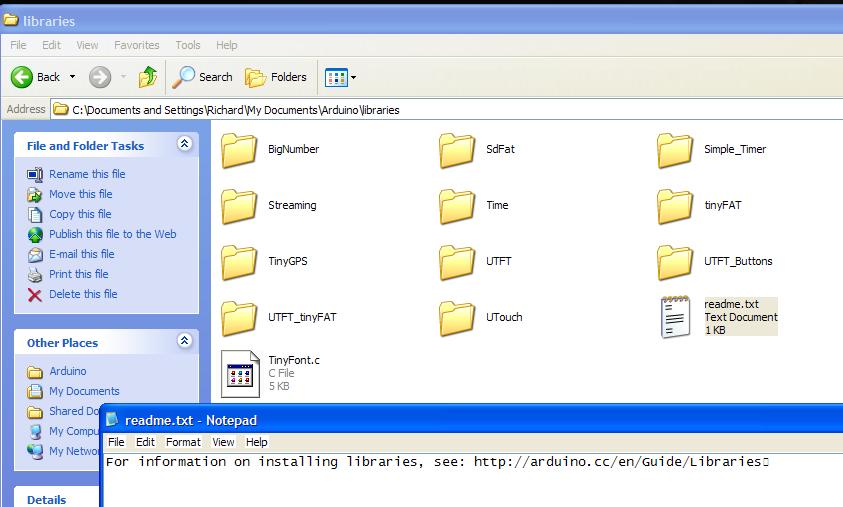
Locate your sketch folder, I can only comment on XP as I am still in the dark (reliable) ages, but it should be in
My Documents\Arduino.

To complicate things further I re-located my sketch library to flash drive.....My sketches AND libraries can now travel!! ;):stuck_out_tongue:

So once you located your 'Arduino' folder.......inside is a 'libraries' folder......... The clue is in the name??? Place UTFT, UTFT_Buttons, UTouch and UTFT_tinyFAT in the libraries folder.

ALL your library files should be placed here!!

Once you have copied your new libraries, you MUST restart the arduino software......... I am mystified why you talk about signing in as a new user and uninstalling and re-installing the software?? Maybe you have too much time on your hands?

Case solved..... Ignore Daryls video, he waffles and rambles for about 5 minutes and the end result is less than useful.......

I especially like Daryls comment about.......i did this and I am not going to do it again, but you like click open and it does the rest?? That will be super helpful to other newbies having this problem!!! Particularly given his own admission he didn't figure out how to get touch working yet!!!???

Furthermore, done the way I have outlined, no further changes needed, you can run Arduino 1.0.5 1.5.3 1.5.4 nightly or any other version you might like..... And all sketches work fine......

Another seemingly important fact our Daryl appears to have overlooked, is that not only does UTFT appear black when not installed correctly, I am quite sure EXAMPLES does not contain anything related to UTFT? Since the library contains the examples??

I am a big fan of Hennings suite of libraries, he has done a sterling job, and I was one of those users that had problems with a MEGA2560, but at least I did install them in the correct location before saying lots of people have had problems!!! I would just like to say finally, comments like that may put off new users from potentially the best TFT related libraries out there, which is a pity when it is so apparent the commentee knows so little.

Regards,

Fellow 'newbie' (recently upgraded :P)

Graham

PS Daryl.....Please don't make another video of comparable standard to your last one..... just follow my instructions..... ;):stuck_out_tongue:

Library is compressed in .rar file. During unpacking Winrar is creating folder (same name us library name) and it's putting library folder in it. Library files are to deep in folders structure.

Solution: open Arduino program, go to menu Sketch >> Import Library >> Add Library.. , open your library folder location and go to one folder level deeper then before and then use "Open".

There is no magic about user libraries. They are just text files organized in folders located in YourWindowsUser/Documents/Arduino/Libraries folder. You may just copy your (one level !!!) library folder to that folder , open Arduino program and use it (no installation required).