by follow this page (Make Ribbon controller)
i did everything what is told on page. for this i use velostat sheet cut into 16mm x 300mm piece.
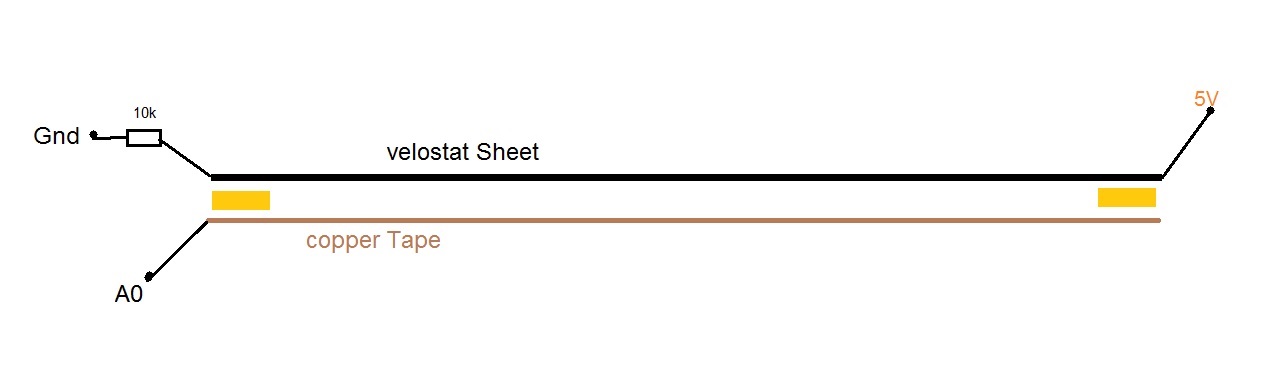
linked page have no wiring with arduino pins. watching some forums/result on web, i made wiring like this
here i used 10k Resistor between Gnd and one end of velostat sheet. i test resistance between both ends of velostat sheet with Digital Multimeter. it was near
170k .
then i tried a simple code to see reading
 int last_val=0;

void setup() {
  Serial.begin(9600);
  Serial.println("Test");
}

void loop() {
int val = analogRead(A0);
if (val != last_val)  {
   Serial.println(val);
  last_val = val;
}

}
Reading was unstayable between (0 to 480) without pressing sheet down like this
which can not be mapped used in sketch. i think my code is right to test .
please suggest here . is there incorrect wiring ?? is there incorrect component used in circuit. ??? resistance in velostat sheet is 170k.
i want a smooth inc/dec in reading acording to swip left & right . like this video look at 2:07.
please reply about my hardware...
Are you saying that the copper sheet is not touching the velostat sheet at any point?
In that case your A0 pin is floating. A floating pin will read random values. It is picking up electrical noise from the environment because the copper tape is a acting like an antenna.
Yes I think so. Remove the 10K from the end of the velostat tape and have it connected directly to ground. Use the 10K to connect the other end of the copper tape to ground.
I'll assume you have an ATmega328 based board, in which case you should consider the recommended max 10 kOhm input for your ADC compared to the 170 k you measured.
but could not get reading according to my finger press position.
getting reading mixes between (0-1023) .
i have test my analog pin A0 on Readymade potentiometer B5K . That is Working with rotate Position.
I again test Resistance in ribbon this way by swiping finger left to right ,right to left
i got propper reading on Digital Multimeter according to finger position .
plaese check any missing in circuit ?? am i using incorrect value of Resistor??
Have Any of you did this experiment like this with velostat sheet ???
resistor showing as 10k in picture is 9.7k
when i pressed and hold on Position"A" . I got Volt Reading on (A0,Gnd) pins by DMM is 0.27 and reading in Serial monitor
here you can see ,by pressing different location , i did not got different Reading in Serial monitor.they are similar to. i also try press on different location . and got reading in serial monitor similar to. but when voltage reading on (A0,Gnd) pin
on DMM is Different.
i again test B5k Potentiometer on (5v,A0,Gnd)pins that is working fine to Rotate postion. i seemed problem in resistace in velostat sheet.
for info i want to told here . now i have only three pieces of velostat sheet
50k resistance in(300mm x 282mm)
i searched on google pot between (1k to 10 k) is best for reading.
should here (max Resistance in sheet + Resistor Resistance = (1k to 10k)) ????
my 3rd piece (300mm x 282mm) with 50k is too large , can not be used in project space.
my second piece (300mm x 16 mm )with 190k is suitable for space.
i think i am confused about Resistor value used with Velostat sheet .
any Idea ??????
It would seem that your big mistake is in your code.
You will never get a consistent reading from any A to D circuit. At the very best they +/- one significant bit. So the If statement condition will hardly ever be true. You need to add a range.
if ( abs(val - last_val) > range) {
Where range is about 8 or so.
Also note that of you want to use your finger then this will be supplying noise.
Note that you made the circuit from the Instructables site. Almost all projects on this site are written by people who don't know as much as they think they do. So unless you are good at spotting errors, never use this site to try to learn something new.
I did make a music instrument called a Spoonduino, which used a square of this material. This is a link to the story behind it along with a video of it in action.
Use that 16mm wide strip, but with a 100K resistor instead of 10K.
If you do not have 100K, any value from 100K to 300K will do.
Then do the A and B tests again.
Yes, Tom
I tried it with 100k and 200k resistor.voltage reading on DMM was right according to swipe A to B , B To A. It was 2.15 v to 4.20 v and 1.90v to 4.20v . But A0 reading in serial monitor was not according to swipe position. As I am getting correct reading result with b5k potentiometer, I found less than 1k resistance in graphite pencil. Now I will try to get hard graphite pencil and use in this experiment. Let me some days to arrange material for it. I will report it with next reply after successfully result. I hope I will do balancing in resistance (200ohm to 2kohm) in gnd and 5v pins . Wait.....
If you notice on my spoonduino project that the spoon handle was wiped with insulating twine, so your hand never had to touch the sensor. Maybe it is a good idea if you adopt the same strategy, and avoided a direct touch to the input pins.