Hello !
My project is to make a voice amplifier with a mic INMP441 and a speaker on a esp32 card.
So I use the i2s protocol to collect the data from the mic and I convert the data to a 8-bits integer to send it to the DAC and then send it to the speaker (with a PAM8403 between).
The problem is that I can't transmit the sound from my microphone correctly to the speaker, there is only an unpleasant noise coming out of it.
If you have any suggestion, it would really help me.
I join my code there :
Have you done any "divide and conquer" testing? For example, have you run a sketch that just sends a sine wave tone to the speaker?
You have a fairly complex system. You can't find a fault in it all at once. You need to break it down to smaller functions to find the one that isn't working.
Oh, and something that hit my mind as soon as I started reading this... what is preventing feedback from the speaker to the mike?
Please post a genuine schematic instead of a Fritzing artwork. It's hard to see some things, for example the ESP pins are unlabelled.
Can the ESP DAC pin drive a 660 ohm load reliably? What is that circuit like, really? Again, need a real schematic for this...
thank you for your reply.
I have checked that the esp32 -> loudspeaker circuit was working correctly by sending a sinusoid. Same for the microphone, no worries on that. Then for the problem of feedback, this one is of little importance since the microphone is located rather far from the loudspeaker and the loudspeaker is unidirectional.
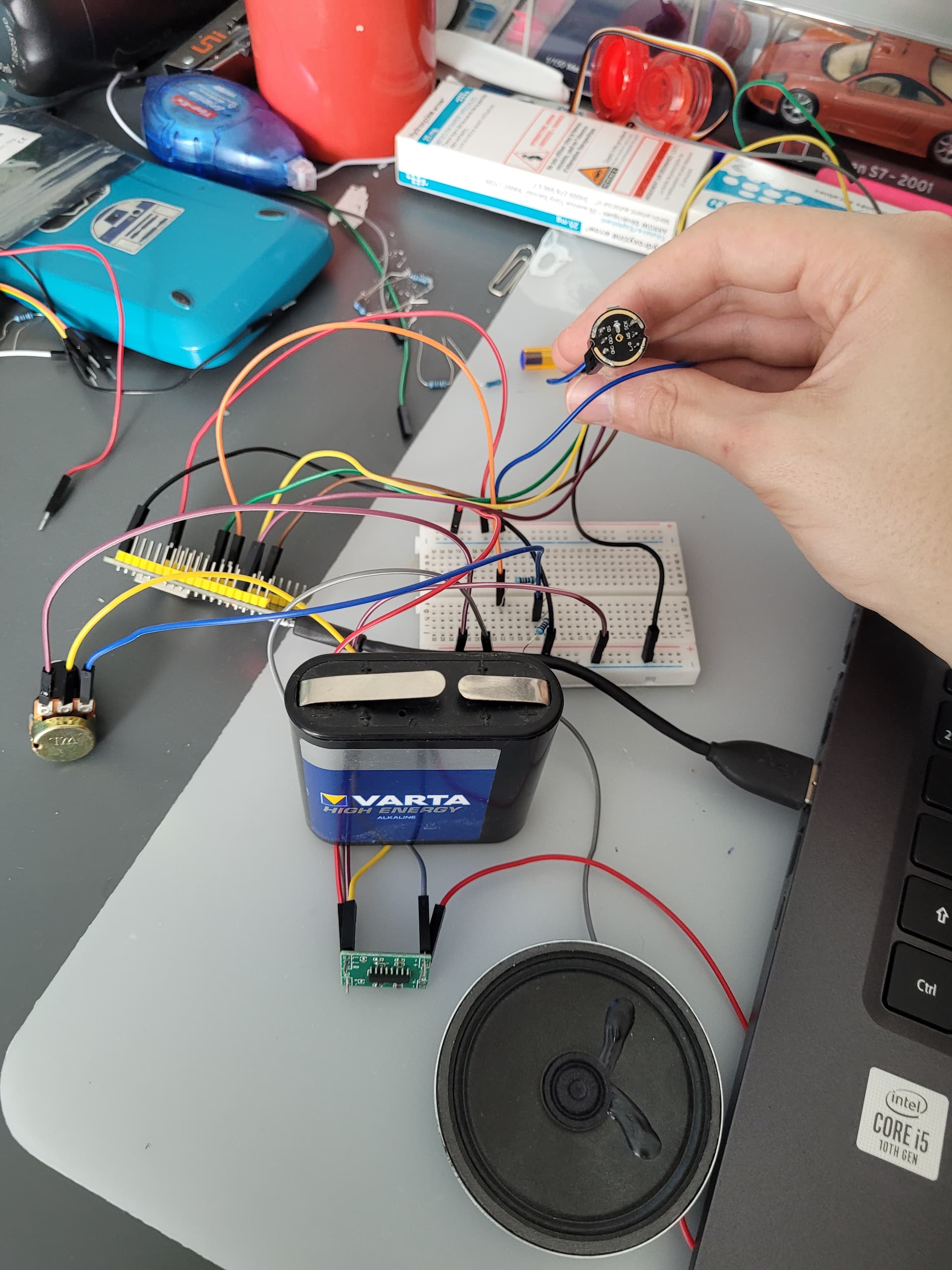
I am attaching a photo of the actual circuit, but this one being a bit messy that's why I sent a fritzing diagram for more clarity, especially since I haven't been able to solder my board yet PAM8403.
Also, it's great that you did that sine wave testing, but did you also use the opportunity to gauge the magnitude and correct digital representation in software? In other words, measure levels and devise a strategy for achieving the correct signal levels throughout the chain?
Electronic schematic. The one that nearly every electronic device that has ever been built on this planet, has. Fritzing diagrams don't add "clarity". Not by a long stretch of the imagination. I already commented on specific reasons why yours falls short of that.
If you really don't know what it is, please Google it.
Also it would be helpful to post the two test sketches that you used to independently verify the mike and speaker. Those could be compared with your combined code to perhaps yield some answers.
That is a spider web, not a schematic. Try again but first please research it. You've actually had 5 hours to do that already...
The importance is lessened somewhat if your speaker and mike test sketches work. But you should demonstrate how you used the data from those to establish the software pass-through. For example how you arrived at scale factors and so on. Lines like
int partieEntiere =(int)floor((sample+3276-1)/256); // convert to a 8-bit integer
are not self-explanatory. It says what but not how or why.
I'm sorry this is the type of schematic I found while googling. I'm new to the arduino world so I don't know all the terms yet and I apologise for that.
As for the lines of code mentioned, they come from the fact that the value contained in 'sample' is an integer between -3275 and +3275 and therefore since the DAC of the esp 32 only manages 8bit unsigned integers I wrote this line of code to be able to convert all the 'sample' integers into a number accepted by the DAC in order to have a good analogue output on my speakers.
I'm sorry this is the type of schematic I found while googling.
Really? Can you link to one? I rarely see any with lines crossing every which way. But if you've tested the hardware, we can move on and focus on the software part.
To do that, everyone here would like to see the two working sine wave sketches, so we can compare working and non-working approaches.
To be straightforward, this
int partieEntiere =(int)floor((sample+3276-1)/256); // convert to a 8-bit integer
seems a strange way to scale and translate the value. Have you tested it with sample quantities, separate from just audio listening, to see if it behaves the way you expect it to?
so what does the function floor() do ?
If you add 3275 to sample your range is 0 - 6552, and you divide by 256 ?
Just by the oddness of that number and your division, isn't it that sample is the full range signed 16-bit integer ?
so a value between -32768 & 32767 ? at least that would make sense. Otherwise if you want to reduce it down to an 8-bit integer, you should divide by 27 or so.
This is the only way I have found to make the conversion but there is the resut of the conversion based on a la 440 sound but I don't know how to do it better.
so a value between -32768 & 32767 ? at least that would make sense. Otherwise if you want to reduce it down to an 8-bit integer, you should divide by 27 or so.
int partieEntiere =(int)floor((sample/27));  // on convertit l'entier 'sample' en un entier compris entre 0 et 255 (pour le DAC)
    Serial.println(partieEntiere);
    dacWrite(25,partieEntiere);
I've tried with this, that's better but not good enough :
Forget all the fancy footwork. If your ADC value is a two's complement signed integer, and the DAC also takes a two's complement signed integer, all you have to do for scaling, is a simple signed division by a constant. Normally that constant would be the ratio of the input to the output numerical range, e.g. 32,768/256 = 128 if those are the input and output ranges.
This manipulation with floor() and such functions is seriously misguided and unnecessary.
well how about you actually do the conversion correctly.
I fully agree with that. But first let me get completely clear that somehow @boolean started adding 3276 as a mystery value where 32768 was meant, i mean you lost a digit.
But yes if the Input is a signed variable, the output should be as well and
The 8-bit output probably has to be unsigned (biased) since the ESP32 probably can't put-out negative voltages.
The Internet says the INMP441 is 24-bits and I assume that's signed. You probably need a "loud" sound to use all 24-bits so you'll have to figure-out the scaling.