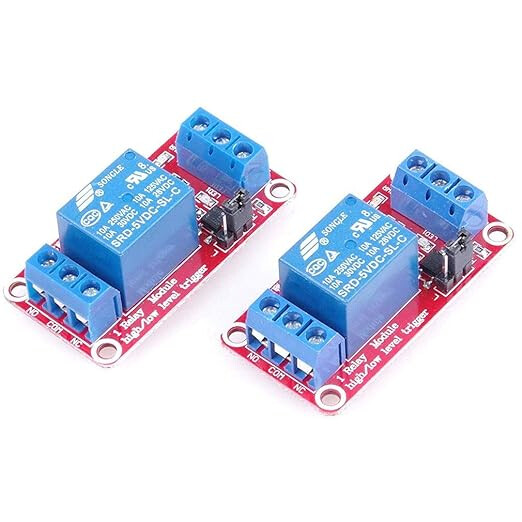
Hi, I am attempting to create a self watering plantpot which monitors soil moisture content, light and temperature, however when trying to add the waterpump to the rest of the circuit I am having issues as it will no longer run. With just the code below and without the relay and pump connected the circuit does the desired tasks. How do I add the waterpump and relay (which I can get to work on its own) to the rest of the circuitry, I have also used a secondary ps for the pump using 9v battery.
I think it may be a current issue as both circuits work when they are separate. Please see below code, and circuit schematic.

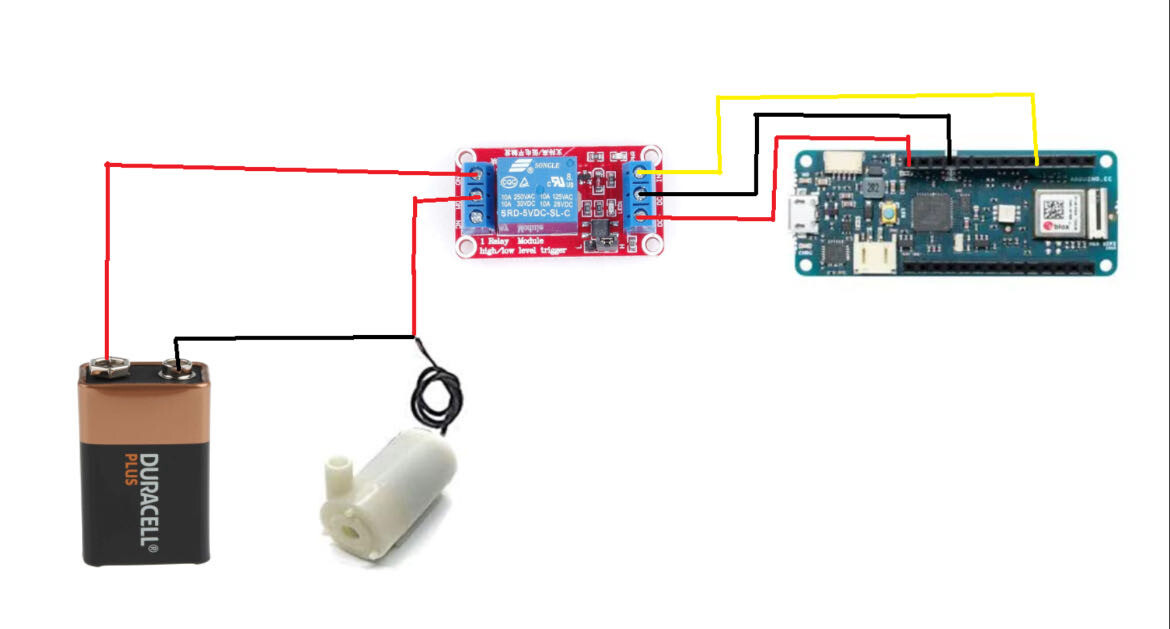
Here is the schematic for the relay and pump.
#define BLYNK_TEMPLATE_ID "TMPL5fmzE-Hpj"
#define BLYNK_TEMPLATE_NAME "Quickstart Template"
#define BLYNK_AUTH_TOKEN "xn54Yt1kZ8AX_7sozzQBeUZoEmolmOKR"
#define BLYNK_PRINT SerialUSB
#include <SPI.h>
#include <WiFiNINA.h>
#include <BlynkSimpleWiFiNINA.h>
#include <LiquidCrystal.h>

char ssid[] = "iPhone";
char pass[] = "password";

BlynkTimer timer;
BLYNK_WRITE(V0){
  digitalWrite(7, param.asInt());
}

LiquidCrystal LCD(0,1,2,3,4,5);
#define analogPin A2
#define beta 3950
#define resistance 10
int lightRead = 0;
int lightLevel;
int button=6;
int moistureSensor;
int moisturePercentage;
#define moisture A4


//const int buttonPin = 6;// Pushbutton pin;
const int redPin = 8;    // Red LED pin
const int greenPin = 10; // Green LED pin
const int bluePin = 9;   // Blue LED pin

int motorState = LOW;      // Motor state (OFF for default)
int lastButtonState = LOW; // Last state of the button
int currentButtonState;    // Current state of the button

const int pump_pin = 11;
/*unsigned long startTimeMotor = 0;
const unsigned long MotorRunTime = 5000;  // 5 seconds
unsigned long previousMillisMotor = 0;
*/
unsigned long startTimeMotor;
const unsigned long motorDuration = 5000;

//Arrays needed for trhe unhappy face on LCD screen
byte a[8] = {B00001,B00011,B00111,B01110,B11110,B11111,B11111,B11111};
byte b[8] = {B11111,B11111,B11111,B01110,B01110,B11111,B11111,B11111};
byte c[8] = {B10000,B11000,B11100,B01110,B01111,B11111,B11111,B11111};
byte d[8] = {B11011,B11000,B11100,B11110,B01111,B00111,B00011,B00001};
byte e[8] = {B11111,B00000,B00000,B00000,B00000,B11111,B11111,B11111};
byte f[8] = {B11011,B00011,B00111,B01111,B11110,B11100,B11000,B10000};
//Arrays needed for trhe happy face on LCD screen
byte g[8] = {B00001,B00011,B00111,B01110,B11100,B11111,B11111,B11111};
byte h[8] = {B11111,B11111,B11111,B01110,B00100,B11111,B11111,B11111};
byte i[8] = {B10000,B11000,B11100,B01110,B00111,B11111,B11111,B11111};
byte j[8] = {B11111,B11111,B11110,B11100,B01101,B00111,B00011,B00001};
byte k[8] = {B11111,B00000,B00000,B11111,B11111,B11111,B11111,B11111};
byte l[8] = {B11111,B11111,B01111,B00111,B10110,B11100,B11000,B10000};
//Array for small waterdrop
byte m[8] = {B00000,B00001,B00011,B00111,B01111,B11111,B11111,B01110};

void setup()
{
  Serial.begin(9600);
  LCD.begin(16,2);
  SerialUSB.begin(115200);
  Blynk.begin(BLYNK_AUTH_TOKEN, ssid, pass);

  LCD.print("  Initializing  ");
  for(int b = 5; b <= 10; b++){
    LCD.setCursor(b, 1);
    LCD.print(".");
    delay(500);
  }

  pinMode(redPin, OUTPUT);
  pinMode(greenPin, OUTPUT);
  pinMode(bluePin, OUTPUT);
  pinMode(pump_pin, OUTPUT); //Motor  pinMode(1, INPUT); //on/off switch
  pinMode(button, INPUT);
  pinMode(A2, INPUT); //Temp
  pinMode(A3, INPUT); //light
  pinMode(A4, INPUT); //moisture
  pinMode(7, OUTPUT);

  //startTimeMotor = millis();  // Record the starting time

  //code for lcd smileyface
  LCD.createChar(0, a);
  LCD.createChar(1, b);
  LCD.createChar(2, c);
  LCD.createChar(3, d);
  LCD.createChar(4, e);
  LCD.createChar(5, f);
  //code for lcd unhappyface
  LCD.createChar(6, g);
  LCD.createChar(7, h);
  LCD.createChar(8, i);
  LCD.createChar(9, j);
  LCD.createChar(10,k);
  LCD.createChar(11,l);
  //code for lcd raindrop
  LCD.createChar(12, m);

}

void loop()
{
  Blynk.run();
  //tempDegrees = (((tempRead-20) * 0.488)-40);//calculates degrees
  //tempDegrees = ((tempRead*5.0/1024.0)-0.5)*100.00;
  //read thermistor value
  long a = analogRead(analogPin);
  float tempC = beta / (log((1025.0 * 10 / a - 10) / 10) + beta / 298.0) - 300; //conversion for degrees in celsius
  Blynk.virtualWrite(V3, tempC);
  //LCD.setCursor(0, 0); // set the cursor to column 0, line 0
 // LCD.print("Temp: ");// Print a message of "Temp: "to the LCD.
  // Print a centigrade temperature to the LCD.
  //LCD.print(tempC);
  // Print the unit of the centigrade temperature to the LCD.
  //LCD.print(char(223));//print the unit" ℃ "
 // LCD.print("C");
  // (note: line 1 is the second row, since counting begins with 0):
  //delay(200); //wait for 100 milliseconds


  int moistureSensor = analogRead(moisture);
  moisturePercentage = map(moistureSensor,0,1023,100,0);
  Blynk.virtualWrite(V2, moisturePercentage);
  int lightRead = analogRead(A3);
  lightLevel = map(lightRead,1023,0,100,0);
 // lightLevel = (lightLevel - 100) * -1;
  Blynk.virtualWrite(V1, lightLevel);

  Serial.println("M =");
  Serial.println(moisturePercentage);
  Serial.println("L =");
  Serial.println(lightLevel);
  Serial.println("T =");
  Serial.println(tempC);
  delay(500);

  currentButtonState = digitalRead(button);
 if (currentButtonState == HIGH && lastButtonState == LOW)
  {
    //runMotor();
    Watering();
    digitalWrite(redPin, LOW);
    digitalWrite(greenPin, LOW);
    digitalWrite(bluePin, HIGH);
    //motorState = !motorState;  // Toggle the motor state on button press
  }
  //controlMotor();  // Call the function to control the motor
  lastButtonState = currentButtonState;


//=======This initial push button if statement^^^^ is breaking the millis and loop below!====
 /*
 if (digitalRead(button) == HIGH)
  {
    runMotor();
    Watering();
    digitalWrite(redPin, LOW);
    digitalWrite(greenPin, LOW);
    digitalWrite(bluePin, HIGH);
  }
  */
  unsigned long currentMillisLCD = millis();
 //if both moisture and light are low (out of water)
  if (moisturePercentage >=0 && lightLevel <=45){

    lightandmoisturebad();
    showvaluesbad();
    //runMotor();
    Watering();
    digitalWrite(redPin, LOW);
    digitalWrite(greenPin, LOW);
    digitalWrite(bluePin, HIGH);
     }

//if just light is low
else if(lightLevel <=45){
    lightbad();
    showvaluesbad();
  }
//if just moisture is too high (in water)
  else if(moisturePercentage <=80){
   digitalWrite(pump_pin, LOW);
   moisturebad();
   showvaluesbad();
   digitalWrite(redPin, HIGH);
   digitalWrite(greenPin, LOW);
   digitalWrite(bluePin, LOW);
   delay(1000);
  }
  else if(moisturePercentage >=0){ //when moisture too low

    showvaluesbad();
    //runMotor();
    Watering();
    LCD.setCursor(0,0);
    LCD.clear();
    LCD.print("Warning,Moisture");
    LCD.setCursor(0,1);
    LCD.print("Level Too LOW");
    digitalWrite(redPin, HIGH);
    digitalWrite(greenPin, LOW);
    digitalWrite(bluePin, LOW);
    delay(1000);
    }

  else if(moisturePercentage >=0 && lightLevel >=45){
    showvaluesgood();
    lightandmoisturegood();
 }

}

void lightandmoisturebad()
{
  LCD.setCursor(0,0);
  LCD.clear();
  LCD.print("Warning, light &");
  LCD.setCursor(0,1);
  LCD.print("soil bad!");
  delay(1000);

}

void lightandmoisturegood()
{
  LCD.setCursor(0,0);
  LCD.clear();
  LCD.print("light &");
  LCD.setCursor(0,1);
  LCD.print("soil good!");
  digitalWrite(8, LOW);
  digitalWrite(9, LOW);
  digitalWrite(10, HIGH);//Green RGB on
  delay(1000);
  LCD.clear();
}

void lightbad()
{
  digitalWrite(pump_pin, LOW);
  LCD.setCursor(0,0);
  LCD.clear();
  LCD.print("Warning, light");
  LCD.setCursor(0,1);
  LCD.print("level bad ");
  digitalWrite(8, HIGH); //Red RGB on
  digitalWrite(9, LOW);
  digitalWrite(10, LOW);
  delay(1000);
}

void moisturebad()
{
  LCD.setCursor(0,0);
  LCD.clear();
  LCD.print("Warning, soil");
  LCD.setCursor(0,1);
  LCD.print("moisture bad ");
  digitalWrite(8, HIGH); //Red RGB on
  digitalWrite(9, LOW);
  digitalWrite(10, LOW);
  delay(1000);
}

void showvaluesgood()
{
  int moistureSensor = analogRead(moisture);
  moisturePercentage = map(moistureSensor,0,1023,100,0);
  int lightRead = analogRead(A3);
  lightLevel = map(lightRead,1023,0,100,0);
  long a = analogRead(analogPin);
  float tempC = beta / (log((1025.0 * 10 / a - 10) / 10) + beta / 298.0) - 300; //conversion for degrees in celsius
  LCD.setCursor(0,0);
  LCD.clear();
  LCD.print("M=");
  LCD.print(moisturePercentage);
  LCD.setCursor(7,0);
  LCD.print("L=");
  LCD.print(lightLevel);
  LCD.setCursor(0,1);
  LCD.print("T=");
  LCD.print(tempC);
  LCD.print(char(223));
  LCD.print("C");

  //lcd smiley face for good values
  LCD.setCursor(13, 0);
  LCD.write(byte(0));
  LCD.setCursor(14, 0);
  LCD.write(byte(1));
  LCD.setCursor(15, 0);
  LCD.write(byte(2));
  LCD.setCursor(13, 1);
  LCD.write(byte(3));
  LCD.setCursor(14, 1);
  LCD.write(byte(4));
  LCD.setCursor(15, 1);
  LCD.write(byte(5));
  delay(1000);
  LCD.clear();
}

void showvaluesbad()
{
  int moistureSensor = analogRead(moisture);
  moisturePercentage = map(moistureSensor,0,1023,100,0);
  int lightRead = analogRead(A3);
  lightLevel = map(lightRead,1023,0,100,0);
  long a = analogRead(analogPin);
  float tempC = beta / (log((1025.0 * 10 / a - 10) / 10) + beta / 298.0) - 300; //conversion for degrees in celsius
  LCD.setCursor(0,0);
  LCD.clear();
  LCD.print("M=");
  LCD.print(moisturePercentage);
  LCD.setCursor(7,0);
  LCD.print("L=");
  LCD.print(lightLevel);
  LCD.setCursor(0,1);
  LCD.print("T=");
  LCD.print(tempC);
  LCD.print(char(223));
  LCD.print("C");

  //lcd unhappy face for badvalue/s
  LCD.setCursor(13, 0);
  LCD.write(byte(6));
  LCD.setCursor(14, 0);
  LCD.write(byte(7));
  LCD.setCursor(15, 0);
  LCD.write(byte(8));
  LCD.setCursor(13, 1);
  LCD.write(byte(9));
  LCD.setCursor(14, 1);
  LCD.write(byte(10));
  LCD.setCursor(15, 1);
  LCD.write(byte(11));
  delay(1500);
  //LCD.clear();
}


void Watering()
{
  LCD.setCursor(0,0);
  LCD.clear();
  LCD.print("Watering: ");
  digitalWrite(pump_pin, HIGH);
  LCD.setCursor(11, 0);
  LCD.write(byte(12));
  LCD.setCursor(10, 1);
  LCD.write(byte(12));
  LCD.setCursor(13, 0);
  LCD.write(byte(12));
  LCD.setCursor(12, 1);
  LCD.write(byte(12));
  LCD.setCursor(15, 0);
  LCD.write(byte(12));
  LCD.setCursor(14, 1);
  LCD.write(byte(12));
  digitalWrite(8, LOW);
  digitalWrite(9, HIGH);
  digitalWrite(10, LOW);
  delay(5000);
  digitalWrite(pump_pin, LOW);

}
/*
void runMotor() {
  unsigned long currentTimeMotor = millis();
  unsigned long elapsedTimeMotor = currentTimeMotor - startTimeMotor;
  // Check if 5 seconds have passed
  if (elapsedTimeMotor < motorDuration) {
    // Turn the motor on
    digitalWrite(pump_pin, HIGH);
    digitalWrite(redPin, LOW);
    digitalWrite(greenPin, LOW);
    digitalWrite(bluePin, HIGH);

  } else {
    // Turn the motor off after 5 seconds
    digitalWrite(pump_pin, LOW);
    digitalWrite(redPin, LOW);
    digitalWrite(greenPin, LOW);
    digitalWrite(bluePin, LOW);

    // Reset the start time for the next cycle
    startTimeMotor = millis();
  }
}
void controlMotor(){
  if (motorState == HIGH) {
    // Motor control code for when the button is pressed (Start)
    digitalWrite(pump_pin, HIGH);
    LCD.setCursor(0,0);
    LCD.print("Watering");
    for (int a = 8; a <= 12; a++) //LCD Cursor 8-12
  {
    LCD.setCursor(0,0);
    LCD.print("Watering");
    LCD.setCursor(a, 0);
    LCD.print(".");
    delay(1000);
  }

  LCD.clear();
  } else {
    // Motor control code for when the button is not pressed (stop)
    digitalWrite(pump_pin, LOW);
  }
}
*/