Hello together,
iam new in the Arduino worl. Maybe you can help me to create a smal code. The target is to send the Lux Value from the veml6030 wich is conected with i2c to the rp2350-eth via UDP Ethernet to a UDP Server wich is running on a PC. I try a bit and i can already see the LUX value from the veml6030 in the Serial monitor. But iam not able to send the UDP Telegramm. I look with wireshark but there are no data to see. I use the Configuration tool from Waveshare to configure the CH9120.
#include <Wire.h>
#include "SparkFun_VEML6030_Ambient_Light_Sensor.h"

#include <Ethernet.h>
#include <EthernetUdp.h>

#define AL_ADDR 0x48

#define ETH Serial1  // oder Serial2 je nach Board
#define BAUD_RATE 115200


SparkFun_Ambient_Light light(AL_ADDR);

// Possible values: .125, .25, 1, 2
// Both .125 and .25 should be used in most cases except darker rooms.
// A gain of 2 should only be used if the sensor will be covered by a dark
// glass.
float gain = .25;

// Possible integration times in milliseconds: 800, 400, 200, 100, 50, 25
// Higher times give higher resolutions and should be used in darker light.
int integationtime = 100;
long luxVal = 0;

void setup(){
  Wire.setSDA(0);
  Wire.setSCL(1);
  Wire.begin();

  Serial.begin(115200);
  Serial1.begin(115200);

  ETH.begin(9600);

  Serial.println("UDP Test gestartet");


  if(light.begin())
    Serial.println("Ready to sense some light!");
  else
    Serial.println("Could not communicate with the sensor!");

  // Again the gain and integration times determine the resolution of the lux
  // value, and give different ranges of possible light readings. Check out
  // hoookup guide for more info.
  light.setGain(gain);
  //light.setIntegTime(time);

  Serial.println("Reading settings...");
  Serial.print("Gain: ");
  float gainVal = light.readGain();
  Serial.print(gainVal, 3);
  Serial.print(" Integration Time: ");
  int timeVal = light.readIntegTime();
  Serial.println(timeVal);
}

void loop(){

  luxVal = light.readLight();
  Serial.print("Ambient Light Reading: ");
  Serial.print(luxVal);
  Serial.println(" Lux");


  ETH.println("Patrick_Test");

  delay(100);


}
Hello Horace,
First of all, thank you very much for your code. I'm trying it out right now, but no packets are arriving yet. Can you send me a snipping of the Net Module Configure? Is there anything else I need to consider with the gateway if I have a direct connection between my laptop and the RP2350-ETH? Thank you very much!
the UDP Server is simply waiting for datagrams
as UDP is connectionless there tends to be little difference in UDP servers and clients in that either can transmit or receive datagrams depending on application requirements
if I set the Net module configure the UDP Client the PC <> RP2350 communication works just the same as with UDP Server
do you use also the generic RP2040 library? Maybe my Hardware is damaged I ordered a new RP2350-ETH. I find out that i should select "new Line" on the right site on the serial monitor. Thanks for youre support
the code of post 2 did not use any libraries - I just communicated with the RPi RP2350 CH9120 using the Serial2 interface transmitting and receiving UDP datagrams using IP/port parameters set up by the CH9120 Network Module configuration program
the Ethernet library is designed to work with W5100/W5200/W5500-based devices, EthernetENC with ENC28J60 devices, etc, not with a CH9120 which has a UART interface
the Waveshare ESP32-S3 ETH Development Board has an onboard W5500 which I have tested in the past using the EthernetESP32 library with a ESP32-S3-DevKitC-1 dev board
just to be shure, when i using the same software as you postet it should work. Thats why i ask that you using the RP2350-ETH Hardware too? Which hardware do you use in youre test?
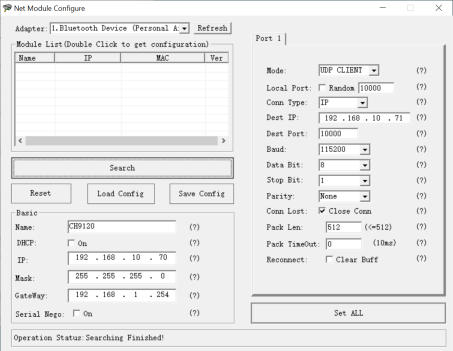
I used a RP2350-ETH module (configured using Net Module Configure as shown in screen dump post 4) connected to a router via Ethernet cable
I ran Packet Sender (see screen dump in post 2) on a PC which was connected to the router via WiFi
also ran Arduino IDE connected to USB port of RP2350-ETH (IDE serial output shown in post 2)
text entered on IDE Serial monitor was sent via the RP2350-ETH to Packet Sender and appeared on the log
when Send button on Packet Sender was hit the ASCII/HEX data was sent to the RP2350-ETH and appeared on the IDE serial monitor
Can you make a final Test with a direkt Connection Like in my Setup? Maybe there ist Sonnenproblem. When do you have the Same effect incan save a Lot of time. Yore Support i really great
using normal Ethernet connection configure the RP2350 using Net Module Configure program - note same subnet as PC static address above, e.g. it's IP is 192.168.10.70 target UDP IP is 192.168.10.71
given up on the RP2350-ETH and consigned it to the junk box
have a look at the Waveshare ESP32-S3 ETH Development Board
it has onboard W5500 ethernet module so works with libraries such as EthernetESP32, EthernetUdp, WebServer, ESPmDNS, etc
implemented webserver, UDPchat (including direct connection),etc without problems
it also support POE
in addition the ESP32-S3 has onboard WiFi and BLE
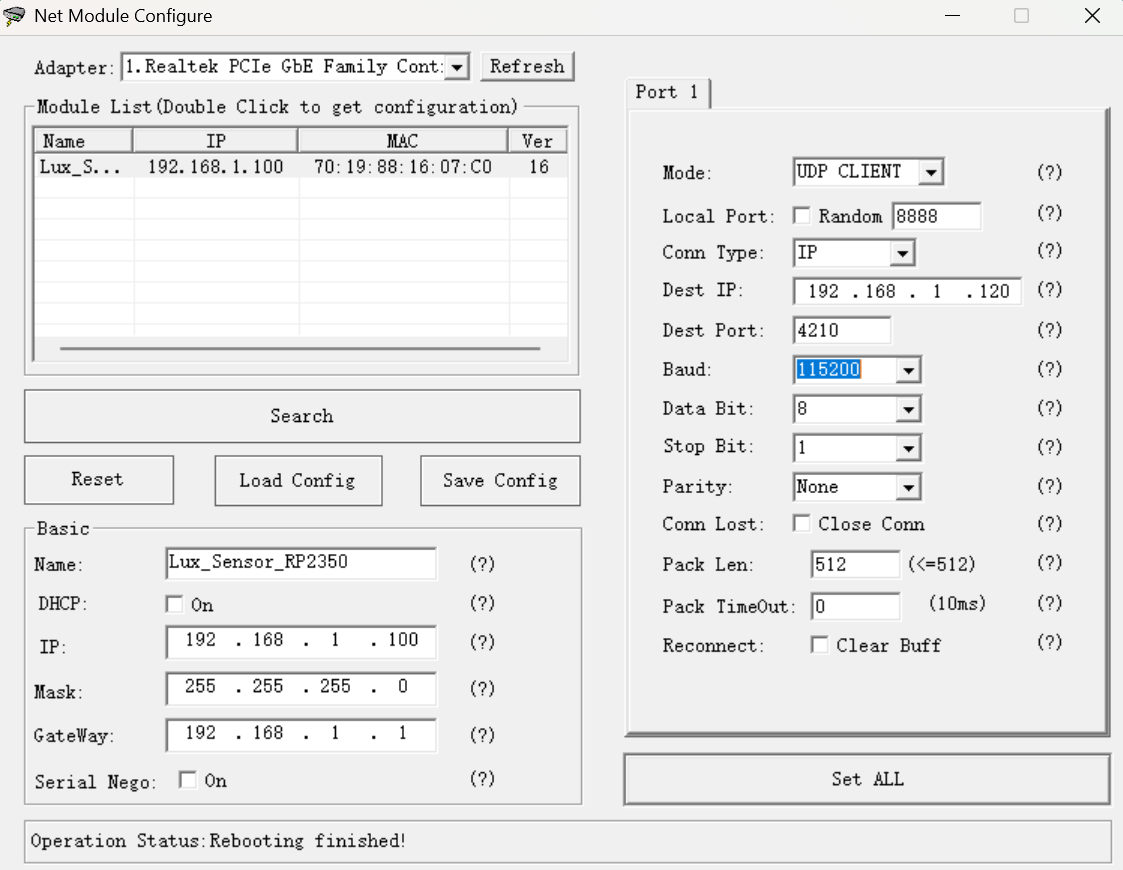


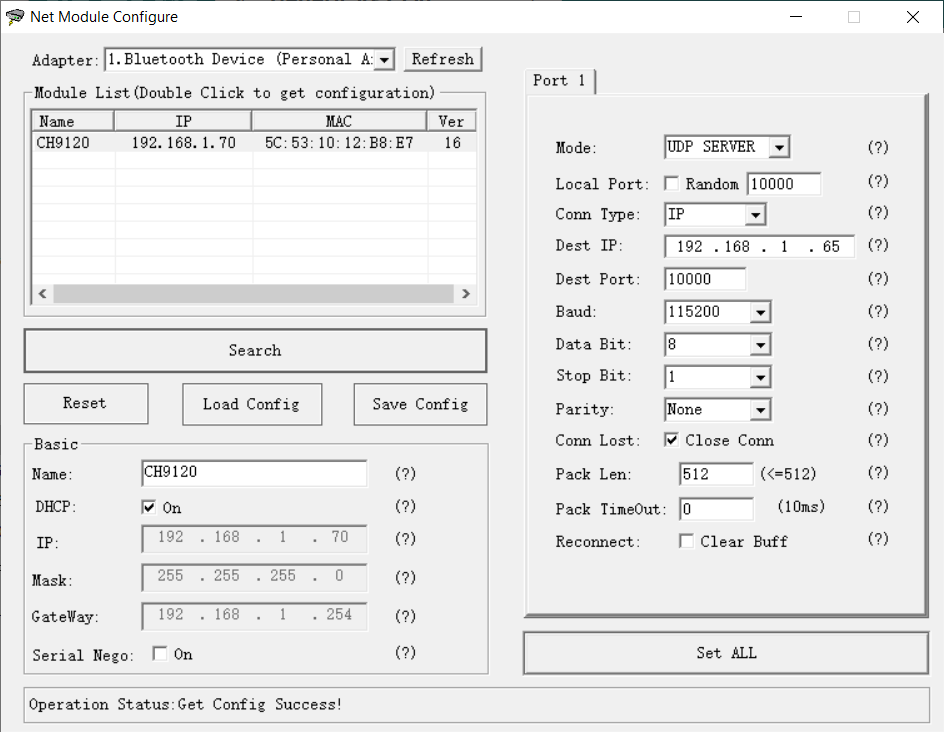


 I ordered a new RP2350-ETH. I find out that i should select "new Line" on the right site on the serial monitor. Thanks for youre support