Weatherstation with SD-card

Hello all,

I am making a weather station with a BME-280 sensor and a data logging shield with an SD card.
The operation is correct, only when I open the values in Excel the values jump.
I can't get it fine tuned.
I have tried several things but without success.
Is there anyone who can help me a little bit, haven't been working with Arduino that long.
I also attached a screenshot of the Excel.

With regards Robert

//Weerstation met datalogging en klok

#include "SD.h" // voor de SD kaart
#include <Adafruit_Sensor.h>  //voor de sensor
#include <Adafruit_BME280.h>  //voor de BME280
#include <Wire.h> //onbekend
#include <RTClib.h> //voor de RTC-clock

Adafruit_BME280 bme; // I2C
File myFile;  //Maak een file voor de gegevens op te slaan
RTC_DS1307 rtc;  // Real Time Clock
const int chipSelect = 10;  //SD-kaartlezer op pin 10

void setup() {
  Serial.begin(9600); //initialiseren Serial Monitor
  while(!Serial); //Tijd voor serial te laten starten
  Serial.println(F("BME280 test"));
  signed status;
  status = bme.begin(0x76);
  if (!status) {
        Serial.println("Could not find a valid BME280 sensor, check wiring, address, sensor ID!");
        Serial.print("SensorID was: 0x"); Serial.println(bme.sensorID(),16);
        Serial.print("        ID of 0xFF probably means a bad address, a BMP 180 or BMP 085\n");
        Serial.print("   ID of 0x56-0x58 represents a BMP 280,\n");
        Serial.print("        ID of 0x60 represents a BME 280.\n");
        Serial.print("        ID of 0x61 represents a BME 680.\n");
        while (1) delay(10);
    }
      
        Serial.println("-- Standaard Test --");
        delay(3000);
    
        Serial.println();

      if(!rtc.begin()) {                          //RTC initialisren
        Serial.println("Kan geen RTC vinden");
        while (1);
      }
      else {
        rtc.adjust(DateTime(F(__DATE__),  F(__TIME__)));  //Compileren van datum en tijd in de sketch
      }
      if(! rtc.isrunning()) {
        Serial.println("RTC start niet!");
      }
    Serial.print("Initialiseren SD card..."); //Setup voor de SD-kaart
    if(!SD.begin(chipSelect)) {
      Serial.println("Initialiseren mislukt!");
      return;
    }
    Serial.println("Initialiseren gelukt");

    myFile=SD.open("DATA.txt", FILE_WRITE); //Openen van de DATA-file
    if (myFile) {
    Serial.println("File geopend ok");  //Print de gegevens voor de data
    myFile.println("Datum, Tijd, Temperatuur ˚C, Luchtdruk Hpa, Luchtvochtigheid %");
    }
  myFile.close();
}

void loggingTime()  {
  DateTime  now = rtc.now();
  myFile=SD.open("DATA.txt",  FILE_WRITE);
  if (myFile) {
    myFile.print(now.year(),    DEC);
    myFile.print('/');
    myFile.print(now.month(),    DEC);
    myFile.print('/');
    myFile.print(now.day(),    DEC);
    myFile.print("\t");
    myFile.print(now.hour(),   DEC);
    myFile.print(':');
    myFile.print(now.minute(),   DEC);
    myFile.print(':');
    myFile.println(now.second(),   DEC);


  }
   
    Serial.print(now.year(),  DEC);
    Serial.print('/');
    Serial.print(now.month(),   DEC);
    Serial.print('/');
    Serial.println(now.day(),   DEC);
    Serial.print(now.hour(),    DEC);
    Serial.print(':');
    Serial.print(now.minute(),    DEC);
    Serial.print(':');
    Serial.print(now.second(),    DEC);
    myFile.close();
    delay(1000);
   }

void loggingBME280() {
  myFile=SD.open("DATA.txt", FILE_WRITE);
  if (myFile) {
    Serial.println("SD geopend met succes");
    myFile.print("\t");
    myFile.print("\t");
    myFile.print(bme.readTemperature());
    myFile.print("\t");
    myFile.print(bme.readPressure() / 100.0F);
    myFile.print("\t");
    myFile.println(bme.readHumidity());
    //myFile.print("\t");
  }
    Serial.print("Temperatuur = ");
    Serial.print(bme.readTemperature());
    Serial.println(" °C");
    Serial.print("Luchtdruk = ");
    Serial.print(bme.readPressure() / 100.0F);
    Serial.println(" hPa");
    Serial.print("Luchtvochtigheid = ");
    Serial.print(bme.readHumidity());
    Serial.println(" %");
    Serial.println();

  myFile.close();
  delay(1000);
}

void loop() {
  loggingTime();
  loggingBME280();
  delay(5000);

}

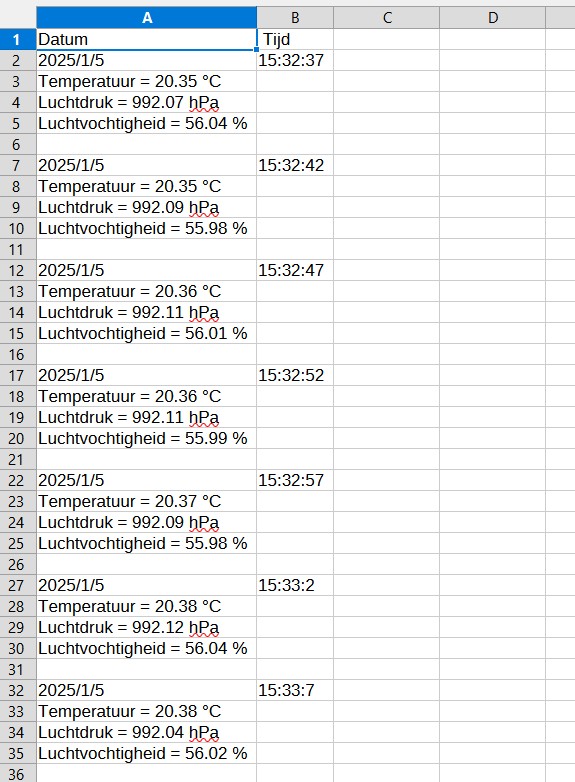
What do you mean ‘jump’ ?

Any reason why you're doing a println rather than a print after the time?

Have you opened the file in a text editor so see what the data actually looks like?

Your code prints the following to the file:

  • the date followed by a tab
  • the time followed by a new line
  • two tabs, followed by the temperature
  • a tab, followed by the pressure
  • a tab, followed by the relative humidity
  • a new line

So the file would look something like this:

date<TAB>time<NEWLINE>
<TAB><TAB>temperature<TAB>pressure<TAB>humidity<NEWLINE>

Which is reflected in how Excel displays it.

To get the date, time, and measurements all on one line, consider something like the following:

//Weerstation met datalogging en klok

#include "SD.h"               // voor de SD kaart
#include <Adafruit_Sensor.h>  //voor de sensor
#include <Adafruit_BME280.h>  //voor de BME280
#include <Wire.h>             //onbekend
#include <RTClib.h>           //voor de RTC-clock

Adafruit_BME280 bme;        // I2C
File myFile;                //Maak een file voor de gegevens op te slaan
RTC_DS1307 rtc;             // Real Time Clock
const int chipSelect = 10;  //SD-kaartlezer op pin 10

void setup() {
   Serial.begin(9600);  //initialiseren Serial Monitor
   while( !Serial )
      ;  //Tijd voor serial te laten starten
   Serial.println(F("BME280 test"));
   signed status;
   status = bme.begin(0x76);
   if( !status ) {
      Serial.println("Could not find a valid BME280 sensor, check wiring, address, sensor ID!");
      Serial.print("SensorID was: 0x");
      Serial.println(bme.sensorID(), 16);
      Serial.print("        ID of 0xFF probably means a bad address, a BMP 180 or BMP 085\n");
      Serial.print("   ID of 0x56-0x58 represents a BMP 280,\n");
      Serial.print("        ID of 0x60 represents a BME 280.\n");
      Serial.print("        ID of 0x61 represents a BME 680.\n");
      while( 1) delay(10 );
   }

   Serial.println("-- Standaard Test --");
   delay(3000);

   Serial.println();

   if( !rtc.begin() ) {  //RTC initialisren
      Serial.println("Kan geen RTC vinden");
      while( 1 )
         ;
   } else {
      rtc.adjust(DateTime(F(__DATE__), F(__TIME__)));  //Compileren van datum en tijd in de sketch
   }
   if( !rtc.isrunning() ) {
      Serial.println("RTC start niet!");
   }
   Serial.print("Initialiseren SD card...");  //Setup voor de SD-kaart
   if( !SD.begin(chipSelect) ) {
      Serial.println("Initialiseren mislukt!");
      return;
   }
   Serial.println("Initialiseren gelukt");

   myFile = SD.open("DATA.txt", FILE_WRITE);  //Openen van de DATA-file
   if( myFile ) {
      Serial.println("File geopend ok");  //Print de gegevens voor de data
      myFile.println("Datum, Tijd, Temperatuur ˚C, Luchtdruk Hpa, Luchtvochtigheid %");
   }
   myFile.close();
}

void loggingTime() {
   DateTime now = rtc.now();
   myFile.print(now.year(), DEC);
   myFile.print('/');
   myFile.print(now.month(), DEC);
   myFile.print('/');
   myFile.print(now.day(), DEC);
   myFile.print('\t');
   myFile.print(now.hour(), DEC);
   myFile.print(':');
   myFile.print(now.minute(), DEC);
   myFile.print(':');
   myFile.print(now.second(), DEC);
   myFile.print('\t');

   Serial.print(now.year(), DEC);
   Serial.print('/');
   Serial.print(now.month(), DEC);
   Serial.print('/');
   Serial.println(now.day(), DEC);
   Serial.print(now.hour(), DEC);
   Serial.print(':');
   Serial.print(now.minute(), DEC);
   Serial.print(':');
   Serial.println(now.second(), DEC);
}

void loggingBME280() {
   myFile.print(bme.readTemperature());
   myFile.print('\t');
   myFile.print(bme.readPressure() / 100.0F);
   myFile.print('\t');
   myFile.println(bme.readHumidity());
   
   Serial.print("Temperatuur = ");
   Serial.print(bme.readTemperature());
   Serial.println(" °C");
   Serial.print("Luchtdruk = ");
   Serial.print(bme.readPressure() / 100.0F);
   Serial.println(" hPa");
   Serial.print("Luchtvochtigheid = ");
   Serial.print(bme.readHumidity());
   Serial.println(" %");
   Serial.println();
}

void loop() {
   myFile = SD.open("DATA.txt", FILE_WRITE);
   if( myFile ) {
      Serial.println("SD geopend met succes");
      loggingTime();
      loggingBME280();
      myFile.close();
   }
   delay(7000);
}

That ought to put each timestamp and set of measurements all on one line. Untested, no warranty is expressed or implied, use at your own risk, etc. etc.

Sorry for my English, which is not too good.
In the 2 left columns are the time and date.
In the columns to the right of these are the values of the sensor.
As you can see, these are staggered.
I want to keep these on 1 line.

Read post#3

Hello David,

In the text editor it is the same as in Excel.
They are all shuffled

Been working this morning to get it on 1 line, but failed despite your efforts, my harateful thanks for that.
But did learn something that “myFile=SD.open(”DATA.txt“, FILE_WRITE);” was in there 2 times.
In LoggingTime and LoggingBME280.
Just a question about that anyway: Is this also called 2x?
I just added a screenshot as it is now in Excel, and I can live with that for now.
I will not go on with it too long otherwise frustration will set in.
I will continue to fiddle with it this week.

It's a Tab Separated Variable string terminated with a newline.
Date TAB Time TAB Temp TAB Pressure TAB Humidity NEWLINE

Edit: I will guess your last code was
Date TAB Time NEWLINE Temp NEWLINE Pressure NEWLINE Humidity NEWLINE

Hello Tim,
This is the last code see below here:
Should I insert a TAB instead of a comma, in this line myFile.println("Datum, Tijd");

//Weerstation met datalogging en klok

#include "SD.h" // voor de SD kaart
#include <Adafruit_Sensor.h>  //voor de sensor
#include <Adafruit_BME280.h>  //voor de BME280
#include <Wire.h> //onbekend
#include <RTClib.h> //voor de RTC-clock

Adafruit_BME280 bme; // I2C
File myFile;  //Maak een file voor de gegevens op te slaan
RTC_DS1307 rtc;  // Real Time Clock
const int chipSelect = 10;  //SD-kaartlezer op pin 10

void setup() {
  Serial.begin(9600); //initialiseren Serial Monitor
  while(!Serial); //Tijd voor serial te laten starten
  Serial.println(F("BME280 test"));
  signed status;
  status = bme.begin(0x76);
  if (!status) {
        Serial.println("Could not find a valid BME280 sensor, check wiring, address, sensor ID!");
        Serial.print("SensorID was: 0x"); Serial.println(bme.sensorID(),16);
        Serial.print("        ID of 0xFF probably means a bad address, a BMP 180 or BMP 085\n");
        Serial.print("   ID of 0x56-0x58 represents a BMP 280,\n");
        Serial.print("        ID of 0x60 represents a BME 280.\n");
        Serial.print("        ID of 0x61 represents a BME 680.\n");
        while (1) delay(10);
    }
      
        Serial.println("-- Standaard Test --");
        delay(3000);
    
        Serial.println();

      if(!rtc.begin()) {                          //RTC initialisren
        Serial.println("Kan geen RTC vinden");
        while (1);
      }
      else {
        rtc.adjust(DateTime(F(__DATE__),  F(__TIME__)));  //Compileren van datum en tijd in de sketch
      }
      if(! rtc.isrunning()) {
        Serial.println("RTC start niet!");
      }
    Serial.print("Initialiseren SD card..."); //Setup voor de SD-kaart
    if(!SD.begin(chipSelect)) {
      Serial.println("Initialiseren mislukt!");
      return;
    }
    Serial.println("Initialiseren gelukt");

    myFile=SD.open("DATA.txt", FILE_WRITE); //Openen van de DATA-file
    if (myFile) {
    Serial.println("File geopend ok");  //Print de gegevens voor de data
    myFile.println("Datum, Tijd");
    
    }

  myFile.close();
}

void loggingTime()  {
    DateTime  now = rtc.now();
    myFile.print(now.year(),    DEC);
    myFile.print('/');
    myFile.print(now.month(),    DEC);
    myFile.print('/');
    myFile.print(now.day(),    DEC);
    myFile.print("\t");
    myFile.print(now.hour(),   DEC);
    myFile.print(':');
    myFile.print(now.minute(),   DEC);
    myFile.print(':');
    myFile.println(now.second(),   DEC);
   
    Serial.print(now.year(),  DEC);
    Serial.print('/');
    Serial.print(now.month(),   DEC);
    Serial.print('/');
    Serial.println(now.day(),   DEC);
    Serial.print(now.hour(),    DEC);
    Serial.print(':');
    Serial.print(now.minute(),    DEC);
    Serial.print(':');
    Serial.print(now.second(),    DEC);
      
  }

void loggingBME280() {
    myFile.print("Temperatuur = ");
    myFile.print(bme.readTemperature());
    myFile.println(" °C");
    myFile.print("Luchtdruk = ");
    myFile.print(bme.readPressure() / 100.0F);
    myFile.println(" hPa");
    myFile.print("Luchtvochtigheid = ");
    myFile.print(bme.readHumidity());
    myFile.println(" %");
    myFile.println();

    Serial.print("Temperatuur = ");
    Serial.print(bme.readTemperature());
    Serial.println(" °C");
    Serial.print("Luchtdruk = ");
    Serial.print(bme.readPressure() / 100.0F);
    Serial.println(" hPa");
    Serial.print("Luchtvochtigheid = ");
    Serial.print(bme.readHumidity());
    Serial.println(" %");
    Serial.println();
}

void loop() {
  myFile=SD.open("DATA.txt",  FILE_WRITE);
  if (myFile) {
    Serial.println("SD geopend met succes");
    loggingTime();
    loggingBME280();
    myFile.close();
}
    delay(5000);

}

This is what I would use. I separated the tabs and newline so you can see where they need to be.

// date
    myFile.print(now.year(),    DEC);
    myFile.print('/');
    myFile.print(now.month(),    DEC);
    myFile.print('/');
    myFile.print(now.day(),    DEC);

// tab
    myFile.print("\t");

// time
    myFile.print(now.hour(),   DEC);
    myFile.print(':');
    myFile.print(now.minute(),   DEC);
    myFile.print(':');
    myFile.print(now.second(),   DEC);

// tab
    myFile.print("\t");

// temp
    myFile.print("Temperatuur = ");
    myFile.print(bme.readTemperature());
    myFile.print(" °C");

// tab
    myFile.print("\t");

// pressure
    myFile.print("Luchtdruk = ");
    myFile.print(bme.readPressure() / 100.0F);
    myFile.print(" hPa");

// tab
    myFile.print("\t");

// humidity
    myFile.print("Luchtvochtigheid = ");
    myFile.print(bme.readHumidity());
    myFile.print(" %");

// newline
    myFile.println();

It worked, at least the way I want it to.
I brought the 2x log file in the loop and in the program to 1 with “loggingData” with the necessary tabb 's.
I didn't know this was so critical in the arduino language.
I briefly added the images of the program and the excel.
Thanks for thinking with me, and is hereby solved.

Regards Robert

//Weerstation met datalogging en klok

#include "SD.h" // voor de SD kaart
#include <Adafruit_Sensor.h>  //voor de sensor
#include <Adafruit_BME280.h>  //voor de BME280
#include <Wire.h> //onbekend
#include <RTClib.h> //voor de RTC-clock

Adafruit_BME280 bme; // I2C
File myFile;  //Maak een file voor de gegevens op te slaan
RTC_DS1307 rtc;  // Real Time Clock
const int chipSelect = 10;  //SD-kaartlezer op pin 10

void setup() {
  Serial.begin(9600); //initialiseren Serial Monitor
  while(!Serial); //Tijd voor serial te laten starten
  Serial.println(F("BME280 test"));
  signed status;
  status = bme.begin(0x76);
  if (!status) {
        Serial.println("Could not find a valid BME280 sensor, check wiring, address, sensor ID!");
        Serial.print("SensorID was: 0x"); Serial.println(bme.sensorID(),16);
        Serial.print("        ID of 0xFF probably means a bad address, a BMP 180 or BMP 085\n");
        Serial.print("   ID of 0x56-0x58 represents a BMP 280,\n");
        Serial.print("        ID of 0x60 represents a BME 280.\n");
        Serial.print("        ID of 0x61 represents a BME 680.\n");
        while (1) delay(10);
    }
      
        Serial.println("-- Standaard Test --");
        delay(3000);
    
        Serial.println();

      if(!rtc.begin()) {                          //RTC initialisren
        Serial.println("Kan geen RTC vinden");
        while (1);
      }
      else {
        rtc.adjust(DateTime(F(__DATE__),  F(__TIME__)));  //Compileren van datum en tijd in de sketch
      }
      if(! rtc.isrunning()) {
        Serial.println("RTC start niet!");
      }
    Serial.print("Initialiseren SD card..."); //Setup voor de SD-kaart
    if(!SD.begin(chipSelect)) {
      Serial.println("Initialiseren mislukt!");
      return;
    }
    Serial.println("Initialiseren gelukt");

    myFile=SD.open("DATA.txt", FILE_WRITE); //Openen van de DATA-file
    if (myFile) {
    Serial.println("File geopend ok");  //Print de gegevens voor de data
    myFile.println("Datum, Tijd, Temperatuur ˚C, Luchtdruk Hpa, Luchtvochtigheid %");
    
    }

  myFile.close();
}

void loggingData()  {
    DateTime  now = rtc.now();
    
    //date
    myFile.print(now.year(),    DEC);
    myFile.print('/');
    myFile.print(now.month(),    DEC);
    myFile.print('/');
    myFile.print(now.day(),    DEC);
    
    //tab
    myFile.print("\t");
    
    //time
    myFile.print(now.hour(),   DEC);
    myFile.print(':');
    myFile.print(now.minute(),   DEC);
    myFile.print(':');
    myFile.print(now.second(),   DEC);

   
    Serial.print(now.year(),  DEC);
    Serial.print('/');
    Serial.print(now.month(),   DEC);
    Serial.print('/');
    Serial.println(now.day(),   DEC);
    Serial.print(now.hour(),    DEC);
    Serial.print(':');
    Serial.print(now.minute(),    DEC);
    Serial.print(':');
    Serial.print(now.second(),    DEC);
    Serial.println();
      
    //tab
    myFile.print("\t");
    
    //temp
    myFile.print(bme.readTemperature());
    
    //tab
    myFile.print("\t");
    
    //pressure
    myFile.print(bme.readPressure() / 100.0F);
    
    //tab
    myFile.print("\t");
    
    //humidity
    myFile.println(bme.readHumidity());
    
    Serial.print("Temperatuur = ");
    Serial.print(bme.readTemperature());
    Serial.println(" °C");
    Serial.print("Luchtdruk = ");
    Serial.print(bme.readPressure() / 100.0F);
    Serial.println(" hPa");
    Serial.print("Luchtvochtigheid = ");
    Serial.print(bme.readHumidity());
    Serial.println(" %");
    Serial.println();
}

void loop() {
  myFile=SD.open("DATA.txt",  FILE_WRITE);
  if (myFile) {
    Serial.println("SD geopend met succes");
    loggingData();
    myFile.close();
}
    delay(5000);

}

This topic was automatically closed 180 days after the last reply. New replies are no longer allowed.