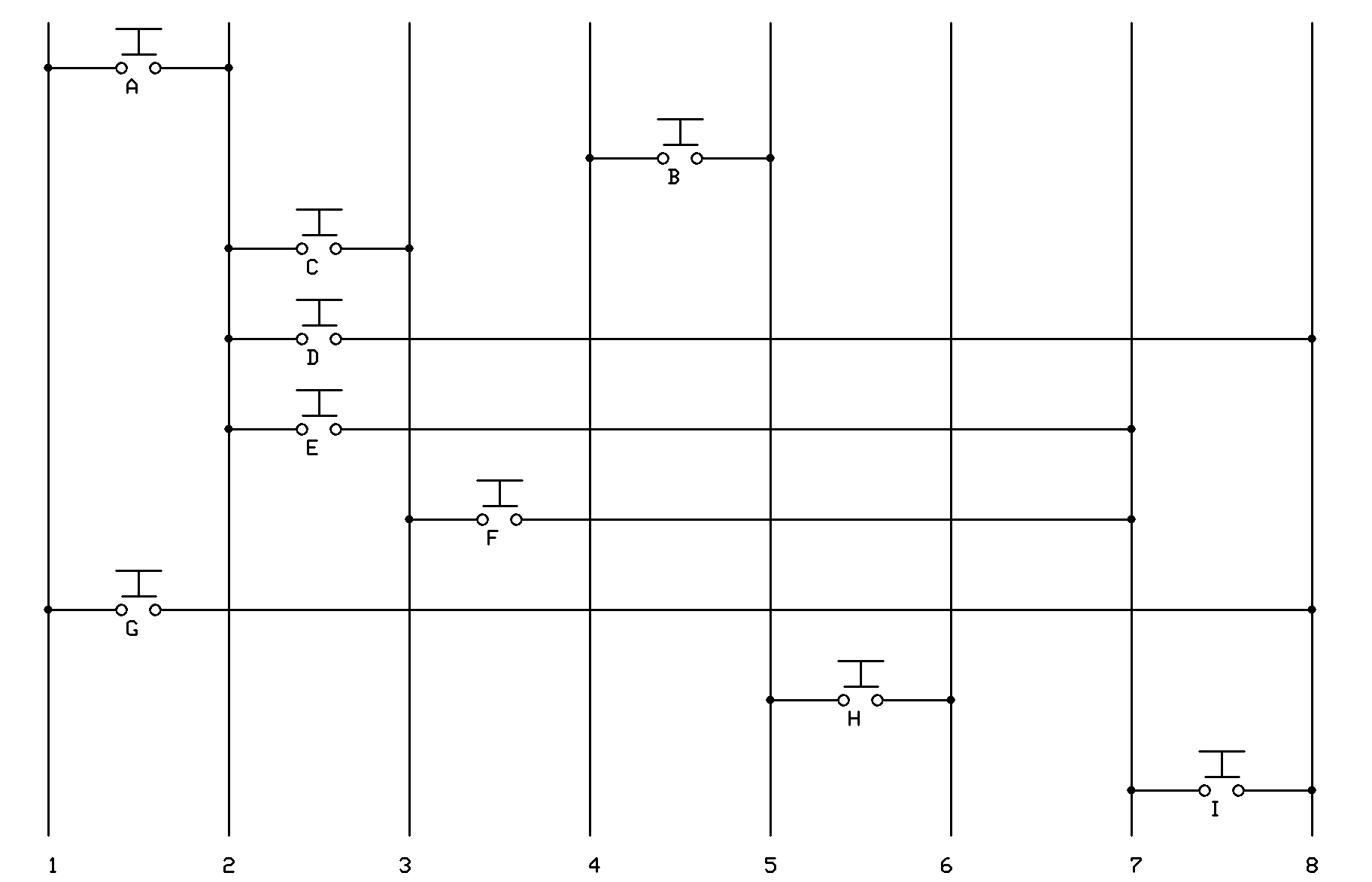
weird membrane keypad

gpop1:
op if you have the keypad and some 10k resistors to make pulldowns on the 7 input pins can you run this and see what happens please.

//a 11000000

//b 00011000//+5v on pin 5 hardwired
//c 01100000
//d 01000001
//e 01000010
//f 00100010
//g 10000001
//h 00001100
//i 00000011

//if 1 high when 2 output theres a A
//if 4 high theres a B
//if 3 high when 2 output theres a c
//if 8 high when 2 output theres a d
//if 7 high when 2 output theres a e
//if 7 high when 3 output theres a f
//if 1 high when 8 output theres a g
//if 6 high theres a H
//if 7 high when 8 output theres a i

//pins 1, 2, 3, 4, 6, 7, 8 all need pull downs
//pin 5 is = 5vdc (not a input)

#define  pin1 2
#define  pin2 3
#define  pin3 4
#define  pin4 5

#define  pin6 7
#define  pin7 8
#define  pin8 9

void setup() {
 // put your setup code here, to run once:
 Serial.begin(9600);
 pinMode (pin1, INPUT);
 pinMode (pin2, INPUT);
 pinMode (pin3, INPUT);
 pinMode (pin4, INPUT);
 pinMode (pin6, INPUT);
 pinMode (pin7, INPUT);
 pinMode (pin8, INPUT);
}

void loop() {
 // put your main code here, to run repeatedly
 Serial.println("start of key scan");
 pinMode (pin2, OUTPUT);
 digitalWrite(pin2, HIGH);
 if (digitalRead (pin1) == HIGH) {
   Serial.println("letter a is pressed");
 }
 if (digitalRead (pin2) == HIGH) {
   Serial.println("letter b is pressed");
 }
 if (digitalRead (pin3) == HIGH) {
   Serial.println("letter c is pressed");
 }
 if (digitalRead (pin8) == HIGH) {
   Serial.println("letter d is pressed");
 }
 if (digitalRead (pin7) == HIGH) {
   Serial.println("letter e is pressed");
 }
 pinMode (pin2, INPUT);

pinMode (pin3, OUTPUT);
 digitalWrite(pin3, HIGH);
 if (digitalRead (pin7) == HIGH) {
   Serial.println("letter f is pressed");
 }
 pinMode (pin2, INPUT);

pinMode (pin8, OUTPUT);
 digitalWrite(pin8, HIGH);
 if (digitalRead (pin1) == HIGH) {
   Serial.println("letter g is pressed");
 }
 if (digitalRead (pin6) == HIGH) {
   Serial.println("letter h is pressed");
 }
 if (digitalRead (pin7) == HIGH) {
   Serial.println("letter i is pressed");
 }
 pinMode (pin8, INPUT);
 Serial.println("end of key scan");
}

is this the correct wiring?

Hi,

I believe it was a device used in the construction field. It was salvaged from the device, why? Does it seem familiar to you?

The assembly will be probably a set of function switches, rather than a numeric keypad.

Not sure if this will help.

Tom.. :slight_smile:

gpop1:
op if you have the keypad and some 10k resistors to make pulldowns on the 7 input pins can you run this and see what happens please.

//a 11000000

//b 00011000//+5v on pin 5 hardwired
//c 01100000
//d 01000001
//e 01000010
//f 00100010
//g 10000001
//h 00001100
//i 00000011

//if 1 high when 2 output theres a A
//if 4 high theres a B
//if 3 high when 2 output theres a c
//if 8 high when 2 output theres a d
//if 7 high when 2 output theres a e
//if 7 high when 3 output theres a f
//if 1 high when 8 output theres a g
//if 6 high theres a H
//if 7 high when 8 output theres a i

//pins 1, 2, 3, 4, 6, 7, 8 all need pull downs
//pin 5 is = 5vdc (not a input)

#define  pin1 2
#define  pin2 3
#define  pin3 4
#define  pin4 5

#define  pin6 7
#define  pin7 8
#define  pin8 9

void setup() {
  // put your setup code here, to run once:
  Serial.begin(9600);
  pinMode (pin1, INPUT);
  pinMode (pin2, INPUT);
  pinMode (pin3, INPUT);
  pinMode (pin4, INPUT);
  pinMode (pin6, INPUT);
  pinMode (pin7, INPUT);
  pinMode (pin8, INPUT);
}

void loop() {
  // put your main code here, to run repeatedly
  Serial.println("start of key scan");
  pinMode (pin2, OUTPUT);
  digitalWrite(pin2, HIGH);
  if (digitalRead (pin1) == HIGH) {
    Serial.println("letter a is pressed");
  }
  if (digitalRead (pin2) == HIGH) {
    Serial.println("letter b is pressed");
  }
  if (digitalRead (pin3) == HIGH) {
    Serial.println("letter c is pressed");
  }
  if (digitalRead (pin8) == HIGH) {
    Serial.println("letter d is pressed");
  }
  if (digitalRead (pin7) == HIGH) {
    Serial.println("letter e is pressed");
  }
  pinMode (pin2, INPUT);

pinMode (pin3, OUTPUT);
  digitalWrite(pin3, HIGH);
  if (digitalRead (pin7) == HIGH) {
    Serial.println("letter f is pressed");
  }
  pinMode (pin2, INPUT);

pinMode (pin8, OUTPUT);
  digitalWrite(pin8, HIGH);
  if (digitalRead (pin1) == HIGH) {
    Serial.println("letter g is pressed");
  }
  if (digitalRead (pin6) == HIGH) {
    Serial.println("letter h is pressed");
  }
  if (digitalRead (pin7) == HIGH) {
    Serial.println("letter i is pressed");
  }
  pinMode (pin8, INPUT);
  Serial.println("end of key scan");
}

i just run your code. and here's the result.

start of key scan
letter b is pressed
end of key scan
start of key scan
letter b is pressed
letter c is pressed
end of key scan
start of key scan
letter b is pressed
letter c is pressed
end of key scan
start of key scan
letter b is pressed
letter c is pressed
end of key scan
.
.
.
.

this happen without any key pressed.

Sry bad copy and paste code.
You have to write pin to low before reseting to a input and you have to set the correct pin

Im on a mobile so i carnt point out the mistakes but its after setting 3 to a output i set the wrong pin back to a input

The code isnt complicated so mistakes should be easy to find

I think the ans is that 2 keys can be used as multi button keys and the others should not in which case you should be able to code it to reject more than one key pressed on the other 7 key

gpop1:
Sry bad copy and paste code.
You have to write pin to low before reseting to a input and you have to set the correct pin

Im on a mobile so i carnt point out the mistakes but its after setting 3 to a output i set the wrong pin back to a input

The code isnt complicated so mistakes should be easy to find

I think the ans is that 2 keys can be used as multi button keys and the others should not in which case you should be able to code it to reject more than one key pressed on the other 7 key

yeah, i was able to see that problem, and after editing the code, its seem that only H button get detected. Have you seen my wiring?(in earlier reply) i hope that was not the problem.

TomGeorge:
Hi,The assembly will be probably a set of function switches, rather than a numeric keypad.

Not sure if this will help.

Tom.. :slight_smile:

yeah, a good point of view. So if this is correct, there is no possible way to detect simultaneous button right? (as we cant adjust diode to the diagram). But maybe there is a way?sequencing using coding?got any idea?

but ..... i cant even detect each individual key....lol

gpop1:
Sry bad copy and paste code.
You have to write pin to low before reseting to a input and you have to set the correct pin

Im on a mobile so i carnt point out the mistakes but its after setting 3 to a output i set the wrong pin back to a input

The code isnt complicated so mistakes should be easy to find

I think the ans is that 2 keys can be used as multi button keys and the others should not in which case you should be able to code it to reject more than one key pressed on the other 7 key

i edited the code and it worked. Thank you soo muchh! but as you say, it cant have more than 2 button to be pressed at once.

//a 11000000
//b 00011000//+5v on pin 5 hardwired
//c 01100000
//d 01000001
//e 01000010
//f 00100010
//g 10000001
//h 00001100
//i 00000011

//if 1 high when 2 output theres a A
//if 4 high theres a B
//if 3 high when 2 output theres a c
//if 8 high when 2 output theres a d
//if 7 high when 2 output theres a e
//if 7 high when 3 output theres a f
//if 1 high when 8 output theres a g
//if 6 high theres a H
//if 7 high when 8 output theres a i

//pins 1, 2, 3, 4, 6, 7, 8 all need pull downs
//pin 5 is = 5vdc (not a input)

#define  pin1 2
#define  pin2 3
#define  pin3 4
#define  pin4 5

#define  pin6 7
#define  pin7 8
#define  pin8 9

void setup() {
  // put your setup code here, to run once:
  Serial.begin(9600);
  intializepin();

}
void intializepin(){

  pinMode (pin1, INPUT);
  pinMode (pin2, INPUT);
  pinMode (pin3, INPUT);
  pinMode (pin4, INPUT);
  pinMode (pin6, INPUT);
  pinMode (pin7, INPUT);
  pinMode (pin8, INPUT);
  
}
void loop() {
  // put your main code here, to run repeatedly
  Serial.println("start of key scan");
  pinMode (pin2, OUTPUT);
  digitalWrite(pin2, HIGH);
  if (digitalRead (pin1) == HIGH) {
    Serial.println("letter a is pressed");
    delay(1000);
  }
  /*if (digitalRead (pin2) == HIGH) {
    Serial.println("letter b is pressed");
    delay(1000);
  }*/
  ///////////////////////////////////////////////////////////C
 if (digitalRead (pin3) == HIGH) {
    Serial.println("letter c is pressed");
    delay(1000);
  }
  if (digitalRead (pin8) == HIGH) {
    Serial.println("letter d is pressed");
    delay(1000);
  }
  if (digitalRead (pin7) == HIGH) {
    Serial.println("letter e is pressed");
    delay(1000);
  }
  
  intializepin();

  pinMode (pin3, OUTPUT);
  digitalWrite(pin3, HIGH);
  if (digitalRead (pin7) == HIGH) {
    Serial.println("letter f is pressed");
    delay(1000);
  }
   intializepin();
   if (digitalRead (pin4) == HIGH) {
    Serial.println("letter b is pressed");
    delay(1000);
  }

   
 intializepin();

  pinMode (pin8, OUTPUT);
  digitalWrite(pin8, HIGH);
 
  if (digitalRead (pin1) == HIGH) {
    Serial.println("letter g is pressed");
    delay(1000);
  }
  if (digitalRead (pin6) == HIGH) {
    Serial.println("letter h is pressed");
    delay(1000);
  }
  if (digitalRead (pin7) == HIGH) {
    Serial.println("letter i is pressed");
    delay(1000);
  }
  pinMode (pin8, INPUT);
  Serial.println("end of key scan");
  
}
#define  pin1 2
#define  pin2 3
#define  pin3 4
#define  pin4 5

#define  pin6 7
#define  pin7 8
#define  pin8 9
#define  led  10
#define  ledOkay 11

int a=0;
int b=0;
int c=0;
int d=0;
int e=0;
int f=0;
int g=0;
int h=0;
int i=0;
int set=0;


void setup() {
  
  Serial.begin(9600);
  intializepin();
  digitalWrite(led,HIGH);

}


void intializepin(){

  pinMode(led,OUTPUT);
  pinMode(ledOkay,OUTPUT);
  pinMode (pin1, INPUT);
  pinMode (pin2, INPUT);
  pinMode (pin3, INPUT);
  pinMode (pin4, INPUT);
  pinMode (pin6, INPUT);
  pinMode (pin7, INPUT);
  pinMode (pin8, INPUT);
  
}


void loop() {


  Serial.println("start of key scan");
  pinMode (pin2, OUTPUT);
  digitalWrite(pin2, HIGH);
  if (digitalRead (pin1) == HIGH) {
    Serial.println("letter a is pressed");
    delay(50);
    a=1;
    set=a+b+c+d+e+f+g+h+i;
    ledblink();
  }

 if (digitalRead (pin3) == HIGH) {
    Serial.println("letter c is pressed");
    delay(50);
        c=1;
    set=a+b+c+d+e+f+g+h+i;
    ledblink();
  }
  
  if (digitalRead (pin8) == HIGH) {
    Serial.println("letter d is pressed");
    delay(50);
        d=1;
    set=a+b+c+d+e+f+g+h+i;
    ledblink();
  }

  
  if (digitalRead (pin7) == HIGH) {
    Serial.println("letter e is pressed");
    delay(50);
        e=1;
    set=a+b+c+d+e+f+g+h+i;
    ledblink();
  }
  
  intializepin();

  pinMode (pin3, OUTPUT);
  digitalWrite(pin3, HIGH);
  if (digitalRead (pin7) == HIGH) {
    Serial.println("letter f is pressed");
    delay(50);
        f=1;
    set=a+b+c+d+e+f+g+h+i;
    ledblink();
  }
   intializepin();
   if (digitalRead (pin4) == HIGH) {
    Serial.println("letter b is pressed");
    delay(50);
        b=1;
    set=a+b+c+d+e+f+g+h+i;
    ledblink();
  }

   
 intializepin();

  pinMode (pin8, OUTPUT);
  digitalWrite(pin8, HIGH);
 
  if (digitalRead (pin1) == HIGH) {
    Serial.println("letter g is pressed");
    delay(50);
        g=1;
    set=a+b+c+d+e+f+g+h+i;
    ledblink();
  }
  if (digitalRead (pin6) == HIGH) {
    Serial.println("letter h is pressed");
    delay(50);
        h=1;
    set=a+b+c+d+e+f+g+h+i;
    ledblink();
  }
  if (digitalRead (pin7) == HIGH) {
    Serial.println("letter i is pressed");
    delay(50);
        i=1;
    set=a+b+c+d+e+f+g+h+i;
    ledblink();
  }
  pinMode (pin8, INPUT);
  Serial.println("end of key scan");


//if all nine button is already preesed once,then reset back to everthing to 0.
  if(set==9){
     Serial.println("complete");
     digitalWrite(ledOkay,HIGH);
    delay(1000);
    digitalWrite(ledOkay,LOW);
    a=0;
    b=0;
    c=0;
    d=0;
    e=0;
    f=0;
    g=0;
    h=0;
    i=0;
    set=0; 
  }
  }

  void ledblink(){

   digitalWrite(led,LOW);
   delay(200);
   digitalWrite(led,HIGH);
  }

fuhh, i managed to detect all button individually! thank you so much for your help. Since i was too lazy for interfacing this to lcd, i just use led, lol. I learned a lot from this project, thank you soo much. The coding was a little bit messy, but you'll get the idea. Thank you again sir!