What is wrong with my code?

I'm trying to make a calculator with arduino but somehow it's not working. Can someone might help?

#include <Keypad.h>

const int ROW_NUM = 4; //four rows
const int COLUMN_NUM = 4; //four columns
const int Ctrl = 13;
int currentState;
int answ;
char oper = ' ';
boolean firstNumState = true;
String firstNum = "";
String secondNum = "";
float answer = 0.0;

char keys[ROW_NUM][COLUMN_NUM] = {
  {'1', '2', '3', '+'},
  {'4', '5', '6', '-'},
  {'7', '8', '9', '*'},
  {'C', '0', '=', '/'}
};
char Ctrlkeys[ROW_NUM][COLUMN_NUM] = {
  {'(', ')', 's', '+'},
  {'4', '5', 'x', '-'},
  {'^', 'c', 't', '*'},
  {'C', '0', '=', '/'}
};
byte pin_rows[ROW_NUM] = {9, 8, 7, 6}; //connect to the row pinouts of the keypad
byte pin_column[COLUMN_NUM] = {5, 4, 3, 2}; //connect to the column pinouts of the keypad

Keypad keypad = Keypad( makeKeymap(keys), pin_rows, pin_column, ROW_NUM, COLUMN_NUM );
Keypad Ctrlkeypad = Keypad( makeKeymap(Ctrlkeys), pin_rows, pin_column, ROW_NUM, COLUMN_NUM );
#include <Wire.h> // Wire Bibliothek einbinden
#include <LiquidCrystal_I2C.h> // Vorher hinzugefĂĽgte LiquidCrystal_I2C Bibliothek einbinden
LiquidCrystal_I2C lcd(0x27, 16, 2); //Hier wird festgelegt um was fĂĽr einen Display es sich handelt. In diesem Fall eines mit 16 Zeichen in 2 Zeilen und der HEX-Adresse 0x27. FĂĽr ein vierzeiliges I2C-LCD verwendet man den Code "LiquidCrystal_I2C lcd(0x27, 20, 4)"

void setup() {
 lcd.init(); // initialize the lcd
 lcd.backlight();
}

void loop() {
  char key;
  currentState = digitalRead(Ctrl);
  if (currentState == LOW) { //Wenn Ctrl nicht gedrückt -> primäres Keypad
    key = keypad.getKey();
  }
  else  { //Wenn Ctrl gedrückt -> sekundäres Keypad
    key = Ctrlkeypad.getKey();
  }
  if (key) {
    Serial.println(key);
  }
  char newKey = key;
  // Was tun, wenn er eine Nummer bekommt?
  if ((newKey != NO_KEY) && (newKey == '1' || newKey == '2' || newKey == '3' || newKey == '4' || newKey == '5' || newKey == '6' || newKey == '7' || newKey == '8' || newKey == '9' || newKey == '0')) {
    if (firstNumState == true) {
      firstNum = firstNum + newKey;
      lcd.print (newKey);
    }
    else {
      secondNum = secondNum + newKey;
      lcd.print (newKey);
    }
  }
  // Was tun, wenn er einen Operator bekommt?
  if (newKey != NO_KEY && (newKey == '+' || newKey == '-' || newKey == '*' || newKey == '/' || newKey == '^' || newKey == 'x' || newKey == 's' || newKey == 'c' || newKey == 't')) {
    // code to execute if the condition is true
  }
  if (firstNumState == true) {
    oper = newKey;
    firstNumState = false;
    lcd.print (oper);
  }
  if (newKey != NO_KEY && newKey == '=') {

  if (oper == '+') {
    answ = firstNum.toFloat () + secondNum.toFloat ();
  }
  if (oper == '-') {
    answ = firstNum.toFloat () - secondNum.toFloat ();
  }
  if (oper == '*') {
    answ = firstNum.toFloat () * secondNum.toFloat ();
  }
  if (oper == '/') {
    answ = firstNum.toFloat () / secondNum.toFloat ();
  }
  if (oper == '^') {
    answ = pow(firstNum.toFloat (),secondNum.toFloat () );
  }
  if (oper == 'x') {
    answ = sqrt(firstNum.toFloat() );
  }
  if (oper == 's') {
    answ = sin(firstNum.toFloat() );
  }
  if (oper == 'c') {
    answ = cos(firstNum.toFloat() ) ;
  }
  if (oper == 't') {
    answ = tan(firstNum.toFloat() );
  }
  }

  lcd.setCursor (0, 0);
  lcd.print (firstNum);
  lcd.setCursor (0,1);
  lcd.print (oper); 
  lcd.setCursor (0,2);
  lcd.print (secondNum);
  lcd.setCursor (0,3);
  lcd.print ("=");
  lcd.setCursor (1,1);
  lcd.print (answ);
  firstNumState = true;
}
Welcome to the forum

That is a very poor description of the problem. Please provide more details

  char newKey = key;

newKey is a character representing the digit entered rather than the actual decimal digit value. Try subtracting '0' from the value returned to get the actual decimal digit value

Pls share your circuit for better understanding and response

If I tipe in numbers on my keypad the number is neither shown on my serialmonitor nor on my lcd display but I'm not sure if that's caused by the same issue.

Let's start with the Serial monitor as it will be helpful for debugging

You do not have a Serial.begin() in the sketch so Serial.println() will not work

So I have to Change the void Setup to:

void setup() {
 Serial.begin(1)
 lcd.init(); // initialize the lcd
 lcd.backlight();
}

Only if you want to use a baud rate of 1, which you don't

Use

 Serial.begin(115200);

and set the baud rate of the Serial monitor to match

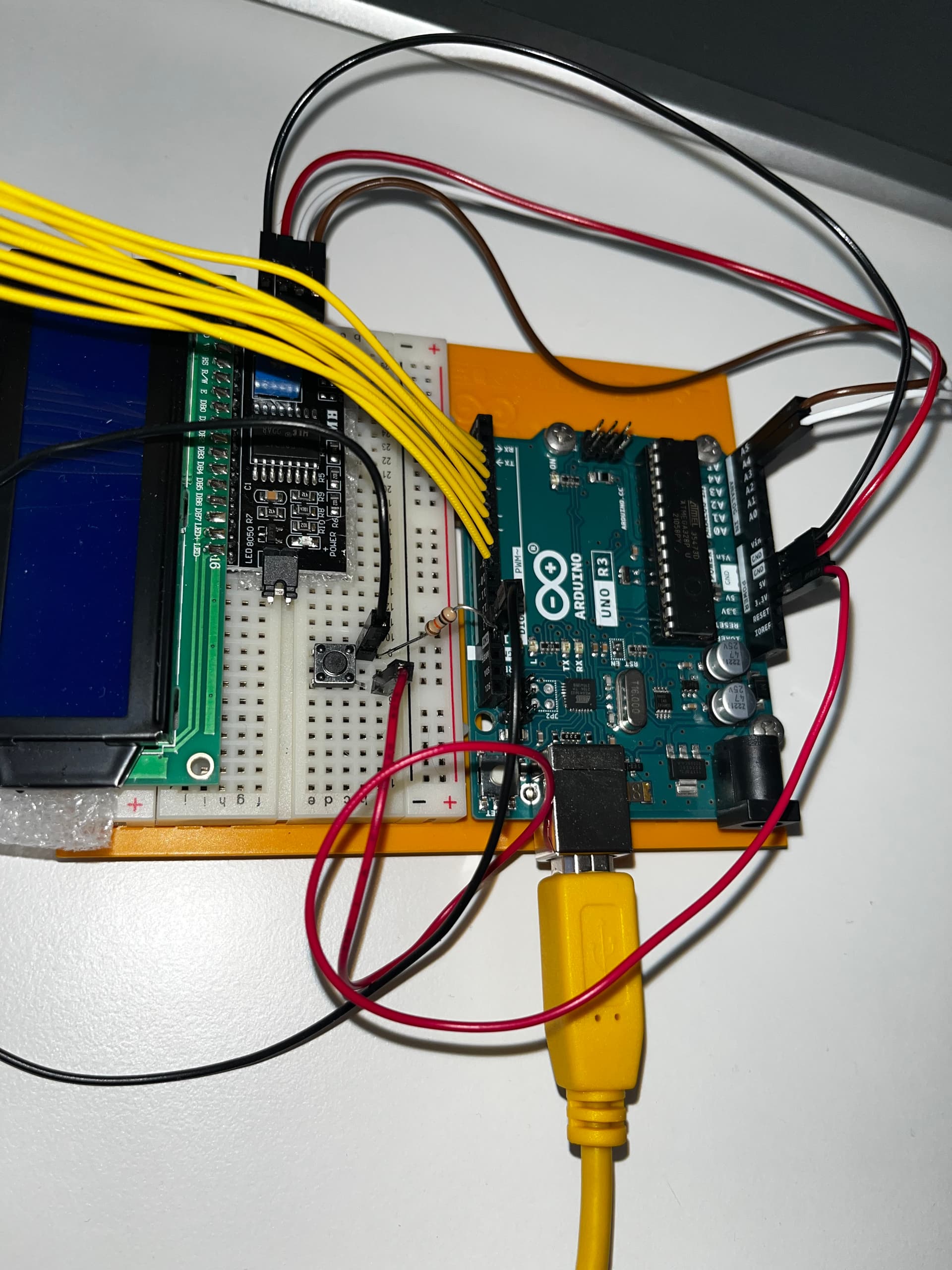
Still waiting (since post #3) for a circuit diagram, and a useful photo (the lighting is too dark to see very much).

How exactly do I change the rate of the Serial monitor to match?

By reading the Serial monitor documentation. Alternatively, you could read the current setting from the Serial monitor window, and set your sketch to use it.

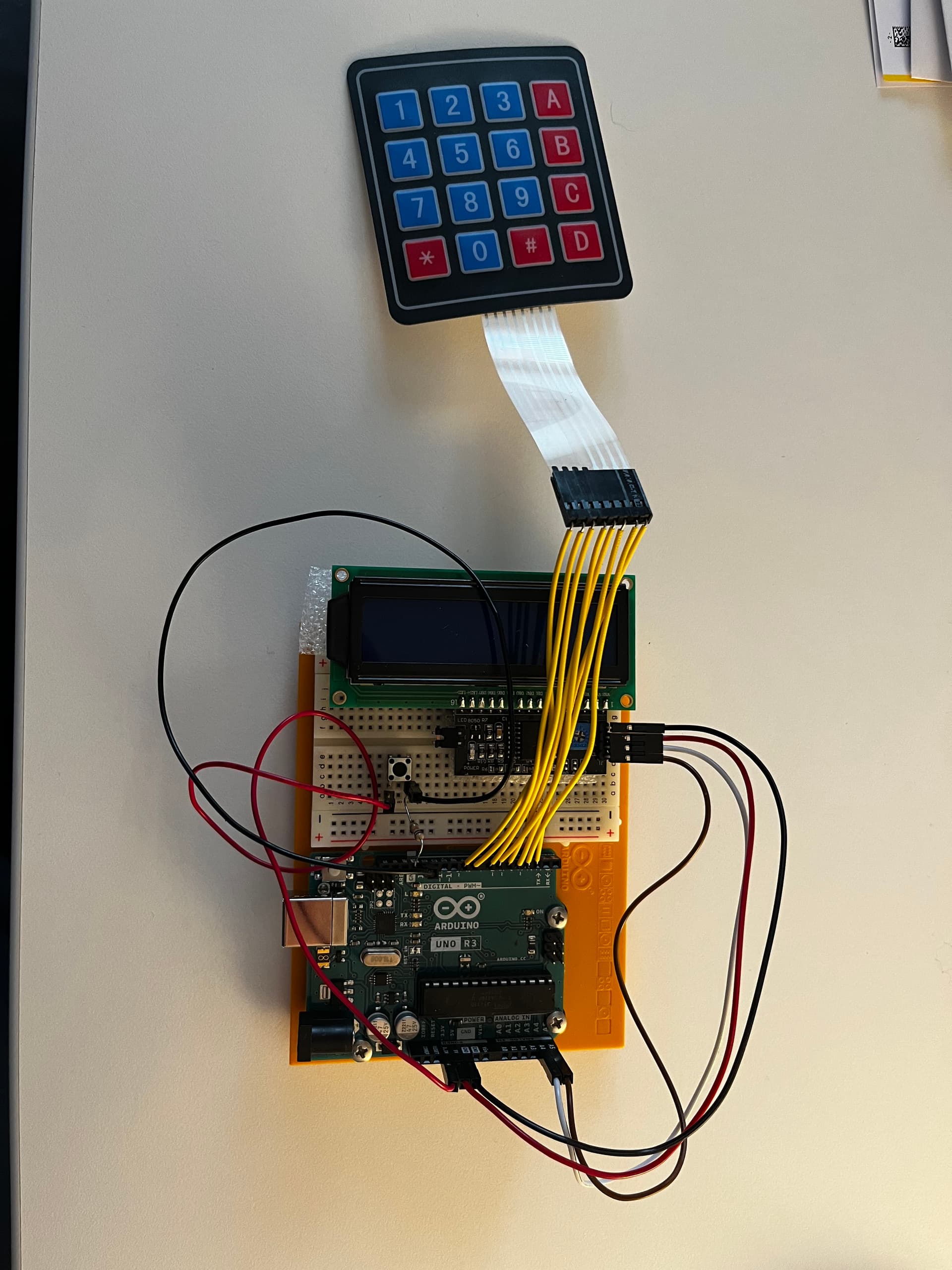
Do you need another picture or is this okay?

It's 10,000 times better than what we usually get! You have connected both display power leads to ground, though. I think it will need some power to operate. :slight_smile:

It does match the problem description... :slight_smile:

You should always run library example sketches to test new hardware before writing your own code.

Another thing, you posted new words, while a number of questions to you, remain unanswered. Please bring us up to date now, about what you have done and what you now have.

This here is my current code:

#include <Keypad.h>

const int ROW_NUM = 4; //four rows
const int COLUMN_NUM = 4; //four columns
const int Ctrl = 13;
int currentState;
int answ;
char oper = ' ';
boolean firstNumState = true;
String firstNum = "";
String secondNum = "";
float answer = 0.0;

char keys[ROW_NUM][COLUMN_NUM] = {
  {'1', '2', '3', '+'},
  {'4', '5', '6', '-'},
  {'7', '8', '9', '*'},
  {'C', '0', '=', '/'}
};
char Ctrlkeys[ROW_NUM][COLUMN_NUM] = {
  {'(', ')', 's', '+'},
  {'4', '5', 'x', '-'},
  {'^', 'c', 't', '*'},
  {'C', '0', '=', '/'}
};
byte pin_rows[ROW_NUM] = {9, 8, 7, 6}; //connect to the row pinouts of the keypad
byte pin_column[COLUMN_NUM] = {5, 4, 3, 2}; //connect to the column pinouts of the keypad

Keypad keypad = Keypad( makeKeymap(keys), pin_rows, pin_column, ROW_NUM, COLUMN_NUM );
Keypad Ctrlkeypad = Keypad( makeKeymap(Ctrlkeys), pin_rows, pin_column, ROW_NUM, COLUMN_NUM );
#include <Wire.h> // Wire Bibliothek einbinden
#include <LiquidCrystal_I2C.h> // Vorher hinzugefĂĽgte LiquidCrystal_I2C Bibliothek einbinden
LiquidCrystal_I2C lcd(0x27, 16, 2); //Hier wird festgelegt um was fĂĽr einen Display es sich handelt. In diesem Fall eines mit 16 Zeichen in 2 Zeilen und der HEX-Adresse 0x27. FĂĽr ein vierzeiliges I2C-LCD verwendet man den Code "LiquidCrystal_I2C lcd(0x27, 20, 4)"

void setup() {
 Serial.begin(115200)
 lcd.init(); // initialize the lcd
 lcd.backlight();
}

void loop() {
  char key;
  currentState = digitalRead(Ctrl);
  if (currentState == LOW) { //Wenn Ctrl nicht gedrückt -> primäres Keypad
    key = keypad.getKey();
  }
  else  { //Wenn Ctrl gedrückt -> sekundäres Keypad
    key = Ctrlkeypad.getKey();
  }
  if (key) {
    Serial.println(key);
  }
  char newKey = key;
  // Was tun, wenn er eine Nummer bekommt?
  if ((newKey != NO_KEY) && (newKey == '1' || newKey == '2' || newKey == '3' || newKey == '4' || newKey == '5' || newKey == '6' || newKey == '7' || newKey == '8' || newKey == '9' || newKey == '0')) {
    if (firstNumState == true) {
      firstNum = firstNum + newKey;
      lcd.print (newKey);
    }
    else {
      secondNum = secondNum + newKey;
      lcd.print (newKey);
    }
  }
  // Was tun, wenn er einen Operator bekommt?
  if (newKey != NO_KEY && (newKey == '+' || newKey == '-' || newKey == '*' || newKey == '/' || newKey == '^' || newKey == 'x' || newKey == 's' || newKey == 'c' || newKey == 't')) {
    // code to execute if the condition is true
  }
  if (firstNumState == true) {
    oper = newKey;
    firstNumState = false;
    lcd.print (oper);
  }
  if (newKey != NO_KEY && newKey == '=') {

  if (oper == '+') {
    answ = firstNum.toFloat () + secondNum.toFloat ();
  }
  if (oper == '-') {
    answ = firstNum.toFloat () - secondNum.toFloat ();
  }
  if (oper == '*') {
    answ = firstNum.toFloat () * secondNum.toFloat ();
  }
  if (oper == '/') {
    answ = firstNum.toFloat () / secondNum.toFloat ();
  }
  if (oper == '^') {
    answ = pow(firstNum.toFloat (),secondNum.toFloat () );
  }
  if (oper == 'x') {
    answ = sqrt(firstNum.toFloat() );
  }
  if (oper == 's') {
    answ = sin(firstNum.toFloat() );
  }
  if (oper == 'c') {
    answ = cos(firstNum.toFloat() ) ;
  }
  if (oper == 't') {
    answ = tan(firstNum.toFloat() );
  }
  }

  lcd.setCursor (0, 0);
  lcd.print (firstNum);
  lcd.setCursor (0,1);
  lcd.print (oper); 
  lcd.setCursor (0,2);
  lcd.print (secondNum);
  lcd.setCursor (0,3);
  lcd.print ("=");
  lcd.setCursor (1,1);
  lcd.print (answ);
  firstNumState = true;
}

Could you eventually try to explain it easier because it is my first programming "project" and I'm not quite familiar with the expressions yet. :slight_smile:

First, I'd like to know that you have not connected both the supply and ground from the display module, both to ground. Because that is what your schematic shows.

Also, I didn't offer any complex explanations that need simplification. If I did, please direct me to them. Anyway, I have suggested that you use library example sketches to test the display and keyboard independently. That is not very complicated.

If explanations are forthcoming, it is from you that they are most needed. For example, I asked you to update us, but I only see a bare sketch. No comments about what it is doing. I'm still waiting for the better photo(s) that I asked you for.

Connecting 5v to GND is a recipe for catastrophe.

That too! Good catch.

Oh, I think I made a mistake conserning the schematic. The 5V actually leads to the VCC of the display. The thing is that with my current setting I was once able to see the pushed buttons on the serial monitor (the ctrl button worked too :slight_smile: ) but somehow it doesn't work anymore...


Did you

run library example sketches to test new hardware

I did right now. The Keypad works flawlessly but the display does not work it's just blue :confused: