I am following this tutorial: Arduino Playground - Tutorial01
I am using Sparkfun Arduino Pro Micro with an ATmega32u4(3.3v, 8MHz) on it (https://www.sparkfun.com/products/12587) and a HC-05 Bluetooth Module. I also running this on Windows 10.
I've made these connections: with some additional for leds
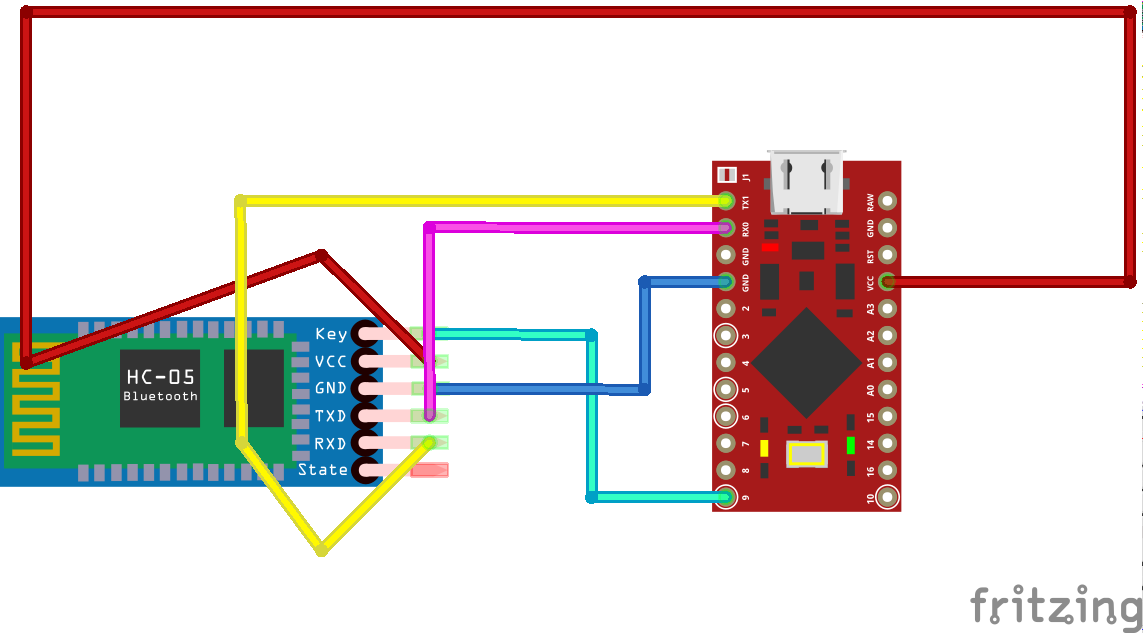
Arduino Pro Micro TxD (Pin 0) -> HC-05 RxD HC-05 TxD -> Arduino Pro Micro RxD (Pin 1)
I have two Serial ports available for the HC-05 COM30(incoming) and COM31(Outgoing). When I try to send letter 'H' in Serial monitor on COM31 the arduino ide freezes and the HC-05 flashes rapidly. When I try to send letter 'H' in Serial monitor on COM30 it sends but nothing happens as H should ideally turn on the led. The arduino pro works with a button but I would like to send the command externally as in the tutorial. I also try in processing but the same thing happens as when using the arduino serial monitor. I have been trying for a couple of days now with no idea why it is not working, I have tried adjusting baud rates and changing to Serial1 with no change.
I uploaded this to the Arduino:
#include <SoftwareSerial.h>
char val; // variable to receive data from the serial port
int ledpin = 6; // LED connected to pin 48 (on-board LED)
int ledpin2 = 5;
void setup() {
pinMode(ledpin, OUTPUT); // pin 48 (on-board LED) as OUTPUT
pinMode(ledpin2, OUTPUT); // pin 48 (on-board LED) as OUTPUT
Serial.begin(9600);
Serial1.begin(9600); // start serial communication at 9600bps
}
void loop() {
if( Serial1.available() ) // if data is available to read
{
digitalWrite(ledpin2, LOW);
val = Serial1.read(); // read it and store it in 'val'
} else {
digitalWrite(ledpin2, HIGH);
}
if( val == 'H' ) // if 'H' was received
{
digitalWrite(ledpin, HIGH); // turn ON the LED
} else {
digitalWrite(ledpin, LOW); // otherwise turn it OFF
}
delay(100); // wait 100ms for next reading
}
And this to processing ide:
//import class to set up serial connection with wiring board
import processing.serial.*;
Serial port;
//button setup
color currentcolor;
RectButton rect1, rect2;
boolean locked = false;
void setup() {
//set up window
size(200, 200);
color baseColor = color(102, 102, 102);
currentcolor = baseColor;
// List all the available serial ports in the output pane.
// You will need to choose the port that the Wiring board is
// connected to from this list. The first port in the list is
// port #0 and the third port in the list is port #2.
println(Serial.list());
// Open the port that the Wiring board is connected to (in this case 1
// which is the second open port in the array)
// Make sure to open the port at the same speed Wiring is using (9600bps)
port = new Serial(this, Serial.list()[2], 9600);
// Define and create rectangle button #1
int x = 30;
int y = 100;
int size = 50;
color buttoncolor = color(153, 102, 102);
color highlight = color(102, 51, 51);
rect1 = new RectButton(x, y, size, buttoncolor, highlight);
// Define and create rectangle button #2
x = 90;
y = 100;
size = 50;
buttoncolor = color(153, 153, 153);
highlight = color(102, 102, 102);
rect2 = new RectButton(x, y, size, buttoncolor, highlight);
}
void draw() {
background(currentcolor);
stroke(255);
update(mouseX, mouseY);
rect1.display();
rect2.display();
}
void update(int x, int y) {
if(locked == false) {
rect1.update();
rect2.update();
} else {
locked = false;
}
//Turn LED on and off if buttons pressed where
//H = on (high) and L = off (low)
if(mousePressed) {
if(rect1.pressed()) { //ON button
currentcolor = rect1.basecolor;
port.write('H');
} else if(rect2.pressed()) { //OFF button
currentcolor = rect2.basecolor;
port.write('L');
}
}
}
class Button {
int x, y;
int size;
color basecolor, highlightcolor;
color currentcolor;
boolean over = false;
boolean pressed = false;
void update()
{
if(over()) {
currentcolor = highlightcolor;
} else {
currentcolor = basecolor;
}
}
boolean pressed()
{
if(over) {
locked = true;
return true;
} else {
locked = false;
return false;
}
}
boolean over()
{
return true;
}
void display()
{
}
}
class RectButton extends Button {
RectButton(int ix, int iy, int isize, color icolor, color ihighlight)
{
x = ix;
y = iy;
size = isize;
basecolor = icolor;
highlightcolor = ihighlight;
currentcolor = basecolor;
}
boolean over()
{
if( overRect(x, y, size, size) ) {
over = true;
return true;
} else {
over = false;
return false;
}
}
void display()
{
stroke(255);
fill(currentcolor);
rect(x, y, size, size);
}
}
boolean overRect(int x, int y, int width, int height) {
if (mouseX >= x && mouseX <= x+width &&
mouseY >= y && mouseY <= y+height) {
return true;
} else {
return false;
}
}