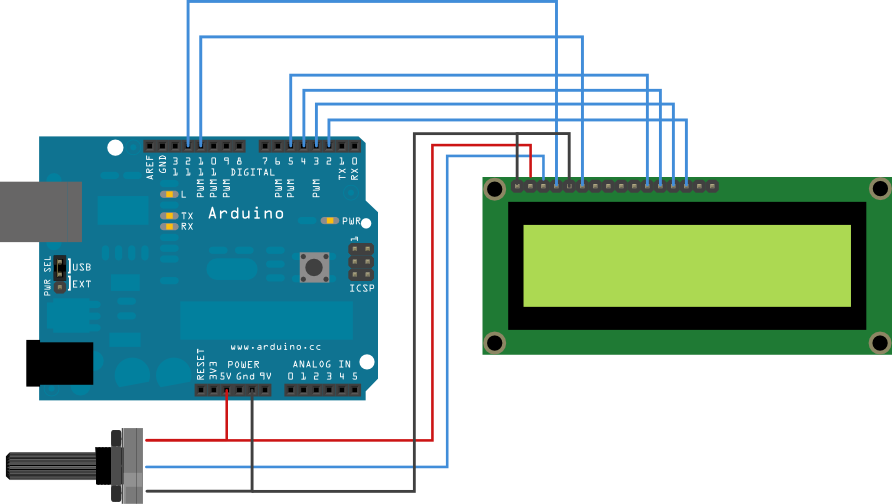
I am trying to get my 20x4 Liquid Crystal display to work with my Arduino Uno but I am constantly being unsuccessful. I have followed various different guides but I end up getting the same result over and over again.
I do get backlight which I can control and I can also control the contrast of the character blocks. But I can't print anything on the display. I only see solid blocks on rows 1 and 4. I really don't understand where I am making the mistake.
It looks like you wired it per the code but you didn't mention if it compiled.
I am assuming that means it compile ok .
Did you save the file in your sketch folder or just paste it in the IDE ?
Thanks for all the replies! I really appreciate your quick help.
Actually, I did try to instantiate the display with lcd.begin(20, 4); but it didn't work so I tried to instantiate a smaller display. That didn't work either.
Regarding the line lcd.setCursor(0,19); -- that was a mistake! I meant to say: lcd.setCursor(0,1);. The idea is to have the name flashing with 1 second delays.
I tried disabling the backlight but no luck. I don't think it is taking up too much current.
I am really starting to think that I have a faulty display. I can't seem to get any characters to show on the screen no matter what I do. Yet I can't see what I am doing wrong.
I have had the same result by not having library installed correctly or not running program
correctly.
Are you using "File/Examples/etc...?
or
"File/Open" etc."
or
pasting code in IDE window ?
Have you installed the library ?
How ? (exactly)
Well, pull it apart, inspect closely and test all the jumper wires with a multimeter or buzz box, and reassemble it.
It would not be the first time that those jumper wires were faulty, and sometimes they have spots of insulating lacquer which just happen to be where you plug them into the breadboard.
Paul__B:
Well, pull it apart, inspect closely and test all the jumper wires with a multimeter or buzz box, and reassemble it.
It would not be the first time that those jumper wires were faulty, and sometimes they have spots of insulating lacquer which just happen to be where you plug them into the breadboard.
Very true.
Another common problem are the actual contacts on the breadboard, over time they get loose or tarnished and make bad contacts,
This is especially true of the "cheaper" breadboards.
I stopped using breadboards years ago simply because there were too many intermittent faults which only got worse as the breadboard was used more and more..
Now I only use veroboard/stripboard or make quick hand drawn PCBs.