4-20mA Pressure Project with Splitboard

Hello, first time poster, couple years lurking.

Project I have been working on will monitor hydraulic and air pressure; hydraulic pressure in a air hydraulic pump that feeds a remote head hydraulic crimping tool. The air pressure will monitor the air pressure into the pump.

These systems use a variety of air pressures to create specific crimp force - the force required depends on the size of the terminal lug. For example 8 AWG requires 40 PSI input, and will create 4000 PSI at the pump and 4800 psi at the hydraulic tool.

I use a button so the operator can choose which AWG size they are using, and the various monitoring thresholds, air & hydraulic, are set.

Everything works well - prototyped on standard breadboard. Using an Arduino Mega 2560, a Noshok Hydraulic pressure sensor and a cheap Amazon (for now) air pressure sensor. Both are 4-20mA.

For the next step I printed a box to house the Meanwell RS-25-24 PSU, Arduino, LEDS, Buzzers, 4 line LCD, and the button. For the sensors I have opted to use a splitboard - first time using a board like this.

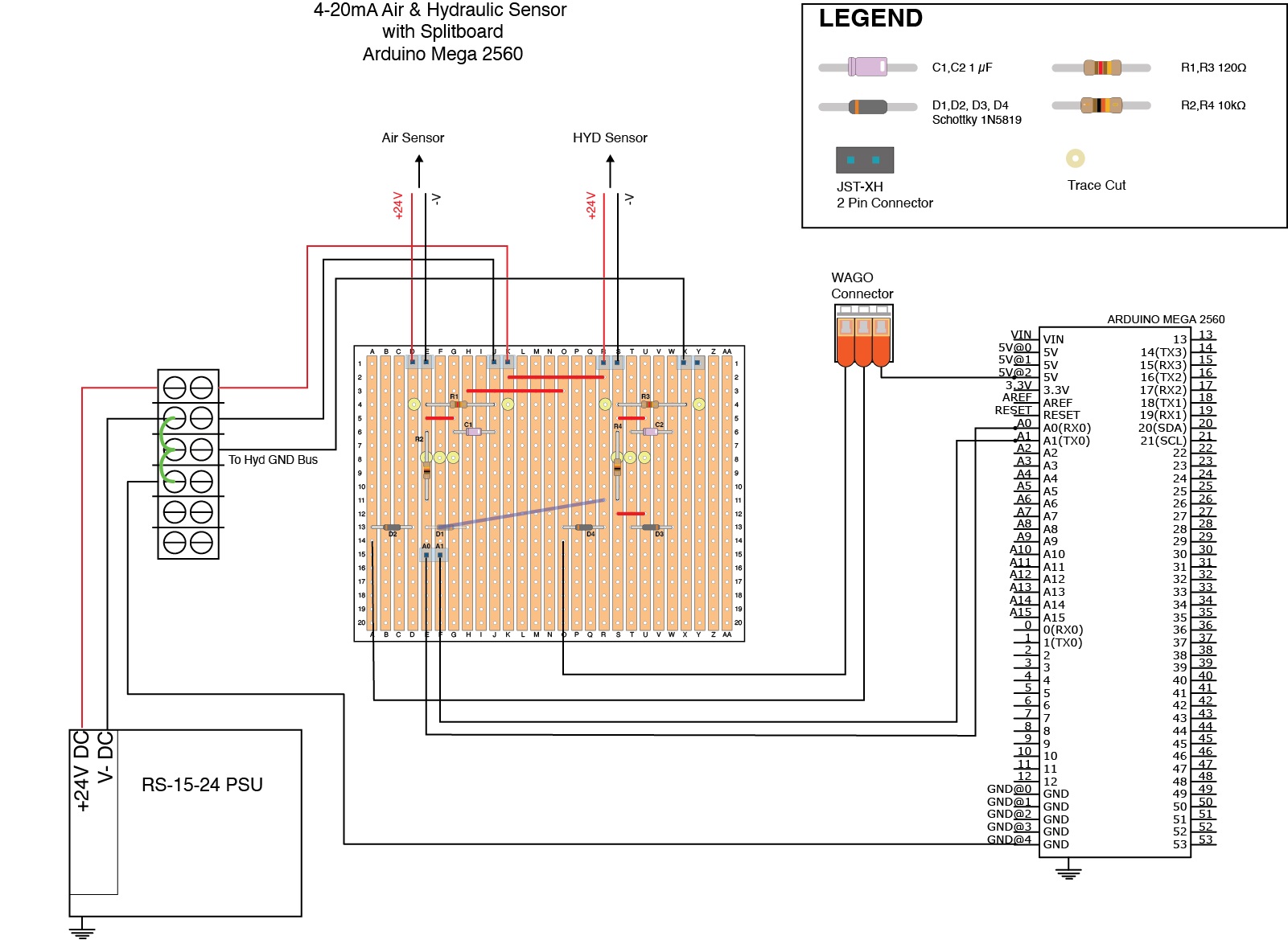
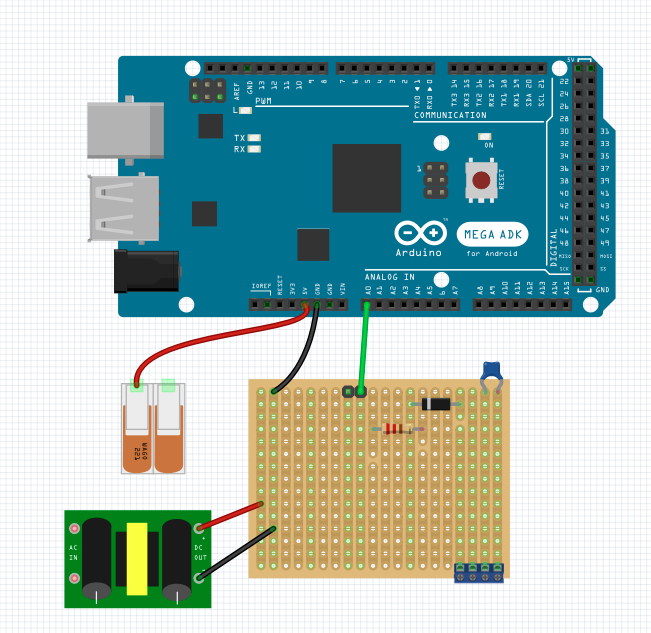
Two images here - overall schematic with splitboard (used DIYLC for this layout), and and loop schematic for a typical circuit I am using. I am not using the analog reference - although after reading through the forum, after I complete the splitboard and become familar with this process, I will go back and update the code and make changes to the circuit.

Air & Hydraulic Sensor with splitboard

Sensor Loop Schematic

As I mentioned, tested on breadboard and the system works well. Given my lack of experience, welcome any advice/criticism on the Splitboard layout before I move to soldering.

Shelley

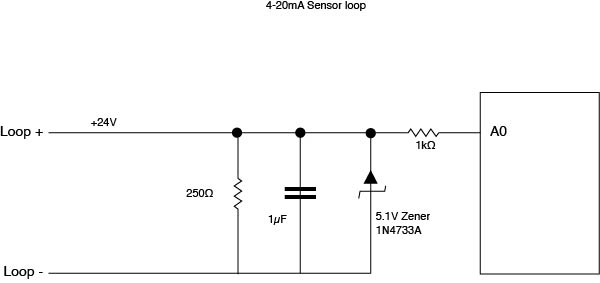
The zener is a mistake.

  1. it doesn't protect the pin when the Arduino happens to be off.
    (max pin voltage is "VCC+0.3volt", not just 5volt).
  2. it introduces non-linearity in the measurements near 20mA.

The 250 Ohm resistor value is a mistake too.
Don't worry, most people and website make both mistakes.

It assumes you will be using default Aref, which is rarely 5.00volt on USB supply.
That introduces variations in the readout, depending on computer voltage variations.

For a Mega it would be better to use a 120 Ohm sense resistor,
and switch to it's internal 2.56volt Aref.
If you need more protection, then use Schottky clamping diodes to VCC and GND.
Leo..

In my opening salvo, I mentioned that through reading the forum on 4-20mA sensors, I came across posts that pointed this out, using Afref - in fact you were the standout in the discussions I read. Thank you for that, as it motivated me to read more and this topic and helped me to understand why this should be the application - over the past couple weeks.

I'll go ahead and do that, instead of postphoning. FWIW, the Mega is powered through the 9V charger - my plan is to use a Pololu to power the Arduino - one reason there are two open spots on the termninal block.

I know a little bit about the physics of crimping, and Im trying to help a friend who has a side business making large gauge wire harnesses - they have NIST calibrated gauges for the hydraulics, but not always easy to keep the operators looking at them. This system has LED's and couple buzzers when things don't work as well as they should - eventually will save data to a server for QC and post-signal analysis.

I've seen a couple posts where the designed user the Shottky to VCC and GND, and I will incoporate that, but will try to understand the why's so I can learn too!

Thanks to people like you Leo - again, I've seen your comments many times and even when its not something I was looking for, grateful people like you are willing to share their expertise.

-S

First you need to understand that max pin voltage is not 5volt, but VCC+0.3volt.
So if the Arduino is off, then max pin voltage is 0 + 0.3 = 0.3volt.
A 5volt zener wont protect tyhe pin in that scenario.
Secondly, a zener is not ideal. It starts already "leaking" below 5volt, spoiling your upper measurement range.
Clamping diodes just dump any input voltage above VCC on the power rail.
A second clamping diode to ground stops negative voltages.
The resistor protects the diodes against too high fault currents, which also would have been needed in your zener circuit.


Schottky diodes are needed here because of their lower threshold voltage.
The 1N5819 is a good choice.
The 3.3volt label should be 5volt for a Mega.
Leo..

1 Like

Hi, @barkingsheltie
Welcome to the forum.

Your images.


Can you please post a copy of your circuit, a picture of a hand drawn circuit in jpg, png?
Hand drawn and photographed is perfectly acceptable.
Please include ALL hardware, power supplies, component names and pin labels.
Your strip board image does not show the input circuitry properly.

Tom.... :smiley: :+1: :coffee: :australia:

1 Like

Can't see how since the Arduino ground is not connected to anything.

Thanks Leo for the summary, it does make sense to me. I will implement this circuit.

Are those 4-20mA signal generators worth while for testing purposes? For instance, everytime I made changes in my code, had to run into garage to test with crimper and air hyd pump - having the signal generator in my office would have been convenient.

and what wattage should the resistor be?

Hi Jim!
My question to the group is primarily about the splitboard layout - that is where most of my uncertainty and lack of experience is. In preivous testing, everything was on standard breadboard, and I didn't post the image of that setup. I used mechanical gauges, both with NIST certificates, air and hydraulic to check the performance of the Arduino setup - going from 1k thru 10k on the hydraulic and 40 PSI through 110 PSI on the air.

The symbol block for the Arduino in my schematic here, I pulled from the 'net - I wasn't sure whether to add the GND symbol near the bottom. There is a lead going from one of the GND pins on the Arduino, to the Terminal block, which is jumpered to the Meanwell V-. I hope this means I have created a Star GND?

OK
Well your schematic does not show a ground connection and now I see the green jumpers on the "stripboard" diagram that connects the grounds.

I use this program for doing srip board designs

You might consider using these type of boards for your permanent installation

They are layed out just like solderless breadboards.

1 Like

You could just use a 0 to 5V adjustable power supply placed across your 250 ohm resistor. 1V equals 4mA, 5V equals 20mA

1 Like

Tom,

I edited both images - and updated the links in the original post. I have to spend more time with LTspice, EasyEDA, and maybe also learn KiCAD, so for now I'm defintely winging it - I made both schematics in Adobe Illustrator - the original Splitboard Schematic was made in DIY Layout Creator - and the export options were limited - I made everything in Illustrator - and that should help to make the schematic a little easier to read. I also changed the format from JPG to PNG - as Illustrator will export a higher resolution image in PNG format.

Let me know if this still isn't sufficient & I will try to improve it. Thanks for making the suggestions!

Hi Jim,
Thanks for posting your image of the breadboard setup :smiling_face_with_sunglasses:

I also stumbled upon DIY Layout creator - my main schematic has the Splitboard in it - I used Adobe Illustrator to create the full schematic - Tom asked if I could edit and make things cleaner - so I created a Splitboard in Illustrator.
I agree with you on DIY - its easy to use, especially for beginners. I find it interesting it came out of needs for guitars and possibly Amps?
I found it a little buggy on my Mac - do have a PC too for Solidworks, but that box sounds like a Cessna idling on the tarmac - and the Mac has the newer ARM chips and is whisper quiet.

Leo,
Shouldn't the Schottky to GND be reversed compared to the diagram you uploaded?

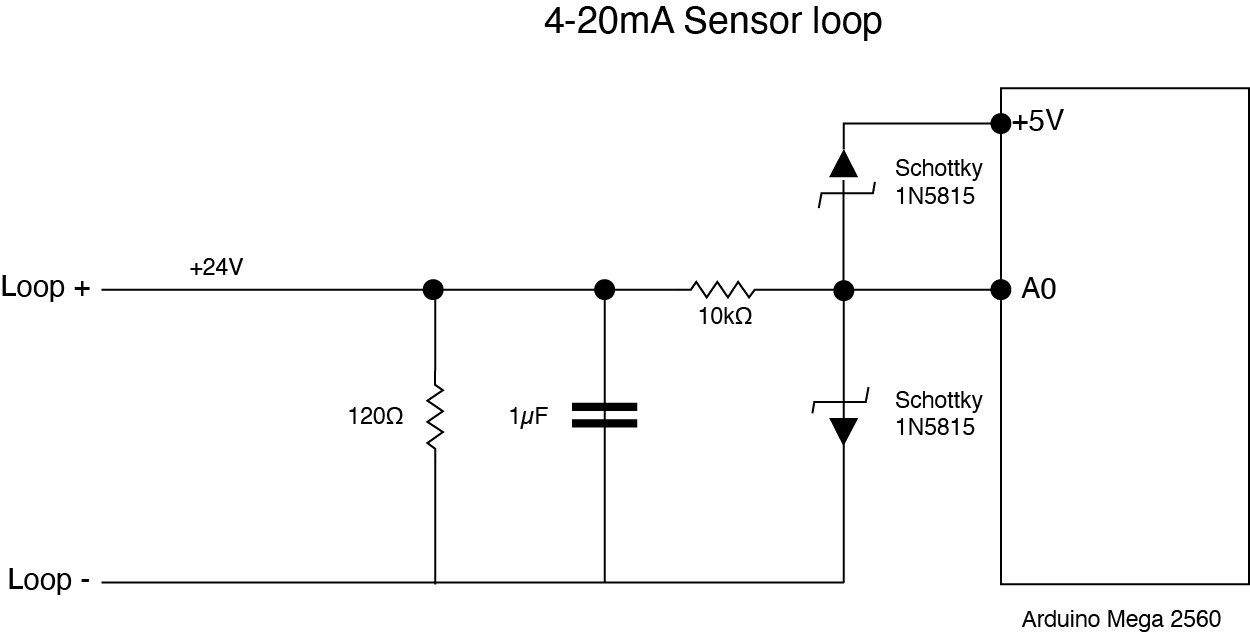
Revised Loop Schematic

My Splitboard diagram is messy, but if you don't mind, take a look. I can isolate the Splitboard and make it larger if that is necessary.

Air & Hyd Schematic with Splitboard

Zoom Splitboard

I changed the 1k resistor(s) that are routed to analog pins A0 & A1, to 10k, and shunt resistors to 120 (as you advised for Aref application). I'm going to change my code, and re-test on breadboard before soldering up these new splitboard layouts.

The revised schematic:
Wrong diode. Must be Schottky, which the 1N5815 is not.
The 1N5819 is a good choice.
Wrong orientation of the bottom diode.
Bottom line must be connected to Arduino ground.
I would cange the cap to 0.1uF (100n) ceramic
and move it to the other side of the 10k resistor.
That gives higher noise rejection.
Leo..

Connect sensor(+) to 24volt (+) supply, sensor(-) to the top of the sense resistor and 24V negative to the bottom of the sense resistor (Arduino GND).

PLEASE do not go and edit earlier posts, this make the thread hard to follow for someone reading this thread hoping to fix a similar situation.
ALWAYS post updates in new posts.


Your "schematic" is fine, but you need to do proper overall schematic diagram for your "stripboard" as well, not a cut and paste of a bit of board.
Then we can confidently compare your board layout.

Tom.... :smiley: :+1: :coffee: :australia:
PS. You should be able to upload images, rather than post links.
menu1

1 Like

Just drag 'n drop the image onto the post.
Leo..

Tom,
As a new user, I wasn't allowed to upload - just checked in this reply - I am now able to do that. I assumed it would change once I had a few posts under the belt. I agree one should upload images in the reply when changes have occured. My bad. I've certainly read enough forum posts that I should have recognized that.

FYI - the stripboard was rebuilt in Illustrator - to help make it easier to view, compared to the PNG export from DIYLC.
I can generally create, if not crudely, traditional electrical schematics - and have done so for the typical sensor node in my project. However, the relative uniques of the stripboard layout due to the trace columns (or rows, based on orientation), is there a way to illustrate that in the traditional schematic format? If so, Im unaware. So, its back to reading/searching to see what I'm missing. If you have a handy link to a resource that might help, feel free to send my way - it will be appreciated.

1 Like

@barkingsheltie
I see you are now using a different protection circuit with a 120Ω loop resistor and a 10KΩ resistor in series. That arrangement will decrease your resolution and reduce the bandwidth. However you could use the internal reference but it is not accurate at all with a -6%/10% error range, hardly useful if you are trying to make precise measurements.

I recommend that you use an accurate external reference.

1 Like

This is Fritzing