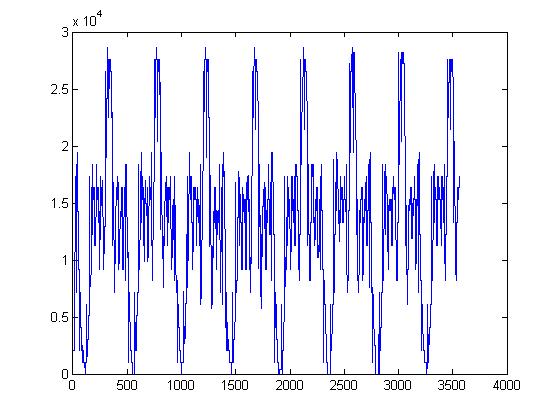
Hi, my goal is to design a system to allow two chips to talk to each other using sinusoidal signals through an analogue pin. After working on some theory, I've now moved to the hands-on side of things.
Before I can really get started, I need to be able to verify that I can transmit a simple analogue signal from the pin of one microcontroller to the pin of a second microcontroller. I test this by sending a basic sine wave through the A0 pin of the first microcontroller (lets call it MC1) to the A0 pin of the second (lets call it MC2). My problem is that when I receive the signal, it seems to magically transform from an analogue waveform to a digital waveform.
Here is the circuit design I'm using:
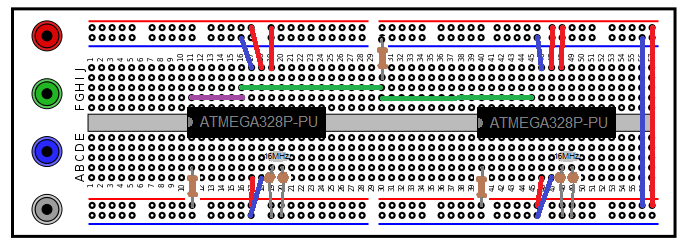
Note: The rails are being powered from the empty arduino uno board that I'm using to program the chips. Also, the blue wire at the right end of the board is supposed to be connecting the negative rails. It would appear that I made a mistake there in the diagram.
I've tried this with the resistor on row 30 going to both ground and the 5V line, using only the green wires (for communication between the chips), and using only the purple wire (sending the signal from A0 to A5 on the same chip) and I always get a binary wave at the end.
Here is the code I use on MC1 to get the values I want:
const int OUTPUT_PIN = A0;
const int INPUT_PIN = A5;
const int FREQUENCY = 1;

void setup()
{
    pinMode(OUTPUT_PIN, OUTPUT);
    pinMode(INPUT_PIN, INPUT);

    Serial.begin(19200);
}
void loop()
{
    //Get an accurate reading for the current time
    float seconds = float(micros())/float(1000000);
    //Defines a sin wave with the desired frequency oscilating from 0 to 1000
    int signal = sin(2*PI*FREQUENCY* seconds)*500 + 500;
    analogWrite(OUTPUT_PIN, signal);

    //to print the recieved values (to print the original signal, I comment out this line)
    signal = analogRead(INPUT_PIN);

    Serial.println(signal);
}

//I have checked to verify that the seconds variable is working as desired.
Using this, I copied some data from the serial monitor and plotted it using MATLAB to help answer some questions. These are the graphs I made:

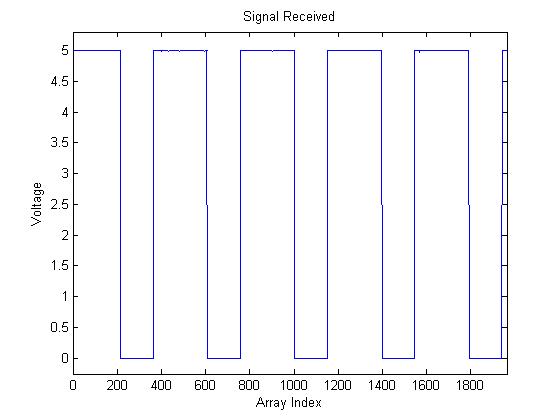

NOTE: These signals are taken from different runs and are not intended to line up
Using these graphs I was able to confirm that I was generating the desired sin wave properly, and that my suspicion that the signal received was a binary wave was correct. The zoomed in graph is there to illustrate that there are no points between high and low, so I can be fairly certain that the sine wave is not simply being chopped off at the top and bottom (I checked several transitions in this way, no intermediate values). Also, noise is minimal.
I am using two ATMEGA328P-PU microcontrollers (the chip from the arduino uno), and I am programming the chips by connecting the TX, RX, and reset pins to an arduino board without a chip on it. This method of programming and using chips has worked for me in the past, but I have never used analogue signals with these particular chips, so I will accept the possibility that these chips are defective.
Loading the fade example and preparing the circuit, the LED does not fade, it turns on and off crisply (acting like a binary switch instead of a dimmer). I tried this with two different LED, which leads me to suspect there is a fault in my use of the analogWrite function (whether it be in the hardware or the software), but if I used this incorrectly, I acknowledge that I may also have used the read function incorrectly.
Being able to transmit an analogue wave like this is imperative to my project, so I would greatly appreciate any feedback. Sorry if this isn't the right category btw, I wasn't sure where to put it.
Kaden Burgart