Anyway to speed up the display (GFX)

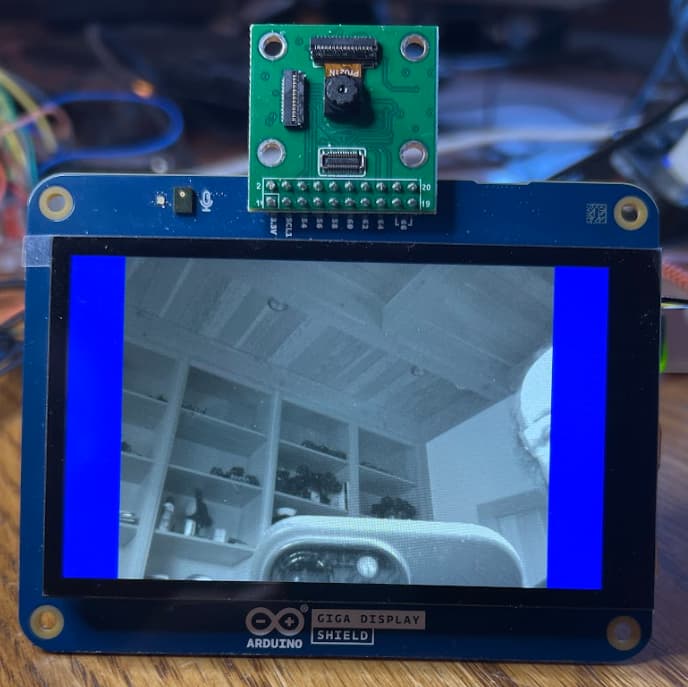
I am playing around with the GIGA with the display and a few of the different cameras.

I have a sketch that uses GFX to talk to the display and display what I read using the camera onto the display. And noticed that I am not getting very many frames per second...

example sketch up at: GitHub - KurtE/Arduino_GIGA-stuff: This is my GIGA test sketches and other like stuff for Arduino GIGA boards
currently using #define ARDUCAM_CAMERA_HM0360

And a few things not checked in yet. My main loop looks like:

void loop() {

  // Grab frame and write to another framebuffer
  digitalWrite(2, HIGH);
  if (cam.grabFrame(fb, 3000) == 0) {
    digitalWrite(2, LOW);

    // We need to swap bytes.
    uint16_t *pixels = (uint16_t *)fb.getBuffer();
    digitalWrite(3, HIGH);
#if defined(ARDUCAM_CAMERA_HM01B0) || defined(ARDUCAM_CAMERA_HM0360)
    writeRect8BPP(&display, (display.width() - CAMERA_WIDTH) / 2, (display.height() - CAMERA_HEIGHT) / 2, (uint8_t *)pixels, CAMERA_WIDTH, CAMERA_HEIGHT, palette);
#else
    for (int i = 0; i < CAMERA_WIDTH * CAMERA_HEIGHT; i++) pixels[i] = HTONS(pixels[i]);
    display.drawRGBBitmap((display.width() - CAMERA_WIDTH) / 2, (display.height() - CAMERA_HEIGHT) / 2, pixels, CAMERA_WIDTH, CAMERA_HEIGHT);
#endif
    digitalWrite(3, LOW);

  } else {
    digitalWrite(2, LOW);
    blinkLED(20);
  }
}

And noticed with Logic analyzer I am not getting that many frame per second:
The calls to get the next fame is taking about a 1/5 of a second:

And the code to display it is taking about another 1/5th of a second:

At first I thought it was my calling to drawPixel to do the work so I hacked up a version of
the writeRect code that tried to minimize speed differences>

With this camera running in orientation 3:

void writeRect8BPP(GigaDisplay_GFX *pdisp, int16_t x, int16_t y, const uint8_t bitmap[],
                   int16_t w, int16_t h, const uint16_t *palette) {
  int display_width = 480;   // pdisp->WIDTH;
  int display_height = 800;  //pdisp->HEIGHT;
  uint16_t *display_buffer = pdisp->getBuffer();

  pdisp->startWrite();
  // BUGBUG Assuming it will fit here and don't need to clip
#if CANVAS_ROTATION == 1
  // y = xIn ;  x = WIDTH - 1 - yIn
  for (int16_t j = 0; j < h; j++, y++) {
    uint16_t *p = display_buffer + (x * display_width) + display_width - 1 - y;
    for (int16_t i = 0; i < w; i++) {
      *p = palette[*bitmap++];
      p += display_width;
    }
  }
#elif CANVAS_ROTATION == 3
  // y = HEIGHT = 1 - xIn ;  x = yIn
  uint16_t *p_row = display_buffer + ((display_height - 1 - x) * display_width);
  for (int16_t j = 0; j < h; j++, y++) {
    uint16_t *p = p_row + y;
    for (int16_t i = 0; i < w; i++) {
      *p = palette[*bitmap++];
      p -= display_width;
    }
  }

#else
  for (int16_t j = 0; j < h; j++, y++) {
    for (int16_t i = 0; i < w; i++) {
      digitalWrite(4, HIGH);
      pdisp->writePixel(x + i, y, palette[bitmap[j * w + i]]);
      digitalWrite(4, LOW);
    }
  }
#endif
  digitalWrite(4, HIGH);
  pdisp->endWrite();
  digitalWrite(4, LOW);
}

I thought maybe having the frame buffer in SDRAM was slowing it down, so I in this case just used normal malloc for the monochrome case and not that much of a difference.

And as a reference point, I printing out how long it takes fillScreen takes:

  elapsedMicros em;
  display.fillScreen(GC9A01A_BLUE);
  Serial.println(em, DEC);

Before setRotation
Before fillscreen
20977end setup
Before camera start
Before setBuffer
Frame buffer: 0x2400ed80
Before setRotation
Before fillscreen
20968
end setup

So again 1/5th of a second.

Why is it so slow? Are there faster ways to update the screen?

Also wondering about the camera speed or setup. In this case I asked for 15 frames per second.

#if CAMERA_WIDTH == 640
  if (!cam.begin(CAMERA_R640x480, IMAGE_MODE, 15)) {
    blinkLED();
  }
#else
  if (!cam.begin(CAMERA_R320x240, IMAGE_MODE, 30)) {
    blinkLED();
  }
#endif

And as I mentioned, I am getting somewhere around 5 frames per second. I expected worst case about 7.5 frames if the frame had start just before we entered the API.

Also wondering if there is a way to put the camera into a continuous read mode maybe with two buffers and have some form of callback to let me know a new frame is available... But maybe different subject.
Note: the camera speed for the OV7675 in the 640x480 mode was similar

2 Likes

I can confirm what @KurtE said for both cameras with the display shield. Just finished testing them.

1 Like

@Merlin513 I was off on the fill screen test speed... By looking at the micros...

Was curious about differences in speed between the GFX versus the Ardruino graphics library:
So wrote quick test of simply fill screen:

#include <elapsedMillis.h>
#include "Arduino_GigaDisplay_GFX.h"

GigaDisplay_GFX display;
#define GC9A01A_CYAN 0x07FF
#define GC9A01A_RED 0xf800
#define GC9A01A_BLUE 0x001F
#define GC9A01A_GREEN 0x07E0
#define GC9A01A_MAGENTA 0xF81F
#define GC9A01A_WHITE 0xffff
#define GC9A01A_BLACK 0x0000
#define GC9A01A_YELLOW 0xFFE0

void setup() {
  while (!Serial && millis() < 5000) {}
  Serial.begin(115200);
  display.begin();
  Serial.println("\nArduino GIGA GFX Speed test");
}

uint32_t fill_screen(uint16_t color) {
  elapsedMicros em;
  display.fillScreen(color);
  uint32_t elapsed = em;
  Serial.print("(");
  Serial.print(color, HEX);
  Serial.print("):");
  Serial.print(elapsed);
  delay(500);
  return elapsed;
}

void loop() {
  uint32_t elapsed_sum = fill_screen(GC9A01A_RED);
  elapsed_sum += fill_screen(GC9A01A_GREEN);
  elapsed_sum += fill_screen(GC9A01A_BLUE);
  float fps = (3000000.0 / elapsed_sum);
  Serial.print(" fps:");
  Serial.println(fps, 2);
  if (Serial.available()) {
    while (Serial.read() != -1) {}
    Serial.println("Paused");
    while (Serial.read() == -1) {}
    while (Serial.read() != -1) {}

  }
}
Arduino GIGA GFX Speed test
(F800):20898(7E0):20942(1F):20798 fps:47.89
(F800):20948(7E0):20515(1F):20923 fps:48.09
(F800):20946(7E0):20919(1F):20916 fps:47.79
(F800):20955(7E0):20965(1F):20886 fps:47.77
(F800):20921(7E0):20802(1F):20957 fps:47.86

Similar with Graphic library:

#include <elapsedMillis.h>
#include "Arduino_H7_Video.h"
#include "ArduinoGraphics.h"

Arduino_H7_Video Display(800, 480, GigaDisplayShield);
//Arduino_H7_Video Display(1024, 768, USBCVideo);

void setup() {
  while (!Serial && millis() < 5000) {}
  Serial.begin(115200);
  Display.begin();
  Serial.println("\nArduino GIGA ArduinoGraphics Speed test");
}

uint32_t fill_screen(uint8_t r, uint8_t g, uint8_t b) {
  elapsedMicros em;
  Display.beginDraw();
  Display.background(r, g, b);
  Display.clear();
  Display.endDraw();
  uint32_t elapsed = em;
  Serial.print("(");
  Serial.print(r, DEC);
  Serial.print(",");
  Serial.print(g, DEC);
  Serial.print(",");
  Serial.print(b, DEC);
  Serial.print("):");
  Serial.print(elapsed);
  delay(500);
  return elapsed;
}

void loop() {
  uint32_t elapsed_sum = fill_screen(255, 0, 0);
  elapsed_sum += fill_screen(0, 255, 0);
  elapsed_sum += fill_screen(0, 0, 255);
  float fps = (3000000.0 / elapsed_sum);
  Serial.print(" fps:");
  Serial.println(fps, 2);
  if (Serial.available()) {
    while (Serial.read() != -1) {}
    Serial.println("Paused");
    while (Serial.read() == -1) {}
    while (Serial.read() != -1) {}
  }
}
Arduino GIGA ArduinoGraphics Speed test
(255,0,0):23839(0,255,0):29018(0,0,255):29995 fps:36.21
(255,0,0):29364(0,255,0):29994(0,0,255):29994 fps:33.58
(255,0,0):29389(0,255,0):29994(0,0,255):28987 fps:33.95
(255,0,0):28305(0,255,0):29995(0,0,255):29994 fps:33.98
(255,0,0):29423(0,255,0):29995(0,0,255):29994 fps:33.55
(255,0,0):28416(0,255,0):29994(0,0,255):29994 fps:33.94
Paused

Next up try speed of copy an image from SDRAM and see what that does to the speed

Note: If I use SDRAM to hold an image, and the draw bitmap function, it slows it down considerably

#include <elapsedMillis.h>
#include "Arduino_GigaDisplay_GFX.h"
#define USE_SDRAM

#ifdef USE_SDRAM
#include "SDRAM.h"
uint16_t *fb_mem;
#endif

GigaDisplay_GFX display;
#define GC9A01A_CYAN 0x07FF
#define GC9A01A_RED 0xf800
#define GC9A01A_BLUE 0x001F
#define GC9A01A_GREEN 0x07E0
#define GC9A01A_MAGENTA 0xF81F
#define GC9A01A_WHITE 0xffff
#define GC9A01A_BLACK 0x0000
#define GC9A01A_YELLOW 0xFFE0


void setup() {
  while (!Serial && millis() < 5000) {}
  Serial.begin(115200);
  display.begin();
  Serial.println("\nArduino GIGA GFX Speed test");
#ifdef USE_SDRAM
  SDRAM.begin();
  fb_mem = (uint16_t *)SDRAM.malloc(800 * 480);
#endif
}

uint32_t fill_screen(uint16_t color) {
#ifdef USE_SDRAM
  for (int i = 0; i < (800 * 480); i++) fb_mem[i] = color;
  elapsedMicros em;
  display.drawRGBBitmap(0, 0, fb_mem, display.width(), display.height());
#else
  elapsedMicros em;
  display.fillScreen(color);
#endif
  uint32_t elapsed = em;
  Serial.print("(");
  Serial.print(color, HEX);
  Serial.print("):");
  Serial.print(elapsed);
  delay(500);
  return elapsed;
}

void loop() {
  uint32_t elapsed_sum = fill_screen(GC9A01A_RED);
  elapsed_sum += fill_screen(GC9A01A_GREEN);
  elapsed_sum += fill_screen(GC9A01A_BLUE);
  float fps = (3000000.0 / elapsed_sum);
  Serial.print(" fps:");
  Serial.println(fps, 2);
  if (Serial.available()) {
    while (Serial.read() != -1) {}
    Serial.println("Paused");
    while (Serial.read() == -1) {}
    while (Serial.read() != -1) {}
  }
}

EDIT: oops pasted in the wrong run output

Arduino GIGA GFX Speed test
(F800):58042(7E0):57802(1F):57750 fps:17.28
(F800):57640(7E0):57887(1F):57723 fps:17.32
(F800):57743(7E0):58230(1F):57779 fps:17.27
(F800):57726(7E0):58048(1F):57876 fps:17.28
(F800):57775(7E0):57705(1F):58126 fps:17.28
(F800):57817(7E0):57712(1F):58158 fps:17.27
(F800):57842(7E0):57770(1F):57730 fps:17.31
(F800):58080(7E0):57837(1F):57747 fps:17.27
(F800):58271(7E0):57765(1F):57676 fps:17.27
(F800):57790(7E0):57758(1F):57823 fps:17.30
(F800):57726(7E0):58036(1F):57721 fps:17.29
(F800):57680(7E0):58269(1F):57718 fps:17.27
(F800):57709(7E0):57773(1F):57841 fps:17.31
1 Like

However Screen rotation makes a BIG difference in the speed:

Simple change to loop:

uint8_t screen_rotation = 0;
void loop() {
  display.setRotation(screen_rotation);
  Serial.print("Rot:");
  Serial.print(screen_rotation);
  uint32_t elapsed_sum = fill_screen(GC9A01A_RED);
  elapsed_sum += fill_screen(GC9A01A_GREEN);
  elapsed_sum += fill_screen(GC9A01A_BLUE);
  float fps = (3000000.0 / elapsed_sum);
  Serial.print(" fps:");
  Serial.println(fps, 2);
  if (Serial.available()) {
    while (Serial.read() != -1) {}
    Serial.println("Paused");
    while (Serial.read() == -1) {}
    while (Serial.read() != -1) {}
  }
  screen_rotation = (screen_rotation + 1) & 0x3;
}
Arduino GIGA GFX Speed test
Rot:0(F800):57905(7E0):57781(1F):57789 fps:17.29
Rot:1(F800):272722(7E0):272092(1F):272787 fps:3.67
Rot:2(F800):64286(7E0):64378(1F):64623 fps:15.52
Rot:3(F800):273457(7E0):272437(1F):272476 fps:3.67
Rot:0(F800):57789(7E0):57789(1F):57858 fps:17.30
Rot:1(F800):272566(7E0):272677(1F):272483 fps:3.67
Rot:2(F800):64560(7E0):64371(1F):64319 fps:15.52
Rot:3(F800):271937(7E0):272072(1F):272826 fps:3.67
Rot:0(F800):58307(7E0):57783(1F):57692 fps:17.26
Rot:1(F800):272869(7E0):272031(1F):271963 fps:3.67
Rot:2(F800):64340(7E0):64352(1F):64279 fps:15.55
Rot:3(F800):273107(7E0):272753(1F):272272 fps:3.67
Rot:0(F800):58191(7E0):57813(1F):57688 fps:17.27
Rot:1(F800):272780(7E0):272550(1F):271427 fps:3.67
Rot:2(F800):64575(7E0):64359(1F):64272 fps:15.53
Rot:3(F800):273183(7E0):272721(1F):271816 fps:3.67
Paused

Not sure if it is the extra math, or how maybe caching of memory works...

1 Like

I thought I would mention that I (and @Merlin513) have been back doing stuff on some different Teensy boards and adding versions of some of our display libraries that use a Parallel output instead of SPI. A few of these displays support 24 bit color mode, so over the last several days, we added some support to a few of these libraries, like one for the HX8357 displays (I have one from Adafruit) and NT35510 (I have one from BuyDisplay and one coming from Ebay)..

So the fun of it I thought I would try to update a sketch I have that displays images off of SD cards and potentially USB Sticks, to output in 24 bit mode (RGB888) instead of 16 bit mode (RBG565). The Jpeg decoder library now has some support in it, and I noticed that our Bitmap (BMP) file decoder code is reading in RGB888 mode and converting it to 565. So I build a version of the sketch to output in 24 bit mode.

Wondered about the GIGA display, so wondered how well it would do. I found that my existing sketch for showing images on the GIGA would not easily translate with the existing code that used GFX Canvas to read the image into and at the appropriate time would not work well, as their canvas code assumes 565...

So built a version that uses
#include "Arduino_H7_Video.h"
And did most everything, with Display.beginDraw() set and endDraw...
Which is working pretty well.

The code can probably be cleaned up, but again it is only for my own fun.
It is up in my Giga test sketches:
Arduino_GIGA-stuff/sketches/tft_picture_view_sd_giga_shield_24Bit at main · KurtE/Arduino_GIGA-stuff (github.com)

2 Likes