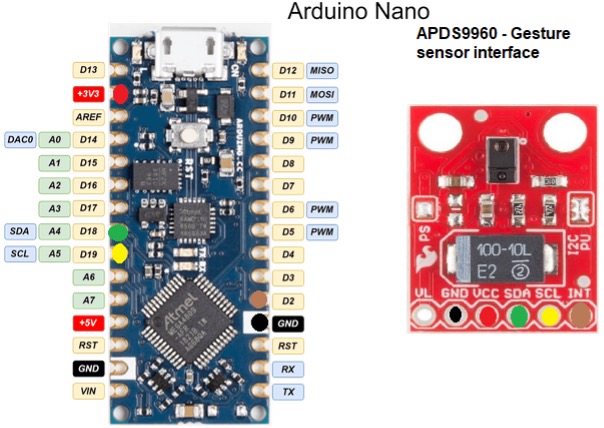
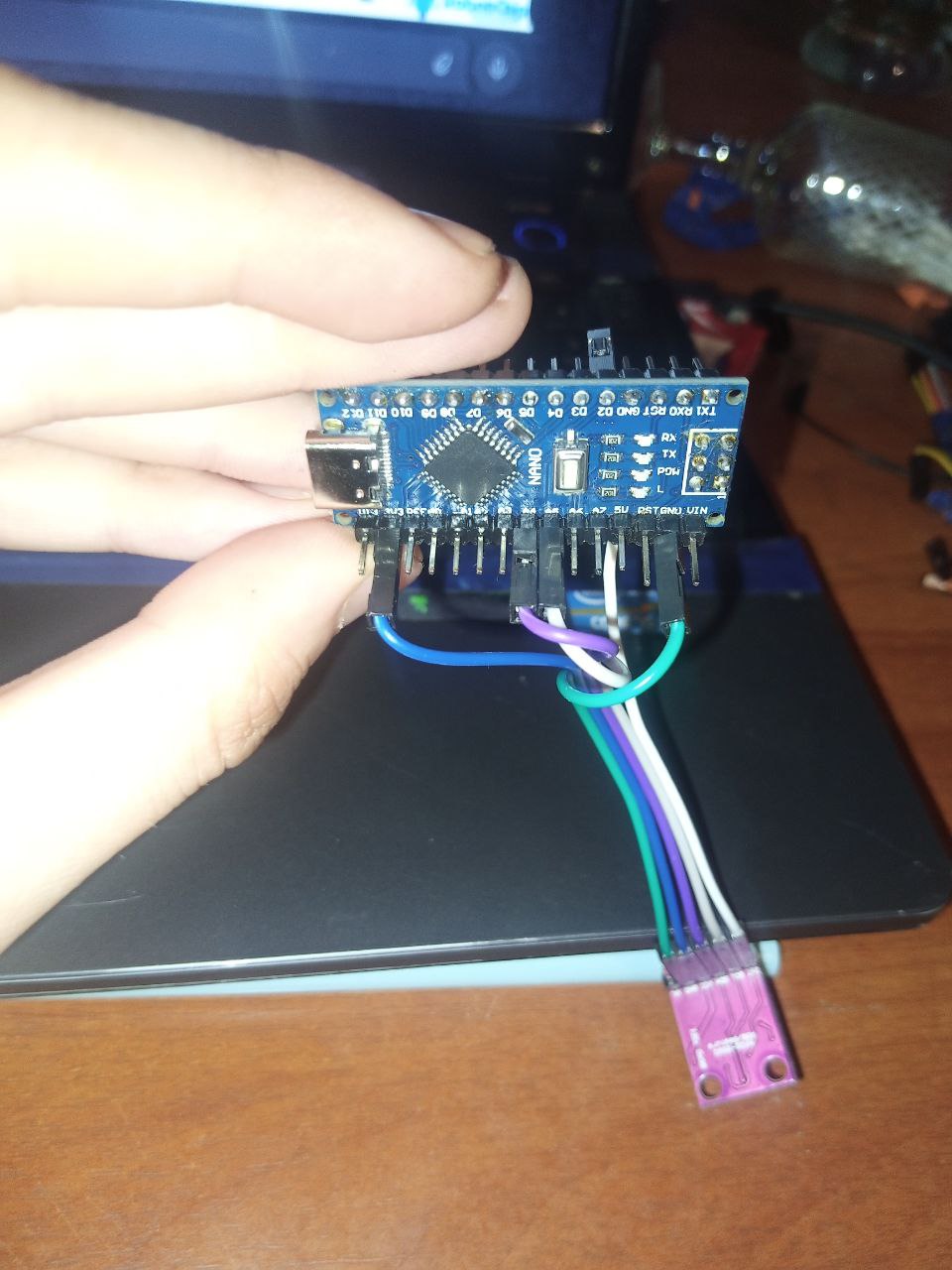
Hello! I bought a nano and a sensor. I connected the sensor to the arduino, (int-D2, vcc-3.3v, gnd-gnd) if I connect scl to A5 and sda to A4, I load gesturetest and open the monitor. It prints out the library name string and the test name and is silent. But if I swap pins, it starts spamming none. Neither in the first nor in the second case does not respond to gestures and any movements. I looked through the phone's camera, the IR is on. What can be wrong?
And how can we know if you don't share your code?
i'm sorry
/****************************************************************
GestureTest.ino
APDS-9960 RGB and Gesture Sensor
Shawn Hymel @ SparkFun Electronics
May 30, 2014
https://github.com/sparkfun/APDS-9960_RGB_and_Gesture_Sensor

Tests the gesture sensing abilities of the APDS-9960. Configures
APDS-9960 over I2C and waits for gesture events. Calculates the
direction of the swipe (up, down, left, right) and displays it
on a serial console.

To perform a NEAR gesture, hold your hand
far above the sensor and move it close to the sensor (within 2
inches). Hold your hand there for at least 1 second and move it
away.

To perform a FAR gesture, hold your hand within 2 inches of the
sensor for at least 1 second and then move it above (out of
range) of the sensor.

Hardware Connections:

IMPORTANT: The APDS-9960 can only accept 3.3V!

 Arduino Pin  APDS-9960 Board  Function

 3.3V         VCC              Power
 GND          GND              Ground
 A4           SDA              I2C Data
 A5           SCL              I2C Clock
 2            INT              Interrupt

Resources:
Include Wire.h and SparkFun_APDS-9960.h

Development environment specifics:
Written in Arduino 1.0.5
Tested with SparkFun Arduino Pro Mini 3.3V

This code is beerware; if you see me (or any other SparkFun
employee) at the local, and you've found our code helpful, please
buy us a round!

Distributed as-is; no warranty is given.
****************************************************************/

#include <Wire.h>
#include <SparkFun_APDS9960.h>

// Pins
#define APDS9960_INT    2 // Needs to be an interrupt pin

// Constants

// Global Variables
SparkFun_APDS9960 apds = SparkFun_APDS9960();
int isr_flag = 0;

void setup() {

  // Set interrupt pin as input
  pinMode(APDS9960_INT, INPUT);

  // Initialize Serial port
  Serial.begin(9600);
  Serial.println();
  Serial.println(F("--------------------------------"));
  Serial.println(F("SparkFun APDS-9960 - GestureTest"));
  Serial.println(F("--------------------------------"));

  // Initialize interrupt service routine
  attachInterrupt(0, interruptRoutine, FALLING);

  // Initialize APDS-9960 (configure I2C and initial values)
  if ( apds.init() ) {
    Serial.println(F("APDS-9960 initialization complete"));
  } else {
    Serial.println(F("Something went wrong during APDS-9960 init!"));
  }

  // Start running the APDS-9960 gesture sensor engine
  if ( apds.enableGestureSensor(true) ) {
    Serial.println(F("Gesture sensor is now running"));
  } else {
    Serial.println(F("Something went wrong during gesture sensor init!"));
  }
}

void loop() {
  if( isr_flag == 1 ) {
    detachInterrupt(0);
    handleGesture();
    isr_flag = 0;
    attachInterrupt(0, interruptRoutine, FALLING);
  }
}

void interruptRoutine() {
  isr_flag = 1;
}

void handleGesture() {
    if ( apds.isGestureAvailable() ) {
    switch ( apds.readGesture() ) {
      case DIR_UP:
        Serial.println("UP");
        break;
      case DIR_DOWN:
        Serial.println("DOWN");
        break;
      case DIR_LEFT:
        Serial.println("LEFT");
        break;
      case DIR_RIGHT:
        Serial.println("RIGHT");
        break;
      case DIR_NEAR:
        Serial.println("NEAR");
        break;
      case DIR_FAR:
        Serial.println("FAR");
        break;
      default:
        Serial.println("NONE");
    }
  }
}
Welcome! I need your help, I cannot see your setup and how you wired it much less which APDS-9960 Board you are using. Post a link to technical information on the APDS-9960 Board and an annotated schematic showing how your wired it, be sure to include all connections and power sources.

Moved topic to "Sensors" forum category, which seems more appropriate than "LEDs and multiplexing", do you not think @nochnik ?
There is a post at the top of each forum category that describes the purpose of each one. Please read them when choosing a category to post your question.
Did you read any of the documentation for this sensor?
According to the Sparkfun page
https://learn.sparkfun.com/tutorials/apds-9960-rgb-and-gesture-sensor-hookup-guide
IMPORTANT: You must use 3.3V! If you try to use a 5V power supply or 5V I2C communications, you risk damaging the APDS-9960. If you are using a 5V Arduino (e.g. UNO), then you need to have some kind of level shifting.
I am also unsure that the 3.3V pin on Nano will be able to supply sufficient current to the board.
You show a red, blue and purple boards, color is not that important. Missing are the links and the annotated schematic (the language of electronics) showing how you connected it (each time). You can use the tools here to draw the schematic or you can download KiCad or many other free CAD (Computer Aided Design) software packages for free. What does "But if I swap pins, it starts spamming none" telling us. You state: " Neither in the first nor in the second case does not respond to gestures and any movements." What are the other cases and how was it wired for each case.
This topic was automatically closed 180 days after the last reply. New replies are no longer allowed.