Apparently the energy is passing through the button

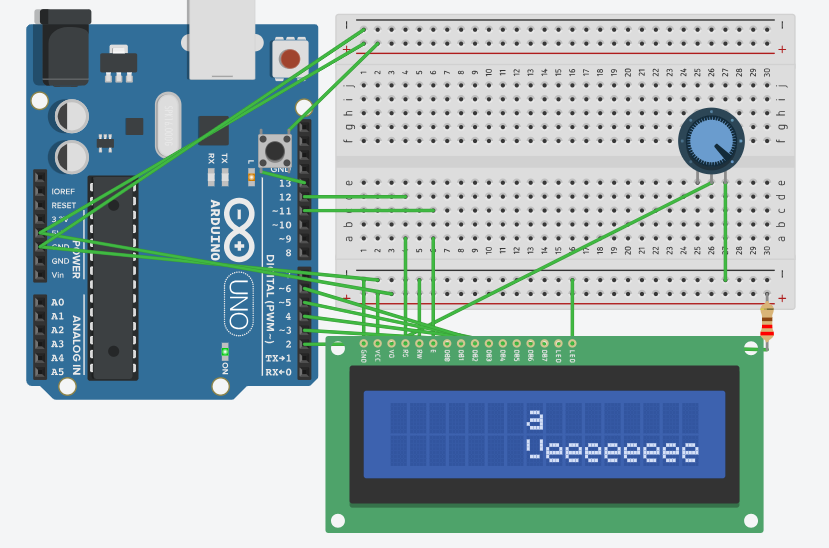
hello everyone, so my problem is with the button close to the 13º digital pin that, supposedly when i pressed the button it starts to print "e", but i dont press anything and the "e"s are getting printed


here is the code

// C++ code
//
#include <LiquidCrystal.h>

const int rs = 12, en = 11, d4 = 5, d5 = 4, d6 = 3, d7 = 2;
LiquidCrystal lcd(rs, en, d4, d5, d6, d7);

byte test[8] = {
  0B00000,
  0B10001,
  0B10001,
  0B10001,
  0B00000,
  0B01110,
  0B00000,
  0B00000
};

void setup() {
  pinMode(13, INPUT);
  lcd.begin(16, 2);
  lcd.createChar(0, test);
  delay(1);
  lcd.setCursor(7, 0);
  lcd.print("a");
  lcd.setCursor(7, 1);
  delay(1);
  lcd.write(byte(0));
  delay(1);
}

void loop() {
  if(digitalRead(13) == HIGH)
    lcd.print("e");
  else
    lcd.setCursor(1, 1);
} 

if you can and want, criticize my code to i lern to program better at the future, thanks

That diagram is hard to read. As far as I can see the button is wired wrong. Wire one side of the switch to ground. Wire a diagonal terminal of the switch to an input. In setup(), set the pinMode of the input to INPUT_PULLUP. The switch will read HIGH when not pressed and LOW when pressed. Adjust the logic in the code appropriately.

If you insist on wiring to Vcc, you need a pull down resistor from the input to ground.

1 Like

Pin 13 also has the built in led connected to it. I would suggest using a different pin.

1 Like

Hello joaosinho

Take a view to gain the knowledge:

Have a nice day and enjoy coding in C++.

Digital read samples 1 microamp of current.

I have used reads in countup loops to see how many reads to empty a charged wire.

When not being read, INPUT pins are electrically neutral. INPUT_PULLUP pins are different, they supply Very Weak VCC.

The program is behaving correctly because pin 13 is effectively open circuit.

If you expect the input to read a sensible value then you must apply a sensible logic value to it.
This page explains how to properly connect logical input devices (switches etc) to your arduino.

My quick easy button is a jumper in the button pin hole.
I ground it on the Arduino USB port box or in a GND hole.

Other forms of button can be used.

Reflective IR can be fingertip size bubble local (led and sensor 90 deg apart point at close spot, no touch or bounce.

In the Arduino Playground / Code Mine
Is a whole section on capacitive sensing... Touch Buttons
I used this with foil held with steel paperclips to solder to.
I found that a .1uF cap with the leads spread out instead of a wire, and made a foil touch surface area at the top.

Cap sensors are my favorite never wear out buttons.
Some phone screens cap sense 2 wires at a time to see which your finger affects the most.

While testing piezo disks as self-powering buttons I found that a diode will flatten piezo spikes.

Cheap Hall Switches (not analog. digital) can sense even weak magnets.

That's just my top list, I hate when a device is useless because a button wore out.

Only with small form-factor boards, like a classic Nano. Pin13 is buffered with an opamp on an Uno R3, so not a problem to use that pin as input. Still wise to leave pin13 as the last available pin.

You should connect the button between pin and ground, with pinMode changed to
pinMode (buttonPin, INPUT_PULLUP);
That eliminates the need to use a pull up/down resistor, which you currently haven't got.
That change also changes logic. The pin now becomes LOW when pressed.
Leo..

The INPUT_PULLUP resistance varies per pin from 20K to 50K. The current through the button is very small and drains quick.

This topic was automatically closed 180 days after the last reply. New replies are no longer allowed.