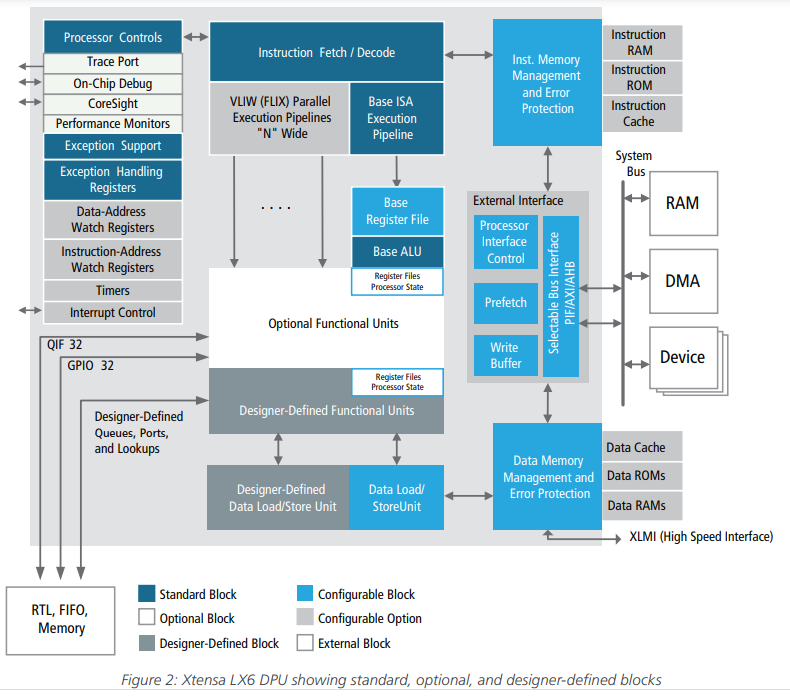
You have provided much more elaborate information than the ESPRESSIF Forum. However, (at the moment) I would like to be more specific to 30-pin ESP32 Board. Based on your opinion and the opinion of ESPRESSIF, my understanding is:
1. Ref to Fig-1 of post #1, each LX6 Core contains:
(1) Instruction Memory Block containing RAM, ROM, and Cache. Any idea about their capacities in bytes?
(2) Data Memory Block containing RAM, ROM, and Cache. Any idea about their capacities in bytes?
(3) I am interested to see the pin diagram of this LX6 Processor (Dataplane Processing Unit DPU) and the Technical Reference Manual.
2. This is the pin diagram (Fig-1, Section-5 of this post) for the 48-pin ESP32 Chip of Espressif, which contains:
(1) 2 pieces of LX6 processor -- is it correct?
(2) (a) 440 KiB ROM Memory, 520 KIB SRAM, 8 KIB RTC Fast Memory, and 8 KiB RTC Slow Memory as per Sec-1.3.2.1 of Tech Ref Manual -- is it correct?
(b) Are these memories together marked as "Embedded Memory in Fig-2 of post #1?
(c) Are they connected with both LX6 Cores by a "Memory Bus" other than APB/AHB/IOBus?
(3) Fig-2 of post #1 shows "Cache" -- does it exist within the ESP32 Chip? There is no mention of it in Sec-1.3.2.1 of Tech Ref Manual.
(4) Is Flash Memory (U3 of Fig-3 of post #1) a separate chip and it exists outside the hood of ESP32 Chip?
3. Are there APB (Advanced Peripheral Bus), AHB (Advanced High Performance Peripheral Bus), and IOBus (Input/Out Bus) in the ESP32 System? Is Flash Memory (U3 of Fig-3 of post #1) seen as a peripheral device?
4. With regards to the storage of RTOS and Sketch:
ESPRESSIF Forums has said in response to my query:
"FreeRTOS (plus every other part of the system: heap implementation, C library, peripheral drivers, network stacks, etc) is compiled along with your application and linked into the application binary. Application binary is stored in Flash. Parts of the application are copied into the internal RAM ("Instruction RAM" and "Data RAM" blocks of Fig.1 of Post #1) on boot, including some parts of FreeRTOS."
5.
Figure-1: Pin diagram of ESP32 chip
6.
If the "Bus Controller (a piece of hardware)" takes care of allocating resources avoiding deadlock/conflict, then why do we need software components like mutex and semaphore as is found in the following Arduino sketch (prepared consulting FreeRTOS manual and ChatGPT and tested) that shares common UART0 Port of ESP32 between Task0/Core0 and Task1/Core1?
//#include "freertos/FreeRTOS.h"  //inclusion is optional
//#include "freertos/task.h"
#include "driver/uart.h"   //this header file must be included

#define UART_PORT UART_NUM_0
#define BAUD_RATE 115200
#define BUFFER_SIZE 128

// Define the mutex handle
SemaphoreHandle_t uartMutex;

void setup()
{
  // Initialize the UART
  uart_config_t uartConfig =
  {
    .baud_rate = BAUD_RATE,
    .data_bits = UART_DATA_8_BITS,
    .parity = UART_PARITY_DISABLE,
    .stop_bits = UART_STOP_BITS_1,
    .flow_ctrl = UART_HW_FLOWCTRL_DISABLE
  };

  uart_param_config(UART_PORT, &uartConfig);
  uart_driver_install(UART_PORT, 256, 0, 0, NULL, 0);

  // Create the mutex
  uartMutex = xSemaphoreCreateMutex();

  // Create tasks for both cores
  xTaskCreatePinnedToCore(core0_task, "Core 0 Task", 4096, NULL, 1, NULL, 0);
  xTaskCreatePinnedToCore(core1_task, "Core 1 Task", 4096, NULL, 1, NULL, 1);
}

void loop() {}

// Task function for Core 0
void core0_task(void *pvParameters) {
  while (true)
  {
    // Attempt to acquire the UART mutex
    if (xSemaphoreTake(uartMutex, portMAX_DELAY) == pdTRUE)
    {
      // Access the UART here (send/receive data)
      // ...
      const char *data = "Hello, UART!\n";
      uart_write_bytes(UART_PORT, data, strlen(data));

      // Release the UART mutex after use
      xSemaphoreGive(uartMutex);
    }

    vTaskDelay(pdMS_TO_TICKS(1000)); // Add a delay to avoid continuous access
  }
}

// Task function for Core 1
void core1_task(void *pvParameters)
{

  char rx_buffer[BUFFER_SIZE];
  size_t rx_bytes;
  while (1)
  {
    // Attempt to acquire the UART mutex
    if (xSemaphoreTake(uartMutex, portMAX_DELAY) == pdTRUE) {
      // Access the UART here (send/receive data)
      // ...
      // Read data from UART
      rx_bytes = uart_read_bytes(UART_PORT, rx_buffer, BUFFER_SIZE - 1, pdMS_TO_TICKS(100));

      // Null-terminate the received data to make it a valid C-string
      rx_buffer[rx_bytes] = '\0';

      // Process the received data (e.g., print it)
      if (rx_bytes > 0)
      {
        //Serial.print("Received: ");
        //Serial.println(rx_buffer);
        uart_write_bytes(UART_PORT, rx_buffer, strlen(rx_buffer));
      }
      // Release the UART mutex after use
      xSemaphoreGive(uartMutex);
    }

    vTaskDelay(pdMS_TO_TICKS(100)); // Add a delay to avoid continuous access
  }
}
7. I can use the following simple sketch (instead of Sec-6) to distribute tasks between Core0 and Core1 where they share common UART0 Port to send/receive data. Is there any advantage of using the above sketch of Sec-6 that uses mutex and semaphore?
void setup()
{
  // Initialize the UART
  Serial.begin(115200);

  // Create tasks for both cores
  xTaskCreatePinnedToCore(core0_task, "Core 0 Task", 4096, NULL, 1, NULL, 0);
  xTaskCreatePinnedToCore(core1_task, "Core 1 Task", 4096, NULL, 1, NULL, 1);
}

void loop() {}

// Task function for Core 0
void core0_task(void *pvParameters)
{
  while (true)
  {
    const char data[] = "Hello, UART!";
    Serial.println(data);
    delay(1000);
  }
}

// Task function for Core 1
void core1_task(void *pvParameters)
{
  char rx_buffer[50];
  while (true)
  {
    byte n = Serial.available();
    if ( n != 0)
    {
      byte m = Serial.readBytesUntil('\n', rx_buffer, 50);
      rx_buffer[m] = '\0';
      Serial.println(rx_buffer);
      delay(1000);
    }
  }
}
Output:
Hello, UART!
Hello, UART!
Bangladesh!   //received from InputBox of Serial Monitor
Hello, UART!
Hello, UART!