If you hold your cursor over u_int16_t what does it say?
Are you including Arduino.h ? It will include this.. typedef unsigned short u_int16_t;
Try putting this near the top of the code.
Or change the u_int16_t to unsigned short but something is broken!
Should be uint16_t.
Both versions compile for me in the arduino ide and vscode.
u_int16_t (I think it's in types.h) is probably depreciated I have changed the code above.
Thank you.

#include <Arduino.h>
#include <DWIN_Arduino.h>

#define myDebug

DWIN hmi(Serial2, 16, 17, 115200);
const byte unLockButton = 0x93;
const int16_t passcodeVP = 0x8800;
const String keyboardVP = "2000"; // can not see this in your code anymore
const int16_t PASSCODE = 1234;
byte lastByteCopy = 0;
String addressCopy = "";

void onHMIEvent(String address, int lastByte, String message, String response);
int16_t readVP(int16_t vpAddress);
void processAddress(String address, byte lastByte);

void setup()
{
  Serial.begin(9600);
  hmi.echoEnabled(false);                   // helps debugging if true as we can see the ack.
  hmi.hmiCallBack(onHMIEvent);
  //#ifdef myDebug
  // hmi.setVPWord(passcodeVP,1234);           // put test passcode in vp 0x8800
  //#endif
  hmi.setPage(0);
}

void loop()
{
  if (Serial2.available() > 4)  // useful (maybe) so we dont lose 100 milli per loop                                     // wait until something is in the rx buffer ie. > 0
  {
    hmi.listen();
  }

  if (addressCopy != "") {
    Serial.println("addressCopy != ");
    processAddress(addressCopy, lastByteCopy);
    // clear our flags
    addressCopy = "";
    lastByteCopy = 0;
  }
}

void onHMIEvent(String address, int lastByte, String message, String response)
{
#ifdef myDebug
  Serial.println("OnEvent : [ A : " + address + " | D : " + String(lastByte, HEX) + " | M : " + message + " | R : " + response + " ]");
#endif
  addressCopy = address;
  lastByteCopy = lastByte;

}


int16_t readVP(int16_t vpAddress)
{
  return (hmi.readVPByte(vpAddress) << 8) + hmi.readVPByte(vpAddress) ;
}

void processAddress(String address, byte lastByte) {
 Serial.println("In processAddress");
 Serial.println("address :" +String(address) +" keyboardVP :" +String(keyboardVP));
 Serial.println("lastByte :" +String(lastByte) +" unLockButton :" +String(unLockButton));

  if ((address == keyboardVP) && (lastByte == unLockButton) ) {

    int16_t passcode = readVP(passcodeVP);
    Serial.println("passcode:" +String(passcode));
#ifdef myDebug
    Serial.println(passcode);
#endif

    if (passcode == 1234) {
      // do other stuff
#ifdef myDebug
      Serial.println("Password Good");
#endif

      //depending on cfg file settings
      hmi.beepHMI();
      //or
      //hmi.playSound(2); // our unlock sound
    }

  }
  //else if (/* condition */)
  //{
  /* code */
  //}

}
Above code return something else, it should be 1234. Below is correct.
OnEvent : [ A : 8800 | D : d2 | M : ⸮ | R : 5a a5 83 88 00 01 04 d2 ]
Output is -11566?
Sorry copy and paste error all int16_t should be uint16_t
I have this.. OnEvent : [ A : 2000 | D : 41 | M : A | R : 5a a5 83 20 00 01 00 93 ]
1234
Password Good
Are you using same code as I am (which shared above)?
If you are getting 1234 then why i am getting -11566?
with change int16_t should be uint16_t
OnEvent : [ A : 2000 | D : 93 | M : ⸮ | R : 5a a5 83 20 00 01 00 93 ]
addressCopy !=
In processAddress
address :2000 keyboardVP :2000
lastByte :147 unLockButton :147
passcode:53970
53970
OnEvent : [ A : 2000 | D : 93 | M : ⸮ | R : 5a a5 83 20 00 01 00 93 ]
addressCopy !=
In processAddress
address :2000 keyboardVP :2000
lastByte :147 unLockButton :147
passcode:53970
53970
Why did you change the function return! it should be this.
return (hmi.readVPByte(vpAddress,1) << 8) + hmi.readVPByte(vpAddress) ;
Note this (vpAddress,1) which reads the hiByte.
Are you using the test version as requested?
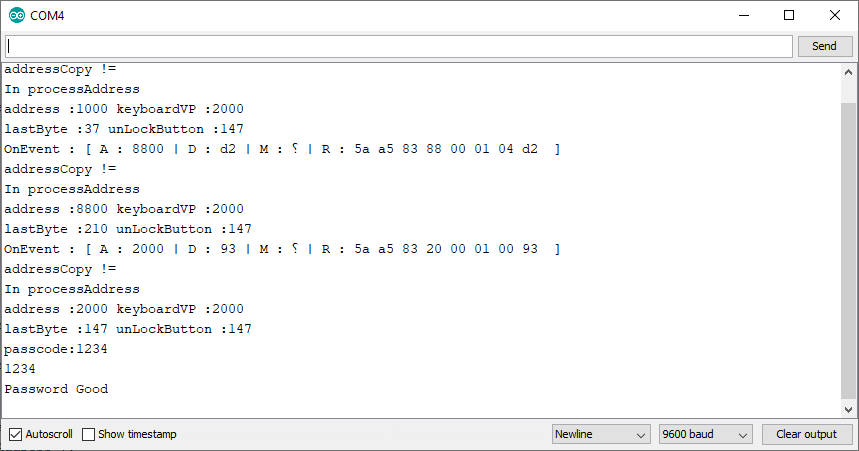
Sorry My bad, I wasn't download new library file. Its works.
Thank you. Will it also work for float?
Read float? not well tested
float readFloatValue(uint16_t vpAddress){

    byte data[4] = {0,0,0,0};
    float fValue;

    data[2] = hmi.readVPByte(vpAddress);
    data[3] = hmi.readVPByte(vpAddress,1);
    data[0] = hmi.readVPByte((vpAddress+1));
    data[1] = hmi.readVPByte((vpAddress+1),1);
    memcpy(&fValue,data,4);
    return fValue;
}
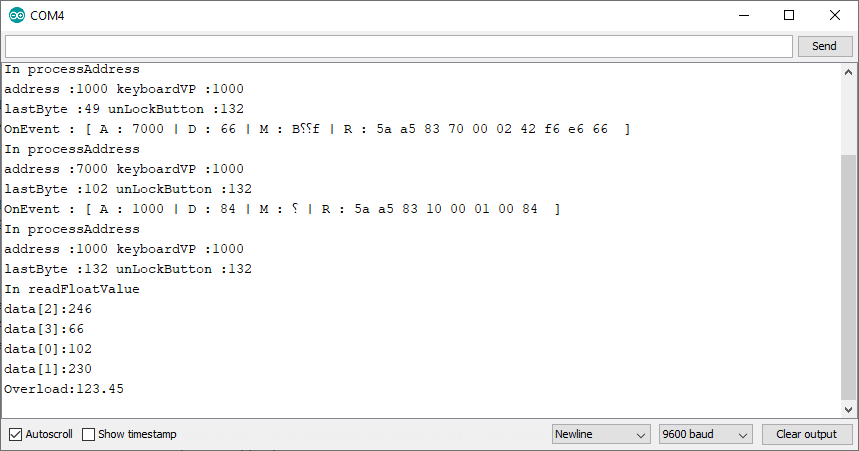
I have tested and here is the output

Address:1000, KeyboardVP="1000", overloadVP=0x7000
For Value 123.45
Hello,
What are you saying?
For value 123.45 function return said values.
Is that what you are expecting?
Hello,
I have encounter another issue
/* ---------------------------------------------------------------------------------------------------------- */
void SetDateInfo()
{
  if (Var_BRTC == true)
  {

    DateTime CurDt = rtc.now();

    Var_SCurDate = String(CurDt.year()) + "." + String(CurDt.month()) + "." + String(CurDt.day());
    Var_SCurTime = String(CurDt.hour()) + "." + String(CurDt.minute()) + "." + String(CurDt.second());

    //Serial.println("Var_SCurDate: " + String(Var_SCurDate) + "  Var_SCurTime: " + String(Var_SCurTime ));
    //Serial.println("CurDt.year():" + String(CurDt.year()));
    //float tmpvar =CurDt.year();

    //hmi.setFloatValue(0x9400, tmpvar); // Year value
    hmi.setVP(0x9400, CurDt.year()); // Year value
    hmi.setVP(0x9500, CurDt.month()); // Month value
    hmi.setVP(0x9600, CurDt.day()); // Day value
    hmi.setVP(0x9700, CurDt.hour()); // HH value
    hmi.setVP(0x9800, CurDt.minute()); // mm value
    hmi.setVP(0x9900, CurDt.second()); // ss value
  }
}
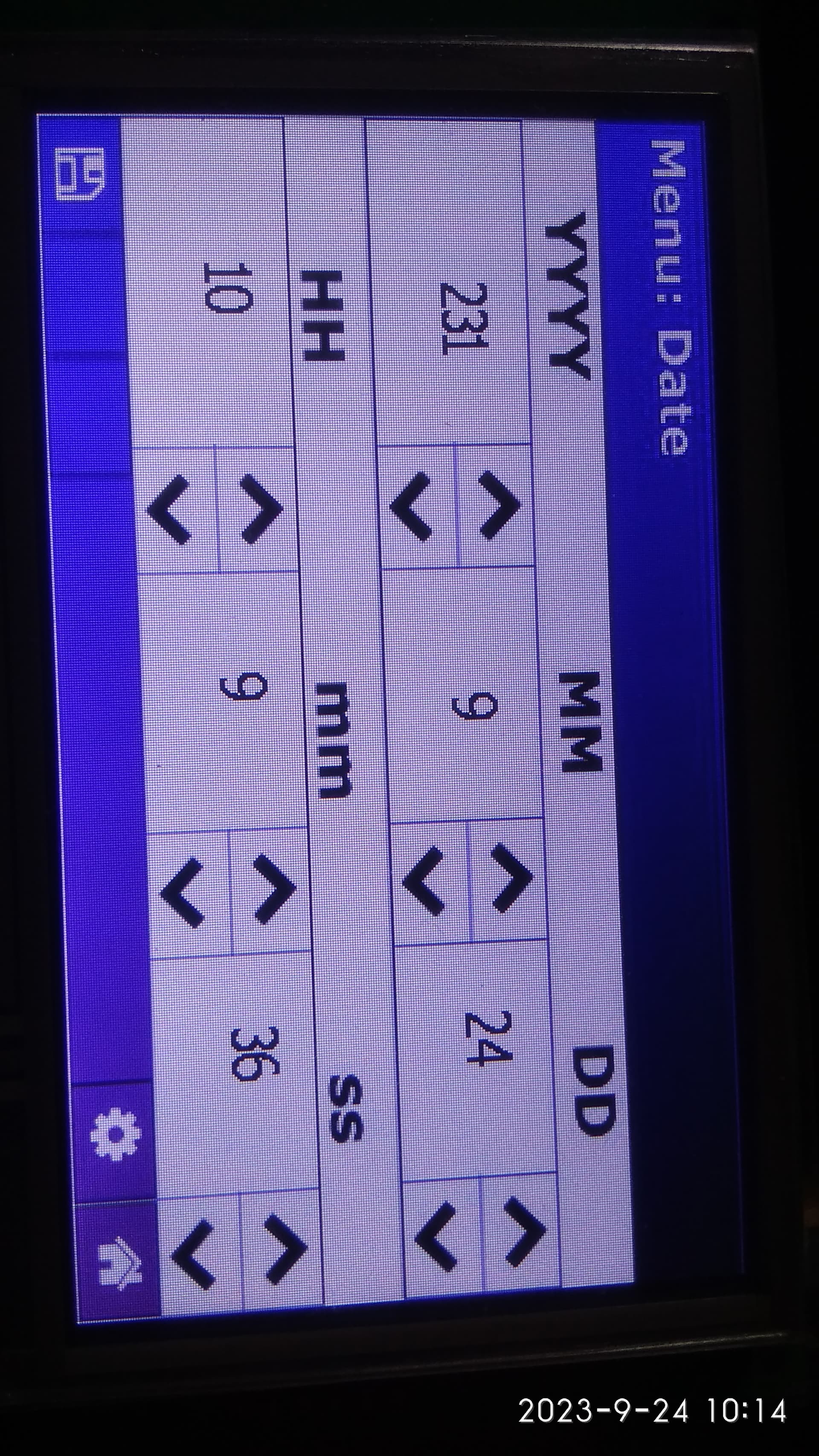
Everything correct expect year. it should be 2023 but its showing 231. I have tested with float and Long INT; it works but i can't able to increment it. so i have to switch to Int

do you have any Suggestion.
All the clock values can be 2 byte int.
None of them should be floats.
Whats does printing CurDt.year() say?
It prints 231 as shown in image,
CurDt.year() should be 2023.
Yes I can see that.
But what does Serial.println(CurDt.year(),DEC ) on the year function say? not the display.

Opps.. should be hmi.setVPWord() for the year function.