Arduino Nano & HC05 Two Way Communication

Greetings,

I have two Arduino Nano's, two HC05 Bluetooth modules, a button, reed switch, and two breadboards. I have both breadboards set up as follows;

Arduino >> HC-05
GND >> GND
5V >> VCC
D3 >> TX
D2 >> RX
Note: The connection for both of the HC-05 modules is the same.

The Button / Reed Switch
GND >> First pin of the Button
D4 >> Second pin of the Button
Note: The connection for both the button and the reed switch is the same.

Arduino >> LED
GND >> Short Leg
D5 >> Long Leg
Note: The connection for both of the LEDs is the same.

Bidirectional communication is working but when I press the button on the master, or separate the magnets on the slave, the LED's only flicker. The serial monitor shows A's & B's and the LED's seem to flicker at the same rate that the serial monitor is populated.

I'm not very good at coding so I suspect that my code may have something to do with it. I downloaded it from the internet and modified it to suite my needs. I've attached the code below, thanks in advance for your help.

MASTER

#include <SoftwareSerial.h>
SoftwareSerial mySerial(3, 2);

#define Button 4
#define blueLed 5
#define greenLed 6
#define redLed 7

void setup() {
  Serial.begin(38400);
  mySerial.begin(38400);
  pinMode(Button, INPUT_PULLUP);
  pinMode(redLed, OUTPUT);
  pinMode(greenLed, OUTPUT);
  pinMode(blueLed, OUTPUT);
}

void loop() {
  // Sending
  int button = digitalRead(Button);
  if(button == HIGH)
  {
    mySerial.println("a");
  }

  // Receiving
  if (mySerial.available())
    Serial.write(mySerial.read());

  if (mySerial.read() == 'b')
  {
    digitalWrite(greenLed, HIGH);
  }
  else
  {
    digitalWrite(greenLed, LOW);
  }
}

SLAVE

#include <SoftwareSerial.h>
SoftwareSerial mySerial(3, 2);

#define Button 4
#define blueLed 5
#define greenLed 6
#define redLed 7

void setup()
{
  Serial.begin(38400);
  mySerial.begin(38400);
  pinMode(Button, INPUT_PULLUP);
  pinMode(redLed, OUTPUT);
  pinMode(greenLed, OUTPUT);
  pinMode(blueLed, OUTPUT);
}

void loop()
{
  // Receiving
  if (mySerial.available())
    Serial.write(mySerial.read());
  if (mySerial.read() == 'a')
  {
    digitalWrite(blueLed, HIGH);
  }
  else
  {
    digitalWrite(blueLed, LOW);
  }

  // Sending
  int button = digitalRead(Button);

  if (button == LOW)
  {
    mySerial.println("b");
  }
}
That's not the way to present things.

Please do a deep read of this topic: How to get the best out of this forum - Using Arduino / IDE 1.x - Arduino Forum

You are sending a new line and carriage return along with your character, and your reading is not set up to deal with these extra characters.

In both sketches where you send a character, use .write( ) and use single quotation marks around the character not double.

Thank you very much. I apologize if i posted incorrectly, i was trying to andser any questions by being thorough. Ive read that aboit the rules, ill read it again as im bot really sure what i did wrong. But thank you again for your help i truly appreciate it.

That did the trick! No more flickering. I wonder if I could ask you one more question, as I've just identified another issue. On the master, if I separate the magnets the LED turns from green to red with no flickering as it should. If I put the magnets back together the LED goes back to green as it should.

If I press the button on the slave, the relay connected to the master closes then opens as it is supposed to. Here's the problem, if I separate the magnet at the master, then try to push the button at the slave, the relay responds irregularly, comes on then turns right back off or I have to hold the button down for an extended period of time.

Do you think this is a case where I should be using some kind of interrupt? I watched some videos on how to implement but I'm not sure which side I should do it on, or what type to use. If upi'd rather I post this question in a new topic I'd be happy to do so. Not sure if I should be garbaging up the forum with multiple posts about the same thing. But thanks again for your assistance, those small changes did resolve the original issue.

I doubt it will be required.

Can you explain more about the reed switch and magnet. Do you have a link to the switch?
What is making the magnet move?

if I separate the magnet at the master, then try to push the button at the slave, the relay responds irregularly, comes on then turns right back off or I have to hold the button down for an extended period of time.

What relay?

Certainly. The relay is just a standard 5v relay and the reed switch is separated when a garage door opens. Here are the links to them.

5v Relay

Door Magnet (Reed Switch)

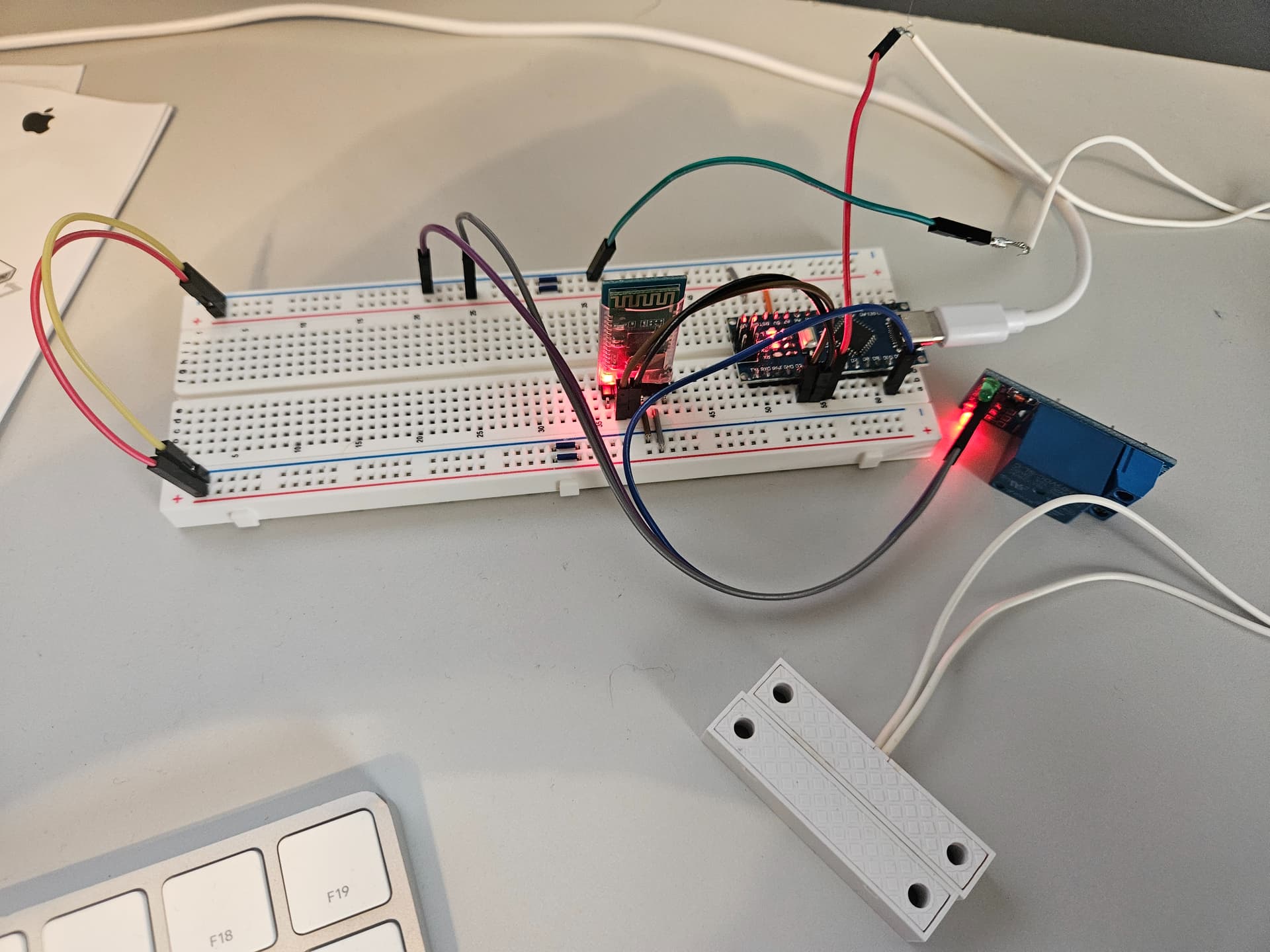
On the Master, I only see a green led, and on the Slave, only a blue one. Where is there a red led?

No where in the schematic do I see a relay, or how it is powered.

Can you please provide a hand drawn schematic of what you actually have?
I would like to see a button, a magnetic reed switch, and a relay. Don't use the fritzing diagram.

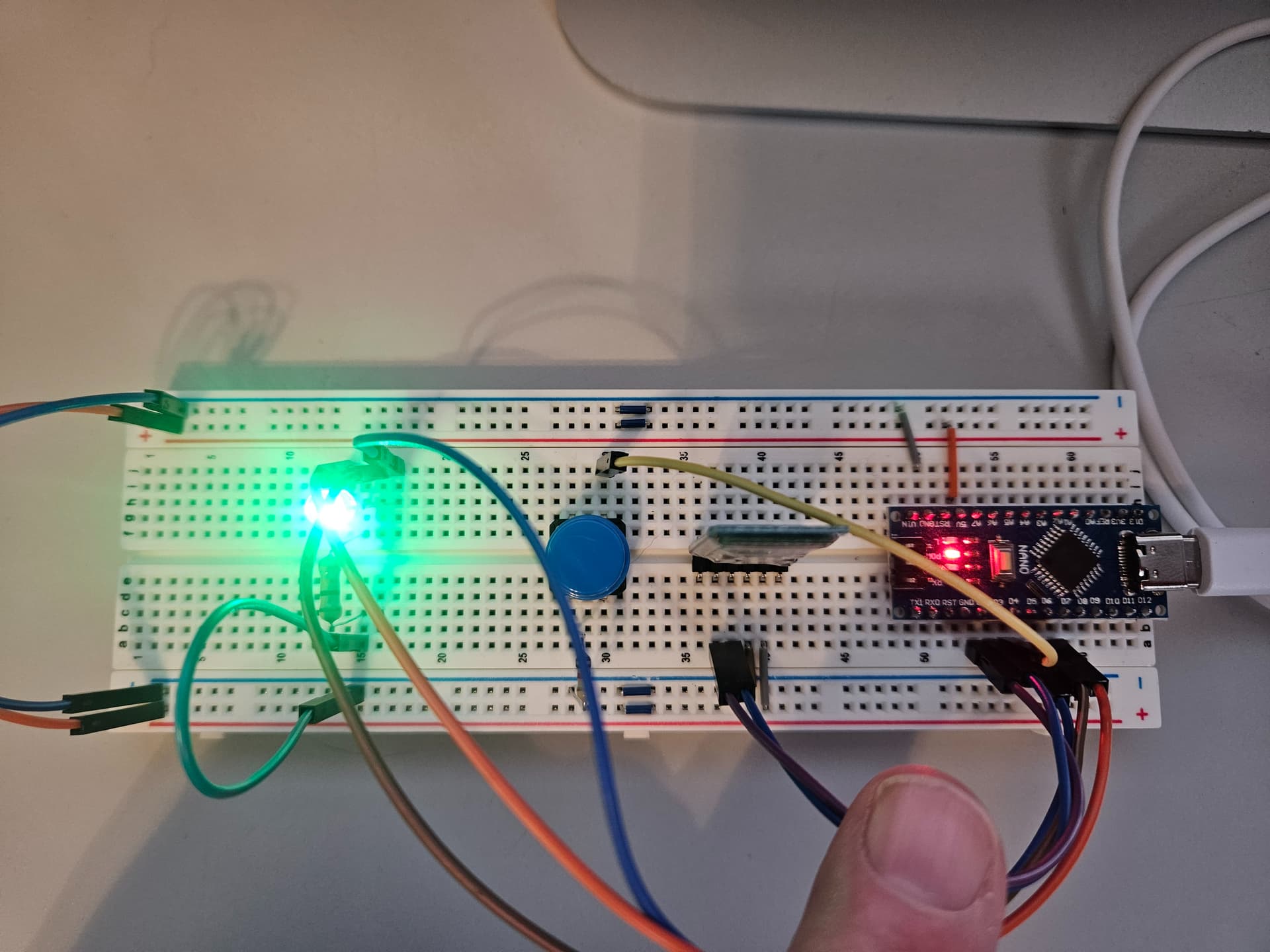
I'm sorry, the code above isn't updated. Here's the updated code. I took some photos of what I'm doing while scurrying around trying to find a piece of paper to draw it out on lol. Let me know if you still need me to draw it out and thanks for being patient with me.

SLAVE

#include <SoftwareSerial.h>
#include <TimerOne.h>

SoftwareSerial mySerial(3, 2);


int Button = 4;

void setup()
{
  // put your setup code here, to run once:
  Serial.begin(38400);
  mySerial.begin(38400);

  pinMode(redLed, OUTPUT);
  pinMode(greenLed, OUTPUT);
  pinMode(blueLed, OUTPUT);
  pinMode(Button, INPUT_PULLUP);
}

void loop()
{
  // Receiving
  if (mySerial.available())
    Serial.write(mySerial.read());

  if (mySerial.read() == 'a')
  {
    digitalWrite(redLed, HIGH);
    digitalWrite(greenLed, LOW);
    delay(1);
  }
  else
  {
    digitalWrite(redLed, LOW);
    digitalWrite(greenLed, HIGH);
  }

  // Sending
  int button = digitalRead(Button);

  if (button == LOW)
  {
    mySerial.print('b');
    digitalWrite(greenLed, LOW);
    digitalWrite(redLed, LOW);
    digitalWrite(blueLed, HIGH);
  } else {
digitalWrite(blueLed, LOW);
digitalWrite(greenLed,LOW);
digitalWrite(redLed, LOW);

  }
}

MASTER

#include <SoftwareSerial.h>
#include <TimerOne.h>

SoftwareSerial mySerial(3, 2);

int GarSwitch = 4;
int relay = 10;

void setup() {
  // put your setup code here, to run once:
  Serial.begin(38400);
  mySerial.begin(38400);

  pinMode(GarSwitch, INPUT_PULLUP);
  pinMode(relay, OUTPUT);
}

void loop() {

  // Sending
  int button = digitalRead(GarSwitch);

  if(button == HIGH)
  {
    mySerial.print('a');
  }

  // Receiving
  if (mySerial.available())
    Serial.write(mySerial.read());

  if (mySerial.read() == 'b')
  {
    digitalWrite(relay, LOW);
    delay(25);    
  }
  else
  {
    digitalWrite(relay, HIGH);
  }
}

Also, I'm going to power it by supplying 5v directly to the Type-C USB port. I have several power adapters made for this.

One more thing LOL, the LED is an RGB LED with a common cathode. :laughing:

I think you need to separate the reading routine from the actions you take. Read the command character into a variable , and then take action. I think the code will work better if both boards send two states for open and closed.

An alternative design would be to only have each side send BT commands when a state changes, and not continually.

Having two variables named Button and button is not a very good practice. The echoing back of the command in not useful.

//Slave
#include <SoftwareSerial.h>
//#include <TimerOne.h>
SoftwareSerial mySerial(3, 2);

#define Button 4
#define blueLed 5
#define greenLed 6
#define redLed 7

char receivedChar;

void setup()
{
  Serial.begin(38400);
  mySerial.begin(38400);

  pinMode(redLed, OUTPUT);
  pinMode(greenLed, OUTPUT);
  pinMode(blueLed, OUTPUT);
  pinMode(Button, INPUT_PULLUP);
}

void loop()
{
  // Receiving
  if (mySerial.available())
  {
    receivedChar = mySerial.read();
   
    if (receivedChar == 'a')
    {
      digitalWrite(redLed, HIGH);
      digitalWrite(greenLed, LOW);
      //delay(1);
    }
    else if (receivedChar == 'c')
    {
      digitalWrite(redLed, LOW);
      digitalWrite(greenLed, HIGH);
    }
  }

  // Sending

  int button = digitalRead(Button);

  if (button == LOW)
  {
    mySerial.print('b');
    digitalWrite(greenLed, LOW);
    digitalWrite(redLed, LOW);
    digitalWrite(blueLed, HIGH);
  }
  else
  {
    mySerial.print('d');
    digitalWrite(blueLed, LOW);
    digitalWrite(greenLed, LOW);
    digitalWrite(redLed, LOW);
  }
}
//Master

#include <SoftwareSerial.h>
//#include <TimerOne.h>

SoftwareSerial mySerial(3, 2);

int GarSwitch = 4;
int relay = 10;

char receivedChar;

void setup() {
  // put your setup code here, to run once:
  Serial.begin(38400);
  mySerial.begin(38400);

  pinMode(GarSwitch, INPUT_PULLUP);
  pinMode(relay, OUTPUT);
}

void loop() {

  // Sending
  int button = digitalRead(GarSwitch);

  if (button == HIGH)
  {
    mySerial.print('a');
  }
  else
  {
    mySerial.print('c');
  }

  // Receiving
  if (mySerial.available())
  {
    receivedChar = mySerial.read();

    if (receivedChar == 'b')
    {
      digitalWrite(relay, LOW);
      delay(25);
    }
    else if (receivedChar == 'd')
    {
      digitalWrite(relay, HIGH);
    }
  }
}

Everything seems to be working but the LED's are back to flickering again.

Actually the LED's are flickering and I can't get the relay to close when the magnets are separated.

Can you add some serial printing to your code to see if the communications are working as expected.

Which color led is flickering?

The relay and the reed switch does not make sense to me as a code issue. When the magnets are separated, the board is sending 'c'. The relay response is based on reading from the other board.

I think there is a power issue. This is from the relay spec

  • ✹✹Coil Current: 71-90mA

That is too much for an Arduino pin to drive.

I think there is a power issue where what you have is insufficient for constant BT sending and running the relay.

I never thought of that. I have it plugged into an iMac. Give me a bit and I"ll test it by using an external power source.

You are the MAN!!! That seems to have done the trick. I'll test it out over the next day or so and let you know but I think that did it. Thanks for all of your help.

Yep, all good. I've tested it over and over and everything looks good. Thank you my friend.