Hi All
I am trying to build a digital display for my EV conversion project using a Nextion display. I am running with an Arduino Uno and a generic CAN to serial converter (MCP2515). I cannot get the CAN messages to display any values on the screen.
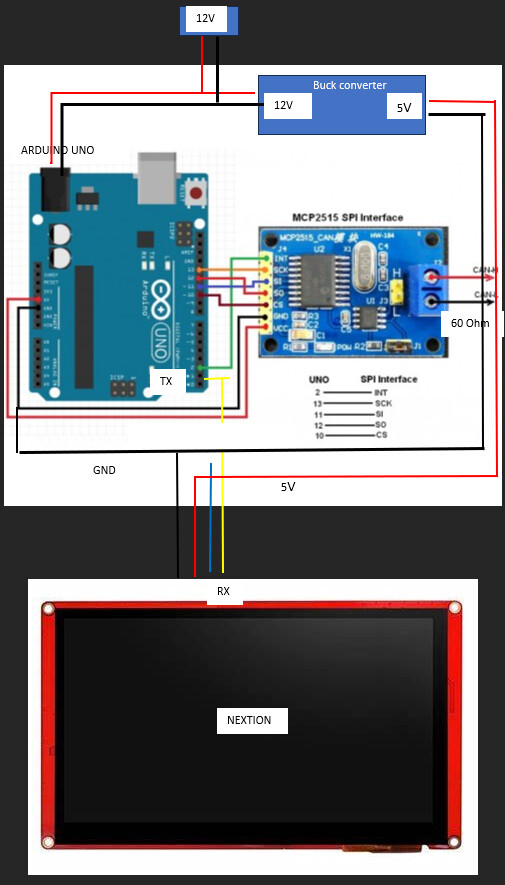
Here is what I have tested:
- No issue with CAN bus with devices in car, 60 Ohm across H/L term, 500kB/s speed
- Confirmed MCP2515 is functioning - serial port will display correct values (8MHz clock)
- commented out #NexConfig Nextion file, confirmed Serial port
- Use common ground between Nextion and Arduino, use TX (Arduino) - RX (Nextion) Yellow. One power supply/GND
- Nextion display values correctly when I use directly with Arduino using analogue rotary pot input. Have tested another Nextion display, same issue.
#include <mcp_can.h>
#include <SPI.h>
#include "Nextion.h"

#define CS_PIN 10// varies between boards
#define INT_PIN 2 //varies between boards

MCP_CAN CAN0(CS_PIN);

long unsigned int rxId;
unsigned char len = 0;
unsigned char rxBuf[8];
int soc; // battery pack state of charge
//double packCurrent; // pack current, amps
//double packVoltage; // pack voltage, V
//double packPower; //pack power, kW


void setup() {

  Serial.begin(9600);  // Start serial comunication at baud=9600

  // I am going to change the Serial baud to a faster rate.
  delay(500);  // This delay is just in case the nextion display didn't start yet, to be sure it will receive the following command.
  Serial.print("bauds=115200");  // Set new baud rate of nextion to 115200, but it's temporal. Next time nextion is power on,
                                // it will retore to default baud of 9600.
                                // To take effect, make sure to reboot the arduino (reseting arduino is not enough).
                                // If you want to change the default baud, send the command as "bauds=115200", instead of "baud=115200".
                                // If you change the default baud, everytime the nextion is power ON is going to have that baud rate, and
                                // would not be necessery to set the baud on the setup anymore.
  Serial.write(0xff);  // We always have to send this three lines after each command sent to nextion.
  Serial.write(0xff);
  Serial.write(0xff);

  Serial.end();  // End the serial comunication of baud=9600

  Serial.begin(115200);

  if (CAN0.begin(MCP_ANY, CAN_500KBPS, MCP_8MHZ) == CAN_OK)
    Serial.println("MCP2515 Initialised Successfully!");
  else
    Serial.println("MCP2515 Initialising Failed!");
  pinMode(INT_PIN, INPUT); // INT input pin

  CAN0.init_Mask(0, 0, 0x07FF0000); // Init mask to allow only 0x6B0 (hex) to pass
  CAN0.init_Filt(0, 0, 0x06B00000); // Init filter for 0x6B0 (hex)

  Serial.println("MCP2515 Library Mask & Filter Example...");
  CAN0.setMode(MCP_NORMAL); // Change to normal mode to allow messages to be transmitted
}

void loop() {
  if (!digitalRead(INT_PIN)) // If pin is low, read the receive buffer
  {
    CAN0.readMsgBuf(&rxId, &len, rxBuf); // Read data: len = data length, rxBuf = data byte(s)
    if (rxId == 0x6B0) { // Check if received ID is 0x6B0
      if (len >= 5) { // Ensure there are at least 5 bytes in the message
        soc = 0.5 * rxBuf[4]; // Store byte 4 as an integer in 'soc'.
        //packCurrent = 0.1* (((rxBuf[0] << 8) | rxBuf[1])); // -500 because we added 500 in Orion CANbus settings
        //packVoltage = 0.1 * ((rxBuf[2] << 8) | rxBuf[3]);

        //packPower = 0.001 * packVoltage * packCurrent;

      Serial.print("soc.val=");
      Serial.print(soc);
      Serial.write(0xff);
      Serial.write(0xff);
      Serial.write(0xff);

      /*
        Serial.print("ID: ");
        Serial.print(rxId, HEX);
        Serial.print(" Data: ");
        for (int i = 0; i < len; i++) // Print each byte of the data
        {
          if (rxBuf[i] < 0x10) // If data byte is less than 0x10, add a leading zero
          {
            Serial.print("0");
          }
          Serial.print(rxBuf[i], HEX);
          Serial.print(" ");
        }
        Serial.print(" SOC: ");
        Serial.print(soc);

        Serial.print(" packCurrent: ");
        Serial.print(packCurrent);

        Serial.print(" Voltage: ");
        Serial.print(packVoltage);

        Serial.print(" packPowerkW: ");
        Serial.println(packPower);
      */

      }
    }
  }
}
The value I am attempting to display is state of charge (soc) - in serial monitor the HEX values are converted and are displaying the correct scaled value (82%) but nothing comes through to the display.
Any ideas what I should try next?
