Arduino serial communication to display on LCDWG128x64

Hi Guys,

Need your help This is part of my project where I need to read serial communication from a device/pc and display it in LED array 5 digit 7 segment. However, as of now I would like to read the value given by a PC and display it to an LCD for testing purposes.

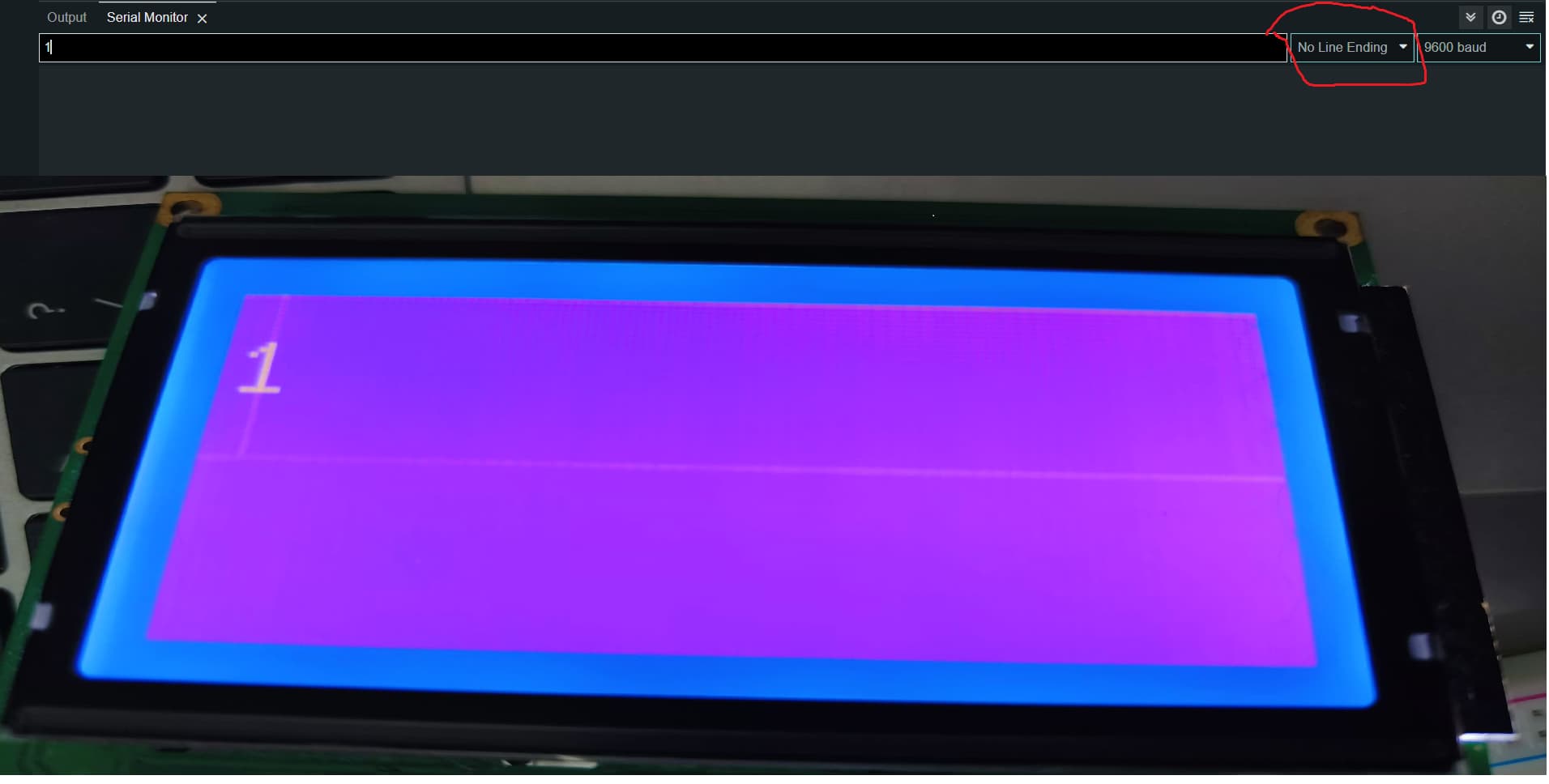
I am using COM PORT 3 of my PC then usb to mini usb cable to arduino. Then I connected my arduino to a WG12864 (LCD 128x64 device). My connections are all good it is just I have a problem with my program. For example I wanted to display "1" from PC to LCD it will display "1" (using serial monitor in Arduino IDE). When I type "2" it will display "12". Basically, it does delete the previous data. I wanted to delete the previous data after I pressed enter. See pictures below. This is using "No Line ending. When I use "New Line", it does not display anything.

The code is below, I just copied this codes from other examples and I experimented it. I think the problem is when I received \r or \n it does not refresh the display or data. I hope you could help me with this.

#include "U8glib.h"

U8GLIB_ST7920_128X64_4X u8g(13, 11, 12);

String inputString = "";
boolean stringComplete = false;
String command = "";
String value = "";
char inChar = "";
void draw(void) {

  u8g.setFont(u8g_font_unifont);
 u8g.setPrintPos(1,20);
 u8g.print(inputString);
  //u8g.setFont(u8g_font_osb21);
  //u8g.drawStr( 0, 22, "Hello World");
}

void setup(void) {


  // assign default color value
  Serial.begin(9600);
  inputString.reserve(50);  // reserve 50 bytes in memory to save for string manipulation 
  if ( u8g.getMode() == U8G_MODE_R3G3B2 ) {
    u8g.setColorIndex(255);     // white
  }
  else if ( u8g.getMode() == U8G_MODE_GRAY2BIT ) {
    u8g.setColorIndex(3);         // max intensity
  }
  else if ( u8g.getMode() == U8G_MODE_BW ) {
    u8g.setColorIndex(1);         // pixel on
  }
  else if ( u8g.getMode() == U8G_MODE_HICOLOR ) {
    u8g.setHiColorByRGB(255,255,255);
  }
  

}

void loop(void) {
  // picture loop
  while (Serial.available()>0) {
    // get the new byte:
    char inChar = (char)Serial.read();
    inputString += inChar;
    // add it to the inputString:
    // if the incoming character is a newline or a carriage return, set a flag
    // so the main loop can do something about it:
    if (inChar == '\n' || inChar == '\r') {
      stringComplete = true;
    } 
  }
  if (stringComplete) {
    //Serial.println(inputString);
    delay(100);
    // identified the posiion of '=' in string and set its index to pos variable
    int pos = inputString.indexOf('=');
    // value of pos variable > or = 0 means '=' present in received string.
    if (pos > -1) {
      // substring(start, stop) function cut a specific portion of string from start to stop
      // here command will be the portion of received string till '='
      // let received string is open=test123
      // then command is 'open' 
        command = inputString.substring(0, pos);
      // value will be from after = to newline command
      // for the above example value is test123
      // we just ignoreing the '=' taking first parameter of substring as 'pos+1'
      // we are using '=' as a separator between command and vale
      // without '=' any other character can be used
      // we are using = menas our command or password must not contains any '=', otherwise it will cause error 
        value = inputString.substring(pos+1, inputString.length()-1);  // extract command up to \n exluded
       //Serial.println(command);
       //Serial.println(value);
       // password.compareTo(value) compare between password and value string,if match return 0 


        } 
       // clear the string for next iteration
       inputString = "";
       stringComplete = false;
    }  

    
  u8g.firstPage();  
  do {
    draw();
  } while( u8g.nextPage() );
  
  // rebuild the picture after some delay
  //delay(50);
}

You mean "doesn't" :wink:

You will need to clear the screen when you have a new valid message. Or at least position the cursor and overwrite the existing text. I'm not familiar with your screen so can't advise further.

What do you enter in serial Monitor to send '1' or '2' ?
In the code I see that you must enter something like "=2" in the monitor?

Yeah, I just realized the code needs '=' to refresh or delete the data. My problem now is that I do not know the set of data that the device is sending. I tried reading it through Putty and Accessport but I do not understand anything because it is all hex codes and when I tried to convert it to char it does not make sense. I will attach the data here tomorrow maybe.

Anyway, is possible if I reduce this "inputString.reserve(50); // reserve 50 bytes in memory to save for string manipulation" to inputString.reserve(5); it will delete the previous data where there is more than 5 bytes?

You will need to clear the screen when you have a new valid message. Or at least position the cursor and overwrite the existing text. I'm not familiar with your screen so can't advise further.

I use an LCD 128x64 screen. How can I overwrite this existing text? Do you have a code I can follow?

Hi Guys,

Already solved my problem. My code is below. My problem now is how to connect it to my device I have a GSE460 a digital weight indicator it has rs232 db9 female connector and I have a rs232 TTL Db9 female connector too. Is the connection as simple as connecting the RX, TX and GND of the device to the rs232 ttl as shown below?

image

image

#include <U8glib.h>    // Include the U8glib library

#include <SoftwareSerial.h>

SoftwareSerial mySerial(A0, A1); // RX | TX

U8GLIB_ST7920_128X64_4X u8g(13, 11, 12);  // Initialize the LCD object

String receivedData = "";   // String to store the received data
long numberValue = 0;       // Variable to store the extracted number as a long

void setup() {
  mySerial.begin(9600);       // Initialize Serial communication
}

void loop() {
  if (mySerial.available()) {
    char receivedChar = mySerial.read();    // Read a character from the Serial port

    // Check if the received character is a valid numerical value ('0'-'9') or a space
    if ((receivedChar >= '0' && receivedChar <= '9') || receivedChar == ' ') {
      // Skip leading spaces
      if (receivedData.length() > 0 || receivedChar != ' ') {
        receivedData += receivedChar;   // Add the character to the received data String
      }
    }
    // If the received character is a newline '\n', then convert the received data String
    // to a long integer and display it on the LCD
    else if (receivedChar == '\n' && receivedData.length() > 0) {
      numberValue = extractNumberFromData(receivedData); // Convert String to long integer
      lcdDisplayNumber(numberValue);      // Display the extracted number on the LCD
      receivedData = "";                 // Clear the receivedData String for the next number
    }
  }
}

// Function to extract the number from the String and convert it to a long integer
long extractNumberFromData(String data) {
  long extractedNumber = 0;
  bool isNegative = false;
  int startIndex = 0;

  // Check if the first character is a minus sign '-'
  if (data.charAt(0) == '-') {
    isNegative = true;
    startIndex = 1; // Start extracting the number from the second character
  }

  // Convert the numeric characters into a long integer
  for (int i = startIndex; i < data.length(); i++) {
    if (data.charAt(i) >= '0' && data.charAt(i) <= '9') {
      extractedNumber = extractedNumber * 10 + (data.charAt(i) - '0');
    }
  }

  // Apply the negative sign if applicable
  if (isNegative) {
    extractedNumber *= -1;
  }

  return extractedNumber;
}

// Function to display the number on the LCD
void lcdDisplayNumber(long number) {
  u8g.firstPage();
  do {
    u8g.setFont(u8g_font_8x13B);
    u8g.drawStr(0, 20, "Extracted Num:");
    u8g.setFont(u8g_font_fur11);
    u8g.setPrintPos(0, 40);  // Set the position to print the extracted number
    u8g.print(number);       // Display the extracted number
  } while (u8g.nextPage());
}