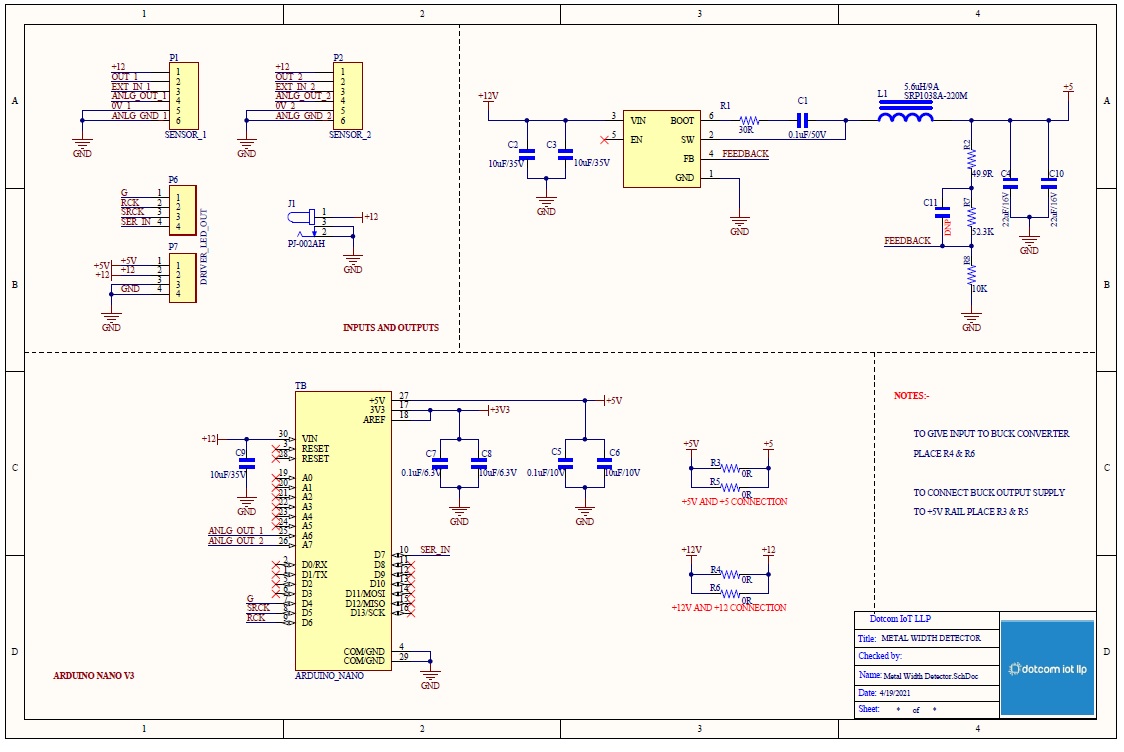
I am using arduino nano with HG-C 1100 measurement sensor and TPIC6C596 shift register with seven segment. This sensor can measure from -35mm to +35mm. Now my sensor measured value is 29.40 and in the seven segment the display has the values like 29.36, 29.46 and 29.33. The sensor is stable and there is no change in the value but why in seven segment the value is changing?
Is there any voltage fluctuations in the arduino nano?
If there are any fluctuations, How come I rectify the same?
Can anyone please help me to solve the issue?
I have uploaded the code for this project?
int DS_pin = 7;   // Data pin of 74hc595 connected to the 11th pin of Arduino Uno(10 for TPIC6C596)
int STCP_pin = 6; // Latch pin of 74hc595 connected to the 12th pin of Arduino Uno(9 for TPIC6C596)
int SHCP_pin = 5 ; // Clock pin of 74hc595 connected to the 8th pin of Arduino Uno(8 for TPIC6C596)
int gpin = 4;
int samplse = 0;   // the first sensor value
int samplse1 = 0;  // the second sensor value
float sensorvalue4;// Variable to store the final values in 7 segment display

/* values that are assigned to the name of the macros */
//  #define x1 0.564662421366142
//  #define x2 1.22135167695223

/* 7 segment common anode values ranging from 0 to 9 */
int dec_digits [11] = {
  B00111111, //0
  B00000110, //1
  B01011011, //2
  B01001111, //3
  B01100110, //4
  B01101101, //5
  B01111101, //6
  B00000111, //7
  B01111111, //8
  B01101111, //9
};

/* setup initializes serial and the pin settings */
void setup()
{
  Serial.begin(9600);          // 9600 Baud Rate
  Serial.println(" Metal Width Detector\n ");
  //set pins to output
  pinMode(DS_pin, OUTPUT);     // Setting Data Pin as an OUTPUT
  pinMode(STCP_pin, OUTPUT);   // Setting Latch Pin as an OUTPUT
  pinMode(SHCP_pin, OUTPUT);   // Setting Clock Pin as an OUTPUT
  pinMode(gpin, OUTPUT);   // Setting gPin as an OUTPUT
  digitalWrite(SHCP_pin, LOW); // Write Pin as LOW
  digitalWrite(DS_pin, LOW);   // Write Pin as LOW
  digitalWrite(STCP_pin, LOW); // Write Pin as LOW
  digitalWrite(gpin, LOW); // Write Pin as LOW
}

/* loop checks the sensor state and will send serial after calibration */
void loop()
{
  // read the first sensor
  int samplse = analogRead(6);
  // read the second sensor
  int samplse1 = analogRead(7);
  /* map(value, fromLow, fromHigh, toLow, toHigh)
     map - maps a number from one range to another.
     value - the number to map.
     fromLow - the lower bound of the value’s current range.
     fromHigh - the upper bound of the value’s current range.
     toLow - the lower bound of the value’s target range.
     toHigh - the upper bound of the value’s target range.
  */
  float sensorvalue = (map(samplse, 0, 1023, -3500, 3500) / 100.0);     // Map an analog value to 10 bits(0 to 1023) and the target range
  float sensorvalue1 = (map(samplse1, 1023, 0, -3500, 3500) / 100.0);    // Map an analog value to 10 bits(0 to 1023) and the target range
  // apply the calibration to both the sensor reading
  //float sensorvalue = (x1 - pow(val, x2));  // Calibration value of first sensor
  //float sensorvalue1 = (x1 + pow(val1, x2));// Calibration value of second sensor
  /* print the sensor values in the serial monitor, if necessary */
  // float sensorvalue=sensorvalue01;
  //  float sensorvalue1=sensorvalue02;
  Serial.print("sensorvalue:");
  Serial.println(sensorvalue, 3);
  Serial.print("sensorvalue1:");
  Serial.println(sensorvalue1, 3);
  /* Subtracting both the sensor values and display in the 7 segment using shift register */
  sensorvalue4 = (sensorvalue - (sensorvalue1)) - 0.77;
  if (sensorvalue4 < 0)
  {
    sensorvalue4 = sensorvalue4 * (-1);
    Serial.println(sensorvalue4, 4);
  }
  else
  {
    sensorvalue4 = sensorvalue4 * (1);
    Serial.println(sensorvalue4, 4);
  }
  // calling function
  updateDisplay();
}

void updateDisplay()
{
  /* To print the values in the serial monitor, if necessary */
  Serial.print("sensorvalue4:");
  Serial.println(sensorvalue4, 4);
  char buf[10]; // A variable that contains char values
  /*
    dtostrf - This function converts the float values to the char.
    dtostrf(floatvar, StringLengthIncDecimalPoint, numVarsAfterDecimal, charbuf);
    floatvar - float variable
    StringLengthIncDecimalPoint - This is the length of the string that will be created
    numVarsAfterDecimal - The number of digits after the decimal point to print
    charbuf - the array to store the results
  */
  dtostrf(sensorvalue4, 5, 3, buf);
  // Writing LOW on the STCP pin allows us to send data to the IC
  digitalWrite(STCP_pin, LOW);
  /* for loop execution */
  for (int i = 0; i <= 4; i++)
  {
    if (buf[i] != '.')
    {
      if (buf[i + 1] == '.')
      {
        /* shiftOut(dataPin, clockPin, bitOrder, value)
           shiftOut - Shifts out a byte of data one bit at a time.
           dataPin - the pin on which to output each bit. Allowed data types: int.
           clockPin - the pin to toggle once the dataPin has been set to the correct value. Allowed data types: int.
           bitOrder - which order to shift out the bits; either MSBFIRST or LSBFIRST.
           value - the data to shift out. Allowed data types: byte.
           converting the resultant char value to a decimal value.
           adding the decimal point wherever we want in the seven segment display
        */
        //digitalWrite(STCP_pin, LOW);
        shiftOut(DS_pin, SHCP_pin, MSBFIRST, dec_digits[(buf[i] - 0x30)] + 0x80);
        //digitalWrite(STCP_pin, HIGH);
       // delay(1000);
      }
      else
      {
        //digitalWrite(STCP_pin, LOW);
        shiftOut(DS_pin, SHCP_pin, MSBFIRST, dec_digits[(buf[i] - 0x30)]);
        //digitalWrite(STCP_pin, HIGH);
       // delay(1000);

      }
    }
  }
  // Writing HIGH on the STCP pin, no longer needs to listen for information
  digitalWrite(STCP_pin, HIGH);
  // waits for a second
  delay(500);
}