First of all, I am undecided where the proper location is for my question: Project Guidance or Programming Questions because I am not really sure what is wrong... 
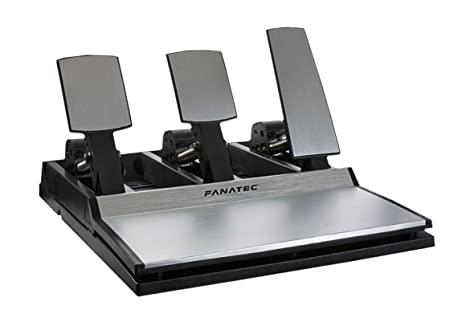
Overview: I bought the above Fanatec CSR pedals a long time ago. They had a RJ-12 to PS/2 connector to connect directly to the Fanatec racing wheel. Since I am planning to make a DIY racing wheel, I want to connect the pedals directly to the Arduino Leonardo.

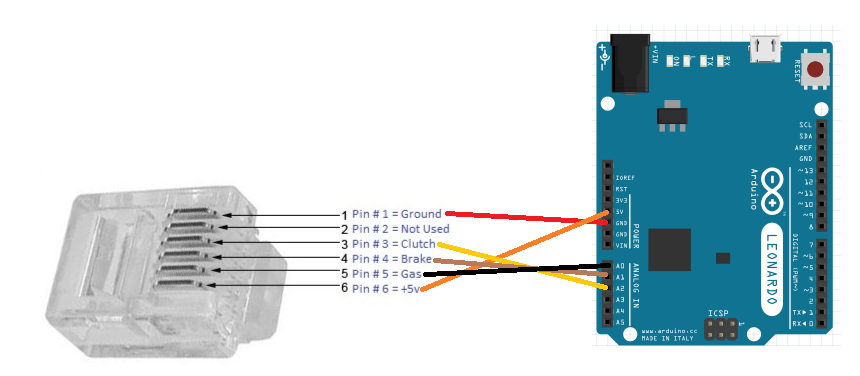
Details: I figured out the pedals pinout via this ISRTV forum. I posted my findings above. I proceeded to cut the PS/2 connector end and splice the wires. I connected the wires to the Arduino according to my findings as pictured below.
Testing: Before starting the coding process, I tested the output of the Gas, Brake, and Clutch potentiometers with the following code and got the following readings: Gas(857 - 214), Brake(1007 - 275), and Clutch(760 - 705).
#include <XInput.h>
#include <Wire.h>

void setup() {
  Serial.begin(9600);
}

void loop() {
  int gas = analogRead(A0);
  //Serial.println(gas); //857 - 214
  int brake = analogRead(A1);
  //Serial.println(brake); //1007 - 275
  int clutch = analogRead(A2);
  //Serial.println(clutch); //760 - 705
}
Xinput Code: After finding the readings of the potentiometers, I proceeded to write the code for the Arduino controller as follows.
#include <XInput.h>
#include <Wire.h>

void setup() {
  XInput.begin();
  XInput.setRange(JOY_RIGHT, 275, 1007);
  XInput.setRange(JOY_LEFT, 705, 760);
  XInput.setRange(TRIGGER_RIGHT, 214, 857);
}

void loop() {
  int gas = analogRead(A0);
  XInput.setTrigger(TRIGGER_RIGHT, gas);
  int brake = analogRead(A1);
  XInput.setJoystickY(JOY_RIGHT, brake);
  int clutch = analogRead(A2);
  XInput.setJoystickX(JOY_LEFT, clutch);
}
Problem: In Windows 10, under "Devices and Printers", my controller shows up as an Xbox 360 controller thanks to the ArduinoXInput library, which is good. Under "Game Controller" properties, I see Z-Axis, X-Rotation, Y-Rotation, X-Axis, Y-Axis, just like a normal Xbox 360 controller, which is also good. When I press either the Gas, Brake, or Clutch, the output of the Gas, Brake, and Clutch shows up correctly in the Game Controller properties. 
However, the problem is that in Euro Truck Simulator 2, for example, when I press the Gas pedal to the max, the truck accelerates very slowly, as if I am not pressing the Gas pedal to the max... :
Question: Did I code this incorrectly? Why is the game not detecting the whole range of the pedals? 
Bonus Question: I would prefer the Clutch to be on the right joystick X rotation. How would I go about programming this?