OK this seems a good job for a filter.
Try this code:
- start a new sketch, save it as test.ino
in test.ino:
#include <ArduinoJson.h>

#include "data.h"

// The filter: it contains "true" for each value we want to keep
StaticJsonDocument<200> filter;
StaticJsonDocument<1000> doc;

void setup() {
  Serial.begin(115200);
  filter["current-scene"] = true;
  filter["scenes"][0]["name"] = true;
  filter["scenes"][0]["sources"][0]["locked"] = true;
  filter["scenes"][0]["sources"][0]["muted"] = true;
  filter["scenes"][0]["sources"][0]["name"] = true;
  filter["scenes"][0]["sources"][0]["render"] = true;

  deserializeJson(doc, (const __FlashStringHelper*) sampleJSON, DeserializationOption::Filter(filter));
  serializeJsonPretty(doc, Serial);
}

void loop() {}
create a second tab in your sketch, call it data.h
in data.h
// C++ raw string literals cf http://en.cppreference.com/w/cpp/language/string_literal
// USE PROGMEM with Program Space Utilities http://www.nongnu.org/avr-libc/user-manual/group__avr__pgmspace.html

const char sampleJSON[] PROGMEM = R"--8<--8<--({
  "current-scene": "Welcome",
  "message-id": "11",
  "scenes": [
    {
      "name": "Parte A",
      "sources": [
        {
          "alignment": 5,
          "cx": 0,
          "cy": 0,
          "id": 3,
          "locked": false,
          "muted": false,
          "name": "AuInCapStreaming",
          "render": true,
          "source_cx": 0,
          "source_cy": 0,
          "type": "coreaudio_input_capture",
          "volume": 0.9885531067848206,
          "x": 0,
          "y": 0
        },
        {
          "alignment": 5,
          "cx": 840,
          "cy": 440,
          "id": 1,
          "locked": false,
          "muted": false,
          "name": "Hello Text",
          "render": true,
          "source_cx": 840,
          "source_cy": 440,
          "type": "text_ft2_source_v2",
          "volume": 1,
          "x": 0,
          "y": 0
        }
      ]
    },
    {
      "name": "LOG CAM",
      "sources": [
        {
          "alignment": 5,
          "cx": 0,
          "cy": 0,
          "id": 2,
          "locked": false,
          "muted": false,
          "name": "AuInCapStreaming",
          "render": true,
          "source_cx": 0,
          "source_cy": 0,
          "type": "coreaudio_input_capture",
          "volume": 0.9885531067848206,
          "x": 0,
          "y": 0
        },
        {
          "alignment": 5,
          "cx": 1280,
          "cy": 720,
          "id": 1,
          "locked": false,
          "muted": false,
          "name": "Son Cam",
          "render": true,
          "source_cx": 1280,
          "source_cy": 720,
          "type": "av_capture_input",
          "volume": 1,
          "x": 0,
          "y": 0
        }
      ]
    },
    {
      "name": "Parte B",
      "sources": [
        {
          "alignment": 5,
          "cx": 0,
          "cy": 0,
          "id": 2,
          "locked": false,
          "muted": false,
          "name": "AuInCapStreaming",
          "render": true,
          "source_cx": 0,
          "source_cy": 0,
          "type": "coreaudio_input_capture",
          "volume": 0.9885531067848206,
          "x": 0,
          "y": 0
        }
      ]
    }
  ],
  "status": "ok"
})--8<--8<--";
compile and run on your Arduino. Serial Monitor (@ 115200 bauds) will show
[color=purple]
{
  "current-scene": "Welcome",
  "scenes": [
    {
      "name": "Parte A",
      "sources": [
        {
          "locked": false,
          "muted": false,
          "name": "AuInCapStreaming",
          "render": true
        },
        {
          "locked": false,
          "muted": false,
          "name": "Hello Text",
          "render": true
        }
      ]
    },
    {
      "name": "LOG CAM",
      "sources": [
        {
          "locked": false,
          "muted": false,
          "name": "AuInCapStreaming",
          "render": true
        },
        {
          "locked": false,
          "muted": false,
          "name": "Son Cam",
          "render": true
        }
      ]
    },
    {
      "name": "Parte B",
      "sources": [
        {
          "locked": false,
          "muted": false,
          "name": "AuInCapStreaming",
          "render": true
        }
      ]
    }
  ]
}
[/color]
which is basically this structure:
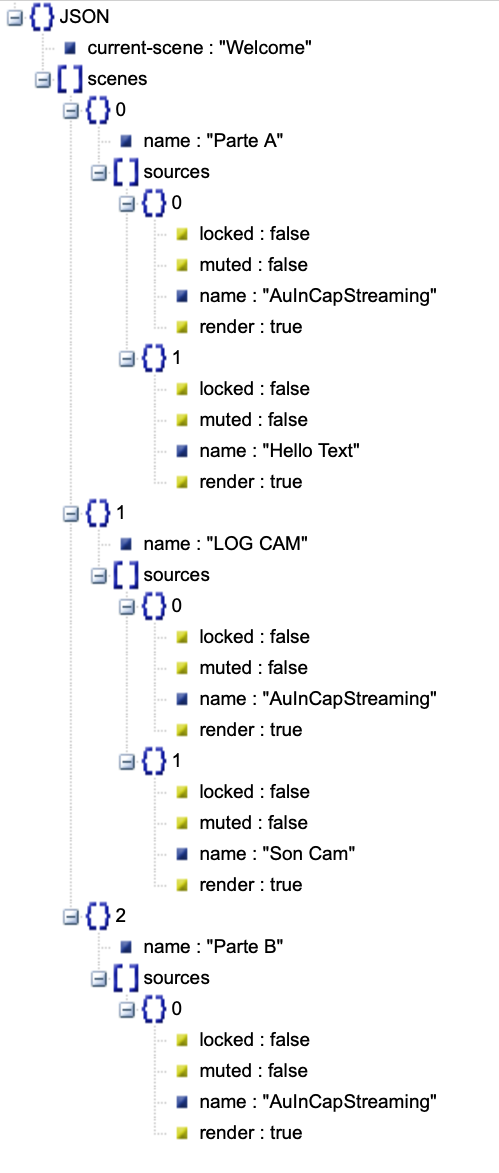
==> you extracted from your JSON string only the fields of interest and now have that in a json document.
if you receive multiple Scenes and you want to build a merge of those, there is an example in the ArduinoJSON documentation.
does it help?