Attiny 1614 DFPlayer not working consistently

Hello everybody,
I'm using an Attiny 1614 and an MP3-TF-16p (china DFPlayer) in a small Lasertag grenade that's supposed to play an explosion sound and then emit an IR signal. strangely the playing of the Audio only works twice. After that the MP3-TF-16p doesn't play a tune and the program gets stuck at the Player.play() command.

#define F_CPU 16000000L

#define DEBUG
#define TRACE
// #include <util/delay.h>

#include <Arduino.h>
#include <tinyNeoPixel.h>
#include <SoftwareSerial.h>
#include <DFRobotDFPlayerMini.h>
#define NEOPIXEL_PIN PIN_PB0

#define SOFTSERIAL_RX PIN_PA2
#define SOFTSERIAL_TX PIN_PA7

#define IR_RECEIVE_PIN PIN_PA6
#define IR_SEND_PIN PIN_PA4

#define BATTERY_MEASURE_PIN PIN_PA3
/*
  +5V
   |
-----------
|  ATiny  |
-----------
   |
   |
   \
    |
    | --------------------> To Power Switch Pin (PIN_PA5)
   /
   |
   |-
   |
  GND
*/

#define POWER_SWITCH_PIN PIN_PA5

#define BUTTON_PIN PIN_PB1

#define DFPLAYER_RX PIN_HWSERIAL0_RX
#define DFPLAYER_TX PIN_HWSERIAL0_TX

#define EXPLODE_SOUND 1
#define COUNTDOWN_SOUND 2

SoftwareSerial Serial1 = SoftwareSerial(SOFTSERIAL_RX, SOFTSERIAL_TX);

// Make sure to DEFINE IR related thinks *before* including IRremote.hpp
#define DECODE_MILESTAG2 // Enable only the MILESTAG 2 protocol to save memory
#define MARK_EXCESS_MICROS 20

#include <IRremote.hpp>

enum GrenadeState
{
  WaitingForConnect,
  WaitingForButtonPress,
  Exploding
};

GrenadeState currentState = WaitingForButtonPress;
uint32_t countdownStart = 0;
const uint32_t countdownDuration = 3000; // 3 seconds countdown

// Team colors (0: red, 1: blue, 2: yellow, 3: green)
const uint32_t teamColors[] = {
    0xFF0000, // red
    0x0000FF, // blue
    0xFFFF00, // yellow
    0x00FF00  // green
};

uint8_t team = 0;        // team of the tagger that connected
uint32_t storedData = 0; // the IR data received during waiting phase
uint8_t storedBits = 0;  // number of bits of the stored signal

tinyNeoPixel pixels = tinyNeoPixel(2, NEOPIXEL_PIN, NEO_GRB);

DFRobotDFPlayerMini dfPlayer;
uint8_t fileToPlay = 0; // File that should be played by the DFPlayer ( 0 = no file, 1 = first file, 2 = second file , etc)

void triggerExplosion();

void setup()
{
  // Softserial pins for debugging || Hardware serial for DFPlayer
  pinMode(SOFTSERIAL_TX, OUTPUT);
  pinMode(SOFTSERIAL_RX, INPUT);

  // Pin for IR receiver
  pinMode(IR_RECEIVE_PIN, INPUT_PULLUP);

  pinMode(BUTTON_PIN, INPUT); // Pulled down externally

  // Power for the grenade is turned on as long is this is high
  pinMode(POWER_SWITCH_PIN, OUTPUT);

  // Pin to meassure Battery
  pinMode(BATTERY_MEASURE_PIN, INPUT);

  // Turn on power at start so grenade stays turned on
  digitalWrite(POWER_SWITCH_PIN, HIGH);

  // Used for debugging
  // Attiny has bug where you have to specify 80% of the baudrate: 115200 * 0.8 = 92160
  Serial1.begin(92160);

  Serial1.println("hello");
  // Serial1.println("IR protocols:");
  // printActiveIRProtocols(&Serial1);
  Serial1.flush();

  // Used for DFPlayer
  ////Attiny has bug where you have to specify 80% of the baudrate: 9600 * 0.8 = 7680
  Serial.begin(7680);
  dfPlayer.begin(Serial, true, false); // The MP3 tf 16P doen't support resting at start
  dfPlayer.setTimeOut(500);

  dfPlayer.volume(30); // Set volume to max

  // dfPlayer.play(2); // Play the second sound on the SD card
  // delay(2000);      // GIve the Dfplayer some time to play the sound

  pixels.begin();
  pixels.setBrightness(127);
  // use default color (blue) until connected

  IrSender.begin();
  IrReceiver.begin(IR_RECEIVE_PIN, DISABLE_LED_FEEDBACK);
  disableLEDFeedback();
  // dfPlayer.loop(2);
}

void loop()
{
    if (currentState == WaitingForConnect) {
        if ((millis() % 2000) < 20)
            Serial1.println("Waiting for connect...");

        // Stay in connect mode until an IR signal is received
        if (IrReceiver.decode()) {
            IRData receivedData = IrReceiver.decodedIRData;
            if (receivedData.protocol == MILESTAG2) {
                // Save the received data for later emission
                storedData = receivedData.decodedRawData;
                storedBits = receivedData.numberOfBits;
                // Extract team color (team is stored in upper nibble of command)
                team = (receivedData.command >> 4) & 0x0F;
                // For safety, limit team to 0-3
                if (team > 3)
                    team = 0;
                // Display the team color on the LEDs
                pixels.fill(teamColors[team]);
                pixels.show();
                Serial1.print("Connected; Team: ");
                Serial1.println(team);
                delay(400);
                currentState = WaitingForButtonPress;
            }
            IrReceiver.resume();
        }
        IrReceiver.resume(); // Resume receiving IR signals

        // If no IR signal is received, do some fancy LED animation
        static uint16_t HSV_hue = 0; // Only assign once, because of 'static' keyword
        HSV_hue += 10000;           // Aggressive hue change to show that grenade is working
        pixels.fill(pixels.ColorHSV(HSV_hue, 255, 255));
        pixels.show();

        // dfPlayer.play(1);
        // delay(2000);
    }
    else if (currentState == WaitingForButtonPress) {
      Serial1.println("Waiting for button press...");
        // Wait here until the explode button is pressed
        if (digitalRead(BUTTON_PIN) == HIGH) { // BUTTON_PIN is pulled down externally
            // Button pressed, start countdown
            countdownStart = millis();
            currentState = Exploding;
            fileToPlay = COUNTDOWN_SOUND;

            // dfPlayer.play(2); // Play the second sound on the SD card
            // delay(2000);

            Serial1.println("Countdown started...");
        }

        // // Play sound for state indication
        // dfPlayer.play(2); // Play the second sound on the SD card
        // delay(2000);
    }
    else if (currentState == Exploding) {
        // During countdown, if a new IR signal is received, override team and explode immediately.
        if (IrReceiver.decode()) {
            IRData receivedData = IrReceiver.decodedIRData;
            if (receivedData.protocol == MILESTAG2) {
                // Update team and stored data on hit
                storedData = receivedData.decodedRawData;
                storedBits = receivedData.numberOfBits;
                team = (receivedData.command >> 4) & 0x0F;
                if (team > 3)
                    team = 0;
                pixels.fill(teamColors[team]);
                pixels.show();
                Serial1.println("Hit during countdown! Changing team & exploding instantly.");
                triggerExplosion();
            }
            IrReceiver.resume();
        }
        else {
            IrReceiver.resume();
            // Check for countdown expiration.
            if (millis() - countdownStart > countdownDuration) {
                Serial1.println("Countdown finished. Exploding now.");
                triggerExplosion();
            }
        }
    }

    if(fileToPlay != 0)
    {
      Serial1.println("playing audio");
      if(!dfPlayer.waitAvailable(3000)){
        Serial1.println("Dfplayer not available");
      }
      dfPlayer.play(fileToPlay);
      fileToPlay = 0;
    }
}

void triggerExplosion()
{
  // Set an explosion effect on the LEDs
  pixels.fill(); // Turn off all LEDs
  pixels.show();
  delay(200);
  pixels.fill(0xFFFFFF); // Bright flash
  pixels.show();
  delay(200);
  pixels.fill(); // Turn off all LEDs
  pixels.show();

  Serial1.println("playing explosion sound");
  dfPlayer.reset();
  // Serial1.println(dfPlayer.readState());
  Serial1.flush();
  // Play explosion sound
  fileToPlay = EXPLODE_SOUND;

  Serial1.println("playing audio finished");
  Serial1.flush();

  // Emit the stored IR signal (repeat count 0)

  // IrSender.sendMilesTag2(storedData, storedBits, 1);

  // Optionally print out explosion info and reset state:
  Serial1.println("Boom! Grenade exploded.");
  Serial1.flush();

  // You might want to add a delay/reset process here.
  currentState = WaitingForConnect;
}

The strange Baudrate is because ATtiny seems to calculate baudrates wrongly.

Which library supports this protocol?
Where do you get it from?

1 Like

Can you post an annotated schematic showing exactly how you have wired this, it could be a hardware problem.

Baudrate 115200 is too much for SoftwareSerial, try to reduce it to 9600 or 19200

Hi, first off sorry for giving so little information. I added some Serial.print() statements to the code. I also attached the log from the serial monitor. Please note, that I'm using Hardware Serial for the DFPlayer and Software Serial to communicate with the PC.

I'm using Arduino IR Remote library in which I added the Milestag2 Protocol following the IR template file.

The "new" code:

#define F_CPU 16000000L

#define DEBUG
#define TRACE
// #include <util/delay.h>

#include <Arduino.h>
#include <tinyNeoPixel.h>
#include <SoftwareSerial.h>
#include <DFRobotDFPlayerMini.h>
#define NEOPIXEL_PIN PIN_PB0

#define SOFTSERIAL_RX PIN_PA2
#define SOFTSERIAL_TX PIN_PA7

#define IR_RECEIVE_PIN PIN_PA6
#define IR_SEND_PIN PIN_PA4

#define BATTERY_MEASURE_PIN PIN_PA3
/*
  +5V
   |
-----------
|  ATiny  |
-----------
   |
   |
   \
    |
    | --------------------> To Power Switch Pin (PIN_PA5)
   /
   |
   |-
   |
  GND
*/

#define POWER_SWITCH_PIN PIN_PA5

#define BUTTON_PIN PIN_PB1

#define DFPLAYER_RX PIN_HWSERIAL0_RX
#define DFPLAYER_TX PIN_HWSERIAL0_TX

#define EXPLODE_SOUND 1
#define COUNTDOWN_SOUND 2

SoftwareSerial Serial1 = SoftwareSerial(SOFTSERIAL_RX, SOFTSERIAL_TX);

// Make sure to DEFINE IR related thinks *before* including IRremote.hpp
#define DECODE_MILESTAG2 // Enable only the MILESTAG 2 protocol to save memory
#define MARK_EXCESS_MICROS 20

#include <IRremote.hpp>

enum GrenadeState
{
  WaitingForConnect,
  WaitingForButtonPress,
  Exploding
};

GrenadeState currentState = WaitingForConnect;
uint32_t countdownStart = 0;
const uint32_t countdownDuration = 3000; // 3 seconds countdown

// Team colors (0: red, 1: blue, 2: yellow, 3: green)
const uint32_t teamColors[] = {
    0xFF0000, // red
    0x0000FF, // blue
    0xFFFF00, // yellow
    0x00FF00  // green
};

uint8_t team = 0;        // team of the tagger that connected
uint32_t storedData = 0; // the IR data received during waiting phase
uint8_t storedBits = 0;  // number of bits of the stored signal

tinyNeoPixel pixels = tinyNeoPixel(2, NEOPIXEL_PIN, NEO_GRB);

DFRobotDFPlayerMini dfPlayer;
uint8_t fileToPlay = 0; // File that should be played by the DFPlayer ( 0 = no file, 1 = first file, 2 = second file , etc)

void triggerExplosion();

void setup()
{
  // Softserial pins for debugging || Hardware serial for DFPlayer
  pinMode(SOFTSERIAL_TX, OUTPUT);
  pinMode(SOFTSERIAL_RX, INPUT);

  // Used for debugging
  // Attiny has bug where you have to specify 80% of the baudrate: 115200 * 0.8 = 92160
  Serial1.begin(92160);

  Serial1.println("Running setup");

  // Pin for IR receiver
  pinMode(IR_RECEIVE_PIN, INPUT_PULLUP);

  pinMode(BUTTON_PIN, INPUT); // Pulled down externally

  // Power for the grenade is turned on as long is this is high
  pinMode(POWER_SWITCH_PIN, OUTPUT);

  // Pin to meassure Battery
  pinMode(BATTERY_MEASURE_PIN, INPUT);

  // Turn on power at start so grenade stays turned on
  digitalWrite(POWER_SWITCH_PIN, HIGH);

  // Serial1.println("IR protocols:");
  // printActiveIRProtocols(&Serial1);

  Serial1.println("Startting DFPlayer");
  // Used for DFPlayer
  ////Attiny has bug where you have to specify 80% of the baudrate: 9600 * 0.8 = 7680
  Serial.begin(7680);
  dfPlayer.begin(Serial, true, false); // The MP3 tf 16P doen't support resting at start
  dfPlayer.setTimeOut(500);

  dfPlayer.volume(30); // Set volume to max

  Serial1.println("DFPlayer started");

  // dfPlayer.play(2); // Play the second sound on the SD card
  // delay(2000);      // GIve the Dfplayer some time to play the sound

  pixels.begin();
  pixels.setBrightness(127);
  // use default color (blue) until connected

  IrSender.begin();
  IrReceiver.begin(IR_RECEIVE_PIN, DISABLE_LED_FEEDBACK);
  disableLEDFeedback();

  Serial1.println("Setup finished");
}

void loop()
{
  if (currentState == WaitingForConnect)
  {

    // Stay in connect mode until an IR signal is received
    if (IrReceiver.decode())
    {
      IRData receivedData = IrReceiver.decodedIRData;
      if (receivedData.protocol == MILESTAG2)
      {
        // Save the received data for later emission
        storedData = receivedData.decodedRawData;
        storedBits = receivedData.numberOfBits;
        // Extract team color (team is stored in upper nibble of command)
        team = (receivedData.command >> 4) & 0x0F;
        // For safety, limit team to 0-3
        if (team > 3)
          team = 0;
        // Display the team color on the LEDs
        pixels.fill(teamColors[team]);
        pixels.show();
        Serial1.print("Connected; Team: ");
        Serial1.println(team);
        delay(400);
        currentState = WaitingForButtonPress;
      }
      IrReceiver.resume();
    }
    IrReceiver.resume(); // Resume receiving IR signals

    // If no IR signal is received, do some fancy LED animation
    static uint16_t HSV_hue = 0; // Only assign once, because of 'static' keyword
    HSV_hue += 10;            // Aggressive hue change to show that grenade is working
    pixels.fill(pixels.ColorHSV(HSV_hue, 255, 255));
    pixels.show();

    // dfPlayer.play(1);
    // delay(2000);
  }
  else if (currentState == WaitingForButtonPress)
  {
    // Wait here until the explode button is pressed
    if (digitalRead(BUTTON_PIN) == HIGH)
    { // BUTTON_PIN is pulled down externally
      // Button pressed, start countdown
      countdownStart = millis();
      currentState = Exploding;
      fileToPlay = COUNTDOWN_SOUND;

      // dfPlayer.play(2); // Play the second sound on the SD card
      // delay(2000);

      Serial1.println("Countdown started...");
    }

    // // Play sound for state indication
    // dfPlayer.play(2); // Play the second sound on the SD card
    // delay(2000);
  }
  else if (currentState == Exploding)
  {
    // During countdown, if a new IR signal is received, override team and explode immediately.
    if (IrReceiver.decode())
    {
      IRData receivedData = IrReceiver.decodedIRData;
      if (receivedData.protocol == MILESTAG2)
      {
        // Update team and stored data on hit
        storedData = receivedData.decodedRawData;
        storedBits = receivedData.numberOfBits;
        team = (receivedData.command >> 4) & 0x0F;
        if (team > 3)
          team = 0;
        pixels.fill(teamColors[team]);
        pixels.show();
        Serial1.println("Hit during countdown! Changing team & exploding instantly.");
        triggerExplosion();
      }
      IrReceiver.resume();
    }
    else
    {
      IrReceiver.resume();
      // Check for countdown expiration.
      if (millis() - countdownStart > countdownDuration)
      {
        Serial1.println("Countdown finished. Exploding now.");
        triggerExplosion();
      }
    }
  }

  if (fileToPlay != 0)
  {
    Serial1.println("playing audio");
    if (!dfPlayer.waitAvailable(3000))
    {
      Serial1.println("Dfplayer not available");
    }
    dfPlayer.play(fileToPlay);
    fileToPlay = 0;
    Serial1.println("playing audio finished");
  }

  // Print current state of grenade every 5 seconds
  static uint32_t lastPrint = 0;
  if (millis() - lastPrint > 5000)
  {
    lastPrint = millis();
    Serial1.print("Current state: ");
    switch (currentState)
    {
    case WaitingForConnect:
      Serial1.println("Waiting for connect");
      break;
    case WaitingForButtonPress:
      Serial1.println("Waiting for button press");
      break;
    case Exploding:
      Serial1.println("Exploding");
      break;
    default:
      Serial1.println("Unknown state");
      break;
    }
  }
}

void triggerExplosion()
{
  // Set an explosion effect on the LEDs
  pixels.fill(); // Turn off all LEDs
  pixels.show();
  delay(200);
  pixels.fill(0xFFFFFF); // Bright flash
  pixels.show();
  delay(200);
  pixels.fill(); // Turn off all LEDs
  pixels.show();

  Serial1.println("playing explosion sound");
  dfPlayer.reset();
  // Serial1.println(dfPlayer.readState());
  Serial1.flush();
  // Play explosion sound
  fileToPlay = EXPLODE_SOUND;

  Serial1.println("playing audio finished");
  Serial1.flush();

  // Emit the stored IR signal (repeat count 0)

  // IrSender.sendMilesTag2(storedData, storedBits, 1);

  // Optionally print out explosion info and reset state:
  Serial1.println("Boom! Grenade exploded.");
  Serial1.flush();

  // You might want to add a delay/reset process here.
  currentState = WaitingForConnect;
}

The log:

Running setup
Startting DFPlayer
DFPlayer started
Setup finished
Current state: Waiting for connect
Connected; Team: 0
Current state: Waiting for button press
Countdown started...
playing audio

After the last line

playing audio

the program freezes.

In my more recent testing I can't get the DFPlayer to play at all with the attiny, but when I start a playing using a jumper wire to short one of the IO pins to ground it keeps looping the two sound files.

Here's also a schematic of the Grenade:

Right off the top I can see that you're running the ATtiny1614 at 5V. And you don't have any level shifting between PB2 (a 5V output) and the DFplayer's Rx pin (a 3.3V input). Not even the minimal 1K series resistor recommended in the DFplayer manual.

And Q2 is hooked up in what I can only describe as an interesting manner.

I'd have to see some pretty convincing evidence of the truth of that statement before accepting it. I have an ATtiny3216 sitting right in front of me at the moment, sending "The quick brown fox jumps over the lazy dog." at 9600 baud repeatedly and I'm measuring a bit time of 104uS, which is 100% of what I'd expect to see, not 80%, or 125%.

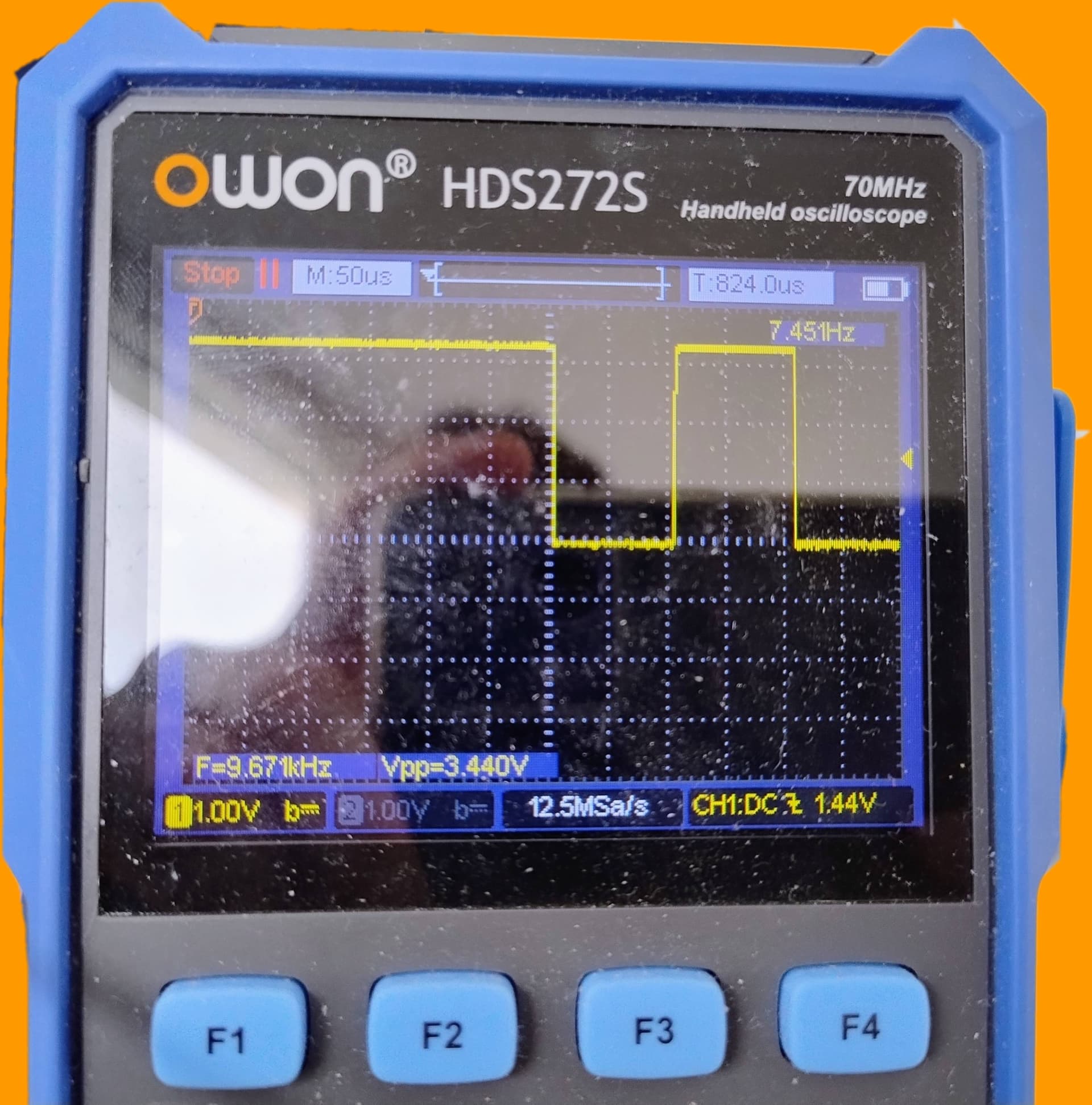
I'm pretty sure that there is a baud rate missmatch. First off I made another simple program that just plays the same audio over and over again and it works (now using 3.3V) and on my oscilloscope I can see that with my selected baudrate of 7680 I get a pretty good 104us for the bits. I got the idea of trying this 80% baudrate thing because of this github issue: Serial does not output anything on Attiny1614 · Issue #868 · SpenceKonde/megaTinyCore · GitHub

This topic was automatically closed 180 days after the last reply. New replies are no longer allowed.