Hello everyone I've never posted before so I may not know how a couple of things work but I've made a fairly basic BLE sketch where a central connects consecutively with 2 peripherals, checks the rssi with each of them and then writes a value to the characteristic of the one with the most powerful rssi. My problem is that the bleCharacteristic.writeValue() function is not going through at all and to confirm this I made a while loop at the point where the value should be updated on the peripheral and the program stops there which means that the value is never written in the first place. I have tried to change the value with the BLE app from my phone and it works as it should but it doesn't with the central.
Here's the codes for the central.
#include <ArduinoBLE.h>
int rssiState1, rssiState2 ;

BLEDevice peripheral1;
BLEDevice peripheral2;
void setup() {

  Serial.begin(9600);
  while (!Serial);
 rssiState1 = -13;
 rssiState2 = -10;


  // begin initialization
  if (!BLE.begin()) {
    Serial.println("starting Bluetooth® Low Energy module failed!");

    while (1);
  }

  Serial.println("Bluetooth® Low Energy Central - Peripheral Explorer");

}

void loop() {

  BLE.scanForUuid("19B10010-E8F2-537E-4F6C-D104768A1214");

  Serial.print("Scanning for Rover 1 ");
Serial.println();
  delay(3000);
  // check if a peripheral has been discovered

  BLEDevice peripheral1 = BLE.available();


  if (peripheral1) {
    // discovered a peripheral, print out address, local name, and advertised service
  Serial.print("Found ");
    Serial.print(peripheral1.address());
    Serial.print(" '");
    Serial.print(peripheral1.localName());
    Serial.print("' ");
    Serial.print(peripheral1.advertisedServiceUuid());
    Serial.println();

    // see if peripheral is a Rover
    if (peripheral1.localName() == "Rover 1") {
      // stop scanning
      BLE.stopScan();
      // connect to the peripheral
      Serial.println("Connecting ...");

      if (peripheral1.connect()) {
        Serial.println("Connected");
      } else {
        Serial.println("Failed to connect!");

      }
      //rssiState1 = peripheral1.rssi();
      // Print RSSI
      Serial.print("RSSI=");
      Serial.println(rssiState1);


      //    // retrieve the moror characteristic
    BLECharacteristic motorCharacteristic = peripheral1.characteristic("19b10002-e8f2-537e-4f6c-d104768a1214");
     //if (rssiState1 > rssiState2 || rssiState1 == rssiState2) {

      delay(3000);
       while(motorCharacteristic.written()== false){
      motorCharacteristic.writeValue((byte(0x01))); //τιμη 1 για το 1 και 0 μηδεν για το άλλο


  //  }else if (rssiState1 < rssiState2){
    // motorCharacteristic.writeValue((byte)0x00);
    }
 //   }
    Serial.println("Moving Rover 1");


    }

  }

     BLE.disconnect();


     BLE.scanForUuid("19B10011-E8F2-537E-4F6C-D104768A1214");

     Serial.println("Scanning for Rover 2 ");


  delay(3000);

  BLEDevice peripheral2 = BLE.available();

  if (peripheral2) {
    // discovered a peripheral, print out address, local name, and advertised service
    Serial.print("Found ");
    Serial.print(peripheral2.address());
    Serial.print(" '");
    Serial.print(peripheral2.localName());
    Serial.print("' ");
    Serial.print(peripheral2.advertisedServiceUuid());
    Serial.println();

    // see if peripheral is a Rover
    if (peripheral2.localName() == "Rover 2") {
      // stop scanning
          BLE.stopScan();
      // connect to the peripheral
      Serial.println("Connecting ...");

      if (peripheral2.connect()) {
        Serial.println("Connected");
      } else {
        Serial.println("Failed to connect!");
        return;
      }
   //    rssiState2 = peripheral2.rssi();
      // Print RSSI
      Serial.print("RSSI=");
      Serial.println(rssiState2);


      BLECharacteristic motorCharacteristic = peripheral2.characteristic("19b10001-e8f2-537e-4f6c-d104768a1214");
  //  if (rssiState1 < rssiState2) {

        motorCharacteristic.writeValue((byte(0x01)));  //τιμη 1 για το 1 και 0 μηδεν για το άλλο
   // }else if (rssiState1 > rssiState2){
   delay(3000);
   // peripheral2.characteristic("19b10001-e8f2-537e-4f6c-d104768a1214").writeValue((byte)0x00);
         Serial.println("Moving Rover 2");
   // }


       BLE.disconnect();
    }
     delay(3000);

    }
       }
And here's the code of the peripheral
#include <ArduinoBLE.h>

//const int motorPin = 4; // set buttonPin to digital pin 4

BLEService motorService("19B10010-E8F2-537E-4F6C-D104768A1214"); // create service

// create motor characteristic and allow remote device to read and write
BLEByteCharacteristic motorCharacteristic("19b10002-e8f2-537e-4f6c-d104768a1214", BLERead | BLEWrite);


void setup() {
  Serial.begin(9600);
  while (!Serial);

  pinMode(LED_BUILTIN, OUTPUT); // use the Motor as an output

  // begin initialization
  if (!BLE.begin()) {
    Serial.println("starting Bluetooth® Low Energy module failed!");

    //while (1);
  }

  // set the local name peripheral advertises
  BLE.setLocalName("Rover 1");
  // set the UUID for the service this peripheral advertises:
  BLE.setAdvertisedService(motorService);

  // add the characteristics to the service
  motorService.addCharacteristic(motorCharacteristic);

  // add the service
  BLE.addService(motorService);

  motorCharacteristic.writeValue((byte)0x00);

  // start advertising
  BLE.advertise();
  Serial.println("advertising ...");

  Serial.println("Bluetooth® device active, waiting for connections...");
     Serial.println("motorchar");
   Serial.println(motorCharacteristic.value())  ;
}


void loop() {
  // listen for Bluetooth® Low Energy peripherals to connect:
  BLE.poll();
  BLEDevice central = BLE.central();


   //if a central is connected to peripheral:
    if (central) {
    Serial.print("Connected to central: ");
    // print the central's MAC address:
    Serial.println(central.address());

    while (central.connected()) {
      Serial.println("it is connetcted");

    // if the remote device wrote to the characteristic,
     if (motorCharacteristic.written()) {
       Serial.println("it is written");

    // use the value to is written()) {
      if (motorCharacteristic.value()>0) {       // any value other than 0
          Serial.println("Movement active");
          digitalWrite(LED_BUILTIN, HIGH);         // will turn the LED on
          delay(5000);
           digitalWrite(LED_BUILTIN, LOW);
          //motorCharacteristic.writeValue((byte)0x00);
           Serial.println("Movement inactive");

        }
     }
   Serial.println("motorchar");
   Serial.println(motorCharacteristic.value())  ;
    }
    }
  }
Also in the serial of the peripheral the value is always 0 just to cross check that it is never written
Here are a few comments about your code that might be helpful:
The central device cannot call written(). It is a peripheral function that checks whether a central has written to the value of the characteristic.
using delay() is a bad practice in most cases, especially when you use communication stacks, time your code with millis(), check the BlinkWithoutDelay example
initializing variables with some magic numbers is not a good practice
I would avoid using rssiState, the term state is usually used with regards to the program e.g., in state machine, I would recommend changing the variable name
Hello and thank you so much for taking the time to help.
First Could I maybe use some other function other than written() for the central code to not move on until the value is written? Also I'm trying to implement milis() as you mentioned but the outcome is the same but would you maybe have an idea on why the phone BLE application works properly but the central doesn't? That would lead me to believe that the problem lies within the code of the central and maybe more specifically in the part where it sends the (byte) 00x1
You have to change your thinking about the application.
First we are talking about a wireless protocol. You have to assume you can loose the connection at any time. Any code that remains in a state and cannot restart, can end up in a situation where the app crashes or hangs.
The central is a client. The peripheral/server makes the rules. So, when you want the central to know that a server state has changed, you need to implement this in the peripheral code. e.g., make the characteristic access read and write and then write the characteristic from the peripheral to a "acknowledge" value. You can even use subscription to alert the central that the state has changed.
communication is slow compared to the speed the processor can compute stuff. Make your code run as fast as you can and do not try to stop and wait. Use state variables and millis() to control the "slow" high level code.
Avoid calling communication code in tight loops. The radio needs time to communicate.
Your code should waste most of the time just running around. That way you can add code without breaking code you already have and everything will continue to run "at the same time".
I have made the changes you mentioned and I found out that the code also needed a part where is discovers the attributes of the peripheral so I added this and now it works just fine.
Currently, everything works fine except that when a connection is not made instantly with one of the 2 peripherals, it just skips the code and searches for the next peripheral. Would you maybe know a way to make the program wait until the connection is made and not to skip the code? Again thank you so much for your help
Yes absolutely, so this is the new code of the central
#include <ArduinoBLE.h>
int rssiValue1, rssiValue2 ;
BLEDevice peripheral1;
BLEDevice peripheral2;
void setup() {
Serial.begin(9600);
while (!Serial);
// begin initialization
if (!BLE.begin()) {
Serial.println("starting Bluetooth® Low Energy module failed!");
while (1);
}
Serial.println("Bluetooth® Low Energy Central - Peripheral Explorer");
}
void loop() {
BLE.scanForUuid("19B10002-E8F2-537E-4F6C-D104768A1214");
Serial.print("Scanning for Rover 1 ");
Serial.println();
delay(3000);
// check if a peripheral has been discovered
BLEDevice peripheral1 = BLE.available();
if (peripheral1) {
// discovered a peripheral, print out address, local name, and advertised service
Serial.print("Found ");
Serial.print(peripheral1.address());
Serial.print(" '");
Serial.print(peripheral1.localName());
Serial.print("' ");
Serial.print(peripheral1.advertisedServiceUuid());
Serial.println();
// see if peripheral is a Rover
if (peripheral1.localName() == "Rover 1") {
// stop scanning
BLE.stopScan();
// connect to the peripheral
Serial.println("Connecting ...");
if (peripheral1.connect()) {
Serial.println("Connected");
} else {
Serial.println("Failed to connect!");
return;
}
      // discover peripheral attributes
  Serial.println("Discovering attributes ...");
  if (peripheral1.discoverAttributes()) {
    Serial.println("Attributes discovered");
  } else {
    Serial.println("Attribute discovery failed!");
    peripheral1.disconnect();
    return;
  }
rssiValue1 = peripheral1.rssi();
// Print RSSI
Serial.print("RSSI=");
Serial.println(rssiValue1);
// // retrieve the moror characteristic
BLECharacteristic motorCharacteristic = peripheral1.characteristic("19b10001-e8f2-537e-4f6c-d104768a1214");
if (!motorCharacteristic) {
Serial.println("Peripheral does not have the motor characteristic!");
peripheral1.disconnect();
return;
} else if (!motorCharacteristic.canWrite()) {
Serial.println("Peripheral does not have a writable motor characteristic!");
peripheral1.disconnect();
return;
}
while (peripheral1.connected()) {
// while the peripheral is connected
if (rssiValue1 > rssiValue2 ) {
motorCharacteristic.writeValue((byte)0x01);
Serial.println("Moving Rover 1");
}
else if (rssiValue1 = rssiValue2 ) {
motorCharacteristic.writeValue((byte)0x01);
Serial.println("Equal Moving Rover 1");
}
else if (rssiValue1 < rssiValue2) {
motorCharacteristic.writeValue((byte)0x00);
}
BLE.disconnect();
}
}
}
BLE.scanForUuid("19B10000-E8F2-537E-4F6C-D104768A1214");
Serial.print("Scanning for Rover 2");
Serial.println();
delay(3000);
// check if a peripheral has been discovered
BLEDevice peripheral2 = BLE.available();
if (peripheral2) {
// discovered a peripheral, print out address, local name, and advertised service
Serial.print("Found ");
Serial.print(peripheral2.address());
Serial.print(" '");
Serial.print(peripheral2.localName());
Serial.print("' ");
Serial.print(peripheral2.advertisedServiceUuid());
Serial.println();
// see if peripheral is a Rover
if (peripheral2.localName() == "Rover 2") {
// stop scanning
BLE.stopScan();
// connect to the peripheral
Serial.println("Connecting ...");
if (peripheral2.connect()) {
Serial.println("Connected");
} else {
Serial.println("Failed to connect!");
return;
}
// discover peripheral attributes
Serial.println("Discovering attributes ...");
if (peripheral2.discoverAttributes()) {
Serial.println("Attributes discovered");
} else {
Serial.println("Attribute discovery failed!");
peripheral1.disconnect();
return;
}
rssiValue2 = peripheral2.rssi();
// Print RSSI
Serial.print("RSSI=");
Serial.println(rssiValue2);
// retrieve the moror characteristic
BLECharacteristic motorCharacteristic = peripheral2.characteristic("19b10001-e8f2-537e-4f6c-d104768a1214");
if (!motorCharacteristic) {
Serial.println("Peripheral does not have the motor characteristic!");
peripheral2.disconnect();
return;
} else if (!motorCharacteristic.canWrite()) {
Serial.println("Peripheral does not have a writable motor characteristic!");
peripheral2.disconnect();
return;
}
while (peripheral2.connected()) {
// while the peripheral is connected
if (rssiValue1 < rssiValue2 ) {
motorCharacteristic.writeValue((byte)0x01);
Serial.println("Moving Rover 2");
}
else if (rssiValue1 > rssiValue2) {
motorCharacteristic.writeValue((byte)0x00);
}
BLE.disconnect();
}
}
}
BLE.scanForUuid("19B10011-E8F2-537E-4F6C-D104768A1214");
}
The code of the peripheral remains the same so I won't post it again.
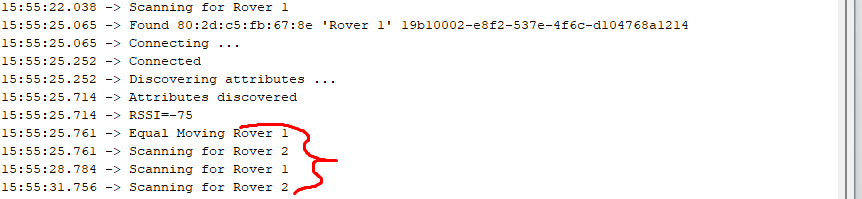
The issue in which I am referring is in the part where the central searches for the first peripheral and if the UUID is not found it skips to the part where it searches for the second peripheral. SO what I want to do it try to make the program wait until it is found.
The output I'm getting when this happens is this