BME/BMP280 code crashes at bmp.begin()

Hi! I am quite new to arduino and I have come across a problem that I couldn't find a solution to. My circuit has a BME/BMP280 and a WaveShare microsd card. When I connected the BME/BMP280 sensor to the Arduino, it worked normally. The day after, I went to test it again. Upon testing, my code would stop at(in the setup function):

if (!bmp.begin(0x76)){
    Serial.println("Could not find a valid BMP280 sensor, check wiring!");
    while(1);
  }

I attached an image of my wiring. I've been trying to solve this for a while now. Could there be a problem with the sensor? I also tried removing while(1);, but the code still gets stuck there. I have tried running a I2C scanner sketch and It does detect a device at 0x76.


My Full Sketch:

//BMP280 Code
#include <Wire.h>
#include <Adafruit_Sensor.h>
#include <Adafruit_BMP280.h>
#include <Adafruit_BME280.h>
//SD Card Reader
#include <SPI.h>
#include <SD.h>

//BMP 280
Adafruit_BMP280 bmp;
//SD card readed
const int chipSelect = 10; //Pin num connected to CS
File dataFile;
String filepath = "D:\data.txt";
//Buzzer
const int buzzerPin = 9;


void setup() {
  Serial.begin(9600);
  
  
  while (!Serial);
  
  Serial.println("staarted?1/3");
  //Buzzer
  pinMode(buzzerPin, OUTPUT);

  //BMP280
  //Code Crashes here. When removed, sd card functions properly, BMP doesn't start.
  
  if (!bmp.begin(0x76)) {
    
    Serial.println("Could not find a valid BMP280 sensor, check wiring!");
    //while (1);
  }
 
  
  Serial.println("Started?2/3");
  //SD card reader

  //pinMode(chipSelect, OUTPUT);
  //SD card init
  if (!SD.begin(chipSelect))
  {
    Serial.println("SD Card Init Failed. Womp Womp D:");
    return;
  }
  Serial.println("SD card initialized YAYAYAYYAYAYAYA :D");
  if (SD.exists(filepath))
  {
    Serial.println("File Exists. Is that good is that bad? Who knowwsss?");
    if (SD.remove(filepath) == true)
    {
      Serial.println("File deleted(I dont know why the file has to be deleted but better be safe than sorry)");
    }
    else
    {
      Serial.println("Couldn't remove");
    }
  }
  Serial.println("Started?3/3");
  
}


void loop() {
  
  Serial.println("Uhhh");
  //BMP280 start
  Serial.println("BMP280 Sensor Readings:");


  float temperature = bmp.readTemperature();
  Serial.print("Temperature = ");
  Serial.print(temperature);
  Serial.println(" °C");

  
  float pressure = bmp.readPressure() / 100.0F; // hPa
  Serial.print("Pressure = ");
  Serial.print(pressure);
  Serial.println(" hPa");


  Serial.println();
  //BMP280 END
  //SD Card Reader
  dataFile = SD.open(filepath, FILE_WRITE); // Opens the file
  //Checks if file has opened
  if (dataFile)
  {
    Serial.println("File has been opened sucessfully :D.");
    //Write to file:
    dataFile.println("---------------------------------------------------------------\n");
    //Temperature
    dataFile.print("Temperature = ");
    dataFile.print(temperature);
    dataFile.println(" C");
    //Pressure
    dataFile.print("Pressure = ");
    dataFile.print(pressure);
    dataFile.println(" hPa");
    dataFile.close(); //CLOSES THE FILEPATH
    
  }
  else
  {
    Serial.println("Something is off... I can smell it in the air.");
  }
  
  //Buzzer sounds every 5 seconds
  tone(buzzerPin, 1000);
  delay(1000);
  noTone(buzzerPin);
  delay(4000);
  
}

Welcome to the forum

Please post your full sketch

Sure thing!

Thanks, but please get out of the habit of updating your previous posts, except for spelling errors, broken links and the like. When posting something new, put it in a new post.

One of the problems with updating previous posts is that it makes replies from other forum members look crazy.

Sorry, I didn't realize it would be an issue. I will put it in a new post next time!

Which is it?

As you can see, Adafruit provide two different libraries for those two sensors:

#include <Adafruit_BMP280.h>
#include <Adafruit_BME280.h>

...so it's reasonable to assume they operate differently in some way, and you should use the correct one for the sensor you have.

This is something that confuses me. On the physical sensor itself, it says, "BME/BMP280". So far I have been assuming it is a bmp sensor but I cannot find out which one it is. It also says GYBMEP on the back.

It's unlikely that the sensor failed overnight, and the fact that it still gets detected by i2c scanner supports that. Are you certain you changed nothing that could explain the failure?

Maybe you should post some bright, clear photos of your circuit, from above, so that every wire can be traced.

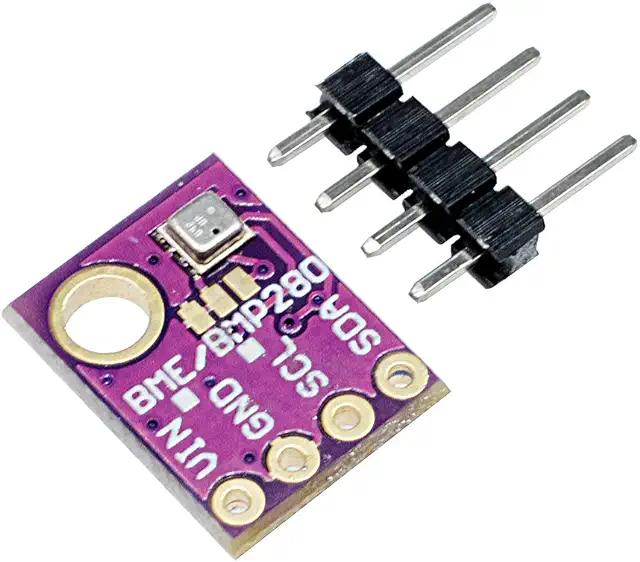
I think you mean on the module's PCB. The PCB is designed to accept either the BMP or BME chip. The chip is tiny! Can you see any writing on it? You may need to use magnification.

You haven't told us what sensor/breakout board you are using. There is a good reason why How to get the best out of this forum says:

Hardware

We need to know exactly what hardware you have. We need to know what Arduino board (or other brand, such as ESP32) you are using and exactly what other hardware you are connecting it to. The more details we have, the easier it is to help.

If you are using something that is a non-Arduino product then it helps to have a link to its technical data sheet or a link to where you bought it.

Both the BME280 and BMP280 are 3.3V devices. The Uno R3 is a 5V device. Does your breakout board include a 3.3V regulator? Does it include level shifting? Since you haven't told us or shown us what breakout board you're using, we're left to guess. Which just wastes your time, and ours. We'd love to help; please don't make it harder to do so.


Does this help at all? (In addition to the circuit diagram I added above, I have added a buzzer)

That is the issue, I wouldn't be able to identify the breakout board. I did not buy this component myself. Also, I am very new to this, I barely know what a breakout board is. Im sorry. Maybe the image helps? I would be surprised if it did not have a voltage regulator, as it has worked before countless times with 5v.

I decided to remove the 0x76 from :bmp.begin(0x76) and the code stopped getting stuck, and instead could not find the BMP280, not being able to output anything(outputs nan).

The breakout board is the purple PCB. The BME/BMP sensor chip itself is inside the tiny metal can with the small hole in it.

Can you see any writing stamped on the can?

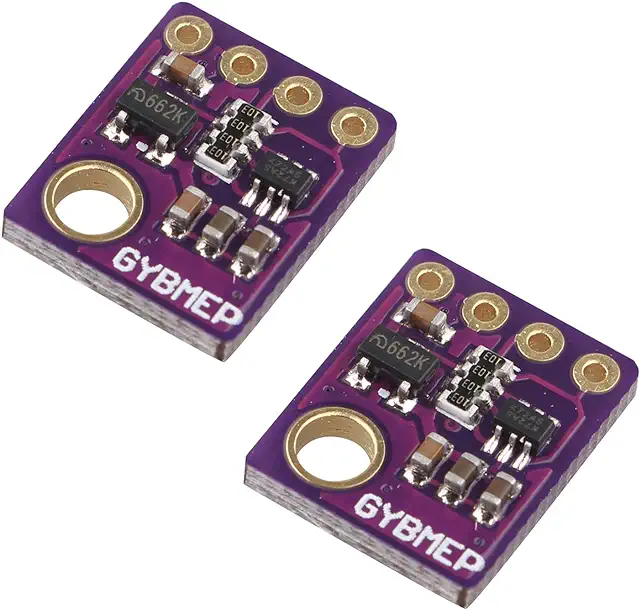
The rear of the PCB contains the regulator and level converters:

Try changing this line to

`Adafruit_BME280 bmp;

The sensor says 120 KW on it. And the image below is the back.


The middle bar says 103, and the one on the left says 662K. I hope that helps.

This gets past not being able to get past that line of code(bmp.begin(0x76)) but still does not output anything(shows nan).

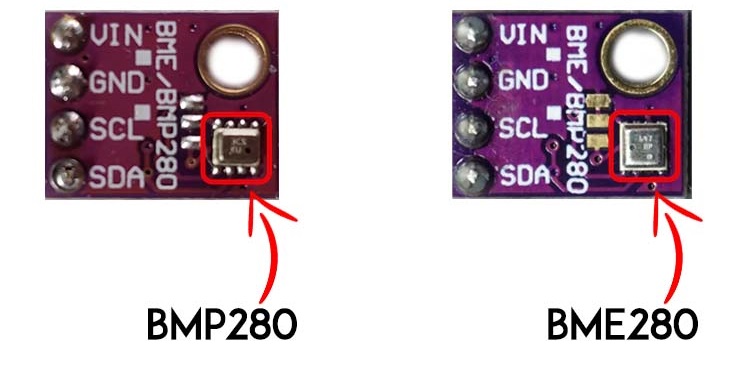
According to this page:

In the following picture, you can see that the BME280 sensor chip is square-shaped, while the BMP280 is more like a rectangle shape.

I believe it is a bmp280 since it is slightly rectangular. Also, the hole is on the right, whereas the bme280 hole is on the left. Even so, I have been using the BMP28 library.

I managed to solve the issue! Simply including the library for the wrong component(in this case the BME280) seems to break it! Buy removing the #include <Adafruit_BME280.h>, the bmp280 seems to work properly now. I figured this out by going into a more barebones program(shown below), and seeing the differences. I would really love to thank you @PaulRB for trying to help me the best you can! Turns out, it seems to have been a mistake on my part. I would like to apologize for that as well. I would also like to apologize for the inconveniences lol, I am really new to this! Thanks again! :smiley:

Code for simpler sketch:

#include <Wire.h>
#include <Adafruit_Sensor.h>
#include <Adafruit_BMP280.h>


Adafruit_BMP280 bmp;


void setup() {
Serial.begin(9600);
while (!Serial);


if (!bmp.begin(0x76)) {
Serial.println("Could not find a valid BMP280 sensor, check wiring!");
while (1);
}
}


void loop() {
Serial.println("BMP280 Sensor Readings:");


float temperature = bmp.readTemperature();
Serial.print("Temperature = ");
Serial.print(temperature);
Serial.println(" °C");


float pressure = bmp.readPressure() / 100.0F; // hPa
Serial.print("Pressure = ");
Serial.print(pressure);
Serial.println(" hPa");


Serial.println();
delay(2000);
}